
C++ While and Do-While Loops: Examples
Compare C++ while and do-while loops, trace condition timing, use break and continue safely, and build a menu that stops on quit, end-of-input or a strict attempt limit.
What you will learn
- Distinguish entry-tested and exit-tested repetition.
- Identify progress and termination on every path.
- Use break and continue without bypassing required state updates.
- Handle quit, input exhaustion and attempt limits separately.
- Test a bounded menu with valid and invalid commands.
Use while when continuation depends on changing state
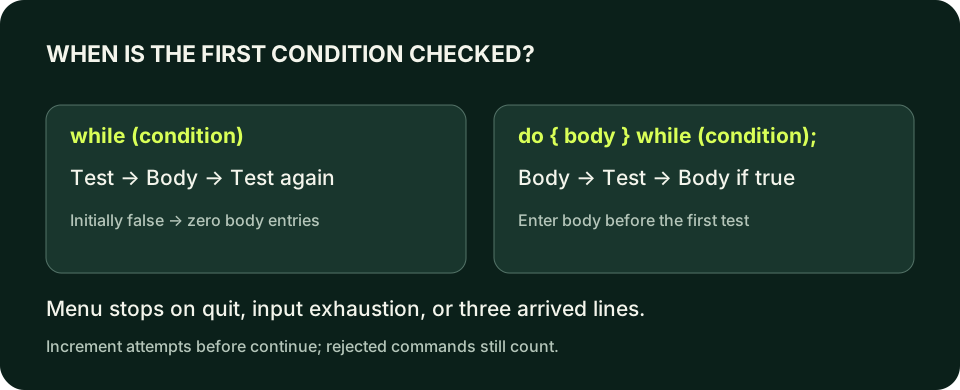
A while loop checks its condition before every body execution. If the condition is initially false, the body executes zero times. It is a useful fit for work that continues while an input source supplies data or while some state remains unfinished. The loop does not make progress by itself: the body or condition must change the facts that eventually allow it to stop. Write that progress rule beside the continuation rule before coding.
Our menu processes at most three input lines. It stops earlier for quit or end-of-input. Unsupported commands consume attempts, because repeatedly sending invalid text must not create an unlimited session. These are three distinct reasons to stop, and the final message should identify the actual one. Merely writing while (true) and adding occasional breaks is not a complete termination design unless every relevant path is explained.
A for loop can express some of the same behavior, but a while loop keeps the continuation state prominent. Choose based on the work rather than searching for a universally best loop. For a fixed count of generated rows, the previous for loop makes initialization and update easy to inspect. For interactive state with several stop causes, an explicit condition and early stop checks can make the interface easier to understand.
Compare initially false conditions
Both conditions start false. The while body never runs; the do body prints once before checking its condition.
Predict the output, edit the source, then select Run code.
Compare with the starter's expected output
While entries: 0
Do entries: 1
After editing inputs, calculate a new prediction; this reference describes only the starter.
do-while guarantees an entry, not valid data
The syntax is do { body } while (condition); with a final semicolon after the condition. That semicolon is required and differs from an accidental empty body created by writing while (condition); in an ordinary while loop. Read the whole construct rather than applying one punctuation rule everywhere. A do-while can be suitable when a prompt or menu must appear once before a continuation decision is available.
At least one body entry does not mean a valid operation is always safe on that entry. If the body indexes a collection, divides by a count, or reads a variable that has not yet been validated, do-while does not establish the required preconditions. Validate before the sensitive operation even when the loop has already begun. The choice of repetition syntax controls timing, not the validity of every instruction placed inside it.
A body can exit early through break or return before reaching the bottom condition. Therefore the useful claim is that the body is entered when execution reaches the do statement, not that every statement in it necessarily runs. The menu lab uses while because a fixed attempt cap and input exhaustion make an entry check natural. You do not need to force do-while into an interface merely because menus are commonly used to demonstrate it.
Identify what changes on every continuing path
For a countdown, remaining decreases until it reaches zero. For a bounded input session, attempts increases for each successfully read line. For a stream-driven loop, reading consumes new input or reports that none is available. Each design has a progress measure. If a branch returns to the same condition without changing any relevant state or consuming input, investigate whether it can repeat forever.
continue in a while loop skips the remaining body and returns directly to the condition. Unlike the counter-based for loop, there is no separate update expression that automatically runs afterward. If attempts is incremented below a continue, rejected commands may never consume an attempt. Put the required accounting before branches that continue, or choose another structure. This is a concrete control-flow bug, not an argument that continue is always bad.
Use small bounded tests rather than intentionally running an infinite loop to learn the symptom. Write a trace showing attempts before the condition, the read result, the command, the updated attempt count and the next action. A timeout in the automated tests is a safety net, not evidence that an otherwise unbounded program is correct. The source's termination argument should stand on its own.
Advance state before a skipped action
attempt increments before continue. The second action is skipped, but the third attempt is still reached and the loop stops.
Predict the output, edit the source, then select Run code.
Compare with the starter's expected output
Action 1
Action 3
Attempts: 3
After editing inputs, calculate a new prediction; this reference describes only the starter.
Input failure is a stop condition, not another command
getline can read a blank line successfully, or it can fail because the source ends. Those states are different. A blank command can be classified as unsupported and consume an attempt. End-of-input provides no fresh command to classify; the program should stop instead of reusing the previous string. Check the read before inspecting command so stale text never performs an action on a failed read.
Do not repeatedly clear an exhausted stream and hope a new line appears. For a noninteractive test, end-of-input is final. A terminal program may have a different recovery policy for an actual recoverable format error, but a line-based command interface avoids leaving numeric extraction failure in std::cin. The whole line either arrives or does not, and string comparisons determine whether the arrived command is known.
A serious input error is also distinct from ordinary end-of-input. Our lab checks bad() and returns failure for that condition, while normal input exhaustion prints Input ended and returns success for ending the session. That policy is documented rather than inferred from an empty command. Different applications may treat premature exhaustion as failure; what matters is choosing and testing a truthful status for the contract at hand.
A quit signal leaves the current loop
quit is recognized on the second iteration. break leaves the loop but allows the final Stopped message to print.
Predict the output, edit the source, then select Run code.
Compare with the starter's expected output
Work 1
Stopped at 2
After editing inputs, calculate a new prediction; this reference describes only the starter.
Test all ways the session can finish
For the lab, send quit as the first line and confirm no status action is performed. Send status then quit and confirm one status report. Send an unsupported line, status and quit to verify rejection still consumes an attempt. Send three unsupported lines followed by status: the fourth line must not be processed. An attempt cap that ignores invalid commands is not the cap described by the requirement.
Also test an empty input source, status followed by end-of-input, and a final line without a newline delimiter. getline can successfully return characters from that last line even when it also reaches the end. Do not reject valid final text merely because eof becomes true after the read. Let the read's success determine whether the command exists, then check continuation on the next attempted read if the session has not already ended.
Loop correctness combines the action policy and the termination policy. A menu that produces correct status text but never stops on exhaustion is not complete. A menu that stops safely but misreports a quit as an attempt limit is also wrong. Keep exact transcripts, final statuses and attempt counts together in your evidence. This habit prepares you for later file-processing loops, where missing data and partial results must remain visible.
Compile the examples and your lab
The editors can compile complete single-file programs when the execution service is available. Provide input in the Standard input field before pressing Run. Alternatively save one program as main.cpp and use your installed C++20 compiler with these terminal commands.
macOS / Clang:
clang++ -std=c++20 -Wall -Wextra -Wpedantic main.cpp -o lesson
./lesson

Linux / GCC:
g++ -std=c++20 -Wall -Wextra -Wpedantic main.cpp -o lesson
./lesson

Windows Developer Command Prompt / MSVC:
cl /std:c++20 /EHsc /W4 main.cpp /Fe:lesson.exe
lesson.exeIndependent lab
Create a text menu with status and quit commands. Process at most three successfully read lines, count unsupported lines, and report the actual reason for stopping.
Acceptance checklist
- Read whole commands with getline and accept exact lowercase status or quit.
- Increment attempts after a successful read, before any continue.
- Print Ready for status and Unsupported for unknown or blank commands.
- Stop for quit or normal end-of-input, with distinct messages.
- After three non-quit commands print Limit reached and ignore later lines.
Need a hint?
- Read failure must not reuse a previous command.
- Return immediately for quit so it cannot be mislabeled as a limit exit.
- The cap measures successfully read lines, not only successful status actions.
Write and run your lab
Build your own solution before revealing the reference. Use the input field for normal, boundary and invalid cases; this runner executes your program but does not grade it.
Predict the output, edit the source, then select Run code.
Your lab evidence and notes
Record predictions, actual output, commands and the cause of each repair. Code is plain text: this scratchpad does not execute or grade C++.
Loading local notes…
Review your acceptance checklist and quiz explanations before marking this lesson complete. This is self-review, not a grade or certification.
Reveal the explained lab solution
Reference lab solution
Compare the reference with your own reasoning. Running this solution does not grade or complete the lesson.
Predict the output, edit the source, then select Run code.
Expected output
Unsupported
Ready
Goodbye
Every arrived line counts toward the bound, including rejected commands. continue cannot bypass the increment.
Quit and end-of-input have their own return paths. A serious stream error reports failure rather than pretending input ended normally.
If three ordinary or unsupported commands are processed, the condition becomes false and Limit reached prints once. A fourth line remains unprocessed.
Review before moving on
Explain the lesson's objectives in your own words, compare your lab evidence with the acceptance checklist, and keep the first failing case alongside your repair. Completing a page is not proof that every C++ feature or input is supported.
- Distinguish entry-tested and exit-tested repetition.
- Identify progress and termination on every path.
- Use break and continue without bypassing required state updates.
- Handle quit, input exhaustion and attempt limits separately.
- Test a bounded menu with valid and invalid commands.
References and further reading
Original examples and exercises accompany these primary references. Tool-specific diagnostics and support depend on your installed version.