
C++ set, queue and stack: When to Use Each
Learn C++ set, queue and stack in simple steps: unique values, first-in-first-out tasks, last-in-first-out history, and safe empty checks.
What you will learn
- Choose a set when repeated values should count only once.
- Explain queue order with a small waiting line.
- Explain stack order with a small pile.
- Check empty before front, top or pop.
- Compare three containers using the same input.
Choose the rule before choosing the container
Suppose your program receives the numbers two, four and two. Do you want a list of different numbers? Do you want to process every number in arrival order? Or do you want to handle the most recent number first? These are three different jobs. A container is not just a place to put values. It also gives you rules for adding, finding and removing them.
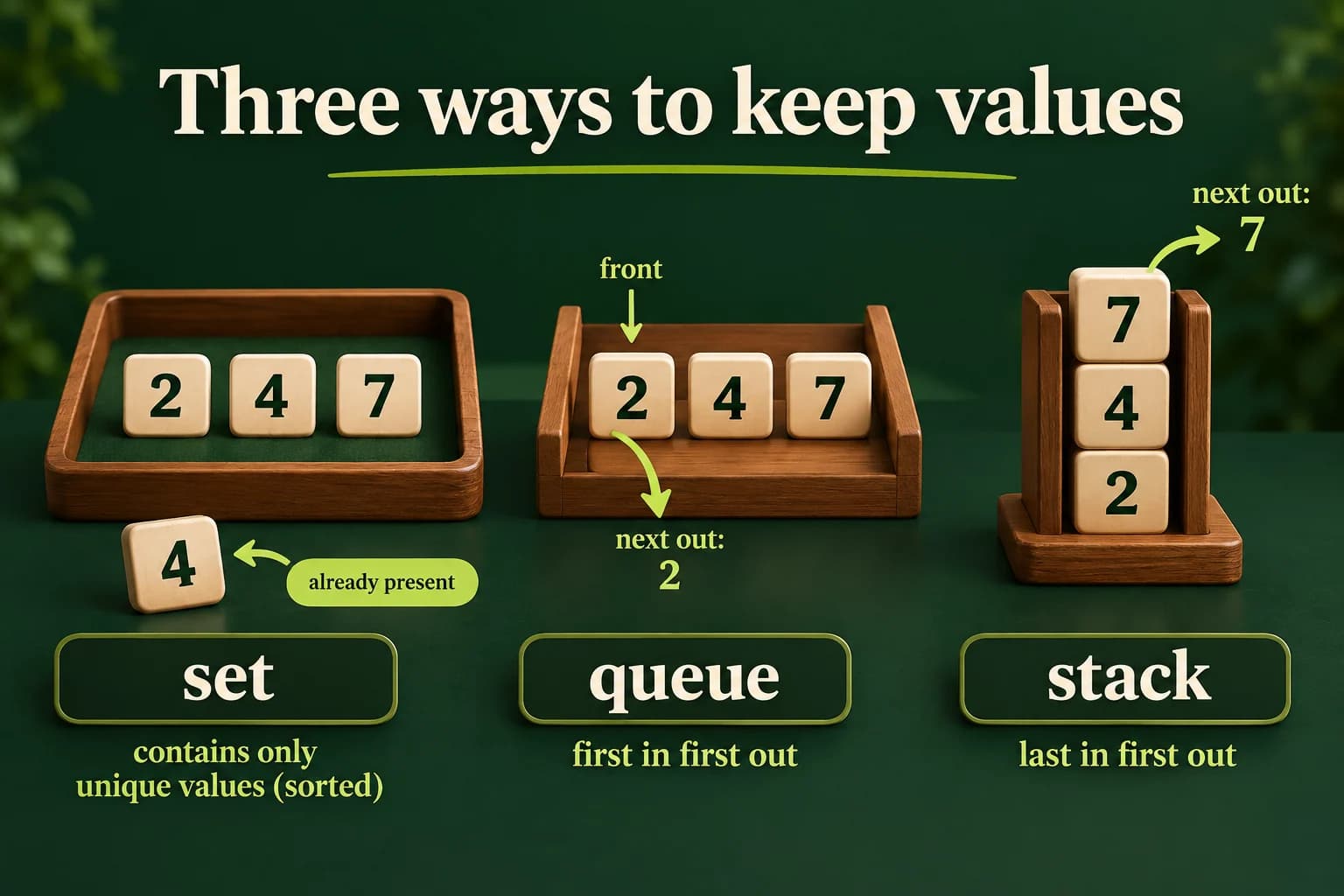
A set keeps unique keys. Unique means that a key is stored only once, even when you try to insert it again. With the normal integer ordering, std::set visits its values from smallest to largest. It does not keep the order in which you entered them. If the input is four, two, four, the set contains two and four. The repeated four does not create a second stored key.
A queue is like a waiting line: the first item added is the first item removed. A stack is like a pile of plates: the last item added is the first item removed. Neither one removes duplicates for you. Start with the rule your task needs, not a favorite container name. A vector remains useful when you need ordinary sequence access instead of one of these narrower rules.
Insert repeated values into a set
Follow the insertions. The second four is already present, so the final size is two.
Predict the output, edit the source, then select Run code.
Compare with the starter's expected output
2
4
Unique: 2
After editing inputs, calculate a new prediction; this reference describes only the starter.
A set answers whether a key is present
Read the first program slowly. The first insert stores four. The second insert stores two as another key. The third insert finds that four is already present. The loop then visits the keys in their normal sorted order, so it prints two before four. size reports two stored keys, not three insertion attempts. This is useful for collecting distinct tags, numbers or names when repeated input should not create repeated entries.
A set does not store a separate count beside each key. Use the map from the previous lesson when you need word counts. To ask whether a key exists in C++20, values.contains(key) returns a true-or-false answer. find also works and gives an iterator. If you use find, compare its result with end before reading through it. The end position is a boundary, not a stored value.
Do not change a set key through its iterator. The container depends on its key ordering. To replace a key, remove the old one and insert the new one. For our ordinary integer set, insertion and lookup take logarithmic work as the number of stored keys grows. That describes growth, not a fixed number of milliseconds or a promise that a set always beats a vector for a tiny collection.
- insert(4) stores one key.
- insert(2) adds another key.
- insert(4) again does not add a duplicate.
- Iteration prints 2, then 4; size is 2.
Process a waiting line
front reads the next value. pop removes it but does not return that value.
Predict the output, edit the source, then select Run code.
Compare with the starter's expected output
2
4
7
After editing inputs, calculate a new prediction; this reference describes only the starter.
A queue keeps arrival order, including repeats
push adds a value at the back of the queue. front reads the value waiting at the front. pop removes that front value. In the example, two leaves before four, and seven leaves after four. If you add two again, it becomes another waiting item; it does not replace the earlier two. Think of ticket numbers arriving at a simple desk, or tasks that must be processed in the order they were accepted.
The while condition is important. It checks that a value exists before front or pop is used. After the final pop, the queue is empty, so the next condition ends the loop. Do not call front on an empty queue and expect a helpful exception. The safe rule is to check first. Also, do not write a loop that reads front repeatedly without pop; it would keep looking at the same item.
std::queue is called a container adaptor. In simple words, it presents a restricted interface built on another container. With its default backing container, push and pop have constant-time complexity. You do not get arbitrary indexing or an ordinary range-for loop over the queue itself. That restriction helps express the waiting-line rule clearly. If you need to keep the original queue while processing, make a deliberate copy and consume the copy.
Read the most recent item first
top reads the latest value. The empty check happens before every read and removal.
Predict the output, edit the source, then select Run code.
Compare with the starter's expected output
7
4
2
After editing inputs, calculate a new prediction; this reference describes only the starter.
A stack is a pile, not a sorted collection
Compare the two programs using the same arrivals: two, four and seven. The queue prints two, four, seven, while the stack prints seven, four, two. Using different numbers makes the reversal easy to see. Now try adding another two to both containers. Predict the whole output before pressing Run, then compare your prediction with the actual result. Both containers keep the extra arrival; only the removal order differs.
top does not mean the largest number. It means the last value added that has not yet been removed. A stack is not a priority queue. A history of recent actions can use this order, although a real undo system must store enough information to reverse an action, not just a number. The small example teaches order; it does not claim to implement a complete undo feature.
A common mistake is trying to assign the result of pop to an integer. pop returns no value. Repair that plan by first copying front or top into a local variable, then calling pop. Another mistake is saving a reference to the front or top and using it after removal. The removed element no longer exists. Keep a value copy when you need the removed data later, and do not use an invalid reference.
Build three reports from one small input
For the lab, read a count from zero through six, then that many integer lines from zero through nine. Use the whole-line reader shown in the solution. It accepts an integer with surrounding whitespace but rejects a suffix such as 2cats, missing input and overflow. Validate all required values before printing a report. A bad count or value prints Invalid input and ends with status one.
For valid input, insert each value into a set, a queue and a stack. Print Unique followed by the sorted set values, Queue followed by arrival order, and Stack followed by removal order. Use one space before each number and a newline after each row. With no values, print the three labels alone. Empty input data is valid when the count is zero; a missing count line is not the same thing.
Test repeated values, all different values, a single value and zero values. Try the exact limits zero, six and nine, then values just outside the accepted ranges. Explain why the set row can be shorter than the queue row. Explain why the stack row is not necessarily sorted. If your program prints a partial report before finding bad input, move reporting after validation so failure has one clear output.
Run the same program on your computer
Save one complete example as main.cpp. Choose your installed compiler and run only after a successful build. These are terminal commands, not C++ source. The in-page Run button needs the configured compiler sandbox.
macOS / Linux:
clang++ -std=c++20 -Wall -Wextra -Wpedantic main.cpp -o lesson
# Or use g++ with the same options.
./lesson

Windows Developer Command Prompt:
cl /std:c++20 /EHsc /W4 main.cpp /Fe:lesson.exe
lesson.exeIndependent lab
Show how the same numbers behave in a set, queue and stack.
Acceptance checklist
- Read count 0..6 and that many whole integer lines in 0..9.
- Reject malformed, missing or out-of-range required input as Invalid input with status 1 before reporting.
- Use set, queue and stack for the three different rules.
- Print Unique in sorted order, Queue in arrival order and Stack in reverse arrival order.
- Check empty before reading or removing queue and stack elements; count zero prints labels only.
Need a hint?
- Collect and validate the input first, then fill the three containers.
- A loop over the set prints unique keys in order.
- Print front or top before pop, and guard each loop with !empty().
Write and run your lab
Build your own solution before revealing the reference. Use the input field for normal, boundary and invalid cases; this runner executes your program but does not grade it.
Predict the output, edit the source, then select Run code.
Your lab evidence and notes
Record predictions, actual output, commands and the cause of each repair. Code is plain text: this scratchpad does not execute or grade C++.
Loading local notes…
Review your acceptance checklist and quiz explanations before marking this lesson complete. This is self-review, not a grade or certification.
Reveal the explained lab solution
Reference lab solution
Compare the reference with your own reasoning. Running this solution does not grade or complete the lesson.
Predict the output, edit the source, then select Run code.
Expected output
Unique: 2 4 7
Queue: 4 2 4 7
Stack: 7 4 2 4
The vector holds validated input before any report is printed. A failure cannot leave a half-finished success report.
The set removes the repeated four; the queue and stack keep every arrival as a separate element.
The empty guards protect access and removal. Processing consumes the queue and stack, while the set loop only reads its keys.
Review before moving on
Explain the lesson's objectives in your own words, compare your lab evidence with the acceptance checklist, and keep the first failing case alongside your repair. Completing a page is not proof that every C++ feature or input is supported.
- Choose a set when repeated values should count only once.
- Explain queue order with a small waiting line.
- Explain stack order with a small pile.
- Check empty before front, top or pop.
- Compare three containers using the same input.
References and further reading
Original examples and exercises accompany these primary references. Tool-specific diagnostics and support depend on your installed version.