
C++ File Handling: Read and Write Text Files
Learn C++ text file input and output with ifstream, ofstream and filesystem paths, careful stream checks, safe temporary practice files and clear failure reporting.
What you will learn
- Explain a file path separately from file contents.
- Write text with ofstream and read it with ifstream.
- Check opening, writing, closing and reading failures.
- Distinguish clean end-of-file from a read error.
- Practise in an owned temporary folder without overwriting existing data.
A file keeps bytes beyond one variable's lifetime
A vector stores values while your program is running. A file can keep data after the process ends, so another run can read it later. A text file contains a sequence of characters and line endings, not a ready-made vector of integers. Your program chooses how to write the text and how to interpret it when reading. Saving data and understanding its format are two separate responsibilities.
A path tells the operating system where to look. A relative path starts from the process's current working directory, which is not necessarily the directory containing main.cpp. An absolute path names a location from the file system's root. std::filesystem::path helps compose path components using the platform's path rules. It does not promise that a file exists, that you can access it, or that arbitrary user-supplied paths are safe.
Use a disposable folder for practice. These examples supply a Workspace helper that creates a fresh temporary directory exclusively and removes only that owned directory afterward. It never reuses an existing folder. The helper is longer than the file operations because safe setup deserves care. Read its purpose first, then focus on the small ofstream and ifstream steps in main. Do not replace its path with an important document just to try the example.
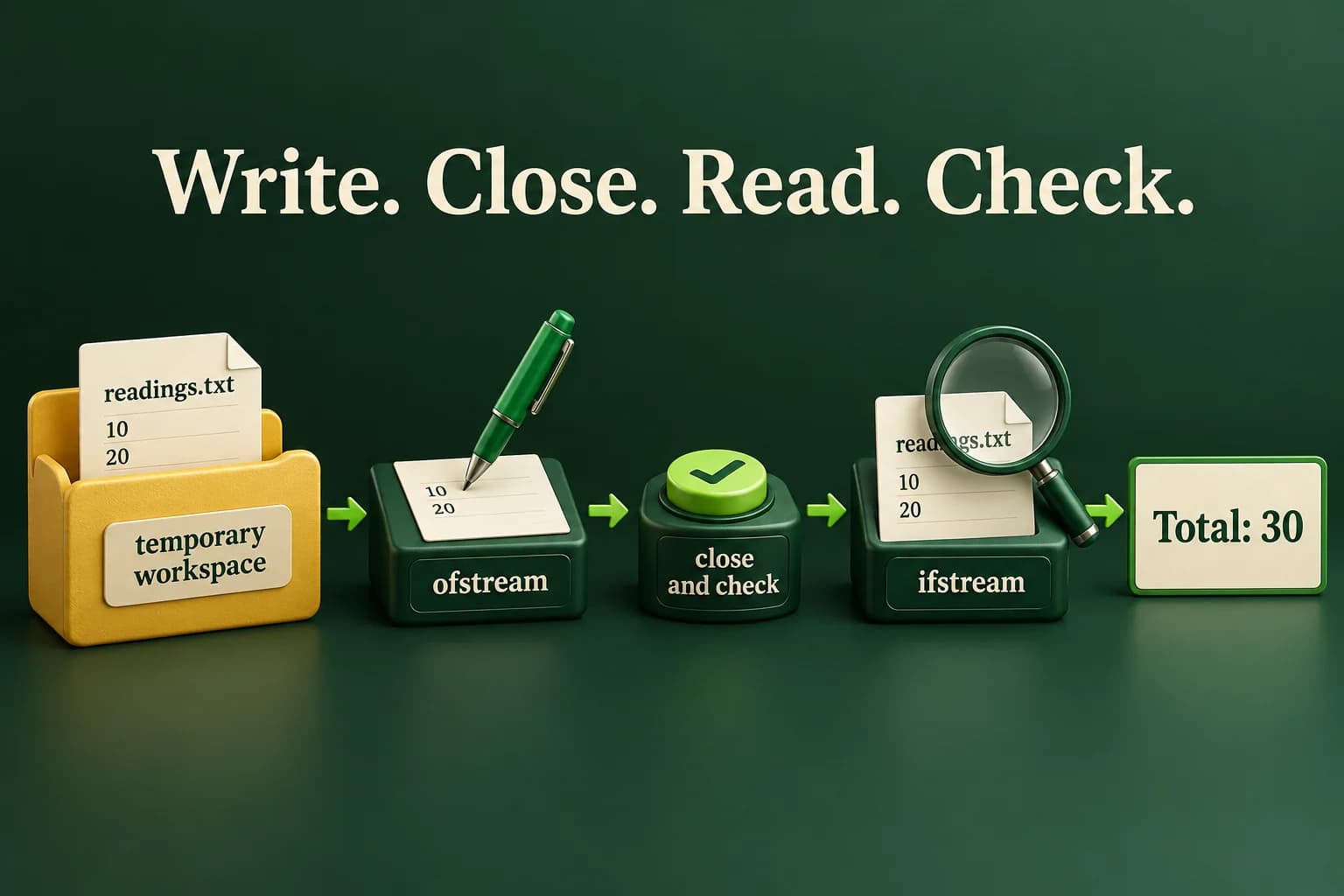
Write two lines, close, then read them
The supplied workspace helper keeps file creation away from existing user data. The stable output assumes temporary storage is available.
Predict the output, edit the source, then select Run code.
Compare with the starter's expected output
Total: 30
After editing inputs, calculate a new prediction; this reference describes only the starter.
Opening a stream is only the first check
ofstream is an output file stream. It connects writing operations to a file. The first example opens a new readings.txt in the run's own folder, checks the open, writes two lines, then explicitly closes and checks the stream again. That last check matters because buffered data can fail to reach the file during closing. A successful open does not guarantee that every later write will succeed.
The normal ofstream opening mode can replace an existing file's contents. Here that is safe only because the directory was just created and belongs to this run. In an application, overwriting a document requires a clear policy and appropriate user intent. ios::app requests appending instead, but appending is not automatically safer for every format. Do not assume writing is atomic or that a catch block can reverse a partially completed external write.
ifstream is an input file stream. We open it after the output stream is closed, then check that opening and extracting two integers succeeded. The known fixture contains exactly the text we wrote, so the arithmetic is small and predictable. For unknown input, parsing must also check syntax and allowed values; the next lesson studies that in detail. Merely obtaining some integer does not prove the whole record was valid.
- Create a fresh workspace that this run owns.
- Open the output file, write, close and check.
- Open the input file and check the reads.
- Print a result only after the required operations succeed.
Read lines using the read operation as the condition
A final line does not need a trailing newline. The example's file is generated in the private workspace.
Predict the output, edit the source, then select Run code.
Compare with the starter's expected output
Lines: 2
After editing inputs, calculate a new prediction; this reference describes only the starter.
End-of-file is a result of reading, not a prediction
Use while(getline(in, line)), not while(!in.eof()). The first form asks the read operation whether it obtained a line. The second asks about an earlier stream state and can cause an extra failed read to be treated as data. In the example, the last line has no newline after it, but it is still a valid line. The successful read must be processed before a later attempt discovers there is nothing more.
After a line loop, check why reading stopped. Reaching the end is normal when the task reads the whole file. A bad stream or a stop without end-of-file can indicate a read problem. Do not silently report a complete file after a genuine I/O error. Also do not call clear and continue blindly; clearing flags does not repair a disconnected device, restore missing bytes or explain a malformed data format.
Our simple counter uses a tiny file created by the program. For an untrusted large file, add practical limits to the number and size of records you accept. A file extension does not enforce a format or a size. A path with .txt can refer to unsuitable data or something your program cannot open. Handle each boundary in the operation that actually knows its requirement, rather than trusting the filename alone.
Handle a file that is not there
The new workspace contains no missing.txt. This is a checked open failure, not a guessed error from an arbitrary machine path.
Predict the output, edit the source, then select Run code.
Compare with the starter's expected output
Cannot open file
After editing inputs, calculate a new prediction; this reference describes only the starter.
Streams own handles; your format still needs checks
A file stream closes its handle when destroyed. That is RAII. We explicitly close output when the program needs to check whether saving finished before announcing success. The Workspace destructor then attempts to remove its own temporary folder using an error-code operation that does not throw. Cleanup failure is not silently claimed to be impossible; it can leave a practice folder behind. The helper never targets the home directory or an existing project folder.
The clock-based name is only a candidate name, not a promise of uniqueness. create_directory is the step that claims a new directory; a preexisting candidate is not reused. This protects ordinary practice runs from accidental collisions. It is not a complete defense against a hostile process altering directories under the same account. Production temporary-file and upload designs need stronger permissions, platform-specific protections and a threat model suited to their environment.
The browser sandbox has temporary writable storage but no host-folder mounts. If the compiler service is available, these examples use that temporary storage and the files disappear after execution. No example creates a downloadable file in the website. A native local run uses your operating system's temporary directory instead. Keep those environments distinct when explaining what you verified. Repair a missing-file error by checking the intended path and source, not by switching to random absolute paths.
Save bounded readings and verify the saved copy
Read count zero through five and that many whole integers from minus one hundred through one hundred. Validate all required input before creating the workspace. Save each reading on its own line in readings.txt, close and check the output, then reopen and read the saved values. The file is generated by this program, but the lab still checks that each read succeeds, stays in range, and that no extra non-whitespace data remains.
Only after a complete verified read should you print Count and Total. Zero readings create an empty file and produce a zero total. Invalid input prints Invalid input with status one. A workspace or file failure prints File operation failed with status two. Test negative values, both bounds, an empty set, missing required lines and a simulated wrong read path. Do not claim that a successful round trip proves crash-safe saving or permanent storage; this is a checked temporary-file exercise.
Compile and check one complete program
Save one example as main.cpp. Choose your installed compiler. Run only after a successful build. The in-page editor needs the configured compiler sandbox; these terminal commands are an alternative, not proof that the sandbox is running.
macOS / Linux:
clang++ -std=c++20 -Wall -Wextra -Wpedantic main.cpp -o lesson
# Or use g++ with the same options.
./lesson

Windows Developer Command Prompt:
cl /std:c++20 /EHsc /W4 main.cpp /Fe:lesson.exe
lesson.exeIndependent lab
Round-trip validated readings through a private temporary text file, then report a verified total.
Acceptance checklist
- Read count 0..5 and that many complete integer lines in -100..100 before creating files.
- Reject invalid required input as Invalid input with status 1.
- Use the supplied exclusive Workspace helper; never reuse a user directory or fixed existing document.
- Write lines, close and check output, then check opening, every read, range and trailing data.
- Print Count and Total only after verification; report file failures with status 2 and let RAII clean up owned resources.
Need a hint?
- Keep validation separate from the try block that performs file operations.
- Use folder.path / "readings.txt" for both writing and reading.
- After reading the expected count, consume whitespace and require clean EOF without badbit.
Write and run your lab
Build your own solution before revealing the reference. Use the input field for normal, boundary and invalid cases; this runner executes your program but does not grade it.
Predict the output, edit the source, then select Run code.
Your lab evidence and notes
Record predictions, actual output, commands and the cause of each repair. Code is plain text: this scratchpad does not execute or grade C++.
Loading local notes…
Review your acceptance checklist and quiz explanations before marking this lesson complete. This is self-review, not a grade or certification.
Reveal the explained lab solution
Reference lab solution
Compare the reference with your own reasoning. Running this solution does not grade or complete the lesson.
Predict the output, edit the source, then select Run code.
Expected output
Count: 3
Total: 10
The input is validated before any file is created. The workspace claims a fresh directory rather than overwriting an existing file location.
Closing and checking the writer completes the save step before the reader opens the file. Every required read and the final stream boundary are checked.
The total is bounded by five readings in -100..100. Output appears only after the whole round trip succeeds; temporary storage is not a persistent download.
Review before moving on
Explain the lesson's objectives in your own words, compare your lab evidence with the acceptance checklist, and keep the first failing case alongside your repair. Completing a page is not proof that every C++ feature or input is supported.
- Explain a file path separately from file contents.
- Write text with ofstream and read it with ifstream.
- Check opening, writing, closing and reading failures.
- Distinguish clean end-of-file from a read error.
- Practise in an owned temporary folder without overwriting existing data.
References and further reading
Original examples and exercises accompany these primary references. Tool-specific diagnostics and support depend on your installed version.