
C++ Multithreading: Threads and Data Races
Learn C++ multithreading in simple English: separate worker results, join before reading, understand data races, and protect shared updates with mutex and lock_guard.
What you will learn
- Distinguish concurrency from a promised speed improvement.
- Explain why unsynchronized shared writes can cause undefined behavior.
- Keep captured objects alive until workers finish.
- Use jthread scope exit as a join boundary.
- Compare mutex-protected updates with separate worker results.
A thread is another path of execution
Until now our examples did their work in one sequence of steps. A thread lets another sequence execute while the original thread continues. The operating system schedules these sequences. They may run on different processor cores or take turns on one core. Concurrency means their work can overlap in time. It does not guarantee that two pieces of work run at exactly the same moment or that the program becomes faster.
Starting threads has a cost. Coordinating them also has a cost. For the tiny arithmetic in this lesson, a simple loop is usually the sensible production choice. We use small work so that the ownership and ordering rules are easy to see. Do not turn this example into a benchmark claiming a parallel speedup. Measure a realistic workload only after you can explain why its results are correct and why the overhead could be worthwhile.
Our first design avoids a shared running total. Worker A writes one integer result; worker B writes another. The main thread waits for both workers to finish, then adds those results. The values belong to the enclosing scope, so they remain alive while workers use their references. This design turns a complicated coordination question into two simpler rules: each worker owns its output operation, and the caller reads only after completion.
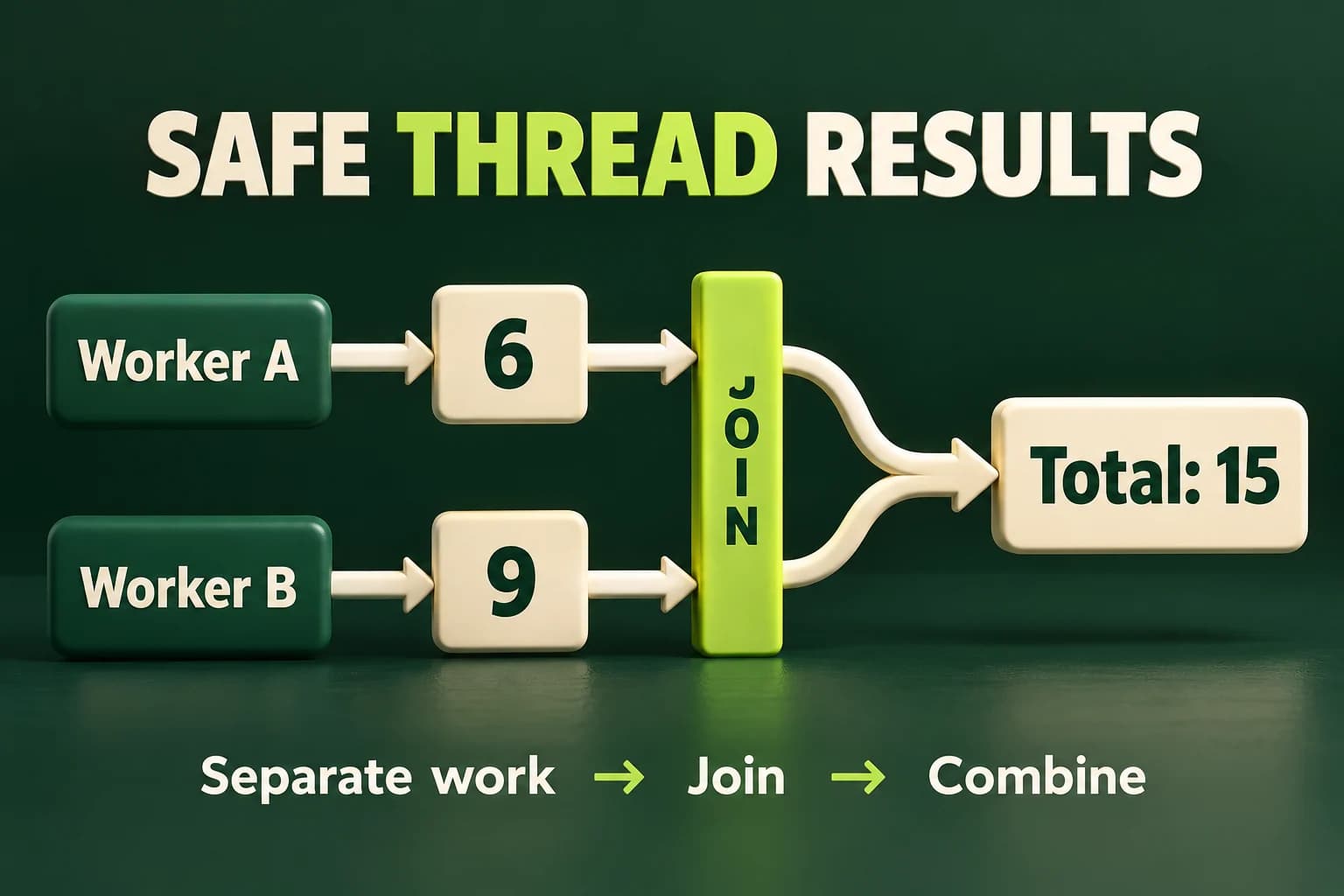
Join before combining two results
The closing inner brace destroys both jthread objects and joins them. Only then does main read the written integers.
Predict the output, edit the source, then select Run code.
Compare with the starter's expected output
Total: 15
After editing inputs, calculate a new prediction; this reference describes only the starter.
Follow lifetimes and ordering, not a guessed schedule
first and second are initialized before the worker objects are created. Each lambda captures just the result it writes by reference. Constructing a jthread starts its function on a new thread. The main thread continues to the next statement; construction does not mean the worker has already finished. We deliberately place both jthread objects in an inner block so that leaving that block gives the caller a clear waiting point.
A join waits until the associated thread completes. Completion then provides the required ordering for the caller's later reads. std::jthread automatically joins a joinable thread during destruction and first makes a stop request. A stop request is cooperative: it does not forcibly kill arbitrary worker code. Our bounded workers do not use a stop token and simply finish their small loops. Automatic joining manages lifetime; it does not make any shared operations inside a worker automatically safe.
- Create result objects outside the workers' inner scope.
- Give each worker a different result object and capture only what it needs.
- Leave the worker scope so both join operations finish.
- Read and combine the results only after that boundary.
Why two ordinary increments can be a data race
Imagine replacing both separate outputs with one ordinary int counter and letting two workers execute ++counter without synchronization. An increment conceptually needs the old value and a new stored value. Two unsynchronized workers can conflict on the same object. In C++, conflicting concurrent operations involving a write need an appropriate ordering or synchronization rule. Without one, an ordinary shared counter can have a data race, and a data race gives undefined behavior.
Undefined behavior is not a predictable smaller count that you can use as an expected output. The program may appear correct during a few runs and still be invalid. Running it one thousand times does not prove safety. This lesson does not provide an executable racing fixture in the normal editor. Reason about the conflicting accesses and repair the design instead of treating one lucky transcript as evidence that a race cannot happen.
Sleeping the main thread for a guessed time is not synchronization. A slower computer or a busy scheduler can invalidate the guess. volatile does not turn an ordinary integer update into a safe cross-thread operation either. Use a join for completion and an appropriate synchronization mechanism for shared state. These solve related but different problems: waiting until the end does not repair two workers racing with each other while they were running.
Protect a shared counter with one mutex
Every worker update uses the same mutex. main reads only after the workers join. No thread prints while others are running.
Predict the output, edit the source, then select Run code.
Compare with the starter's expected output
Count: 200
After editing inputs, calculate a new prediction; this reference describes only the starter.
A lock protects an agreed set of accesses
A mutex allows only one holder at a time. lock_guard locks the supplied mutex when constructed and unlocks when its scope ends. In this loop each increment happens inside that short scope. Both workers use the same gate, so their updates cannot overlap as unsynchronized accesses. The counter is read by main only after both joins. Protecting writes while allowing an early unprotected read would still break the design.
A mutex does not automatically attach itself to a variable. The protection is a rule followed by every access that needs it. Adding a second unrelated mutex for one worker would not protect the same shared operation. Keep the lock scope short and avoid calling unknown code while holding it. More complicated designs can deadlock by waiting for locks in incompatible orders; this lesson uses only one mutex and does not claim to solve general scheduling problems.
Atomic integers are another tool for certain shared operations, but they are not a universal fix for a multi-field invariant. If two values must change together, making each individually atomic does not necessarily make their relationship correct. Prefer eliminating unnecessary sharing first. Here a protected counter illustrates synchronization, while separate partial results keep the more useful sum calculation easier to understand and test. Choose the simplest design that fits the real contract.
Build thread examples with supported tools
Save one complete program as main.cpp. Toolchain and library support are both required. The page runner may reject unsupported facilities; that is not evidence the compiler on your own machine supports them.
# macOS / Linux with a supporting Clang or GCC + standard library:
clang++ -std=c++20 -Wall -Wextra -Wpedantic -pthread main.cpp -o lesson
./lesson

# Windows Developer Command Prompt:
cl /std:c++20 /EHsc /W4 main.cpp /Fe:lesson.exe
lesson.exe

# CMake, after creating your executable target named lesson:
set(THREADS_PREFER_PTHREAD_FLAG TRUE)
find_package(Threads REQUIRED)
target_link_libraries(lesson PRIVATE Threads::Threads)
Keep support limits and failure paths visible
If jthread is missing, inspect the compiler and standard-library versions rather than removing the language flag at random. Thread support can require compiler or linker options on a given platform. For a CMake project, FindThreads exposes the Threads::Threads target so platform requirements can be attached to your executable. Do not assume that because one operating system needs no separate library flag, every supported system has the same build requirements.
The small examples assume worker creation succeeds. Creating a thread can fail because system resources are unavailable. An exception escaping a worker function is not transported automatically to the caller; it can terminate the process. Production work needs an explicit error strategy, bounded resource use and shutdown behavior. We avoid allocation and throwing operations inside these tiny workers, but that narrow choice is not a general exception-handling framework.
A thread sanitizer can help investigate some races on supported toolchains, but platform support and runtime setup vary. A clean diagnostic run does not prove all schedules safe. We are not asking you to execute undefined behavior to finish this lab. The correctness argument comes from separate output objects, bounded loops, valid captured lifetimes and joins before reads. Diagnostics are additional evidence when available, not a substitute for those rules.
Split an inclusive range without overlap
Read count in 0..100. The first worker handles 1..split and the second split+1..count. For zero, both loops are empty.
Predict the output, edit the source, then select Run code.
Compare with the starter's expected output
Total: 15
Agreement: true
After editing inputs, calculate a new prediction; this reference describes only the starter.
Compare the result with a simple sequential oracle
The lab sums the integers from one through an accepted count. Split the range using integer division. For an odd count, the second worker receives one more number; this is correct because the ranges still cover every required integer once. For zero, neither worker adds anything and the initialized total remains zero. With count at most one hundred, the sum is at most five thousand and fifty, which fits the chosen integer type.
Compute the same answer with a normal loop only after the workers join. Print both the threaded total and whether it agrees with the sequential result. Test zero, one, an odd count, an even count and the upper limit. Repeating successful runs is useful as a regression check, but explain the ownership and join rules too. Agreement alone cannot validate a design that contains undefined behavior; the program must already have a sound synchronization argument.
Independent lab
Split a small bounded sum into independent worker results, join, then compare with a sequential calculation.
Acceptance checklist
- Read one complete integer line in 0..100; reject missing, malformed or out-of-range input with status 1.
- Partition 1..count into 1..split and split+1..count with no duplicate or missing value.
- Use two jthreads with separate result objects whose lifetimes cover both workers.
- Read the partial results only after both workers join at the inner scope boundary.
- Print Total and Agreement; verify zero, one, odd, even and maximum inputs without claiming a speedup.
Need a hint?
- Initialize both partial sums to zero before creating either thread.
- Capture split and count by value; capture each output by reference.
- Printing outside the worker scope avoids relying on worker output ordering.
Write and run your lab
Build your own solution before revealing the reference. Use the input field for normal, boundary and invalid cases; this runner executes your program but does not grade it.
Predict the output, edit the source, then select Run code.
Your lab evidence and notes
Record predictions, actual output, commands and the cause of each repair. Code is plain text: this scratchpad does not execute or grade C++.
Loading local notes…
Review your acceptance checklist and quiz explanations before marking this lesson complete. This is self-review, not a grade or certification.
Reveal the explained lab solution
Reference lab solution
Compare the reference with your own reasoning. Running this solution does not grade or complete the lesson.
Predict the output, edit the source, then select Run code.
Expected output
Total: 15
Agreement: true
Each worker writes a different ordinary int, while their shared inputs are read-only copies. There is no competing update of a shared total.
The enclosing result objects outlive the inner jthread objects. Both joins finish before main reads their results, so the program does not guess when a worker is done.
The bounded domain avoids overflow and the sequential loop supplies a simple independent calculation. This is a correctness exercise, not evidence that threads help tiny workloads.
Review before moving on
Explain the lesson's objectives in your own words, compare your lab evidence with the acceptance checklist, and keep the first failing case alongside your repair. Completing a page is not proof that every C++ feature or input is supported.
- Distinguish concurrency from a promised speed improvement.
- Explain why unsynchronized shared writes can cause undefined behavior.
- Keep captured objects alive until workers finish.
- Use jthread scope exit as a join boundary.
- Compare mutex-protected updates with separate worker results.
References and further reading
Original examples and exercises accompany these primary references. Tool-specific diagnostics and support depend on your installed version.