
C++ Conditions: if, else if and else
Write C++ if, else if and else conditions, trace exclusive branches, use guard clauses, avoid dangling else and assignment mistakes, and test below, at and above each threshold.
What you will learn
- Trace which branch an if statement executes.
- Distinguish exclusive chains from independent checks.
- Order validation and threshold decisions correctly.
- Use braces and early returns to clarify control flow.
- Test boundaries and verify exactly one classification.
A condition chooses which work happens
An if statement evaluates a condition and executes its controlled statement when that condition is true. An optional else executes when the condition is false. This is control flow: unlike a plain arithmetic expression, it determines which statements are reached. Begin with a written decision contract. Our sample workshop allows ages zero through 120, classifies ages below twelve as child tickets, ages twelve through seventeen as youth tickets, and ages eighteen upward as standard tickets.
Those age cutoffs are fictional teaching rules, not legal or real-world eligibility advice. They give us precise endpoints to test. Invalid input must be rejected before classification, and every accepted value must receive exactly one category. If you cannot state whether a value exactly at twelve is child or youth, your requirement is incomplete before any C++ syntax is written. Good conditions encode a clear rule; they do not discover the policy for you.
The condition in parentheses is contextually converted to bool. Comparisons already produce Boolean results and usually express intent more clearly than testing an unexplained numeric value. An integer zero is false and a nonzero integer is true in this context, but relying on that conversion can hide an assignment mistake. Prefer age == 12 when testing equality and keep modifications outside the decision expression while learning.
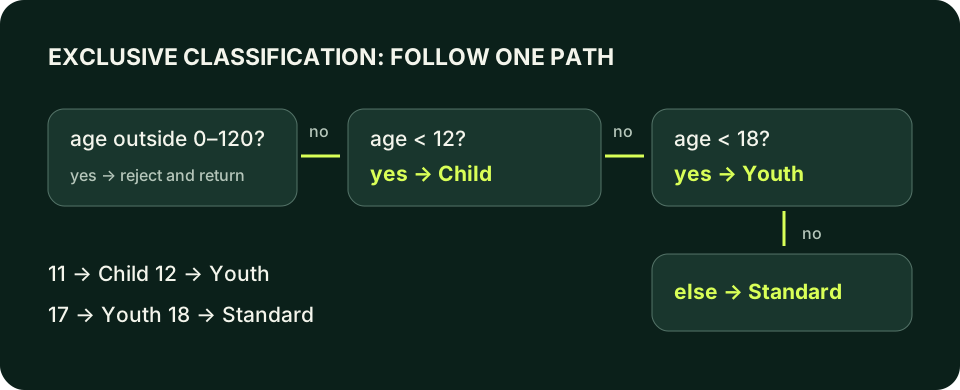
Trace one exclusive branch
age is twelve: the child check is false, the youth check is true, and the standard branch is skipped. Change the value to eleven, seventeen and eighteen before separate builds.
Predict the output, edit the source, then select Run code.
Compare with the starter's expected output
Youth
After editing inputs, calculate a new prediction; this reference describes only the starter.
else if is an ordered decision
An else if chain tests the next condition only after the preceding condition was false. Once one branch is taken, later branches in that chain are skipped. In our example, reaching age < 18 already implies age is at least twelve because age < 12 failed. You can repeat that lower bound for emphasis, but understand why the chain makes it unnecessary. The order carries information, so rearranging thresholds can change the result.
Check the most restrictive ascending threshold first for this policy. If age < 18 appears before age < 12, every child age also satisfies the first condition and is labeled youth; the child branch becomes unreachable for valid inputs. That is a logic error despite a successful build. Trace one value from each category through every condition instead of only checking whether the expected output string appears somewhere in the source.
Separate if statements are independent checks. A value can make several of them true, producing several labels or applying several actions. That is appropriate for independent facts, such as a report that notes both membership and an accessibility request. It is wrong when the contract requires exactly one ticket category. Choose the structure from whether decisions are exclusive, not from a preference for shorter syntax. Multiple successful outputs can be a bug, not extra helpful information.
Spot a valid program with the wrong classification
This is an intentional logic-error example, not a compile failure. For age ten it prints both categories. Repair by changing the second if into else if, then test twelve and eighteen too.
Predict the output, edit the source, then select Run code.
Compare with the starter's expected output
Child
Youth
After editing inputs, calculate a new prediction; this reference describes only the starter.
Use a guard before the normal path
A guard clause detects a case that cannot proceed and exits the current function early. In main, return 1 ends the program with a failure status for our invalid input. After the guard returns, the remaining code can rely on the permitted age range. This reduces nesting and separates rejection from normal classification. It does not automatically validate every property; the accepted assumptions must match the guard's actual comparisons.
Nested if statements are useful when a second question matters only after a first one succeeds. For example, only an available workshop might need a membership discount decision. Avoid nesting merely because you have not separated independent requirements. Deep indentation can obscure which condition governs a print statement. Write down the path conditions for each action; if the explanation is difficult, named Boolean values or an early rejection often improve the structure.
A guard also protects arithmetic. If the count is zero, report that an average is unavailable and return before dividing. Place the check before the operation rather than printing an error after an unsafe expression has already executed. That connection between validation and control flow is central to reliable C++: code is safe because required preconditions hold when it is reached, not because a later message admits something went wrong.
Braces make ownership of a branch visible
Without braces, an if controls one statement. Indentation may suggest that a second print belongs to the branch, but the compiler does not use indentation to decide that relationship. Use braces consistently for these beginner examples, including single-statement bodies. They make adding a second action less likely to change behavior accidentally and give the reader a visible boundary around each path.
An else attaches to the nearest preceding unmatched if, not to whichever indentation level looks most convincing. This is the dangling-else problem. Add braces around an outer condition before placing an inner condition inside it, and give each else a clear partner. Do not solve it by experimenting with whitespace. The source should communicate the same nesting to a human reader and to the compiler.
An accidental semicolon immediately after if (condition) creates an empty controlled statement. A following block can then run independently, even when the condition is false. Similarly, assigning inside a condition can change the input and test the assigned value rather than compare it. Warnings can reveal suspicious cases; braces, explicit comparisons and targeted tests make the intended behavior clearer. A warning-clean build still needs logic verification.
Make each else partner explicit
The outer decision concerns availability. The inner decision concerns membership. Here availability is false, so neither inner label is reached.
Predict the output, edit the source, then select Run code.
Compare with the starter's expected output
Unavailable
After editing inputs, calculate a new prediction; this reference describes only the starter.
A decision table is a test plan
For our ticket rule, test minus one, zero, eleven, twelve, seventeen, eighteen, 120 and 121. The invalid values must terminate with Invalid age; the accepted endpoints must receive exactly one category. The threshold-adjacent values expose off-by-one choices that a middle-of-range example will miss. Record the expected status as well as text, because an invalid-input path should not look like successful completion to a calling script.
Do not use the word covered to mean every input has been tested. These cases target the branches and boundaries of this small policy; they do not prove arbitrary later changes correct. If you add a new condition, identify which existing cases still discriminate it and which new cases are required. If you change < to <=, explicitly revisit the exact threshold. Tests should make a policy change visible rather than silently blessing whatever the program now prints.
When a branch behaves unexpectedly, inspect the actual value, the Boolean result, and the earlier path that allowed this condition to be reached. Check for overlapping independent if statements, reversed threshold order, a semicolon after the condition, or an assignment where equality was intended. Repair the smallest cause and rerun all discriminating cases. The next planned lesson introduces switch for discrete choices; it does not replace ordered interval checks like this age classification.
Build and run the local examples
Save one complete example or lab solution as main.cpp. Choose your installed toolchain; run only after a successful build. Input examples wait for text in your terminal. The browser teaching interpreter does not support these full-language features.
macOS / Clang:
clang++ -std=c++20 -Wall -Wextra -Wpedantic main.cpp -o lesson
./lesson

Linux / GCC:
g++ -std=c++20 -Wall -Wextra -Wpedantic main.cpp -o lesson
./lesson

Windows Developer Command Prompt / MSVC:
cl /std:c++20 /EHsc /W4 main.cpp /Fe:lesson.exe
lesson.exeIndependent lab
Read one whole-line age and classify a fictional workshop ticket. Reject invalid syntax, trailing text, and ages outside zero through 120 before choosing exactly one category.
Acceptance checklist
- Read and validate a whole line using the preceding input lesson's parser pattern.
- Reject a word, an empty line, and trailing nonwhitespace.
- Reject ages below zero or above 120 with exit status one.
- Use child below twelve, youth below eighteen, otherwise standard.
- Test eleven/twelve and seventeen/eighteen; print exactly one label.
Need a hint?
- Keep parsing failure distinct from age range failure.
- Apply the guard before the exclusive chain.
- After the child condition fails, the youth branch already has a lower-bound guarantee.
Write and run your lab
Build your own solution before revealing the reference. Use the input field for normal, boundary and invalid cases; this runner executes your program but does not grade it.
Predict the output, edit the source, then select Run code.
Your lab evidence and notes
Record predictions, actual output, commands and the cause of each repair. Code is plain text: this scratchpad does not execute or grade C++.
Loading local notes…
Review your acceptance checklist and quiz explanations before marking this lesson complete. This is self-review, not a grade or certification.
Reveal the explained lab solution
Reference lab solution
Compare the reference with your own reasoning. Running this solution does not grade or complete the lesson.
Predict the output, edit the source, then select Run code.
Expected output
Standard
Parsing must succeed for the entire line before age participates in the policy. The range guard rejects invalid ages before a category can be printed.
At twelve the child test is false, so youth applies. At eighteen both less-than tests are false, so standard applies.
The else-if chain prints exactly one accepted category. Invalid input and invalid age are separate rejection paths with failure status one.
Review before moving on
Explain the lesson's objectives in your own words, compare your lab evidence with the acceptance checklist, and keep the first failing case alongside your repair. Completing a page is not proof that every C++ feature or input is supported.
- Trace which branch an if statement executes.
- Distinguish exclusive chains from independent checks.
- Order validation and threshold decisions correctly.
- Use braces and early returns to clarify control flow.
- Test boundaries and verify exactly one classification.
References and further reading
Original examples and exercises accompany these primary references. Tool-specific diagnostics and support depend on your installed version.