SovranCode
Modern C++ Lesson 30
Course contents50 available · 0 planned

Get a program running

01 · C++ Introduction: What Is C++?02 · How to Install a C++ Compiler and Set Up Your Editor03 · C++ Hello World: Your First Program Explained04 · How to Compile and Run C++ Programs05 · C++ Debugging: Warnings and Breakpoints

Work with values and input

06 · C++ Variables: Initialization and Scope07 · C++ Data Types: int, double and Type Conversion08 · C++ const, constexpr and auto Explained09 · C++ Operators: Arithmetic, Comparison and Logic10 · C++ User Input: cin, getline and Validation

Control flow and functions

11 · C++ Conditions: if, else if and else12 · C++ Switch Statement: Cases, break and default13 · C++ For Loop: Syntax and Examples14 · C++ While and Do-While Loops: Examples15 · C++ Functions: Parameters and Return Values

Strings and sequences

16 · C++ Strings: std::string with Examples17 · C++ Vector: std::vector with Examples18 · C++ Arrays: std::array and Bounds Checking19 · C++ Range-Based For Loop and Iterators20 · C++ Vector Practice: Build a Data Summary

Model data with classes

21 · C++ Structs and enum class Explained22 · C++ Classes and Objects: Encapsulation23 · C++ Constructors and Member Initialization24 · C++ Const Member Functions and Composition25 · C++ Copying Objects and the Rule of Zero

Lifetime and resource ownership

26 · C++ Object Lifetime, Destructors and RAII27 · C++ Pointers and References: nullptr and Borrowing28 · C++ unique_ptr: Smart Pointers and Ownership29 · C++ Move Semantics: std::move vs Copying30 · C++ string_view and span: Avoid Dangling Views

Containers and algorithms

31 · C++ map vs unordered_map: Lookup and Examples32 · C++ set, queue and stack: When to Use Each33 · C++ Lambda Expressions and STL Algorithms34 · C++ sort and binary_search: Rules and Complexity35 · C++20 Ranges: Views, filter and transform

Errors, files, and interfaces

36 · C++ optional and variant Explained37 · C++ Exceptions: try, catch and Safe Cleanup38 · C++ File Handling: Read and Write Text Files39 · C++ Input Parsing and Data Validation40 · C++ Polymorphism: Virtual Functions and Interfaces

Generic programming and quality

41 · C++ Templates: Function and Class Examples42 · C++20 Concepts and Template Constraints43 · C++ Unit Testing: Normal and Boundary Cases44 · C++ Sanitizers: Find Memory and Undefined Behavior Bugs45 · C++ Performance: Benchmark Before Optimizing

Build and deliver a complete application

46 · C++ Header Files and Translation Units47 · C++ CMake Tutorial: Build an Executable48 · C++ Dependencies and CTest: Automated Tests49 · C++ Multithreading: Threads and Data Races50 · C++ Command-Line Applications: Help and Release Checks
Modern C++50 available · 0 planned

Get a program running

01 · C++ Introduction: What Is C++?02 · How to Install a C++ Compiler and Set Up Your Editor03 · C++ Hello World: Your First Program Explained04 · How to Compile and Run C++ Programs05 · C++ Debugging: Warnings and Breakpoints

Work with values and input

06 · C++ Variables: Initialization and Scope07 · C++ Data Types: int, double and Type Conversion08 · C++ const, constexpr and auto Explained09 · C++ Operators: Arithmetic, Comparison and Logic10 · C++ User Input: cin, getline and Validation

Control flow and functions

11 · C++ Conditions: if, else if and else12 · C++ Switch Statement: Cases, break and default13 · C++ For Loop: Syntax and Examples14 · C++ While and Do-While Loops: Examples15 · C++ Functions: Parameters and Return Values

Strings and sequences

16 · C++ Strings: std::string with Examples17 · C++ Vector: std::vector with Examples18 · C++ Arrays: std::array and Bounds Checking19 · C++ Range-Based For Loop and Iterators20 · C++ Vector Practice: Build a Data Summary

Model data with classes

21 · C++ Structs and enum class Explained22 · C++ Classes and Objects: Encapsulation23 · C++ Constructors and Member Initialization24 · C++ Const Member Functions and Composition25 · C++ Copying Objects and the Rule of Zero

Lifetime and resource ownership

26 · C++ Object Lifetime, Destructors and RAII27 · C++ Pointers and References: nullptr and Borrowing28 · C++ unique_ptr: Smart Pointers and Ownership29 · C++ Move Semantics: std::move vs Copying30 · C++ string_view and span: Avoid Dangling Views

Containers and algorithms

31 · C++ map vs unordered_map: Lookup and Examples32 · C++ set, queue and stack: When to Use Each33 · C++ Lambda Expressions and STL Algorithms34 · C++ sort and binary_search: Rules and Complexity35 · C++20 Ranges: Views, filter and transform

Errors, files, and interfaces

36 · C++ optional and variant Explained37 · C++ Exceptions: try, catch and Safe Cleanup38 · C++ File Handling: Read and Write Text Files39 · C++ Input Parsing and Data Validation40 · C++ Polymorphism: Virtual Functions and Interfaces

Generic programming and quality

41 · C++ Templates: Function and Class Examples42 · C++20 Concepts and Template Constraints43 · C++ Unit Testing: Normal and Boundary Cases44 · C++ Sanitizers: Find Memory and Undefined Behavior Bugs45 · C++ Performance: Benchmark Before Optimizing

Build and deliver a complete application

46 · C++ Header Files and Translation Units47 · C++ CMake Tutorial: Build an Executable48 · C++ Dependencies and CTest: Automated Tests49 · C++ Multithreading: Threads and Data Races50 · C++ Command-Line Applications: Help and Release Checks
PREVIOUS LESSONC++ Move Semantics: std::move vs Copying
NEXT LESSONC++ map vs unordered_map: Lookup and Examples
C++ foundations · Lesson 30 About 47 min with practice

C++ string_view and span: Avoid Dangling Views

Learn C++ string_view and span with simple owner-and-window examples, read-only elements, lifetime checks and a report that keeps its data owners alive.

Before you begin

Understand strings, vectors, borrowing, const and object lifetime. std::span requires the course's C++20 mode; neither view owns the data it describes.

What you will learn

  • Explain an owning container versus a non-owning view.
  • Use string_view for borrowed text and span for borrowed contiguous elements.
  • Distinguish a const view handle from const elements.
  • Recognize dangling views without executing invalid access.
  • Build views only after storage is complete and keep owners alive through reporting.

A view is a window onto existing data

A string owns its character sequence and a vector owns its elements. Sometimes a function only needs to read part or all of that existing data during a call. Making another owning copy may not be necessary. A view describes access to an existing range instead. Picture a window over a row of values: the window tells you which values to see, but the window does not keep the underlying row alive.

std::string_view describes a character range. std::span<T> describes a contiguous range of T elements and is available in C++20. Both carry range information that is more useful than a bare pointer alone. Neither is a lifetime manager. Copying the view copies its description, not the underlying owned data, and it does not normally extend the lifetime of the object that supplies those characters or elements.

Ask three questions when you see a view: who owns this data, how long will that owner remain valid, and will anything change its storage before the view is used? These questions are easier to answer when a function borrows a range only for the duration of a call. They become harder when a view is stored in a long-lived object or returned from a function whose local owner is about to disappear.
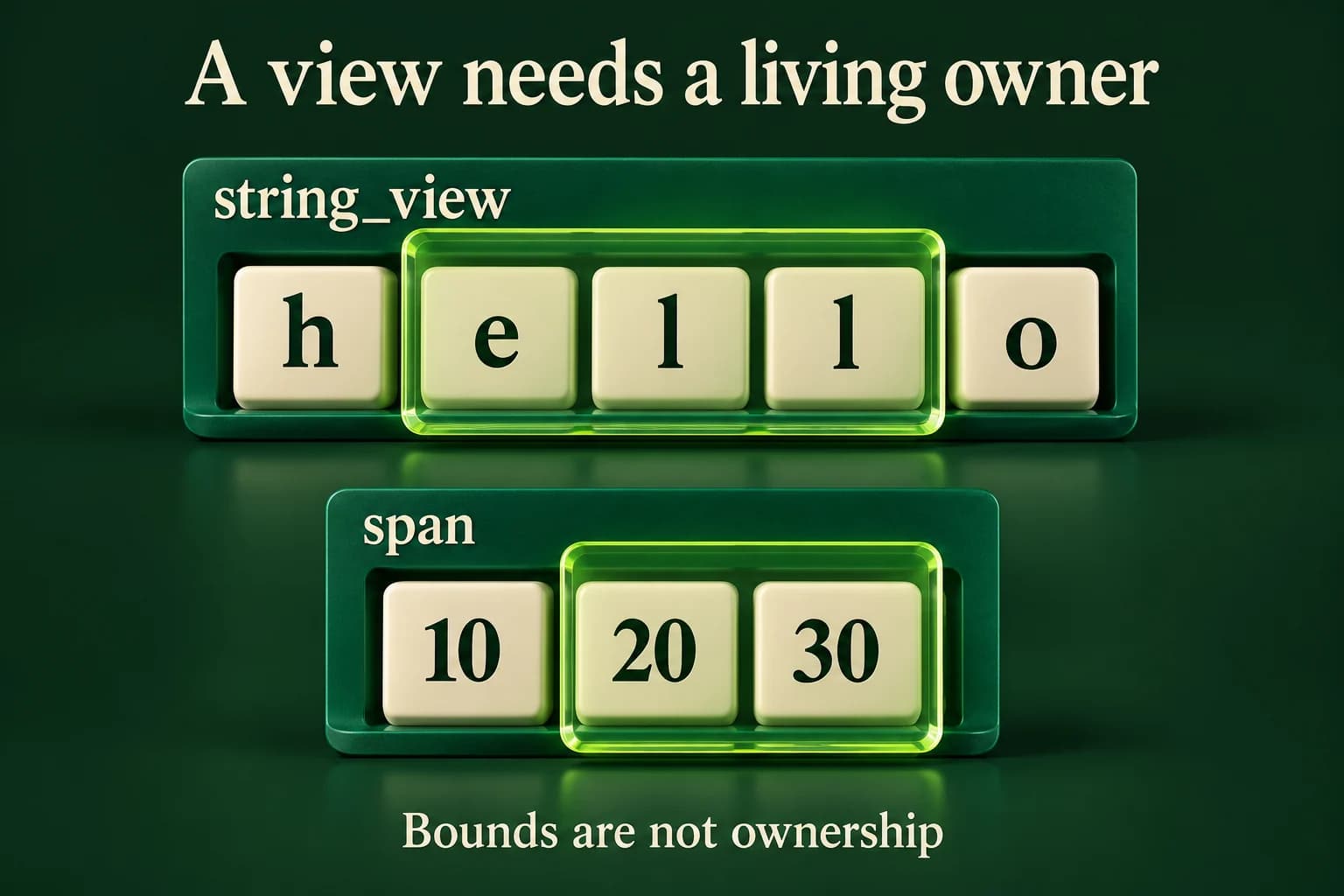
Two owner-backed windows illustrate borrowing: a string_view selects the middle characters of hello while a span selects existing integer elements. The owners remain visible beneath both windows, and no transfer arrow or copied storage suggests that either view owns the data.
The view supplies a range, not ownership. Bounds, element mutability and the lifetime of the backing data must each be checked separately.
C++ PRACTICE RUNNER

Read a smaller text window while its string owner lives

The middle view borrows three characters from owner. Both are local to main, and the owner is not changed before output.

#include <iostream>
#include <string>
#include <string_view>
int main() {
    const std::string owner{"hello"};
    const std::string_view whole{owner};
    const auto middle = whole.substr(1, 3);
    std::cout << "Owner: " << owner << '\n';
    std::cout << "Window: " << middle << '\n';
}
TERMINAL OUTPUT
Predict the output, edit the source, then select Run code.

C++20 compiler runner: source and input are sent only when you press Run to this website's execution endpoint, not an external vendor. Local preview requires Docker and gcc:14; production requires a separately isolated execution service. Network is disabled; execution is limited to 3 seconds, compilation to 10 seconds, memory to 384 MB and output to 32 KB. Single-file programs only. Don't enter secrets. Edits reset on refresh; Copy your work to keep it.

Compare with the starter's expected output
Owner: hello
Window: ell

After editing inputs, calculate a new prediction; this reference describes only the starter.

string_view is not another editable string

The first example creates an owning string containing hello. whole observes all five characters. Calling whole.substr(1, 3) creates another view of the three characters starting at index one, so it displays ell. It does not change owner or create another owned string containing those letters. The original string remains alive and unchanged until after both output operations, which makes the borrowed access valid.

A string_view lets you read characters but not change them through the view. It also does not promise a null terminator at the end of its selected range. Do not pass view.data() to an interface that expects a zero-terminated string unless that interface's requirements are actually satisfied. Stream output understands the view's length; an unrelated C-style text function may not. Knowing the selected length matters even when the displayed text looks ordinary.

For this course's text examples, positions and lengths count char units, commonly UTF-8 bytes in real files, not user-perceived letters. Slicing bytes can split a multi-byte character. This lesson teaches ownership and access, not Unicode normalization or a safe text-editor cursor. Use a suitable text-processing library when the actual task requires grapheme-aware editing instead of treating every byte index as a human character position.

  • owner stores the characters.
  • whole records access to the owner's full range.
  • middle records a smaller range, starting after h.
  • Output happens before owner is destroyed or its storage can change.

span describes a sequence; its element type controls writing

A span can be built over a suitable array or vector of contiguous elements. A function taking std::span<const int> can read integers from either source without demanding a particular owning container type. The size travels with the access range. That is a useful interface when a calculation needs a sequence now but should not take ownership, resize the container or keep a hidden copy for later.

Read the type carefully. const std::span<int> makes the view handle const, but its int elements can still be writable through that handle. std::span<const int> gives read-only access to the elements. Const on the wrapper is not automatically deep const on everything it describes. Our sum function uses span<const int> because adding readings does not require permission to change them.

A view reflects valid changes made to the same underlying elements; it is not a frozen snapshot. The span example changes an array element through its owner and then observes the new value through a read-only view. The array's storage and lifetime have not changed. This is different from growing a vector so that it reallocates: a view into its former storage would no longer provide valid access. Rebuild a view after such a structural change.

C++ PRACTICE RUNNER

Observe an owner's element change without copying the array

The element is changed through the owner, not through the read-only span. The fixed array remains alive and its storage does not move.

#include <array>
#include <iostream>
#include <span>
int totalOf(std::span<const int> values) {
    int total{};
    for (int value : values) total += value;
    return total;
}
int main() {
    std::array<int, 3> owner{10, 20, 30};
    std::span<const int> view{owner};
    std::cout << "Before: " << totalOf(view) << '\n';
    owner[1] = 25;
    std::cout << "After: " << totalOf(view) << '\n';
}
TERMINAL OUTPUT
Predict the output, edit the source, then select Run code.

C++20 compiler runner: source and input are sent only when you press Run to this website's execution endpoint, not an external vendor. Local preview requires Docker and gcc:14; production requires a separately isolated execution service. Network is disabled; execution is limited to 3 seconds, compilation to 10 seconds, memory to 384 MB and output to 32 KB. Single-file programs only. Don't enter secrets. Edits reset on refresh; Copy your work to keep it.

Compare with the starter's expected output
Before: 60
After: 65

After editing inputs, calculate a new prediction; this reference describes only the starter.

Return ownership when the data must survive the function

A common mistake is to create a local string and return a string_view referring to it. When the function returns, that local string is destroyed, leaving the view without a valid owner. The view may still have a nonzero size and a non-null data pointer. Neither observation makes the characters safe to read. We describe this error rather than running it, because undefined behavior has no trustworthy expected transcript.

One repair is to return an owning std::string. The caller keeps that returned value alive and may create a temporary view of it during later work. Another design can accept an existing owner by reference and return a view into that owner, but then the caller must respect the owner's lifetime. Choose based on who needs the data, not on a wish to make every function return a small view type.

Bounds also need care. In C++20, unchecked span indexing does not provide an automatic exception for every invalid index. Check the selected range before reading an element, and handle an empty span with an empty traversal. Do not use front or index zero merely because the view object itself exists. Ownership, lifetime and bounds are three separate facts; a safe design establishes all the ones its operations require.

C++ PRACTICE RUNNER

Repair a would-be dangling return with an owning result

makeText returns a string value. The caller stores that owner before creating the view, so no function-local string is borrowed after destruction.

#include <iostream>
#include <string>
#include <string_view>
std::string makeText() { return "safe"; }
int main() {
    const auto owner = makeText();
    const std::string_view view{owner};
    std::cout << view << '\n';
}
TERMINAL OUTPUT
Predict the output, edit the source, then select Run code.

C++20 compiler runner: source and input are sent only when you press Run to this website's execution endpoint, not an external vendor. Local preview requires Docker and gcc:14; production requires a separately isolated execution service. Network is disabled; execution is limited to 3 seconds, compilation to 10 seconds, memory to 384 MB and output to 32 KB. Single-file programs only. Don't enter secrets. Edits reset on refresh; Copy your work to keep it.

Compare with the starter's expected output
safe

After editing inputs, calculate a new prediction; this reference describes only the starter.

Create the views after collection, then finish using them before owners end

The lab reads a label line of one through forty bytes, a count from zero through five, and that many whole integer reading lines from minus one hundred through one hundred. The displayed label is the part before the first colon, or the whole line if no colon exists. That prefix must contain something other than ordinary spaces. These are narrow byte-level rules; they do not claim to trim all whitespace or normalize Unicode.

Keep the owning string and vector in main. Finish all vector push_back operations before creating a span of its elements. Make a string_view of the label prefix while the string is still alive and unchanged. Pass span<const int> to a pure total function, then print Label, Count and Total before leaving main. At most five bounded values keep the sum within minus five hundred through five hundred, including the empty total of zero.

Test a label with and without a colon, an empty prefix, the maximum label length, an empty reading sequence and malformed required readings. Do not append to the vector or replace the owning string while using their views. As a repair exercise, explain what would go wrong if the label owner were created in a helper and destroyed before reporting. Choose an owning return value or a caller-owned argument rather than hoping the old bytes remain readable.

LOCAL TERMINAL COMMANDS

Compile one program and compare its output

The lesson editors run complete programs only when the compiler sandbox is available. You can also save one example as main.cpp and use your installed compiler. Run only the repaired version of an intentional compile-error example.

macOS / Linux (choose your compiler):
clang++ -std=c++20 -Wall -Wextra -Wpedantic main.cpp -o lesson
# Or: g++ -std=c++20 -Wall -Wextra -Wpedantic main.cpp -o lesson
./lesson

Windows Developer Command Prompt:
cl /std:c++20 /EHsc /W4 main.cpp /Fe:lesson.exe
lesson.exe
APPLY THE CONCEPT

Independent lab

Build a reading report that borrows a label prefix and a completed numeric sequence while both owners remain alive.

Acceptance checklist

  • Read a 1–40-byte label line, count 0..5, and that many integers -100..100 on complete lines.
  • Use the prefix before the first colon as label; reject an empty or ordinary-space-only prefix.
  • Reject bad or missing required input as Invalid input with status 1 before reporting.
  • Create span<const int> only after vector collection; use string_view while the label's string remains alive and unchanged.
  • Print Label, Count and Total using a read-only span calculation, including the empty sequence's zero total.
Need a hint?
  1. substr(0, the first colon position) also handles npos by taking the remaining range.
  2. A view should not escape beyond the lifetime of main's owning variables.
  3. An empty span can be traversed safely without accessing an element.
C++ PRACTICE RUNNER

Write and run your lab

Build your own solution before revealing the reference. Use the input field for normal, boundary and invalid cases; this runner executes your program but does not grade it.

#include <iostream>
#include <string>
#include <sstream>
#include <limits>

int main() {
    // Implement the acceptance checklist above.
    return 0;
}

TERMINAL OUTPUT
Predict the output, edit the source, then select Run code.

C++20 compiler runner: source and input are sent only when you press Run to this website's execution endpoint, not an external vendor. Local preview requires Docker and gcc:14; production requires a separately isolated execution service. Network is disabled; execution is limited to 3 seconds, compilation to 10 seconds, memory to 384 MB and output to 32 KB. Single-file programs only. Don't enter secrets. Edits reset on refresh; Copy your work to keep it.

Your lab evidence and notes

Record predictions, actual output, commands and the cause of each repair. Code is plain text: this scratchpad does not execute or grade C++.

Loading local notes…

Review your acceptance checklist and quiz explanations before marking this lesson complete. This is self-review, not a grade or certification.

Reveal the explained lab solution
C++ PRACTICE RUNNER

Reference lab solution

Compare the reference with your own reasoning. Running this solution does not grade or complete the lesson.

#include <iostream>
#include <sstream>
#include <string>
bool readInteger(int& value) {
    std::string line;
    if (!std::getline(std::cin, line)) return false;
    std::istringstream parser{line};
    if (!(parser >> value)) return false;
    parser >> std::ws;
    return parser.eof();
}
#include <span>
#include <string_view>
#include <vector>
int totalOf(std::span<const int> values) {
    int total{};
    for (int value : values) total += value;
    return total;
}
int main() {
    std::string owner;
    int count{};
    if (!std::getline(std::cin, owner) || owner.empty() || owner.size() > 40 || !readInteger(count) || count < 0 || count > 5) {
        std::cout << "Invalid input\n"; return 1;
    }
    std::vector<int> readings;
    for (int i = 0; i < count; ++i) {
        int value{};
        if (!readInteger(value) || value < -100 || value > 100) {
            std::cout << "Invalid input\n"; return 1;
        }
        readings.push_back(value);
    }
    const std::string_view label = std::string_view{owner}.substr(0, owner.find(':'));
    if (label.find_first_not_of(' ') == std::string_view::npos) {
        std::cout << "Invalid input\n"; return 1;
    }
    const std::span<const int> values{readings};
    std::cout << "Label: " << label << "\nCount: " << values.size() << "\nTotal: " << totalOf(values) << '\n';
}
TERMINAL OUTPUT
Predict the output, edit the source, then select Run code.

C++20 compiler runner: source and input are sent only when you press Run to this website's execution endpoint, not an external vendor. Local preview requires Docker and gcc:14; production requires a separately isolated execution service. Network is disabled; execution is limited to 3 seconds, compilation to 10 seconds, memory to 384 MB and output to 32 KB. Single-file programs only. Don't enter secrets. Edits reset on refresh; Copy your work to keep it.

Expected output

Label: sensor
Count: 3
Total: 6

The string and vector in main own the data until reporting finishes. The temporary string_view wrapper used for substr does not own the text and does not destroy the owner's characters.

The span is made after collection, so later vector growth cannot invalidate it during this report; no growth happens after the view is created.

The read-only span function needs neither ownership nor a container copy. The accepted bounds justify its int sum and empty traversal.

Review before moving on

Explain the lesson's objectives in your own words, compare your lab evidence with the acceptance checklist, and keep the first failing case alongside your repair. Completing a page is not proof that every C++ feature or input is supported.

  • Explain an owning container versus a non-owning view.
  • Use string_view for borrowed text and span for borrowed contiguous elements.
  • Distinguish a const view handle from const elements.
  • Recognize dangling views without executing invalid access.
  • Build views only after storage is complete and keep owners alive through reporting.

References and further reading

Original examples and exercises accompany these primary references. Tool-specific diagnostics and support depend on your installed version.

  • C++ draft: string views
  • C++ draft: span overview
  • Microsoft: span class
KNOWLEDGE CHECK

Check your understanding

Answer all five questions, then review the explanations. Answers are not saved or synced; completion is a separate self-review choice.

01What does copying a string_view copy?
02Which type gives read-only access to the span's integers?
03Why create the span after all push_back calls?
04What repairs a returned view into a destroyed local string?
05Does a view's size prove every later use is safe?
PREVIOUS LESSONC++ Move Semantics: std::move vs Copying
NEXT LESSONC++ map vs unordered_map: Lookup and Examples
ON THIS PAGELearning objectivesA view is a window onto existing datastring_view is not another editable stringspan describes a sequence; its element type controls writingReturn ownership when the data must survive the functionCreate the views after collection, then finish using them before owners endIndependent labReviewKnowledge checkReferences
Course overview