SovranCode
Modern C++ Lesson 06
Course contents50 available · 0 planned

Get a program running

01 · C++ Introduction: What Is C++?02 · How to Install a C++ Compiler and Set Up Your Editor03 · C++ Hello World: Your First Program Explained04 · How to Compile and Run C++ Programs05 · C++ Debugging: Warnings and Breakpoints

Work with values and input

06 · C++ Variables: Initialization and Scope07 · C++ Data Types: int, double and Type Conversion08 · C++ const, constexpr and auto Explained09 · C++ Operators: Arithmetic, Comparison and Logic10 · C++ User Input: cin, getline and Validation

Control flow and functions

11 · C++ Conditions: if, else if and else12 · C++ Switch Statement: Cases, break and default13 · C++ For Loop: Syntax and Examples14 · C++ While and Do-While Loops: Examples15 · C++ Functions: Parameters and Return Values

Strings and sequences

16 · C++ Strings: std::string with Examples17 · C++ Vector: std::vector with Examples18 · C++ Arrays: std::array and Bounds Checking19 · C++ Range-Based For Loop and Iterators20 · C++ Vector Practice: Build a Data Summary

Model data with classes

21 · C++ Structs and enum class Explained22 · C++ Classes and Objects: Encapsulation23 · C++ Constructors and Member Initialization24 · C++ Const Member Functions and Composition25 · C++ Copying Objects and the Rule of Zero

Lifetime and resource ownership

26 · C++ Object Lifetime, Destructors and RAII27 · C++ Pointers and References: nullptr and Borrowing28 · C++ unique_ptr: Smart Pointers and Ownership29 · C++ Move Semantics: std::move vs Copying30 · C++ string_view and span: Avoid Dangling Views

Containers and algorithms

31 · C++ map vs unordered_map: Lookup and Examples32 · C++ set, queue and stack: When to Use Each33 · C++ Lambda Expressions and STL Algorithms34 · C++ sort and binary_search: Rules and Complexity35 · C++20 Ranges: Views, filter and transform

Errors, files, and interfaces

36 · C++ optional and variant Explained37 · C++ Exceptions: try, catch and Safe Cleanup38 · C++ File Handling: Read and Write Text Files39 · C++ Input Parsing and Data Validation40 · C++ Polymorphism: Virtual Functions and Interfaces

Generic programming and quality

41 · C++ Templates: Function and Class Examples42 · C++20 Concepts and Template Constraints43 · C++ Unit Testing: Normal and Boundary Cases44 · C++ Sanitizers: Find Memory and Undefined Behavior Bugs45 · C++ Performance: Benchmark Before Optimizing

Build and deliver a complete application

46 · C++ Header Files and Translation Units47 · C++ CMake Tutorial: Build an Executable48 · C++ Dependencies and CTest: Automated Tests49 · C++ Multithreading: Threads and Data Races50 · C++ Command-Line Applications: Help and Release Checks
Modern C++50 available · 0 planned

Get a program running

01 · C++ Introduction: What Is C++?02 · How to Install a C++ Compiler and Set Up Your Editor03 · C++ Hello World: Your First Program Explained04 · How to Compile and Run C++ Programs05 · C++ Debugging: Warnings and Breakpoints

Work with values and input

06 · C++ Variables: Initialization and Scope07 · C++ Data Types: int, double and Type Conversion08 · C++ const, constexpr and auto Explained09 · C++ Operators: Arithmetic, Comparison and Logic10 · C++ User Input: cin, getline and Validation

Control flow and functions

11 · C++ Conditions: if, else if and else12 · C++ Switch Statement: Cases, break and default13 · C++ For Loop: Syntax and Examples14 · C++ While and Do-While Loops: Examples15 · C++ Functions: Parameters and Return Values

Strings and sequences

16 · C++ Strings: std::string with Examples17 · C++ Vector: std::vector with Examples18 · C++ Arrays: std::array and Bounds Checking19 · C++ Range-Based For Loop and Iterators20 · C++ Vector Practice: Build a Data Summary

Model data with classes

21 · C++ Structs and enum class Explained22 · C++ Classes and Objects: Encapsulation23 · C++ Constructors and Member Initialization24 · C++ Const Member Functions and Composition25 · C++ Copying Objects and the Rule of Zero

Lifetime and resource ownership

26 · C++ Object Lifetime, Destructors and RAII27 · C++ Pointers and References: nullptr and Borrowing28 · C++ unique_ptr: Smart Pointers and Ownership29 · C++ Move Semantics: std::move vs Copying30 · C++ string_view and span: Avoid Dangling Views

Containers and algorithms

31 · C++ map vs unordered_map: Lookup and Examples32 · C++ set, queue and stack: When to Use Each33 · C++ Lambda Expressions and STL Algorithms34 · C++ sort and binary_search: Rules and Complexity35 · C++20 Ranges: Views, filter and transform

Errors, files, and interfaces

36 · C++ optional and variant Explained37 · C++ Exceptions: try, catch and Safe Cleanup38 · C++ File Handling: Read and Write Text Files39 · C++ Input Parsing and Data Validation40 · C++ Polymorphism: Virtual Functions and Interfaces

Generic programming and quality

41 · C++ Templates: Function and Class Examples42 · C++20 Concepts and Template Constraints43 · C++ Unit Testing: Normal and Boundary Cases44 · C++ Sanitizers: Find Memory and Undefined Behavior Bugs45 · C++ Performance: Benchmark Before Optimizing

Build and deliver a complete application

46 · C++ Header Files and Translation Units47 · C++ CMake Tutorial: Build an Executable48 · C++ Dependencies and CTest: Automated Tests49 · C++ Multithreading: Threads and Data Races50 · C++ Command-Line Applications: Help and Release Checks
PREVIOUS LESSONC++ Debugging: Warnings and Breakpoints
NEXT LESSONC++ Data Types: int, double and Type Conversion
C++ foundations · Lesson 06 About 45 min with practice

C++ Variables: Initialization and Scope

Learn C++ variable declarations, brace initialization, assignment, const and block scope. Trace state changes and repair uninitialized or out-of-scope reads.

Before you begin

Read complete small programs and understand that output uses a value. Scope and assignment examples below run locally unless the block explicitly offers browser execution.

What you will learn

  • Separate a variable's type, name and initial value.
  • Distinguish initialization from later assignment.
  • Prefer deliberate brace initialization for beginner values.
  • Explain const and the visibility of local names.
  • Trace state changes without reading an uninitialized value.

A name connects source expressions to a typed object

A variable is more than an editable label in your source. Its declaration introduces a name and type; for the local examples here, initialization gives the associated object its starting value. Think of planned as a name through which the program can refer to one count. The name itself is not the number, and printing planned does not print the word planned. Distinguishing the name from the stored value keeps tracing concrete.

In const int planned{6}, int selects an integer type, planned is the identifier, braces hold an initializer, and const prevents modifying that object through ordinary assignment. The declaration is also a definition of a local object in this example. Use domain names such as completed rather than unexplained letters when the relationship matters. A readable name helps a human understand intent; it does not enforce the business rule automatically.

Types constrain operations and representation, but they do not tell the program every valid domain state. int can represent negative counts on ordinary platforms, while our study-session model rejects negative completed sessions. Choosing a type is therefore only part of modeling data. For now initialize valid small counts; later lessons add explicit input checks and types that protect stronger invariants.
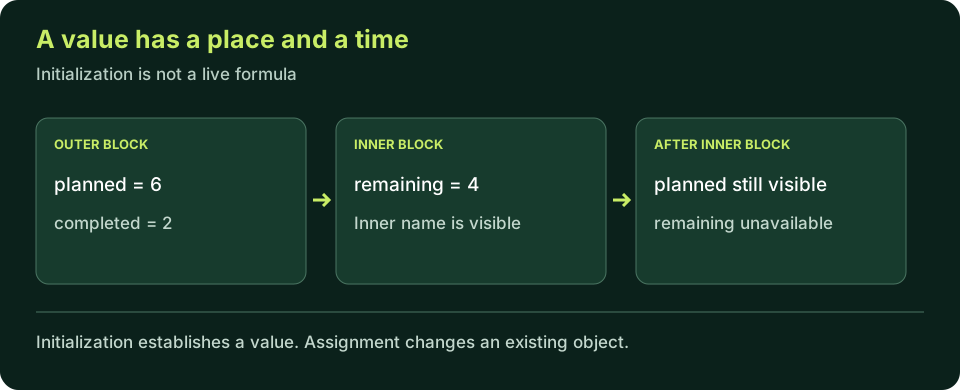
A main block owns planned and completed values; an inner block owns its local remaining value. Inner code can refer to outer names, but the inner remaining name is unavailable after its block ends. Initialization establishes a value; assignment changes an existing value.
Block boundaries control local name visibility. They are not merely indentation guides.
C++ PRACTICE RUNNER

Initialize before reading

Predict the remaining count. Change planned and completed separately; keep completed between zero and planned for this model.

#include <iostream>

int main() {
    const int planned{6};
    const int completed{2};
    const int remaining{planned - completed};
    std::cout << "Remaining: " << remaining << '\n';
    return 0;
}
TERMINAL OUTPUT
Predict the output, edit the source, then select Run code.

C++20 compiler runner: source and input are sent only when you press Run to this website's execution endpoint, not an external vendor. Local preview requires Docker and gcc:14; production requires a separately isolated execution service. Network is disabled; execution is limited to 3 seconds, compilation to 10 seconds, memory to 384 MB and output to 32 KB. Single-file programs only. Don't enter secrets. Edits reset on refresh; Copy your work to keep it.

Compare with the starter's expected output
Remaining: 4

After editing inputs, calculate a new prediction; this reference describes only the starter.

Initialization creates the starting state; assignment changes it

int completed{2} initializes a new object. A later completed = 3 statement assigns to the existing object. Writing int completed{3} again in the same scope would try to declare another object with the same name, not update the original. That distinction matters when tracing a sequence: a declaration introduces state, and assignment changes state that is already present.

An initializer expression is evaluated when the declaration executes. If remaining is initialized from planned - completed, it captures that result; it does not become a live spreadsheet formula. Changing completed later does not automatically recompute remaining. If a report needs a new remaining value, compute or assign it again deliberately. This is a frequent beginner misconception because the source expression looks like a permanent relationship.

Prefer const for a value that should not change in the current example. Use an ordinary variable when a change is part of the program's contract. Avoid making everything mutable merely because a future version might need it. Also avoid making a value const and then removing the qualifier to silence an unexplained error: first decide whether the intended behavior really requires mutation. Clear decisions about state simplify debugging.

C++ PRACTICE RUNNER

Trace: updating a count does not update a derived value

Predict the four output lines before running in the compiler-backed editor or with a local compiler.

#include <iostream>
int main() {
    const int planned{6};
    int completed{2};
    int remaining{planned - completed};
    std::cout << "Before: " << remaining << '\n';
    completed = 3;
    std::cout << "Completed: " << completed << '\n';
    std::cout << "Old remaining: " << remaining << '\n';
    remaining = planned - completed;
    std::cout << "Updated remaining: " << remaining << '\n';
    return 0;
}
TERMINAL OUTPUT
Predict the output, edit the source, then select Run code.

C++20 compiler runner: source and input are sent only when you press Run to this website's execution endpoint, not an external vendor. Local preview requires Docker and gcc:14; production requires a separately isolated execution service. Network is disabled; execution is limited to 3 seconds, compilation to 10 seconds, memory to 384 MB and output to 32 KB. Single-file programs only. Don't enter secrets. Edits reset on refresh; Copy your work to keep it.

Compare with the starter's expected output
Before: 4
Completed: 3
Old remaining: 4
Updated remaining: 3

After editing inputs, calculate a new prediction; this reference describes only the starter.

Make the initial value deliberate

For these simple values, int count{3} and int count = 3 both initialize a count. Braces are a useful default because list initialization rejects certain narrowing conversions. For example, int count{3.5} is not a valid way to silently discard the fractional part. Do not interpret that rule as a complete conversion-safety system; later data-type lessons explain range, signedness and explicit conversion choices in more detail.

int count{} value-initializes this integer to zero. Zero is helpful when it is the intended starting state, such as a count of completed tasks before work starts. It is not a universal substitute for missing data. If an unknown measurement cannot truthfully be represented by zero, the model needs a different representation. Good initialization gives a valid starting state rather than hiding the fact that information is unavailable.

An ordinary automatic local int count; has no deliberately supplied value here. Reading it before assignment is invalid; depending on the language version, the formal categories for such reads have details, but the safe beginner rule is unchanged: do not read it. Do not run an uninitialized-read experiment and call an observed zero reliable. A particular result from an invalid operation is not a contract you can reuse.

C++ PRACTICE RUNNER

Local compile-error experiment: narrowing

This intentionally fails compilation in C++20. Repair the model by choosing a valid integer count, not by assuming fractional sessions are silently rounded.

int main() {
    int sessions{3.5};
    return sessions;
}
TERMINAL OUTPUT
Predict the output, edit the source, then select Run code.

C++20 compiler runner: source and input are sent only when you press Run to this website's execution endpoint, not an external vendor. Local preview requires Docker and gcc:14; production requires a separately isolated execution service. Network is disabled; execution is limited to 3 seconds, compilation to 10 seconds, memory to 384 MB and output to 32 KB. Single-file programs only. Don't enter secrets. Edits reset on refresh; Copy your work to keep it.

Scope controls where a name can be used

A name declared inside a block can be used after its declaration within the appropriate scope. Inner blocks can refer to enclosing local names that remain visible, but an inner local name is not available to code after that inner block closes. This is why braces matter even when they do not belong to a loop or condition: they define a boundary for local declarations as well as grouping statements.

Scope and lifetime are related but different ideas. Scope describes where a name can be used in source; lifetime describes when an object exists during execution. For the simple automatic locals in this lesson, leaving the block also ends their lifetimes. Later ownership and reference lessons show why access through another name or pointer makes the distinction important. Do not assume that a value can safely be accessed merely because you remember its earlier contents.

Keep declarations close to their first meaningful use, with the smallest scope that fits the task. That reduces the number of places a mutable value can be changed. Avoid shadowing an outer count with an inner count merely to reuse a short name: valid shadowing can still make code confusing. Descriptive distinct names make it easier to trace which object a statement reads.

C++ PRACTICE RUNNER

Trace: an inner calculation has a limited scope

Run the complete program in the compiler-backed editor or with a local compiler. The inner remaining name is intentionally not used after its block.

#include <iostream>
int main() {
    const int planned{6};
    {
        const int completed{2};
        const int remaining{planned - completed};
        std::cout << "Inside: " << remaining << '\n';
    }
    std::cout << "Planned: " << planned << '\n';
    return 0;
}
TERMINAL OUTPUT
Predict the output, edit the source, then select Run code.

C++20 compiler runner: source and input are sent only when you press Run to this website's execution endpoint, not an external vendor. Local preview requires Docker and gcc:14; production requires a separately isolated execution service. Network is disabled; execution is limited to 3 seconds, compilation to 10 seconds, memory to 384 MB and output to 32 KB. Single-file programs only. Don't enter secrets. Edits reset on refresh; Copy your work to keep it.

Compare with the starter's expected output
Inside: 4
Planned: 6

After editing inputs, calculate a new prediction; this reference describes only the starter.

LOCAL TERMINAL COMMANDS

Run the state and scope traces locally

Save each example under its displayed filename and build it separately. On Linux, replace clang++ with g++ if GCC is your selected compiler. Run only after the matching build succeeds.

Clang / GCC-style commands:
clang++ -std=c++20 -Wall -Wextra -Wpedantic assignment.cpp -o assignment-demo
./assignment-demo
clang++ -std=c++20 -Wall -Wextra -Wpedantic scope.cpp -o scope-demo
./scope-demo

MSVC Developer Command Prompt:
cl /std:c++20 /EHsc /W4 assignment.cpp /Fe:assignment-demo.exe
assignment-demo.exe
cl /std:c++20 /EHsc /W4 scope.cpp /Fe:scope-demo.exe
scope-demo.exe
C++ PRACTICE RUNNER

Local compile-error experiment: a name outside its block

This intentionally fails compilation. Repair it by moving the cout statement inside the inner block, where count is visible; do not run an unrelated old binary.

#include <iostream>
int main() {
    {
        const int count{3};
    }
    std::cout << count << '\n';
    return 0;
}
TERMINAL OUTPUT
Predict the output, edit the source, then select Run code.

C++20 compiler runner: source and input are sent only when you press Run to this website's execution endpoint, not an external vendor. Local preview requires Docker and gcc:14; production requires a separately isolated execution service. Network is disabled; execution is limited to 3 seconds, compilation to 10 seconds, memory to 384 MB and output to 32 KB. Single-file programs only. Don't enter secrets. Edits reset on refresh; Copy your work to keep it.

Repair the cause, not a guessed symptom

If a name is not declared at a use, inspect spelling and scope. Moving every declaration to the top of main may silence one error while making the design less clear. Ask which statements actually need the object, then place the declaration in a suitable shared scope or keep the calculation local and output it there. Later functions provide better boundaries for larger programs.

If a const object is assigned later, decide whether the value should change. If it should remain stable, remove the unintended assignment rather than removing const. If state change is genuinely required, declare the object mutable and trace its updates. If a derived count is stale, recompute it at the point required by the report. Different causes require different repairs even when several mistakes produce similar-looking output.

Before the next lesson, be able to explain each read: where the object was declared, what initialized it, whether it changed and whether it is still in scope. That short checklist catches more than memorizing a definition of 'variable.' It also prepares you to compare numeric types and conversions without losing track of the state the arithmetic actually uses.

APPLY THE CONCEPT

Independent lab

Build a remaining-task report with a stable total and a changing completed count. Trace the old and recomputed derived values, then keep a temporary calculation inside an inner block.

Acceptance checklist

  • Use a const total of 8 and initialize completed to 3.
  • Report 5 remaining before the update.
  • Assign completed to 4 without redeclaring it.
  • Recompute remaining and report 4.
  • Explain why changing completed alone does not update the previously stored remaining value.
  • Compile locally; assignment is not part of the current browser interpreter.
Need a hint?
  1. The total does not change, so const documents that contract.
  2. An assignment uses the existing name without another int declaration.
  3. A derived value stores a result; it is not a persistent formula.
C++ PRACTICE RUNNER

Write and run your lab

Build your own solution before revealing the reference. Use the input field for normal, boundary and invalid cases; this runner executes your program but does not grade it.

#include <iostream>
#include <string>
#include <sstream>
#include <limits>

int main() {
    // Implement the acceptance checklist above.
    return 0;
}

TERMINAL OUTPUT
Predict the output, edit the source, then select Run code.

C++20 compiler runner: source and input are sent only when you press Run to this website's execution endpoint, not an external vendor. Local preview requires Docker and gcc:14; production requires a separately isolated execution service. Network is disabled; execution is limited to 3 seconds, compilation to 10 seconds, memory to 384 MB and output to 32 KB. Single-file programs only. Don't enter secrets. Edits reset on refresh; Copy your work to keep it.

Your lab evidence and notes

Record predictions, actual output, commands and the cause of each repair. Code is plain text: this scratchpad does not execute or grade C++.

Loading local notes…

Review your acceptance checklist and quiz explanations before marking this lesson complete. This is self-review, not a grade or certification.

Reveal the explained lab solution
C++ PRACTICE RUNNER

Reference lab solution

Compare the reference with your own reasoning. Running this solution does not grade or complete the lesson.

#include <iostream>
int main() {
    const int total{8};
    int completed{3};
    int remaining{total - completed};
    std::cout << "Before: " << remaining << '\n';
    completed = 4;
    remaining = total - completed;
    {
        const int checkedRemaining{remaining};
        std::cout << "After: " << checkedRemaining << '\n';
    }
    return 0;
}
TERMINAL OUTPUT
Predict the output, edit the source, then select Run code.

C++20 compiler runner: source and input are sent only when you press Run to this website's execution endpoint, not an external vendor. Local preview requires Docker and gcc:14; production requires a separately isolated execution service. Network is disabled; execution is limited to 3 seconds, compilation to 10 seconds, memory to 384 MB and output to 32 KB. Single-file programs only. Don't enter secrets. Edits reset on refresh; Copy your work to keep it.

Expected output

Before: 5
After: 4

The first initialization evaluates 8 - 3 and stores 5. Assigning completed changes only completed.

The second assignment evaluates 8 - 4 and updates remaining to 4. checkedRemaining is a separate initialized value visible only inside its block.

With completed equal to total, recomputing gives zero. Counts above total need rejection in a later validation lesson; this sample uses fixed valid inputs.

Review before moving on

Explain the lesson's objectives in your own words, compare your lab evidence with the acceptance checklist, and keep the first failing case alongside your repair. Completing a page is not proof that every C++ feature or input is supported.

  • Separate a variable's type, name and initial value.
  • Distinguish initialization from later assignment.
  • Prefer deliberate brace initialization for beginner values.
  • Explain const and the visibility of local names.
  • Trace state changes without reading an uninitialized value.

References and further reading

Original examples and exercises accompany these primary references. Tool-specific diagnostics and support depend on your installed version.

  • C++ draft: initialization
  • C++ draft: block scope
  • C++ Core Guidelines: initialization and scope
KNOWLEDGE CHECK

Check your understanding

Answer all five questions, then review the explanations. Answers are not saved or synced; completion is a separate self-review choice.

01What does int count{3} do?
02remaining was initialized from total - completed. completed changes later. What happens to remaining?
03Which declaration deliberately gives this local int a zero value?
04A local name declared in an inner block is used after that block. What is wrong?
05Why is int sessions{3.5} rejected in C++20?
PREVIOUS LESSONC++ Debugging: Warnings and Breakpoints
NEXT LESSONC++ Data Types: int, double and Type Conversion
ON THIS PAGELearning objectivesA name connects source expressions to a typed objectInitialization creates the starting state; assignment changes itMake the initial value deliberateScope controls where a name can be usedRepair the cause, not a guessed symptomIndependent labReviewKnowledge checkReferences
Course overview