SovranCode
Modern C++ Lesson 12
Course contents50 available · 0 planned

Get a program running

01 · C++ Introduction: What Is C++?02 · How to Install a C++ Compiler and Set Up Your Editor03 · C++ Hello World: Your First Program Explained04 · How to Compile and Run C++ Programs05 · C++ Debugging: Warnings and Breakpoints

Work with values and input

06 · C++ Variables: Initialization and Scope07 · C++ Data Types: int, double and Type Conversion08 · C++ const, constexpr and auto Explained09 · C++ Operators: Arithmetic, Comparison and Logic10 · C++ User Input: cin, getline and Validation

Control flow and functions

11 · C++ Conditions: if, else if and else12 · C++ Switch Statement: Cases, break and default13 · C++ For Loop: Syntax and Examples14 · C++ While and Do-While Loops: Examples15 · C++ Functions: Parameters and Return Values

Strings and sequences

16 · C++ Strings: std::string with Examples17 · C++ Vector: std::vector with Examples18 · C++ Arrays: std::array and Bounds Checking19 · C++ Range-Based For Loop and Iterators20 · C++ Vector Practice: Build a Data Summary

Model data with classes

21 · C++ Structs and enum class Explained22 · C++ Classes and Objects: Encapsulation23 · C++ Constructors and Member Initialization24 · C++ Const Member Functions and Composition25 · C++ Copying Objects and the Rule of Zero

Lifetime and resource ownership

26 · C++ Object Lifetime, Destructors and RAII27 · C++ Pointers and References: nullptr and Borrowing28 · C++ unique_ptr: Smart Pointers and Ownership29 · C++ Move Semantics: std::move vs Copying30 · C++ string_view and span: Avoid Dangling Views

Containers and algorithms

31 · C++ map vs unordered_map: Lookup and Examples32 · C++ set, queue and stack: When to Use Each33 · C++ Lambda Expressions and STL Algorithms34 · C++ sort and binary_search: Rules and Complexity35 · C++20 Ranges: Views, filter and transform

Errors, files, and interfaces

36 · C++ optional and variant Explained37 · C++ Exceptions: try, catch and Safe Cleanup38 · C++ File Handling: Read and Write Text Files39 · C++ Input Parsing and Data Validation40 · C++ Polymorphism: Virtual Functions and Interfaces

Generic programming and quality

41 · C++ Templates: Function and Class Examples42 · C++20 Concepts and Template Constraints43 · C++ Unit Testing: Normal and Boundary Cases44 · C++ Sanitizers: Find Memory and Undefined Behavior Bugs45 · C++ Performance: Benchmark Before Optimizing

Build and deliver a complete application

46 · C++ Header Files and Translation Units47 · C++ CMake Tutorial: Build an Executable48 · C++ Dependencies and CTest: Automated Tests49 · C++ Multithreading: Threads and Data Races50 · C++ Command-Line Applications: Help and Release Checks
Modern C++50 available · 0 planned

Get a program running

01 · C++ Introduction: What Is C++?02 · How to Install a C++ Compiler and Set Up Your Editor03 · C++ Hello World: Your First Program Explained04 · How to Compile and Run C++ Programs05 · C++ Debugging: Warnings and Breakpoints

Work with values and input

06 · C++ Variables: Initialization and Scope07 · C++ Data Types: int, double and Type Conversion08 · C++ const, constexpr and auto Explained09 · C++ Operators: Arithmetic, Comparison and Logic10 · C++ User Input: cin, getline and Validation

Control flow and functions

11 · C++ Conditions: if, else if and else12 · C++ Switch Statement: Cases, break and default13 · C++ For Loop: Syntax and Examples14 · C++ While and Do-While Loops: Examples15 · C++ Functions: Parameters and Return Values

Strings and sequences

16 · C++ Strings: std::string with Examples17 · C++ Vector: std::vector with Examples18 · C++ Arrays: std::array and Bounds Checking19 · C++ Range-Based For Loop and Iterators20 · C++ Vector Practice: Build a Data Summary

Model data with classes

21 · C++ Structs and enum class Explained22 · C++ Classes and Objects: Encapsulation23 · C++ Constructors and Member Initialization24 · C++ Const Member Functions and Composition25 · C++ Copying Objects and the Rule of Zero

Lifetime and resource ownership

26 · C++ Object Lifetime, Destructors and RAII27 · C++ Pointers and References: nullptr and Borrowing28 · C++ unique_ptr: Smart Pointers and Ownership29 · C++ Move Semantics: std::move vs Copying30 · C++ string_view and span: Avoid Dangling Views

Containers and algorithms

31 · C++ map vs unordered_map: Lookup and Examples32 · C++ set, queue and stack: When to Use Each33 · C++ Lambda Expressions and STL Algorithms34 · C++ sort and binary_search: Rules and Complexity35 · C++20 Ranges: Views, filter and transform

Errors, files, and interfaces

36 · C++ optional and variant Explained37 · C++ Exceptions: try, catch and Safe Cleanup38 · C++ File Handling: Read and Write Text Files39 · C++ Input Parsing and Data Validation40 · C++ Polymorphism: Virtual Functions and Interfaces

Generic programming and quality

41 · C++ Templates: Function and Class Examples42 · C++20 Concepts and Template Constraints43 · C++ Unit Testing: Normal and Boundary Cases44 · C++ Sanitizers: Find Memory and Undefined Behavior Bugs45 · C++ Performance: Benchmark Before Optimizing

Build and deliver a complete application

46 · C++ Header Files and Translation Units47 · C++ CMake Tutorial: Build an Executable48 · C++ Dependencies and CTest: Automated Tests49 · C++ Multithreading: Threads and Data Races50 · C++ Command-Line Applications: Help and Release Checks
PREVIOUS LESSONC++ Conditions: if, else if and else
NEXT LESSONC++ For Loop: Syntax and Examples
C++ foundations · Lesson 12 About 50 min with practice

C++ Switch Statement: Cases, break and default

Learn C++ switch syntax, case labels, break, default and intentional fallthrough. Compare discrete commands with if/else intervals and build a validated menu dispatcher.

Before you begin

Complete conditions and whole-line input validation. Use a local C++20 compiler for switch; browser practice does not execute this feature.

What you will learn

  • Choose switch for a discrete integral decision.
  • Trace entry at a matching case and exit at break.
  • Handle unsupported values with default.
  • Distinguish shared cases from intentional fallthrough.
  • Scope case-local variables and test every command.

Choose switch when one value selects a discrete action

A switch statement examines one selector and transfers control to the matching case label. It is a useful shape for a small numeric command menu: zero means exit, one means help, and two means status. Those commands are distinct values, not ranges. Write the mapping before the code so each case has a clear responsibility. The selector is evaluated for this dispatch, rather than independently retested for every case as a chain of comparisons might be.

Use an if/else chain when the decision depends on intervals, several independent facts, or comparisons that cannot be expressed as discrete case constants. The previous age classification is a better fit for ordered less-than tests than a switch with one label for every age. A switch is not automatically faster or more modern than if. Choose the structure that makes the policy easiest to review, then measure performance only if the actual application requires it.

These introductory selectors are integers. C++ also supports enumeration selectors and certain class conversions, but not arbitrary strings or floating-point values as switch selectors. Do not write case "help" and expect a string command to work. Read text commands with if comparisons, or deliberately map them to a discrete representation later. Scoped enumerations can replace unexplained command numbers after the enum lesson; numeric cases here keep the control flow visible without introducing an untaught type system.
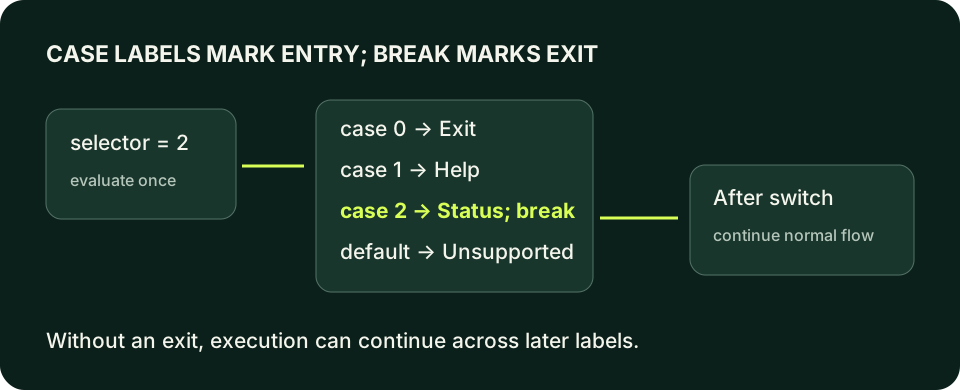
A selector enters case zero for exit, case one for help, case two for status, or default for unsupported values. Each ordinary command exits the switch using break; labels alone do not stop execution flowing into the next case.
A case marks an entry point. break provides the exit that keeps ordinary menu actions independent.
C++ PRACTICE RUNNER

Trace a supported menu command

command is two. Only the Status line appears, then execution continues after the switch.

#include <iostream>
int main() {
    const int command{2};
    switch (command) {
        case 0: std::cout << "Exit\n"; break;
        case 1: std::cout << "Help\n"; break;
        case 2: std::cout << "Status\n"; break;
        default: std::cout << "Unsupported\n"; break;
    }
    std::cout << "Dispatch finished\n";
    return 0;
}
TERMINAL OUTPUT
Predict the output, edit the source, then select Run code.

C++20 compiler runner: source and input are sent only when you press Run to this website's execution endpoint, not an external vendor. Local preview requires Docker and gcc:14; production requires a separately isolated execution service. Network is disabled; execution is limited to 3 seconds, compilation to 10 seconds, memory to 384 MB and output to 32 KB. Single-file programs only. Don't enter secrets. Edits reset on refresh; Copy your work to keep it.

Compare with the starter's expected output
Status
Dispatch finished

After editing inputs, calculate a new prediction; this reference describes only the starter.

Labels do not create exclusive branch bodies

A case label identifies where execution enters the switch body. It does not automatically create a branch that ends at the next label. If code reaches another case label without exiting, execution continues through it. That behavior is called fallthrough. For an ordinary menu, omitting break after Help could print Status as well, even though command was one. A valid build would not prove that the menu performed only the requested action.

break exits the nearest enclosing switch or loop. In the single switch shown here, it leaves the dispatch and reaches the following statement. It does not necessarily end main. return exits the current function instead, so a return inside main ends this program immediately. Choose deliberately: a menu action that finishes dispatch but needs a final report uses break; a fatal invalid input can return a failure status before normal work continues.

If no case matches and default is present, execution enters at default. Without default, an unmatched value can cause the whole body to be skipped. That is sometimes intentional, but an external menu should not silently pretend an unknown command succeeded. A rejection label and meaningful failure status make the boundary observable. default is not proof of validation: malformed text must still be rejected before a parsed selector is available.

C++ PRACTICE RUNNER

Repair accidental fallthrough

Intentional logic-error example: command one prints two actions. Add break after Help, replace the explicit fallthrough attribute with that exit, and verify command two still prints Status.

#include <iostream>
int main() {
    const int command{1};
    switch (command) {
        case 1:
            std::cout << "Help\n";
            [[fallthrough]];
        case 2:
            std::cout << "Status\n";
            break;
        default: std::cout << "Unsupported\n"; break;
    }
    return 0;
}
TERMINAL OUTPUT
Predict the output, edit the source, then select Run code.

C++20 compiler runner: source and input are sent only when you press Run to this website's execution endpoint, not an external vendor. Local preview requires Docker and gcc:14; production requires a separately isolated execution service. Network is disabled; execution is limited to 3 seconds, compilation to 10 seconds, memory to 384 MB and output to 32 KB. Single-file programs only. Don't enter secrets. Edits reset on refresh; Copy your work to keep it.

Compare with the starter's expected output
Help
Status

After editing inputs, calculate a new prediction; this reference describes only the starter.

Share behavior explicitly instead of relying on an accident

Several case labels can lead to the same statements. Placing case 1 and case 2 together before one output action means both selectors enter the shared action. There is no earlier action to complete and fall through from. This is a clear way to group equivalent discrete commands. Keep the shared behavior named in your requirement so a future reader does not assume each case was supposed to do something different.

When one case performs work and intentionally continues into the next, write [[fallthrough]] at the permitted point and explain the reason. The attribute documents intent for readers and diagnostics; it does not itself create a control transfer or make the policy correct. The repair example uses it so a warning-clean build can still illustrate the wrong business rule. Remove the intentional continuation when independent commands are required, rather than believing the attribute makes every continuation desirable.

Do not replace an unexplained fallthrough with duplicated output in every case merely to silence a warning. Ask whether the shared action really belongs to both commands and whether each path should report success. In larger systems, a small function can express shared behavior with a clearer contract. The upcoming functions lesson makes that refactoring possible without treating control-flow punctuation as a substitute for interface design.

Case values are constants, and local objects need clear scopes

A case value must be a suitable constant expression. A value just read from std::cin cannot become a runtime case label; it is the selector that varies at runtime. Duplicate case values are also rejected even if you spell the same numeric value in different ways. These restrictions let the mapping remain a compile-time structure. Changing a menu mapping means changing the program, not silently adding labels based on untrusted input.

Case labels do not each establish a separate scope. Declaring an initialized local object after one case can make a jump to a later label improperly bypass its initialization. Wrap a case that needs local declarations in braces. The block makes the object's scope explicit and prevents later cases from entering the middle of that initialization region. The braces belong to your object-lifetime reasoning, not just visual formatting.

Keep external parsing outside the switch. First read one complete line, parse one integer, and reject trailing nonwhitespace. Then dispatch the accepted selector. Unsupported but syntactically valid numbers still reach default. That separation produces two useful rejection classes: Invalid input for a malformed line and Unsupported command for a well-formed but unmapped number. A user or test can distinguish them without guessing which stage failed.

C++ PRACTICE RUNNER

Keep a case-local value inside its own block

The count exists only inside case two. The braces permit the default path without bypassing an initialization in a shared scope.

#include <iostream>
int main() {
    const int command{2};
    switch (command) {
        case 2: {
            const int pending{3};
            std::cout << "Pending: " << pending << '\n';
            break;
        }
        default: std::cout << "Unsupported\n"; break;
    }
    return 0;
}
TERMINAL OUTPUT
Predict the output, edit the source, then select Run code.

C++20 compiler runner: source and input are sent only when you press Run to this website's execution endpoint, not an external vendor. Local preview requires Docker and gcc:14; production requires a separately isolated execution service. Network is disabled; execution is limited to 3 seconds, compilation to 10 seconds, memory to 384 MB and output to 32 KB. Single-file programs only. Don't enter secrets. Edits reset on refresh; Copy your work to keep it.

Compare with the starter's expected output
Pending: 3

After editing inputs, calculate a new prediction; this reference describes only the starter.

Prove one request causes one documented action

Test every supported selector, an unknown positive value, a negative value, a blank line, a word and a numeric suffix such as 2abc. The supported commands must print exactly their own action. The unknown numbers must report unsupported without printing Help or Status. The malformed lines must never reach dispatch at all. Testing command two alone would miss a forgotten break in command one, so branch coverage needs cases that discriminate the actual error.

Review where each path goes after the switch. A final success message after a default rejection may contradict the program's exit status or confuse a calling script. Decide whether unsupported commands return immediately or join a shared final report. Keep the transcript and status in your notes. This lesson dispatches once; repeated menu interaction belongs to the while-loop lesson, where quit, end-of-input and attempt limits need separate stopping rules.

LOCAL TERMINAL COMMANDS

Compile the examples and your lab

The editors can compile complete single-file programs when the execution service is available. Provide input in the Standard input field before pressing Run. Alternatively save one program as main.cpp and use your installed C++20 compiler with these terminal commands.

macOS / Clang:
clang++ -std=c++20 -Wall -Wextra -Wpedantic main.cpp -o lesson
./lesson

Linux / GCC:
g++ -std=c++20 -Wall -Wextra -Wpedantic main.cpp -o lesson
./lesson

Windows Developer Command Prompt / MSVC:
cl /std:c++20 /EHsc /W4 main.cpp /Fe:lesson.exe
lesson.exe
APPLY THE CONCEPT

Independent lab

Build a one-request numeric menu: zero exits, one prints help, and two prints status. Reject malformed input separately from unsupported numbers.

Acceptance checklist

  • Read one whole line and parse exactly one integer.
  • Reject words, blank input and trailing nonwhitespace with Invalid input and status one.
  • Dispatch zero, one and two using switch.
  • Keep each supported action independent using break or a deliberate return.
  • Report Unsupported command with status one for unmapped values.
Need a hint?
  1. Reuse the whole-line parser pattern from the input lesson.
  2. Every supported case should have an obvious exit.
  3. Do not put a runtime variable after case.
C++ PRACTICE RUNNER

Write and run your lab

Build your own solution before revealing the reference. Use the input field for normal, boundary and invalid cases; this runner executes your program but does not grade it.

#include <iostream>
#include <string>
#include <sstream>
#include <limits>

int main() {
    // Implement the acceptance checklist above.
    return 0;
}

TERMINAL OUTPUT
Predict the output, edit the source, then select Run code.

C++20 compiler runner: source and input are sent only when you press Run to this website's execution endpoint, not an external vendor. Local preview requires Docker and gcc:14; production requires a separately isolated execution service. Network is disabled; execution is limited to 3 seconds, compilation to 10 seconds, memory to 384 MB and output to 32 KB. Single-file programs only. Don't enter secrets. Edits reset on refresh; Copy your work to keep it.

Your lab evidence and notes

Record predictions, actual output, commands and the cause of each repair. Code is plain text: this scratchpad does not execute or grade C++.

Loading local notes…

Review your acceptance checklist and quiz explanations before marking this lesson complete. This is self-review, not a grade or certification.

Reveal the explained lab solution
C++ PRACTICE RUNNER

Reference lab solution

Compare the reference with your own reasoning. Running this solution does not grade or complete the lesson.

#include <iostream>
#include <sstream>
#include <string>
int main() {
    std::string line;
    if (!std::getline(std::cin, line)) { std::cout << "Invalid input\n"; return 1; }
    std::istringstream parser{line};
    int command{};
    if (!(parser >> command)) { std::cout << "Invalid input\n"; return 1; }
    parser >> std::ws;
    if (!parser.eof()) { std::cout << "Invalid input\n"; return 1; }
    switch (command) {
        case 0: std::cout << "Exit\n"; break;
        case 1: std::cout << "Help\n"; break;
        case 2: std::cout << "Status\n"; break;
        default: std::cout << "Unsupported command\n"; return 1;
    }
    return 0;
}
TERMINAL OUTPUT
Predict the output, edit the source, then select Run code.

C++20 compiler runner: source and input are sent only when you press Run to this website's execution endpoint, not an external vendor. Local preview requires Docker and gcc:14; production requires a separately isolated execution service. Network is disabled; execution is limited to 3 seconds, compilation to 10 seconds, memory to 384 MB and output to 32 KB. Single-file programs only. Don't enter secrets. Edits reset on refresh; Copy your work to keep it.

Expected output

Status

Parsing precedes dispatch and validates the entire line, so 2abc is not silently treated as command two.

Each supported case prints one action and exits the switch. The function then returns zero for success.

default handles unmapped integer commands; it does not conceal syntax errors, which are rejected earlier.

Review before moving on

Explain the lesson's objectives in your own words, compare your lab evidence with the acceptance checklist, and keep the first failing case alongside your repair. Completing a page is not proof that every C++ feature or input is supported.

  • Choose switch for a discrete integral decision.
  • Trace entry at a matching case and exit at break.
  • Handle unsupported values with default.
  • Distinguish shared cases from intentional fallthrough.
  • Scope case-local variables and test every command.

References and further reading

Original examples and exercises accompany these primary references. Tool-specific diagnostics and support depend on your installed version.

  • C++ draft: switch statement
  • C++ draft: break statement
  • C++ draft: fallthrough attribute
KNOWLEDGE CHECK

Check your understanding

Answer all five questions, then review the explanations. Answers are not saved or synced; completion is a separate self-review choice.

01Which decision best fits this introductory switch?
02What happens if a case reaches the next label without an exit?
03What does break exit in the simple switch example?
04Why wrap a case-local initialized object in braces?
05Does default validate a line such as 2abc?
PREVIOUS LESSONC++ Conditions: if, else if and else
NEXT LESSONC++ For Loop: Syntax and Examples
ON THIS PAGELearning objectivesChoose switch when one value selects a discrete actionLabels do not create exclusive branch bodiesShare behavior explicitly instead of relying on an accidentCase values are constants, and local objects need clear scopesProve one request causes one documented actionIndependent labReviewKnowledge checkReferences
Course overview