
C++ Hello World: Your First Program Explained
Write C++ Hello World, understand main, headers and cout, predict output, fix a syntax error, and build a three-line console introduction.
What you will learn
- Explain headers and the main function in a hosted program.
- Distinguish statements, braces and semicolons.
- Use std::cout with literals and initialized values.
- Predict spaces and line breaks precisely.
- Repair syntax without changing unrelated behavior.
Start with one observable promise
Hello World is deliberately small. Its job is not to demonstrate every language feature; it gives you a complete path from source to visible behavior. Our contract is one line containing Hello, C++!, followed by a newline, and successful completion. Writing that expectation before running makes it possible to tell whether the program did the intended work rather than merely produced some text.
The exact spelling matters because output is an interface. An extra space, missing punctuation or missing newline may matter to a user, a script or a test. Do not treat this precision as memorizing magic syntax. You are learning how explicit instructions produce explicit observations. Later programs will have richer interfaces, but they still benefit from a small, testable promise.
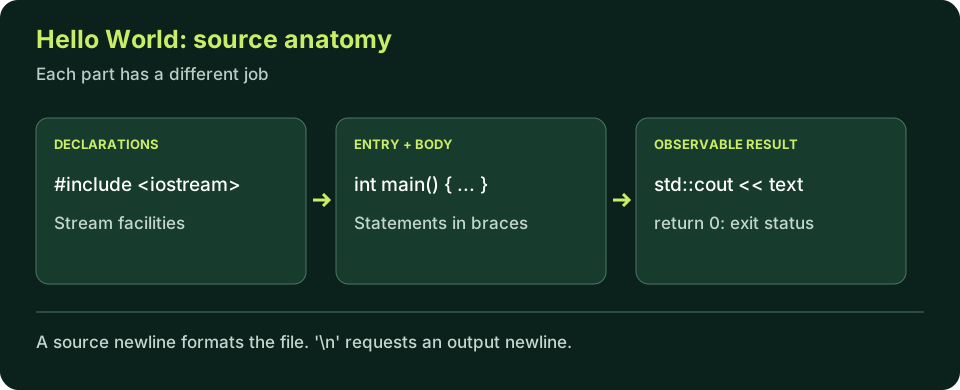
Hello World, one line at a time
Run once, then change only the greeting. Predict punctuation and the final newline before running again.
Predict the output, edit the source, then select Run code.
Compare with the starter's expected output
Hello, C++!
After editing inputs, calculate a new prediction; this reference describes only the starter.
Headers provide declarations; main starts execution
The #include <iostream> directive requests the declarations for stream facilities used below. It is processed as part of preparing the source, not executed as a line of your program at runtime. A header is not a downloaded library package, and including it does not call every operation it declares. Here it allows the compiler to understand the standard output facility you name.
In this ordinary hosted program, int main() names the entry function. The parentheses belong to the function declaration; the braces enclose its body. int describes the result communicated when the function completes. For this first program we write return 0 explicitly to show successful completion. Reaching the end of main also has a special successful-return rule, but writing the statement now makes the control flow visible.
The source is read and checked as a whole during a build, while runtime follows the program's control flow. Do not confuse the order in which the compiler sees declarations with the order in which operations happen. In this simple body the output statement precedes return, so the greeting is produced first. Later functions and branches make execution order more interesting without changing that distinction.
Statements are not the same as lines
A semicolon ends the output statement and the return statement. Braces delimit the function body. A physical newline in the source helps a reader, but it usually does not terminate a C++ statement. You can split a long output statement across several source lines and still end it with one semicolon. Conversely, putting two statements on one line does not merge them into one operation.
Use indentation to reveal structure rather than relying on it to create structure. The compiler follows punctuation and language rules. A missing semicolon may cause a message on the next line because that is where the parser discovers the previous statement cannot continue. Read the nearby preceding statement before making a random change at the highlighted location. One carefully placed repair is better than several edits that hide the cause.
Comments document intent and are ignored as program instructions. A // comment ends at the source line boundary; a /* ... */ comment spans its delimiters. Explain a reason or non-obvious assumption rather than repeating the obvious meaning of cout. Never place a missing semicolon inside a comment and expect it to count as syntax. Clear layout and focused comments make diagnostics easier to investigate.
Separate text, values and output operations
std::cout names the standard output stream. The std:: qualifier identifies the standard namespace rather than a local variable with a similar name. The << operations insert values into that stream. In this lesson we keep the qualifier visible so you can see where each library facility comes from. It is not necessary to introduce a global using directive merely to make a tiny example shorter.
Double quotes surround a string literal: the text is part of the source instruction. A std::string object can hold text as a named value, while an int object can hold a count. Outputting a variable prints its current value, not its identifier. If you want the word Sessions in a report, write that label as text; if you want the number three, insert the integer value. Keeping the label and data separate makes changes predictable.
The escape sequence \n represents a newline in a literal. It is not the same as moving to another source line. The character literal '\n' and a string literal containing a newline are both suitable for these output examples. std::endl also requests flushing the stream, which is a separate concern; this course uses newline characters where only a line break is needed. Do not infer advanced performance rules from such a tiny program.
A greeting with named values
Change learner and sessions independently. Explain which output lines change and why.
Predict the output, edit the source, then select Run code.
Compare with the starter's expected output
Learner: Alex
Sessions: 3
After editing inputs, calculate a new prediction; this reference describes only the starter.
Trace exact output before changing the source
For the first report line, follow each insertion: the label includes a colon and a space, learner supplies Alex, and the final character ends the line. For the next line, the count is formatted as visible digits. This example does not ask for input or save a profile. Its values are fixed in the source. A browser output panel is a teaching aid, not proof that a database or account system exists.
Try removing the space after the colon, then predict the result. Try removing the first newline and observe that the second label follows on the same output line. Restore the starter before the next independent experiment. Changing one cause at a time lets you connect a visible difference to a particular source change. If the output surprises you, compare the literal characters before blaming the toolchain.
Repair the missing statement boundary
This starter intentionally fails. Add the one missing semicolon; do not change the greeting or return value.
Predict the output, edit the source, then select Run code.
Recognize three different kinds of mistake
A syntax error prevents this source from being built. A logic error can produce incorrect output despite a successful build. An environment error can prevent launching a valid executable. The same symptom—'it does not work'—therefore needs different evidence. Record the command, diagnostic and observed output instead of collapsing all three categories into a guess about C++ being difficult.
The browser interpreter accepts only the documented beginner subset. Its helpful messages are not the exact diagnostics emitted by GCC, Clang or MSVC. Verify local builds when you need compiler-specific behavior. In particular, a unsupported feature message does not mean the feature is invalid C++; it may simply be outside this practice tool. You should be able to describe both the program and the tool's limitation.
- Missing semicolon → syntax repair.
- Wrong wording with a successful run → check the output contract.
- Edited source but unchanged local output → verify save, rebuild and executable path.
Independent lab
Write a three-line learning introduction with a named learner, topic and session count. Define the exact output before editing.
Acceptance checklist
- Include iostream and string for the library facilities you use.
- Initialize a std::string learner, std::string topic and int sessions.
- Print one labeled value on each line, with a final newline.
- Use no interactive input or account information; choose fictional sample values.
- Change sessions from 2 to 0 and verify that only the count line changes.
Need a hint?
- Use a separate cout statement for each line while learning the structure.
- Spaces inside labels are data; indentation outside literals is formatting.
- Copy the pattern of braces and statement terminators, not unexplained extra code.
Write and run your lab
Build your own solution before revealing the reference. Use the input field for normal, boundary and invalid cases; this runner executes your program but does not grade it.
Predict the output, edit the source, then select Run code.
Your lab evidence and notes
Record predictions, actual output, commands and the cause of each repair. Code is plain text: this scratchpad does not execute or grade C++.
Loading local notes…
Review your acceptance checklist and quiz explanations before marking this lesson complete. This is self-review, not a grade or certification.
Reveal the explained lab solution
Reference lab solution
Compare the reference with your own reasoning. Running this solution does not grade or complete the lesson.
Predict the output, edit the source, then select Run code.
Expected output
Learner: Sam
Topic: C++
Sessions: 2
The headers declare the stream and string facilities. Each named object is initialized before its value is read.
The labels supply wording; the inserted variables supply data. Newlines keep the three reports separate.
With sessions initialized to zero, the third line becomes Sessions: 0. Zero is a meaningful count here, not an error or missing value.
Review before moving on
Explain the lesson's objectives in your own words, compare your lab evidence with the acceptance checklist, and keep the first failing case alongside your repair. Completing a page is not proof that every C++ feature or input is supported.
- Explain headers and the main function in a hosted program.
- Distinguish statements, braces and semicolons.
- Use std::cout with literals and initialized values.
- Predict spaces and line breaks precisely.
- Repair syntax without changing unrelated behavior.
References and further reading
Original examples and exercises accompany these primary references. Tool-specific diagnostics and support depend on your installed version.