
C++ Introduction: What Is C++?
Before installing tools or memorizing syntax, build a model you can use: what the source describes, what a build produces, and how to check whether the running program does the right work.
Learning objectives
- Distinguish source code, a compiler, and an executable.
- Separate language features from standard-library tools.
- Trace a small program and predict its output.
- Explain why a successful build is not proof of correctness.
- Use a predict, observe, explain, and change practice loop.
C++ is a language for describing programs
A program is a precise description of work you want a computer to do. It represents information, makes decisions, and produces an observable result. A small program might summarize a shopping list. A larger one might process images, implement a simulation, or manage a desktop application's data. The size changes; the need for clear rules does not.
C++ gives you tools for expressing those rules: values and types, expressions, conditions, loops, functions, and user-defined types. It is a general-purpose language, not a game engine, an editor, or a particular company's application. You can write procedural code, organize behavior with classes, and use generic algorithms. You do not have to start with inheritance or memorize every language feature.
C++ is often used where control over data representation, resource lifetime, and execution cost matters. That control brings responsibility. Accessing data outside its lifetime or assuming an unchecked index is valid can make a program unsafe. This course introduces useful standard-library types early and studies lifetime before asking you to manage more complicated ownership.
Source code, the build, and the running program
Source code is text that follows the language's rules. You usually keep it in files such as main.cpp. An editor helps you write that text; it does not automatically make the text a working program. A compiler toolchain checks and translates source for a selected target environment. A normal native build combines translated code with the required library code to produce an executable.
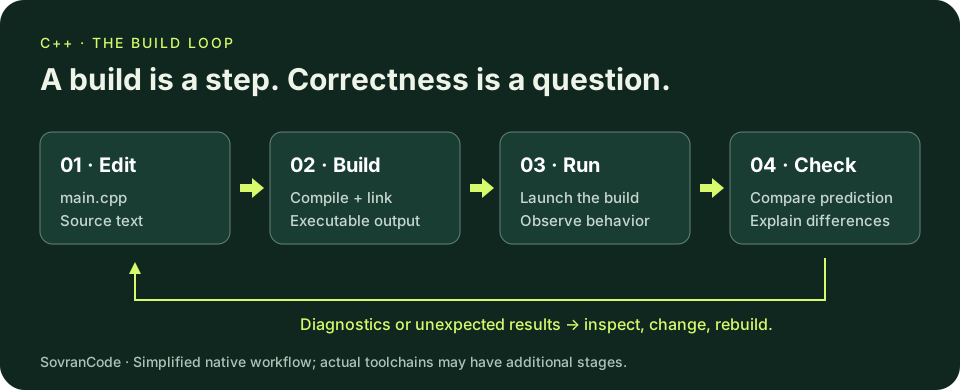
Running the executable is a separate action from building it. If you edit main.cpp but do not rebuild, the old executable has not changed. When the output stubbornly stays the same, first ask which source was built and which executable was actually launched. Repeated editing cannot fix running the wrong file.
A compiler diagnostic is information, not a verdict about your ability. The compiler can report malformed syntax or many type mistakes. A linker can report missing definitions. A running program can still fail on input, crash, or produce the wrong answer. Later lessons separate these stages in detail; today, keep 'the build succeeded' and 'the behavior is correct' as two different claims.
Three layers: language, library, and tools
- Language: int, const, function definitions, braces, and return are part of how C++ expresses a program.
- Standard library: std::string provides an owning text type and std::cout provides an output stream. Headers make the relevant declarations available to your source.
- Development tools: a compiler builds, a debugger inspects execution, an editor helps you navigate source, and a build system coordinates the work. Installing an editor is not the same as installing a compiler.
The standard library is part of the C++ ecosystem, not an optional collection of random web snippets. Prefer a clear library abstraction over recreating storage or algorithms before you understand their contracts. An owning string keeps responsibility for its text; a vector manages a sequence of elements. We will later study what ownership guarantees and which operations can invalidate access to data.
The course uses C++20 as its teaching baseline. This is an explicit language mode, not a claim that every compiler implements every feature equally. Compiler and library support both matter. Early examples deliberately use small, widely supported facilities, and a lesson that introduces a version-sensitive feature will name the requirement. Record your toolchain version when reporting a problem.
Read a complete example before changing it
You do not need to install anything to reason through this example. Read it and predict the two output lines first. If you already have a configured compiler, you can also build it locally with the commands below. Installation is the next lesson; do not interpret a missing compiler as a failure to understand this one.
Explore the program
Predict, run, change one value, and compare. Reset restores the lesson starter.
Predict the output, edit the source, then select Run code.
- The two #include directives request the declarations needed for stream output and strings.
- main is the entry function for this small hosted program. Its braced body contains the statements that run.
- item is an initialized std::string and quantity is an initialized int. const means this code cannot assign a different value to those variables after initialization.
- std:: qualifies a name from the standard namespace. It tells a reader where string and cout come from.
- The << operations send values into the output stream. The character '\n' requests a newline; it is not part of the printed wording.
- return 0 reports successful completion to the environment. It does not print a zero and does not prove the output meets the task's requirements.
Notice the limits of what we are claiming. There is no user input, database, network call, or saved inventory here. The values are written directly into the source. The program demonstrates how a typed value becomes visible output; a real inventory application needs validation and persistence that this example does not yet provide.
Trace the values to the output
Item: notebook
Quantity: 3
Trace the first output statement from left to right: a label, the current item value, then a newline. Trace the second in the same way. quantity contains the integer 3; the output operation converts its representation into visible characters. The variable's name is not printed unless you explicitly put that name in a string.
Predict two changes independently. If quantity becomes 7, only the second output line changes. If the label 'Item: ' becomes 'Product: ', the text before notebook changes but the stored item value does not. This distinction between data, instructions, and presentation will keep later programs easier to test.
Optional: build it with an existing toolchain
Save the complete example as main.cpp. In a terminal opened in that file's directory, use the commands for your installed compiler. The compiler command builds; the following command runs the result. Do not paste commands for a toolchain you have not installed.
GCC on Linux (or a configured GCC environment):
g++ -std=c++20 -Wall -Wextra -Wpedantic main.cpp -o hello
./hello

Clang on macOS or Linux with a configured C++ library:
clang++ -std=c++20 -Wall -Wextra -Wpedantic main.cpp -o hello
./hello

MSVC on Windows, in its Developer Command Prompt:
cl /std:c++20 /EHsc /W4 main.cpp /Fe:hello.exe
hello.exe
The source filename tells the tool what to build; the output option names the executable. The language-mode option makes the baseline explicit, and the warning options request useful diagnostics. Commands and executable formats depend on the environment: a macOS executable is not automatically a Windows application. On Windows PowerShell, an executable in the current directory is normally invoked as .\hello.exe; the example above uses the Developer Command Prompt.
A successful build can still produce the wrong answer
Imagine a progress report with two completed lessons out of five. You want the number remaining, which is three. The next program is syntactically valid and runs, but the calculation does not implement that rule. Before looking at the repair, predict the actual output and identify the wrong assumption.
Repair the progress report
Predict, run, change one value, and compare. Reset restores the lesson starter.
Predict the output, edit the source, then select Run code.
The actual result is 'Lessons left: -3'. Both operands are integers and subtraction is allowed, so a compiler is not required to reject the program. The mistake is in the meaning: remaining should be total minus completed. A sensible-looking label and a zero exit code cannot turn the wrong calculation into a correct report.
Use a repeatable learning loop
- Predict: write the expected output or state change before running the example.
- Observe: build the intended source, run the intended executable, and keep the actual output or diagnostic.
- Explain: connect each difference to a specific value, operation, or assumption. Avoid 'the compiler is confused' as a diagnosis.
- Change: make one deliberate edit, predict its effect, rebuild, and compare again.
- Review: keep a normal case and a boundary case so the next change cannot silently break the behavior you already understood.
This approach works even when a topic is unfamiliar. Instead of pasting a larger example until something runs, shrink the question. Can this value be represented? Which statement changes it? Does this object still exist when it is used? Small questions create evidence you can check. Large unexamined changes create more places for a misunderstanding to hide.
Independent lab: describe a study-session planner
Plan a tiny command-line report before writing it. It should display a study goal and how many sessions remain. For this first lesson, the goal and counts are fixed in the source; interactive input and files are not required. Write down the data, the rule, the exact desired output, and what would make the data invalid.
- Inputs: the goal text, planned session count, and completed session count.
- Rule: sessions left equals planned minus completed, provided the counts are non-negative and completed does not exceed planned.
- Normal case: planned 4, completed 1 produces 'Sessions left: 3'.
- Boundary case: planned 4, completed 4 produces 'Sessions left: 0'.
- Invalid case: planned 4, completed 5 must not be described as a sensible remaining workload. For now, identify it in your written contract; later lessons implement rejection.
- Deliverable: a written contract and two predicted reports. If you already have a compiler, also create the program, run both valid cases, and compare actual output with your predictions.
Use the optional scratchpad below for your contract or code. It stores only on this device when browser storage is available; it does not compile, grade, upload, or synchronize your work. The quiz is separate and checks understanding, not whether a program is safe.
Your study-planner scratchpad
Write your inputs, rule, expected reports, and invalid case here. Code is plain text: this scratchpad does not execute or grade C++.
Loading local notes…
After explaining the build loop, tracing the example, and reviewing your lab, you may mark this lesson complete. This is self-review, not a grade or certification.
Reveal the explained repair and lab solution
Repair: subtract in the direction the rule requires
Two lessons are complete out of five, so remaining is five minus two. The repaired program produces Lessons left: 3. This correction assumes the counts represent a valid state; later validation must reject completed greater than total.
Repaired progress report
Run the repair, then change the counts and predict the new result.
Predict the output, edit the source, then select Run code.
Lab: keep the contract separate from the output
The goal is text, the counts are initialized integers, and the report uses planned minus completed. This example intentionally contains no interactive validation. Its fixed inputs satisfy the stated contract.
Study-session planner
Try the normal and boundary cases. What happens if completed exceeds planned?
Predict the output, edit the source, then select Run code.
Goal: Understand the build loop
Sessions left: 3
Change only completed to 4 and rebuild: the second line should end in 0. Changing it to 5 reveals an unhandled invalid state, not a supported negative workload. Write that missing validation as a requirement rather than claiming this example implements it.
Recap and readiness for setup
You now have a model to attach future syntax to. Source expresses the rules; a toolchain builds an executable for an environment; running it produces behavior you must check. Language facilities and standard-library abstractions work together, while editors and build systems are supporting tools. A successful compile is one check, not the end of verification.
You are ready for the setup lesson when you can explain the build loop without naming an IDE button, trace both lines of the inventory example, and explain why the reversed subtraction is a logic error. You do not need to memorize compiler switches or class syntax. Keep your study-planner contract: later lessons will add validated input, functions, storage, and tests to the same kind of problem.
References and further reading
The source examples and exercises are original teaching material. Consult the official references for compiler-specific behavior and deeper design guidance.