SovranCode
Modern C++ Lesson 50
Course contents50 available · 0 planned

Get a program running

01 · C++ Introduction: What Is C++?02 · How to Install a C++ Compiler and Set Up Your Editor03 · C++ Hello World: Your First Program Explained04 · How to Compile and Run C++ Programs05 · C++ Debugging: Warnings and Breakpoints

Work with values and input

06 · C++ Variables: Initialization and Scope07 · C++ Data Types: int, double and Type Conversion08 · C++ const, constexpr and auto Explained09 · C++ Operators: Arithmetic, Comparison and Logic10 · C++ User Input: cin, getline and Validation

Control flow and functions

11 · C++ Conditions: if, else if and else12 · C++ Switch Statement: Cases, break and default13 · C++ For Loop: Syntax and Examples14 · C++ While and Do-While Loops: Examples15 · C++ Functions: Parameters and Return Values

Strings and sequences

16 · C++ Strings: std::string with Examples17 · C++ Vector: std::vector with Examples18 · C++ Arrays: std::array and Bounds Checking19 · C++ Range-Based For Loop and Iterators20 · C++ Vector Practice: Build a Data Summary

Model data with classes

21 · C++ Structs and enum class Explained22 · C++ Classes and Objects: Encapsulation23 · C++ Constructors and Member Initialization24 · C++ Const Member Functions and Composition25 · C++ Copying Objects and the Rule of Zero

Lifetime and resource ownership

26 · C++ Object Lifetime, Destructors and RAII27 · C++ Pointers and References: nullptr and Borrowing28 · C++ unique_ptr: Smart Pointers and Ownership29 · C++ Move Semantics: std::move vs Copying30 · C++ string_view and span: Avoid Dangling Views

Containers and algorithms

31 · C++ map vs unordered_map: Lookup and Examples32 · C++ set, queue and stack: When to Use Each33 · C++ Lambda Expressions and STL Algorithms34 · C++ sort and binary_search: Rules and Complexity35 · C++20 Ranges: Views, filter and transform

Errors, files, and interfaces

36 · C++ optional and variant Explained37 · C++ Exceptions: try, catch and Safe Cleanup38 · C++ File Handling: Read and Write Text Files39 · C++ Input Parsing and Data Validation40 · C++ Polymorphism: Virtual Functions and Interfaces

Generic programming and quality

41 · C++ Templates: Function and Class Examples42 · C++20 Concepts and Template Constraints43 · C++ Unit Testing: Normal and Boundary Cases44 · C++ Sanitizers: Find Memory and Undefined Behavior Bugs45 · C++ Performance: Benchmark Before Optimizing

Build and deliver a complete application

46 · C++ Header Files and Translation Units47 · C++ CMake Tutorial: Build an Executable48 · C++ Dependencies and CTest: Automated Tests49 · C++ Multithreading: Threads and Data Races50 · C++ Command-Line Applications: Help and Release Checks
Modern C++50 available · 0 planned

Get a program running

01 · C++ Introduction: What Is C++?02 · How to Install a C++ Compiler and Set Up Your Editor03 · C++ Hello World: Your First Program Explained04 · How to Compile and Run C++ Programs05 · C++ Debugging: Warnings and Breakpoints

Work with values and input

06 · C++ Variables: Initialization and Scope07 · C++ Data Types: int, double and Type Conversion08 · C++ const, constexpr and auto Explained09 · C++ Operators: Arithmetic, Comparison and Logic10 · C++ User Input: cin, getline and Validation

Control flow and functions

11 · C++ Conditions: if, else if and else12 · C++ Switch Statement: Cases, break and default13 · C++ For Loop: Syntax and Examples14 · C++ While and Do-While Loops: Examples15 · C++ Functions: Parameters and Return Values

Strings and sequences

16 · C++ Strings: std::string with Examples17 · C++ Vector: std::vector with Examples18 · C++ Arrays: std::array and Bounds Checking19 · C++ Range-Based For Loop and Iterators20 · C++ Vector Practice: Build a Data Summary

Model data with classes

21 · C++ Structs and enum class Explained22 · C++ Classes and Objects: Encapsulation23 · C++ Constructors and Member Initialization24 · C++ Const Member Functions and Composition25 · C++ Copying Objects and the Rule of Zero

Lifetime and resource ownership

26 · C++ Object Lifetime, Destructors and RAII27 · C++ Pointers and References: nullptr and Borrowing28 · C++ unique_ptr: Smart Pointers and Ownership29 · C++ Move Semantics: std::move vs Copying30 · C++ string_view and span: Avoid Dangling Views

Containers and algorithms

31 · C++ map vs unordered_map: Lookup and Examples32 · C++ set, queue and stack: When to Use Each33 · C++ Lambda Expressions and STL Algorithms34 · C++ sort and binary_search: Rules and Complexity35 · C++20 Ranges: Views, filter and transform

Errors, files, and interfaces

36 · C++ optional and variant Explained37 · C++ Exceptions: try, catch and Safe Cleanup38 · C++ File Handling: Read and Write Text Files39 · C++ Input Parsing and Data Validation40 · C++ Polymorphism: Virtual Functions and Interfaces

Generic programming and quality

41 · C++ Templates: Function and Class Examples42 · C++20 Concepts and Template Constraints43 · C++ Unit Testing: Normal and Boundary Cases44 · C++ Sanitizers: Find Memory and Undefined Behavior Bugs45 · C++ Performance: Benchmark Before Optimizing

Build and deliver a complete application

46 · C++ Header Files and Translation Units47 · C++ CMake Tutorial: Build an Executable48 · C++ Dependencies and CTest: Automated Tests49 · C++ Multithreading: Threads and Data Races50 · C++ Command-Line Applications: Help and Release Checks
PREVIOUS LESSONC++ Multithreading: Threads and Data Races
C++ foundations · Lesson 50 About 56 min with practice

C++ Command-Line Applications: Help and Release Checks

Build a clear C++ command-line interface with argc and argv, help text, strict parsing, exit codes, stdout and stderr, then verify a clean release without risking user files.

Before you begin

Understand input validation, functions, tests and CMake. The argument-based executable runs locally; the editor lab uses one input line because the page runner supplies stdin rather than command-line arguments.

What you will learn

  • Read command arguments only after checking their count.
  • Define help, version, output and failure contracts.
  • Reject partial numeric tokens with from_chars.
  • Keep output channels and exit statuses meaningful.
  • Review a fresh build, tests, documentation and data-safety limits.

A command-line tool is an interface for another person

A command-line application is not finished merely because its calculation works. A user must know how to start it, what input it accepts, what output means and how failures are reported. Scripts need these answers too. A clear interface is a small contract: command names, argument order, supported options, output channels and exit statuses. Writing that contract before release prevents your README and executable from teaching different ways to use the same tool.

Our report tool supports total followed by two integers, plus --help and --version. Each integer must be between minus one hundred and one hundred. Success writes the numeric sum to standard output and returns zero. Invalid syntax, an unknown command or an out-of-range operand writes a clear error to standard error and returns two. The number two is our documented usage-error convention, not a universal C++ rule for every failure.

This tool deliberately reads no user files and writes no persistent data. That small scope makes its release checks safe to repeat. A later inventory tool needs a separate policy for paths, overwrite protection, backups and recovery from failed writes. Do not claim those protections exist here just because the course previously introduced file streams. Release documentation should distinguish actual behavior from features you plan to add after students understand the simpler interface.
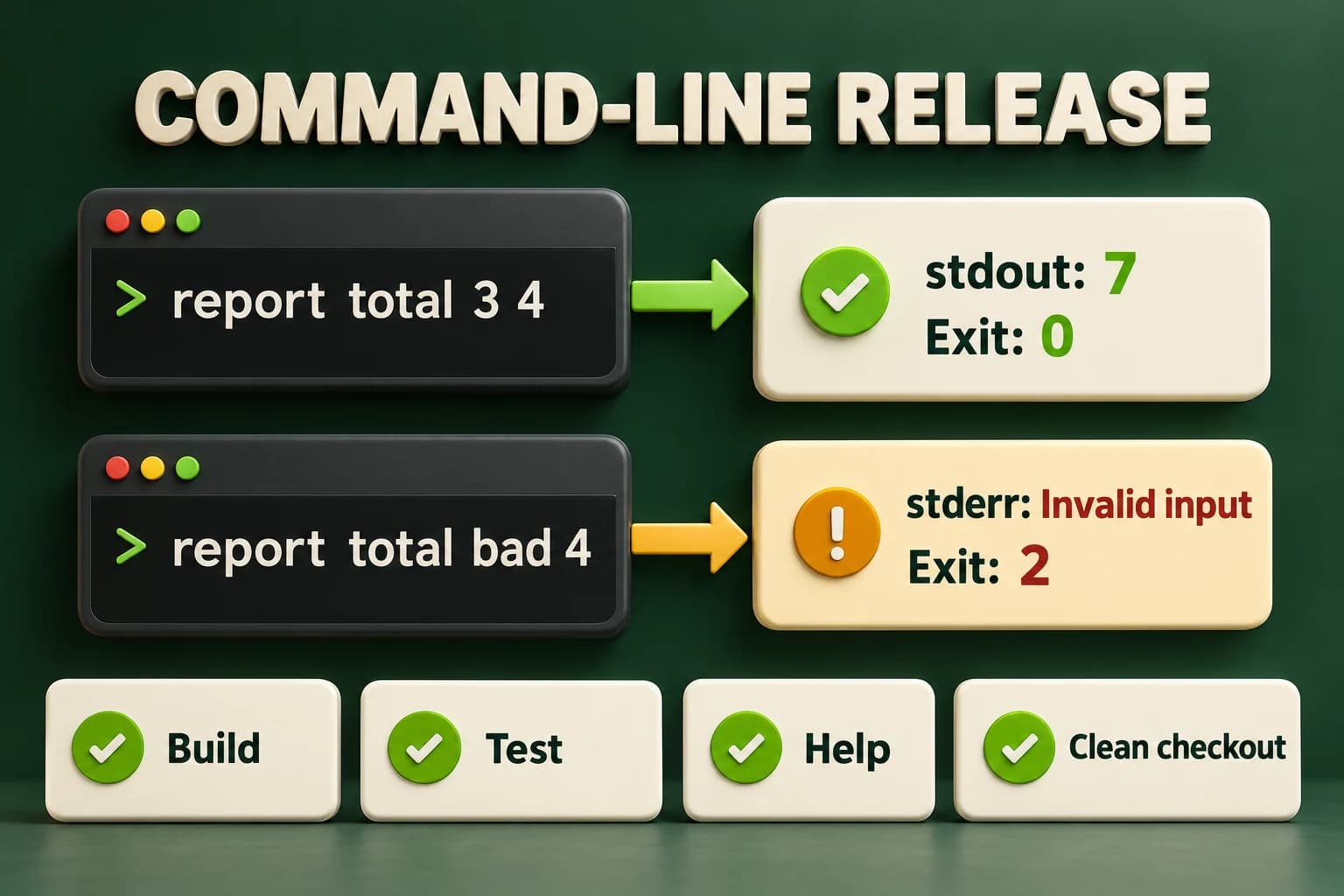
The valid report total 3 4 invocation writes seven to stdout and exits zero. The malformed report total bad 4 invocation writes Invalid input to stderr and exits two. Build, test, help and clean-checkout checks form the release review.
Output text and process status are both part of the contract. A rejected command must not produce a success result, and testing help alone does not verify arithmetic, validation or a clean build.

argc tells you which argv entries exist

The two-parameter main receives an argument count and an array of argument strings. argv[0] represents the invocation name in the usual hosted environment; user arguments begin at argv[1]. Before reading argv[3], check that the count is four. The example performs shape checks before parsing values. This avoids indexing past the available arguments when someone omits a number, asks for help or enters an unrelated command.

The shell splits the command line into arguments before your program sees it. Quotes can keep spaces inside one argument, and exact quoting rules differ across shells. Our numeric tokens do not need spaces. We compare command names with string_view because the argument strings remain valid during main. The program does not store those non-owning views after the underlying data disappears. That lifetime reasoning still matters in a small command handler.

With no user arguments, the example prints help and succeeds. With exactly --help it does the same. --version prints a small fixed version string. Other shapes are rejected instead of guessing what the user meant. Keep option behavior explicit: --help with extra operands is not secretly a valid total command. A predictable small grammar is easier for beginners to document, test and use safely from a script.

C++ PRACTICE RUNNER

The real argc and argv program

Save as main.cpp and build locally to test arguments. In the page editor, no arguments are supplied, so Run displays the documented help path rather than pretending stdin is argv.

#include <charconv>
#include <iostream>
#include <optional>
#include <string_view>
std::optional<int> parseCount(std::string_view text) {
    int value{};
    const auto result = std::from_chars(text.data(), text.data() + text.size(), value);
    if (result.ec != std::errc{} || result.ptr != text.data() + text.size()
        || value < -100 || value > 100) return std::nullopt;
    return value;
}
void help() {
    std::cout << "Usage: report total <a> <b>\n"
              << "Each integer must be in -100..100.\n"
              << "Options: --help, --version\n";
}
int main(int argc, char* argv[]) {
    if (argc == 1 || (argc == 2 && std::string_view{argv[1]} == "--help")) {
        help(); return 0;
    }
    if (argc == 2 && std::string_view{argv[1]} == "--version") {
        std::cout << "report 1.0.0\n"; return 0;
    }
    if (argc != 4 || std::string_view{argv[1]} != "total") {
        std::cerr << "Usage error: try report --help\n"; return 2;
    }
    const auto first = parseCount(argv[2]);
    const auto second = parseCount(argv[3]);
    if (!first || !second) {
        std::cerr << "Invalid input\n"; return 2;
    }
    std::cout << *first + *second << '\n';
}

TERMINAL OUTPUT
Predict the output, edit the source, then select Run code.

C++20 compiler runner: source and input are sent only when you press Run to this website's execution endpoint, not an external vendor. Local preview requires Docker and gcc:14; production requires a separately isolated execution service. Network is disabled; execution is limited to 3 seconds, compilation to 10 seconds, memory to 384 MB and output to 32 KB. Single-file programs only. Don't enter secrets. Edits reset on refresh; Copy your work to keep it.

Compare with the starter's expected output
Usage: report total <a> <b>
Each integer must be in -100..100.
Options: --help, --version

After editing inputs, calculate a new prediction; this reference describes only the starter.

Validate shape, parse tokens, then calculate

from_chars parses an integer from a character range without depending on a stream's locale. Check both its error code and where it stopped. A successful prefix such as 12 in 12cats is not a complete valid token. This parser also applies the domain range after parsing, so values too large for int and values outside our smaller allowed interval are both rejected. Nothing is added until both operands have passed every required check.

The chosen token grammar accepts a minus sign for negative numbers but does not accept a leading plus sign or surrounding whitespace inside one token. That is the behavior of this integer from_chars use, not an accidental promise to accept every human number spelling. The shell normally separates outside whitespace before invocation. Document the grammar you implement and test cases such as an empty quoted token, partial text and an extremely long digit string.

  • Handle the exact help and version forms first.
  • Require total and exactly two operand arguments before indexing them.
  • Parse each complete token, then check -100..100.
  • Write a result only after both operands pass; otherwise report the documented failure.
LOCAL TERMINAL COMMANDS

Build and exercise the command contract

Use a supporting compiler. These commands use macOS/Linux paths; Windows users can build with cl /std:c++20 /EHsc /W4 main.cpp /Fe:report.exe and invoke report.exe instead. After a failure inspect $? in a POSIX shell, $LASTEXITCODE in PowerShell, or echo %ERRORLEVEL% in Command Prompt.

clang++ -std=c++20 -Wall -Wextra -Wpedantic main.cpp -o report
./report --help
./report --version
./report total 3 4
# stdout: 7; exit 0
./report total -100 100
# stdout: 0; exit 0
./report total bad 4
# stderr: Invalid input; exit 2
./report total 3
# stderr: Usage error: try report --help; exit 2

Do not hide failures inside a friendly message

Standard output is the program's normal result channel. Standard error is its diagnostic channel. Keeping them separate lets another process consume the numeric result without accidentally treating an error sentence as data. A nonzero exit status tells the caller the requested operation did not succeed. Printing a red message while returning zero would mislead a script. Returning failure after printing a plausible sum would also create an unclear contract.

Help and version are intentional successful requests, so their output goes to standard output and status is zero. A missing operand is a usage error, so this tool writes a short diagnostic and returns two. Future runtime failures, such as an unreadable requested file, may deserve another documented nonzero status. Do not invent a complex list of codes before you have distinct useful behavior to communicate. Choose a simple policy and keep tests and documentation aligned.

The in-page runner supplies standard input and combines execution feedback in its own interface. It does not supply arbitrary command-line arguments. The lab therefore uses one command line read through getline and prints its teaching feedback on standard output. That adaptation is explicitly different from the local argv program. It lets you practise dispatch and parsing without falsely claiming that the editor validates operating-system argument splitting or separate redirected output streams.

C++ PRACTICE RUNNER

Practise dispatch through one input line

The editor adaptation accepts total <a> <b>, --help or --version. It rejects extra tokens instead of silently ignoring them.

#include <charconv>
#include <iostream>
#include <optional>
#include <sstream>
#include <string>
#include <string_view>
std::optional<int> parseCount(std::string_view text) {
    int value{};
    const auto result = std::from_chars(text.data(), text.data() + text.size(), value);
    if (result.ec != std::errc{} || result.ptr != text.data() + text.size()
        || value < -100 || value > 100) return std::nullopt;
    return value;
}
int main() {
    std::string line;
    if (!std::getline(std::cin, line)) { std::cout << "Usage error\n"; return 2; }
    if (line == "--help") { std::cout << "Usage: total <a> <b>\n"; return 0; }
    if (line == "--version") { std::cout << "report 1.0.0\n"; return 0; }
    std::istringstream parser{line};
    std::string command, a, b, extra;
    if (!(parser >> command >> a >> b) || parser >> extra || command != "total") {
        std::cout << "Usage error\n"; return 2;
    }
    const auto first = parseCount(a), second = parseCount(b);
    if (!first || !second) { std::cout << "Invalid input\n"; return 2; }
    std::cout << "Total: " << *first + *second << '\n';
}

TERMINAL OUTPUT
Predict the output, edit the source, then select Run code.

C++20 compiler runner: source and input are sent only when you press Run to this website's execution endpoint, not an external vendor. Local preview requires Docker and gcc:14; production requires a separately isolated execution service. Network is disabled; execution is limited to 3 seconds, compilation to 10 seconds, memory to 384 MB and output to 32 KB. Single-file programs only. Don't enter secrets. Edits reset on refresh; Copy your work to keep it.

Compare with the starter's expected output
Total: 7

After editing inputs, calculate a new prediction; this reference describes only the starter.

C++ PRACTICE RUNNER

Check the explicit help path

This is the stdin teaching interface. Its shorter usage string omits the executable name because the input line starts at the command.

#include <charconv>
#include <iostream>
#include <optional>
#include <sstream>
#include <string>
#include <string_view>
std::optional<int> parseCount(std::string_view text) {
    int value{};
    const auto result = std::from_chars(text.data(), text.data() + text.size(), value);
    if (result.ec != std::errc{} || result.ptr != text.data() + text.size()
        || value < -100 || value > 100) return std::nullopt;
    return value;
}
int main() {
    std::string line;
    if (!std::getline(std::cin, line)) { std::cout << "Usage error\n"; return 2; }
    if (line == "--help") { std::cout << "Usage: total <a> <b>\n"; return 0; }
    if (line == "--version") { std::cout << "report 1.0.0\n"; return 0; }
    std::istringstream parser{line};
    std::string command, a, b, extra;
    if (!(parser >> command >> a >> b) || parser >> extra || command != "total") {
        std::cout << "Usage error\n"; return 2;
    }
    const auto first = parseCount(a), second = parseCount(b);
    if (!first || !second) { std::cout << "Invalid input\n"; return 2; }
    std::cout << "Total: " << *first + *second << '\n';
}

TERMINAL OUTPUT
Predict the output, edit the source, then select Run code.

C++20 compiler runner: source and input are sent only when you press Run to this website's execution endpoint, not an external vendor. Local preview requires Docker and gcc:14; production requires a separately isolated execution service. Network is disabled; execution is limited to 3 seconds, compilation to 10 seconds, memory to 384 MB and output to 32 KB. Single-file programs only. Don't enter secrets. Edits reset on refresh; Copy your work to keep it.

Compare with the starter's expected output
Usage: total <a> <b>

After editing inputs, calculate a new prediction; this reference describes only the starter.

Review the release from a clean checkout

A release candidate should build using only tracked source, declared dependencies and documented tools. Create a fresh checkout or an independent copy of the tracked project in a safe location, configure into a new build directory, build and run the tests. Do not rely on a generated executable already present in your working folder. The goal is to discover missing files and hidden environment assumptions before another person downloads the project.

Check the actual packaged file list. Include the source, build instructions, license information and a README showing supported platforms, prerequisites and exact commands. Exclude secrets, private test data, local caches and machine-specific paths. If distributing binaries, state the operating system and architecture they were built for. A macOS executable is not automatically a Windows executable, and a successful source build on one machine is not evidence of every promised target platform.

Review failure cases deliberately: unknown command, missing operand, extra operand, empty token, trailing junk, an out-of-range value and a numeric overflow. Verify both output streams and the status for the real argv executable. Check that normal zero is accepted and endpoints are correct. A README transcript copied from imagination is not evidence; keep a short record from the build and test run you actually performed, including any checks that were unavailable.

Keep promises about data and deployment narrow

If you later add file output, do not make overwrite the default merely because an output path exists. Decide how users confirm replacement, what happens if writing stops halfway and whether temporary files or backups are needed. Validate data before changing persistent state. Avoid destructive commands in introductory release instructions. The current arithmetic tool has no persistence, so its honest safety claim is simply that it does not intentionally open or modify user data files.

Publishing source, creating a release archive, installing a local binary and deploying a server are different actions. Finishing this lesson does not automatically perform any of them. A useful review states what is ready and what remains manual. The course's milestone project briefs, assessment and inventory capstone also remain separate activities; completing fifty instructional lessons does not award a score, certificate or a fully implemented capstone application.

For the final lab, test the stdin command handler in the page and the separate argv executable locally. Write a short release note naming the supported command grammar, exit codes, tool versions and limitations. Include at least one success and one failure transcript from real execution. Clear, modest documentation is more valuable than claiming every edge case is solved. You now have a repeatable way to explain, build, test and review the next program you create.

APPLY THE CONCEPT

Independent lab

Build the one-line teaching command handler, then verify the real argv program's output channels and release checklist locally.

Acceptance checklist

  • Read one line supporting exactly --help, --version, or total with two integer tokens.
  • Reject missing or extra tokens and unknown commands as Usage error with status 2.
  • Reject incomplete integer tokens, overflow and operands outside -100..100 as Invalid input with status 2.
  • Print Total for valid addition and preserve zero; help and version succeed without requiring operands.
  • Test the separate argv program locally, documenting stdout, stderr, exit codes, fresh build instructions and no-persistence limitations.
Need a hint?
  1. Try extracting an extra token after the two operands to reject accidental trailing fields.
  2. from_chars must both succeed and consume the entire token.
  3. The page lab uses stdin; only the separate local executable tests argv and separate output streams.
C++ PRACTICE RUNNER

Write and run your lab

Build your own solution before revealing the reference. Use the input field for normal, boundary and invalid cases; this runner executes your program but does not grade it.

#include <iostream>
#include <string>
#include <sstream>
#include <limits>

int main() {
    // Implement the acceptance checklist above.
    return 0;
}

TERMINAL OUTPUT
Predict the output, edit the source, then select Run code.

C++20 compiler runner: source and input are sent only when you press Run to this website's execution endpoint, not an external vendor. Local preview requires Docker and gcc:14; production requires a separately isolated execution service. Network is disabled; execution is limited to 3 seconds, compilation to 10 seconds, memory to 384 MB and output to 32 KB. Single-file programs only. Don't enter secrets. Edits reset on refresh; Copy your work to keep it.

Your lab evidence and notes

Record predictions, actual output, commands and the cause of each repair. Code is plain text: this scratchpad does not execute or grade C++.

Loading local notes…

Review your acceptance checklist and quiz explanations before marking this lesson complete. This is self-review, not a grade or certification.

Reveal the explained lab solution
C++ PRACTICE RUNNER

Reference lab solution

Compare the reference with your own reasoning. Running this solution does not grade or complete the lesson.

#include <charconv>
#include <iostream>
#include <optional>
#include <sstream>
#include <string>
#include <string_view>
std::optional<int> parseCount(std::string_view text) {
    int value{};
    const auto result = std::from_chars(text.data(), text.data() + text.size(), value);
    if (result.ec != std::errc{} || result.ptr != text.data() + text.size()
        || value < -100 || value > 100) return std::nullopt;
    return value;
}
int main() {
    std::string line;
    if (!std::getline(std::cin, line)) { std::cout << "Usage error\n"; return 2; }
    if (line == "--help") { std::cout << "Usage: total <a> <b>\n"; return 0; }
    if (line == "--version") { std::cout << "report 1.0.0\n"; return 0; }
    std::istringstream parser{line};
    std::string command, a, b, extra;
    if (!(parser >> command >> a >> b) || parser >> extra || command != "total") {
        std::cout << "Usage error\n"; return 2;
    }
    const auto first = parseCount(a), second = parseCount(b);
    if (!first || !second) { std::cout << "Invalid input\n"; return 2; }
    std::cout << "Total: " << *first + *second << '\n';
}

TERMINAL OUTPUT
Predict the output, edit the source, then select Run code.

C++20 compiler runner: source and input are sent only when you press Run to this website's execution endpoint, not an external vendor. Local preview requires Docker and gcc:14; production requires a separately isolated execution service. Network is disabled; execution is limited to 3 seconds, compilation to 10 seconds, memory to 384 MB and output to 32 KB. Single-file programs only. Don't enter secrets. Edits reset on refresh; Copy your work to keep it.

Expected output

Total: 7

The handler checks the command shape before calculating. Unknown and incomplete commands never become a numeric success result.

The complete-token parser and bounded operand range reject numeric prefixes and overflow while allowing an ordinary present zero.

The local program separates stdout from stderr; the editor version documents its stdin adaptation. Release evidence must state which interface was actually verified.

Review before moving on

Explain the lesson's objectives in your own words, compare your lab evidence with the acceptance checklist, and keep the first failing case alongside your repair. Completing a page is not proof that every C++ feature or input is supported.

  • Read command arguments only after checking their count.
  • Define help, version, output and failure contracts.
  • Reject partial numeric tokens with from_chars.
  • Keep output channels and exit statuses meaningful.
  • Review a fresh build, tests, documentation and data-safety limits.

References and further reading

Original examples and exercises accompany these primary references. Tool-specific diagnostics and support depend on your installed version.

  • C++ draft: main function
  • C++ draft: from_chars
  • CMake: build tool mode
KNOWLEDGE CHECK

Check your understanding

Answer all five questions, then review the explanations. Answers are not saved or synced; completion is a separate self-review choice.

01When is it safe to read argv[3] in this command handler?
02Why check the pointer returned by from_chars?
03Where does the real argv program send Invalid input?
04Does passing the stdin lab prove shell argument handling?
05What should a release claim when only macOS was tested?
PREVIOUS LESSONC++ Multithreading: Threads and Data Races
ON THIS PAGELearning objectivesA command-line tool is an interface for another personargc tells you which argv entries existValidate shape, parse tokens, then calculateDo not hide failures inside a friendly messageReview the release from a clean checkoutKeep promises about data and deployment narrowIndependent labReviewKnowledge checkReferences
Course overview