
C++ Functions: Parameters and Return Values
Define C++ functions with parameters and return values, compare value and reference arguments, understand declarations, overloads and default arguments, and extract a tested price calculation.
What you will learn
- Describe a function's inputs, output and preconditions.
- Separate declaration, definition and call.
- Compare value copies with references to caller objects.
- Introduce overloads and default arguments without ambiguity.
- Keep calculation separate from input and output.
A function is a named operation with a contract
A function groups work behind a name, parameters and a return type. A useful name describes the operation rather than the place where code happened to be copied from. For a price calculation, the contract includes the unit in cents, the permitted quantity, a nonnegative discount and the result's meaning. Writing that contract first lets a caller know what facts must hold before the operation and what value it can rely on afterward.
Parameters are the local names in the function declaration or definition. Arguments are the expressions supplied at a call. In totalPrice(850, 3), the arguments are those two values; unitCents and quantity inside the function are parameters. They need not share the caller's variable names. The call connects values to the operation through the declared types and order, not through matching identifiers across different scopes.
A pure calculation returns a result without reading the terminal, printing a receipt or modifying hidden global state. That separation makes it easy to test the same function with several cases. It is not a claim that every useful function must be pure: an input operation or a deliberate update has effects. Make those effects part of the contract instead of hiding them inside a function named as though it only computes a value.
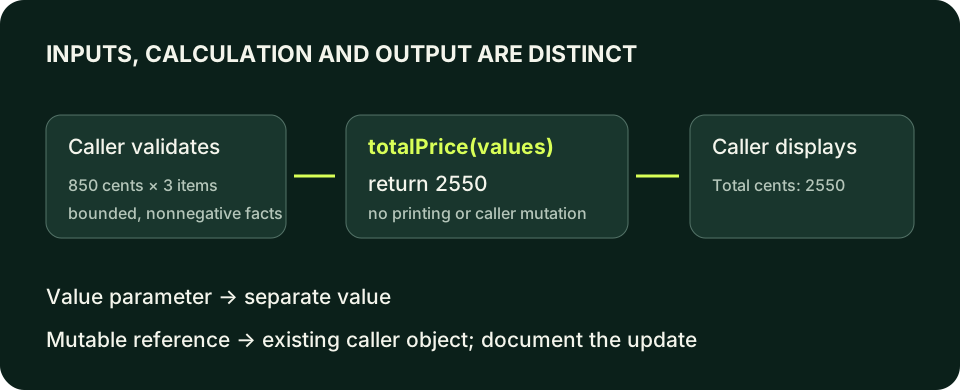
Return a result instead of printing inside the calculation
The small bounded arguments satisfy the calculation's preconditions. long long keeps the integer-cent product in a deliberately wider type.
Predict the output, edit the source, then select Run code.
Compare with the starter's expected output
Total cents: 2550
After editing inputs, calculate a new prediction; this reference describes only the starter.
The compiler needs a declaration before a call
A definition supplies the function body. A declaration tells the compiler the callable name, return type and parameter types without supplying that body. Defining the function before main is enough for these small programs. Alternatively, put a declaration above main and the matching definition later. The declaration ends with a semicolon; the definition has a body. A call supplies argument expressions rather than redeclaring the parameter types.
A declaration alone does not provide executable behavior. If the function is called but no required definition is linked, you can get a linker error, as the compile-and-link lesson showed. If no declaration is visible at the call, translation can fail earlier. Classify the first failure accurately instead of responding to every function error by moving random lines. A mismatched return or parameter type may describe a different interface, not the promised definition.
Parameter names can differ between a declaration and its definition, but their types and the rest of the callable interface must agree. Useful names in both locations help readers understand units and roles. Do not rely on implicit conversion to paper over a caller passing arguments in the wrong order when both happen to be numeric. Later domain types can make such mistakes harder; here descriptive names and tests protect the small interface.
Return a value whose lifetime belongs to the caller
return supplies the result and exits the current function. In an ordinary non-void calculation, every reachable path must provide the required result. Do not assume a missing return produces a helpful zero. A void function performs its documented effect without returning a result value, and can use return; to leave early. Keep that distinction separate from main's special end-of-function rule taught in Hello World.
A function's local objects stop being available as local state when their scopes end. Returning an ordinary computed integer value gives the caller its result without borrowing a dying local object. Do not return a reference to a local variable to avoid an imagined copy. That creates dangling access rather than a faster ownership design. These examples return small values or ordinary owning strings, leaving more advanced lifetime rules to the ownership units.
The function does not automatically validate its preconditions because a comment says them. Either validate inside the operation using a documented failure strategy or validate at its controlled caller before the call. This lab chooses caller validation and a bounded arithmetic contract. A future general-purpose API might need an explicit result type or another error mechanism. Do not publish an unchecked arithmetic function as safe for all arbitrary integers.
Value parameters copy; reference parameters access existing objects
An int parameter passed by value is a separate local value. Assigning to it does not update the caller's int. An int& parameter refers to the caller's object; an assignment through it changes that object. The ampersand is a meaningful interface choice, not decoration needed to make a function work. State whether mutation is intended, and use a name that signals an update rather than making a computation unexpectedly alter its inputs.
A const reference can allow a function to inspect an existing object without modifying it through that reference. For a larger std::string, const std::string& can avoid a value copy when the function only needs to read the text during the call. It does not extend arbitrary lifetimes or make every reachable object immutable. Small numeric inputs are normally clear as values; use references because the contract needs borrowing or mutation, not by habit.
The caller must supply an appropriate object for a mutable reference. A literal or a const int cannot serve as an ordinary int& target. Read the diagnostic as an interface mismatch, not as permission to remove const everywhere. If an operation should merely compute a new count, returning the count may communicate the relationship more clearly than mutating a reference. If mutation is the purpose, document it and test that the caller actually changes.
Observe a copy and a caller update
Both operations receive the same caller value initially. Only the reference-taking operation changes the original count.
Predict the output, edit the source, then select Run code.
Compare with the starter's expected output
Original: 3
Returned: 4
Updated: 4
After editing inputs, calculate a new prediction; this reference describes only the starter.
Repair an incompatible mutable reference call
Intentional compile failure. The count is stable, so prefer a value-returning operation if the caller should remain unchanged. Removing const is justified only if mutation is genuinely required.
Predict the output, edit the source, then select Run code.
Convenience features still require one clear interface
Overloaded functions share a name but have different parameter lists. The compiler selects a viable operation from argument types and conversion rules; changing only the return type cannot distinguish two overloads with identical parameter types. Use overloads for closely related operations, not unrelated behaviors whose shared name hides a policy difference. An int and double overload can illustrate selection, but mixed numeric arguments can create surprising or ambiguous choices.
A default argument supplies an omitted trailing argument at a call where that default is visible. It does not initialize every local variable or create a runtime fallback after invalid input. The lab gives discountCents a default of zero, meaning no discount when the caller deliberately omits it. Keep the default in one visible declaration rather than repeating it inconsistently. If changing that default changes a public policy, tests and callers deserve a review.
Before extracting a function, identify what remains at the caller: validation, input reads and output formatting should not disappear unnoticed into a helper. Test a normal quantity, zero quantity, a discounted calculation and the accepted upper bounds. Check invalid inputs before calling under this lab's contract. A name and a successful call are not sufficient evidence; the result must match the intended formula without changing inputs or producing an unexpected side effect.
See argument types select an overload
Return strings make the selected operation observable without relying on compiler-specific type names.
Predict the output, edit the source, then select Run code.
Compare with the starter's expected output
Whole
Fractional type
After editing inputs, calculate a new prediction; this reference describes only the starter.
Compile the examples and your lab
The editors can compile complete single-file programs when the execution service is available. Provide input in the Standard input field before pressing Run. Alternatively save one program as main.cpp and use your installed C++20 compiler with these terminal commands.
macOS / Clang:
clang++ -std=c++20 -Wall -Wextra -Wpedantic main.cpp -o lesson
./lesson

Linux / GCC:
g++ -std=c++20 -Wall -Wextra -Wpedantic main.cpp -o lesson
./lesson

Windows Developer Command Prompt / MSVC:
cl /std:c++20 /EHsc /W4 main.cpp /Fe:lesson.exe
lesson.exeIndependent lab
Extract a pure integer-cent total with an optional flat discount. Validate the fixed sample at its caller, then report the result separately.
Acceptance checklist
- Define long long totalPrice(long long unitCents, int quantity, long long discountCents = 0).
- Use unitCents 850, quantity 3 and discountCents 150.
- Accept unit prices 0–100000, quantities 0–1000 and discounts from zero through subtotal.
- Reject invalid sample values before calling and return status one.
- Print Total cents: 2400; verify zero quantity and the omitted default discount.
Need a hint?
- Keep multiplication in long long; validate bounds before computing the subtotal.
- Subtract a flat discount once, not once per item.
- Do not print from the calculation function or mutate the caller's arguments.
Write and run your lab
Build your own solution before revealing the reference. Use the input field for normal, boundary and invalid cases; this runner executes your program but does not grade it.
Predict the output, edit the source, then select Run code.
Your lab evidence and notes
Record predictions, actual output, commands and the cause of each repair. Code is plain text: this scratchpad does not execute or grade C++.
Loading local notes…
Review your acceptance checklist and quiz explanations before marking this lesson complete. This is self-review, not a grade or certification.
Reveal the explained lab solution
Reference lab solution
Compare the reference with your own reasoning. Running this solution does not grade or complete the lesson.
Predict the output, edit the source, then select Run code.
Expected output
Total cents: 2400
The caller validates each operand before multiplication and the discount before subtraction. The resulting bounded product fits the minimum range guaranteed for long long.
The function takes values and returns an integer-cent result. Input, validation and display remain visible at the caller.
The flat discount is subtracted once. Calling totalPrice(unitCents, quantity) uses the visible zero default and reports 2550 for the ordinary sample.
Review before moving on
Explain the lesson's objectives in your own words, compare your lab evidence with the acceptance checklist, and keep the first failing case alongside your repair. Completing a page is not proof that every C++ feature or input is supported.
- Describe a function's inputs, output and preconditions.
- Separate declaration, definition and call.
- Compare value copies with references to caller objects.
- Introduce overloads and default arguments without ambiguity.
- Keep calculation separate from input and output.
References and further reading
Original examples and exercises accompany these primary references. Tool-specific diagnostics and support depend on your installed version.