
C++ Sanitizers: Find Memory and Undefined Behavior Bugs
Learn C++ AddressSanitizer, UndefinedBehaviorSanitizer and static analysis with a clearly isolated local diagnostic fixture, safe repairs and honest limits on what a clean run proves.
What you will learn
- Distinguish compiler warnings, static analysis and runtime instrumentation.
- Recognize the cause behind a bounds diagnostic.
- Build with supported sanitizer flags locally.
- Repair bounds, lifetime and arithmetic issues rather than suppressing reports.
- Explain why clean diagnostics are useful evidence but not proof.
Different checks look for different kinds of mistakes
A program can compile and still use memory incorrectly. Compiler warnings can highlight suspicious source. Static analysis examines possible paths without running the whole program in the ordinary way. A sanitizer adds checks to an instrumented build so certain mistakes can be detected while that build runs. These tools complement tests; they do not replace a clear contract or correct ownership design.
AddressSanitizer, often called ASan, can detect many invalid memory accesses such as reading beyond allocated storage or using freed memory. UndefinedBehaviorSanitizer, often called UBSan, checks selected categories such as signed integer overflow. Their exact support depends on the compiler, platform and enabled flags. Installing a source editor does not install a sanitizer runtime, and a language-standard flag does not enable these checks by itself.
This lesson keeps a deliberately invalid memory-access fixture separate from the safe examples. It is for a local instrumented investigation, not an ordinary Run-button exercise. We do not assign a predictable normal output to undefined behavior. If your toolchain cannot run the diagnostic setup, retain the safe examples and notes rather than executing the bad access without instrumentation and treating a lucky-looking output as a result.
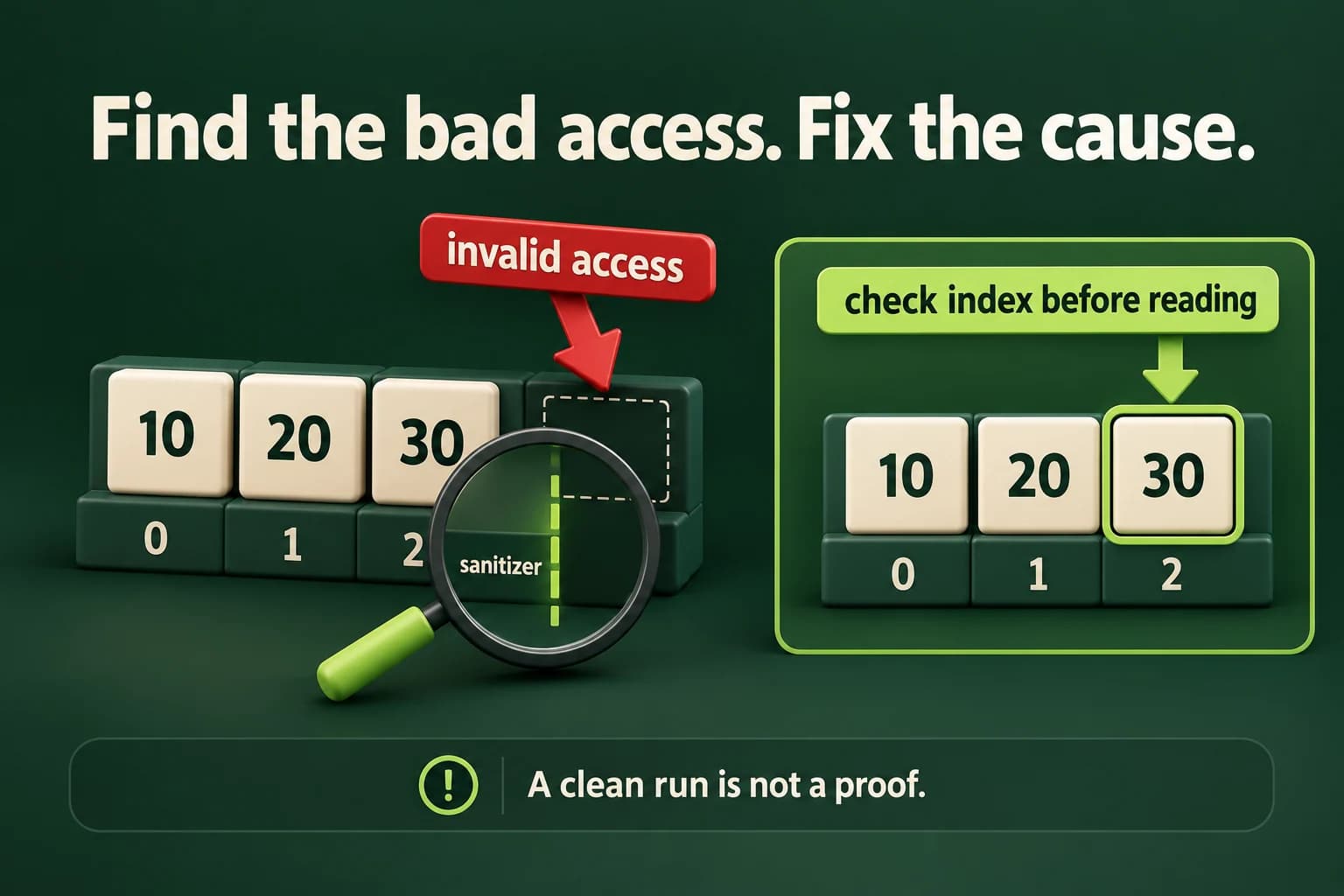
Check the signed index before indexing
The safe function returns a value copy or no value. It never reads the missing element.
Predict the output, edit the source, then select Run code.
Compare with the starter's expected output
No element
After editing inputs, calculate a new prediction; this reference describes only the starter.
Three elements have indices zero through two
The vector contains three elements, so size is three. The first index is zero, and the last valid index is two. An index equal to size is outside the element range. checkedAt rejects negative indices before converting to the unsigned size type, then rejects indices greater than or equal to size. Only after those checks does it use the subscript operator. Follow that order carefully; converting a negative number first can make it look like a very large positive index.
When a tool reports an invalid read, start with the source operation and the relevant object's size or lifetime. The reported machine address helps a diagnostic tool locate memory, but it is not a stable expected value for a lesson. Reports can differ by platform, compiler version and optimization. Focus on the access category, call site, allocation or lifetime information, and the smallest input that reproduces the error.
A common mistake is to change <= to < in a loop without checking what the loop is meant to do. That may repair a particular overrun, but the real proof is that every access uses an index in the valid element range. Test empty data, index zero, the last element, index equal to size and a negative index. These cases make the rule visible instead of relying on an unexplained change that merely quiets one report.
- The owner has size 3 and valid indices 0, 1 and 2.
- A requested index of 3 equals size and must be rejected.
- The repaired function returns nullopt before any subscript access.
- The caller prints No element without reading outside storage.
Local-only ASan investigation: one invalid read
bad-index.cppDeliberately unsafe fixture. Build and run only with the instrumented command below in a disposable local practice directory. No ordinary stdout transcript is promised; inspect the sanitizer's error category and nonzero status. This fixture is not sent to the in-page compiler runner.
#include <iostream>
#include <vector>
int main(int argc, char**) {
    const std::vector<int> values{10, 20, 30};
    const auto index = static_cast<std::size_t>(argc + 2);
    std::cout << values[index] << '\n'; // Invalid when launched with no extra arguments.
}Instrument the isolated fixture with supported Clang tools
These commands are for a local Clang environment with its sanitizer runtime. Run the fixture with no extra arguments. A detected error should produce a diagnostic and a nonzero exit, not a trusted number. Do not use the fixture as application code.
clang++ -std=c++20 -O1 -g -fsanitize=address -fno-omit-frame-pointer bad-index.cpp -o bad-index
./bad-index

Build the repaired main.cpp separately:
clang++ -std=c++20 -O1 -g -fsanitize=address,undefined -fno-sanitize-recover=undefined -fno-omit-frame-pointer main.cpp -o checked
./checked

Optional supported Clang static-analysis pass:
clang++ --analyze -std=c++20 main.cpp
Run the checked build, not an old executable
Compile and link with the sanitizer flags, then run the explicitly named instrumented executable. Adding a flag only to an unrelated editor setting does not instrument an existing binary. Read the build result before launching, because a failed rebuild can leave an older executable on disk. The command uses debug information and a frame-pointer option to help reports identify call paths. These options aid diagnosis, not correctness by themselves.
AddressSanitizer changes memory use and runtime behavior. Its performance is not a production benchmark. Our ordinary lesson runner has its own resource limits and does not silently add these diagnostic options, so the local-only fixture is kept outside it. The separately supplied safe programs can still run through the normal compiler interface when that sandbox is available. Keep the environment and build flags in your investigation notes.
Do not suppress a report merely to make the terminal look clean. Reduce the failing case, identify the invalid access and repair the ownership, lifetime or bounds rule. Rebuild and run the instrumented repaired program, then run its functional tests too. A suppression can be appropriate for a carefully understood external limitation, but it is not an explanation for a real defect in code you control.
Keep the string owner alive before using a view
Returning an owning string repairs the would-be dangling local return. No invalid version is executed here.
Predict the output, edit the source, then select Run code.
Compare with the starter's expected output
ready
After editing inputs, calculate a new prediction; this reference describes only the starter.
Check before an addition can overflow
The maximum int cannot be incremented safely. The guard runs before the addition, not afterward.
Predict the output, edit the source, then select Run code.
Compare with the starter's expected output
Cannot increment
After editing inputs, calculate a new prediction; this reference describes only the starter.
A clean run only covers the paths that ran
Sanitizers do not detect every bug. A path that was never executed might still contain an invalid access. Some logical mistakes, such as choosing the wrong valid element, do not violate memory rules at all. UBSan's enabled checks are selected categories, not a universal definition of correctness. State which build and inputs you tested, and do not turn the absence of a report into a promise that every future execution is safe.
Static analysis can explore possible issues without the same concrete runtime input, but it also has limits and can require interpretation. Compiler warnings, static-analysis findings, runtime diagnostics and failed behavior tests are different evidence. Investigate them according to their cause. A static warning is not automatically a runtime crash, and a program that happens to return zero is not automatically free of memory errors.
The safe repairs use the same principles from earlier lessons: keep an owner alive, check the index, and guard arithmetic before the risky operation. Do not teach tools as magic that makes raw invalid access acceptable. Use them as feedback while improving a design whose rules you can explain in plain words. Keep the smallest failing input and the repaired test as a record so the same mistake is less likely to return.
Build a safe checked lookup and verify it with tools
Read count zero through five, that many readings from minus one hundred through one hundred, and a whole signed zero-based index. Invalid required input prints Invalid input with status one. A well-formed index outside the data is a valid missing lookup: print No element with status zero. A match prints Value, including a real zero. Validate bounds before unsigned conversion and subscript access.
Use the safe lab source as main.cpp in a supported local sanitizer build. Test empty data, first and last elements, negative indices, index equal to size and the largest supported int index. Record the compiler, flags, observed status and any diagnostic category. The normal reference output describes the safe starter, not the unsafe fixture. If diagnostic tools are unavailable, say so in your notes; do not invent a clean sanitizer result.
Build one complete safe example
Choose an installed compiler. These commands run locally, not in the source editor. The in-page Run button requires the configured compiler sandbox. Diagnostic fixtures and multi-file projects use their separate instructions.
macOS / Linux:
clang++ -std=c++20 -Wall -Wextra -Wpedantic main.cpp -o lesson
# Or use g++ with the same options.
./lesson

Windows Developer Command Prompt:
cl /std:c++20 /EHsc /W4 main.cpp /Fe:lesson.exe
lesson.exeIndependent lab
Use safe zero-based lookup, then run the safe program under a supported local diagnostic build.
Acceptance checklist
- Read count 0..5, bounded readings -100..100 and a whole signed zero-based index.
- Reject malformed, missing or out-of-range required data as Invalid input with status 1.
- Check a negative index before unsigned conversion and reject index >= size before access.
- Print Value for a found copy or No element for a valid missing request, both with status 0.
- Run the safe source with supported sanitizer flags and boundary cases; record actual evidence and do not run the unsafe fixture uninstrumented.
Need a hint?
- Zero-based means the last valid index is size minus one, not size.
- A missing optional is different from a contained zero reading.
- No host-code fallback or sanitizer availability should be assumed from an editor's Run button.
Write and run your lab
Build your own solution before revealing the reference. Use the input field for normal, boundary and invalid cases; this runner executes your program but does not grade it.
Predict the output, edit the source, then select Run code.
Your lab evidence and notes
Record predictions, actual output, commands and the cause of each repair. Code is plain text: this scratchpad does not execute or grade C++.
Loading local notes…
Review your acceptance checklist and quiz explanations before marking this lesson complete. This is self-review, not a grade or certification.
Reveal the explained lab solution
Reference lab solution
Compare the reference with your own reasoning. Running this solution does not grade or complete the lesson.
Predict the output, edit the source, then select Run code.
Expected output
Value: 30
The index is zero-based and checked while still signed. Only a proven valid index is converted and used to access storage.
The result is an owned integer copy or an empty optional, so no pointer into a destroyed container escapes.
Functional tests and an instrumented clean run answer different questions. Record actual tool availability and never claim an unperformed sanitizer check passed.
Review before moving on
Explain the lesson's objectives in your own words, compare your lab evidence with the acceptance checklist, and keep the first failing case alongside your repair. Completing a page is not proof that every C++ feature or input is supported.
- Distinguish compiler warnings, static analysis and runtime instrumentation.
- Recognize the cause behind a bounds diagnostic.
- Build with supported sanitizer flags locally.
- Repair bounds, lifetime and arithmetic issues rather than suppressing reports.
- Explain why clean diagnostics are useful evidence but not proof.
References and further reading
Original examples and exercises accompany these primary references. Tool-specific diagnostics and support depend on your installed version.