
C++ Range-Based For Loop and Iterators
Learn C++ range-based for loops, copies versus references, begin/end iterators, vector invalidation and safe erase-while-iterating patterns.
What you will learn
- Choose value, mutable reference or const reference loop variables.
- Explain begin/end as a half-open traversal boundary.
- Avoid vector growth and erasure inside a range-based traversal.
- Use erase's returned iterator without skipping adjacent matches.
- Test filtering for empty, all-kept, all-removed and adjacent-removal inputs.
Range-based for expresses visiting every element
A counter-based loop is useful when position is part of the calculation. If the task is simply to visit each value, a range-based for loop states that intention directly: for (int score : scores). The loop obtains each existing element in order, so you do not manually maintain an index or repeat size comparisons. This removes one source of off-by-one mistakes without deciding whether you are reading a copy or the original element.
The declaration before the colon matters. An ordinary value variable receives a copy for these integer and string examples. int& refers to an existing integer and allows changes through that name; const auto& observes an element without copying it or permitting modification through that reference. Choose based on the operation you intend. Copying a small integer is normal, while copying every large string just to print it is often unnecessary.
Do not treat auto as an automatic reference qualifier. for (auto label : labels) still creates copies of the strings in this lesson. Mutating label does not update the stored string. Adding an ampersand changes that contract, not just performance. When reviewing a loop, explain both its traversal boundary and the ownership or borrowing behavior of its loop variable before discussing the statements inside the body.
Compare a copied loop variable with a mutable reference
The first loop changes temporary strings; the second changes the vector's owned strings. Read-only printing uses const references.
Predict the output, edit the source, then select Run code.
Compare with the starter's expected output
After copies: a
a!
bb!
After editing inputs, calculate a new prediction; this reference describes only the starter.
begin points to a candidate; end is a boundary
An iterator represents a position in a sequence and supports the operations required by its category. For this vector traversal, begin() provides the first position and end() provides the past-the-end boundary. Compare the positions before dereferencing with *. When begin equals end, the sequence is empty and the loop body must not execute. The boundary is useful for comparisons but is not a hidden extra element you may read.
An explicit iterator loop can therefore test it != values.end(), inspect *it, then increment it. Read that as a half-open interval, the same model used for valid indices. Do not assume all iterators support arbitrary addition, subtraction or integer comparison just because vector iterators permit more than simple increment. Later container choices change available operations and costs. Write only the operations the current algorithm actually requires.
A range-based loop conceptually keeps traversal positions of its own. You do not get those positions back merely by declaring the loop variable as a reference. A reference changes how the current element is accessed; it does not redesign the loop's cached boundary. This explains why a concise range loop is excellent for observing elements but is not automatically the right tool for structural edits to the collection being traversed.
Changing an element differs from changing the sequence
Assigning a new integer to an existing element preserves the vector's shape. Appending, inserting and erasing can change positions or storage and therefore affect traversal validity. Reallocation invalidates all element references, pointers and iterators. Erasure invalidates positions at or after the erased location. Keep these rules connected to the particular operation instead of saying every change is always safe or every change is always forbidden.
Do not push_back into the same vector from its range-based loop, even if you reserved enough capacity first. A successful append changes the past-the-end position; avoiding reallocation does not preserve that old boundary. For a transformation that produces extra values, collect them in a separate output vector, finish traversal, and then decide how to combine results. Separating source and destination also makes the intended result easier to specify and test.
Do not erase through a saved iterator and then increment that invalidated iterator. A range variable cannot repair the hidden traversal state either. Instead choose an algorithm whose mutation contract gives you a valid next position, or construct a separate filtered collection. C++20 also offers std::erase_if for supported containers, but the later algorithms lesson will introduce predicates. Here the explicit iterator approach keeps each state change visible.
Erase adjacent matches without skipping the next value
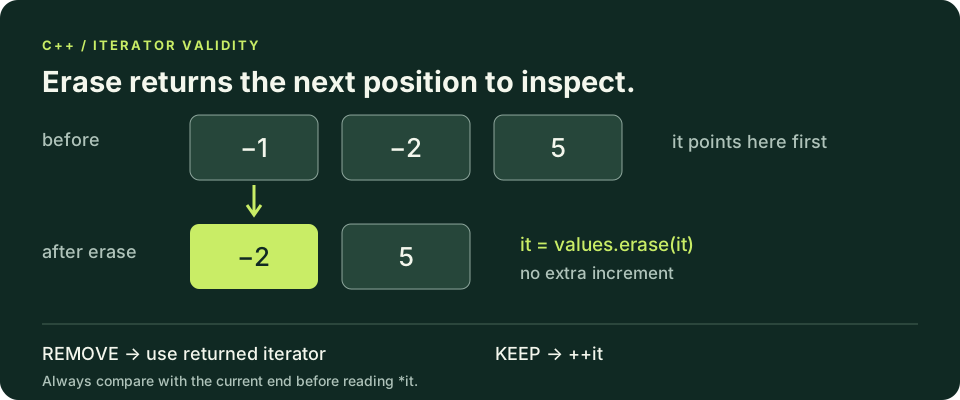
The returned iterator may point at another even number. The erase branch does not increment it again.
Predict the output, edit the source, then select Run code.
Compare with the starter's expected output
5
7
After editing inputs, calculate a new prediction; this reference describes only the starter.
Explain the erase loop before adapting it
At the beginning of each iteration, it is either a valid position to inspect or the current end boundary. The condition establishes which case applies. If the value must be removed, erase returns the position following the removed element in the updated sequence, possibly end. Assign that returned value to it. If the element is kept, advance once so it will not be inspected forever. Every branch makes progress without using an invalidated position.
Removing the first of two adjacent matches shifts the next match into the position that now needs inspection. Incrementing again would skip it. Removing the last element returns end, which the next condition recognizes before dereferencing. These are not exotic edge cases: they are the exact cases that distinguish a valid erase loop from one that happens to work when matches are spaced apart. Trace both with a short handwritten sequence.
Repeated vector erasure can move many elements, so this teaching pattern is not automatically the fastest way to filter a large collection. Its purpose here is correctness and explicit invalidation handling. An algorithm that compacts survivors in one pass can be preferable later. The lab bounds the input to six values, making the simple approach reasonable without teaching that its cost scales efficiently to an unlimited data set.
Validate first, mutate second, report third
The lab reads a count from zero through six, followed by that many integer lines from minus one hundred through one hundred. Malformed input, overflow, missing required lines and out-of-range values all produce Invalid input and status one. Collect the entire accepted sequence before filtering. That keeps input failure separate from the algorithm and prevents a partial success report from appearing after only some records were valid.
Remove every negative value in place, preserve the relative order of nonnegative values, then print the retained count and one Value line for each survivor. Zero is a retained value, not an empty marker. An initially empty sequence and a sequence whose elements are all removed both print Kept: 0 without reading front or dereferencing begin. Extra lines beyond the requested record count are outside this single-report protocol and remain unread.
Test consecutive negatives at the beginning, middle and end, all-kept values, all-removed values, zero, a final input line without a newline and count zero. Compare every output line, not just the count, because an algorithm can preserve the right number of elements but reorder them incorrectly. Finally, explain which branch advances the iterator and why no invalidated iterator is reused. That explanation is stronger evidence than one successful run.
Compile and test outside the lesson
The compiler-backed editors support complete single-file programs when the execution service is available. Otherwise save one program as main.cpp and run these commands with your configured compiler. Supply all standard input before Run; this is not an interactive terminal.
macOS / Linux (choose your installed compiler):
clang++ -std=c++20 -Wall -Wextra -Wpedantic main.cpp -o lesson
# Or: g++ -std=c++20 -Wall -Wextra -Wpedantic main.cpp -o lesson
./lesson

Windows Developer Command Prompt:
cl /std:c++20 /EHsc /W4 main.cpp /Fe:lesson.exe
lesson.exeIndependent lab
Collect a bounded integer sequence, remove negative values safely with iterators, and preserve survivor order.
Acceptance checklist
- Read a whole-line count in 0 through 6 and then that many whole-line values in -100 through 100.
- Reject bad or missing required input with Invalid input and status 1 before reporting.
- Use erase's returned iterator when removing a value; increment only on the keep branch.
- Retain zero and preserve the order of all nonnegative values.
- Print Kept followed by one Value line per survivor, including an explicit zero-count result.
Need a hint?
- Check it against the current end before using *it.
- Adjacent negatives expose an extra increment after erase.
- Use a range-based value loop for final read-only integer output.
Write and run your lab
Build your own solution before revealing the reference. Use the input field for normal, boundary and invalid cases; this runner executes your program but does not grade it.
Predict the output, edit the source, then select Run code.
Your lab evidence and notes
Record predictions, actual output, commands and the cause of each repair. Code is plain text: this scratchpad does not execute or grade C++.
Loading local notes…
Review your acceptance checklist and quiz explanations before marking this lesson complete. This is self-review, not a grade or certification.
Reveal the explained lab solution
Reference lab solution
Compare the reference with your own reasoning. Running this solution does not grade or complete the lesson.
Predict the output, edit the source, then select Run code.
Expected output
Kept: 3
Value: 1
Value: 0
Value: 2
Collection finishes before mutation, so a parse error cannot leave a misleading partial report.
After erasing, the next value may have shifted into the same location; assigning erase's return avoids both stale positions and skipped neighbors.
The final traversal performs no structural edits, so a range-based loop clearly expresses reporting the survivors in their original order.
Review before moving on
Explain the lesson's objectives in your own words, compare your lab evidence with the acceptance checklist, and keep the first failing case alongside your repair. Completing a page is not proof that every C++ feature or input is supported.
- Choose value, mutable reference or const reference loop variables.
- Explain begin/end as a half-open traversal boundary.
- Avoid vector growth and erasure inside a range-based traversal.
- Use erase's returned iterator without skipping adjacent matches.
- Test filtering for empty, all-kept, all-removed and adjacent-removal inputs.
References and further reading
Original examples and exercises accompany these primary references. Tool-specific diagnostics and support depend on your installed version.