
C++ CMake Tutorial: Build an Executable
Learn CMake for C++ step by step: create an executable target, organize source and header files, request C++20, and configure and build outside your source folder.
What you will learn
- Explain the difference between configure, build and run.
- List the source files belonging to an executable target.
- Attach include paths and language requirements to a target.
- Keep generated files in a separate build directory.
- Rebuild a changed program and verify the intended executable.
CMake describes how a project should be built
In the previous lesson you compiled several files by naming them in a terminal command. That is a good way to understand compilation and linking. As a project grows, repeating long commands becomes easy to get wrong. One person may forget a source file; another may use a different language option. CMake records the build structure in text so that a build tool can follow the same project instructions on another machine.
CMake is not your C++ compiler. It reads project instructions, checks the selected environment and generates a build system for a tool such as Make, Ninja or a supported IDE. The compiler still translates C++ and the linker still connects definitions. This distinction matters when diagnosing failures. A missing compiler is an environment problem. A missing semicolon is a source problem. Installing another editor does not automatically repair either one.
We will build a small report program from three files. The header declares boundedTotal. Its source file defines the rule, accepting operands from minus one hundred through one hundred. The main file reads two whole integer lines and reports their sum. A present zero is a valid answer. Keeping the domain rule unchanged lets you concentrate on how the same behavior becomes a named build target rather than learning a new algorithm at the same time.
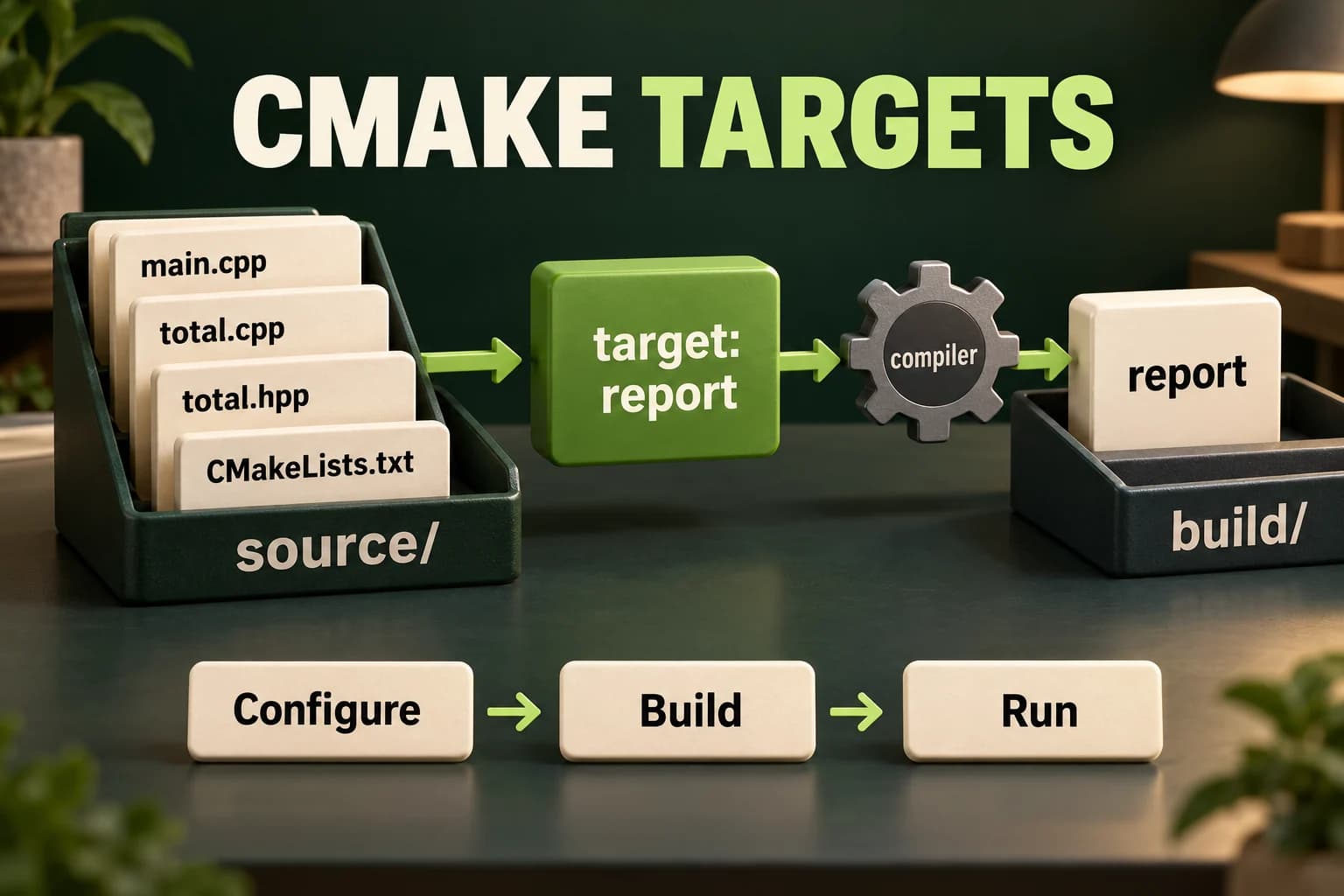
Make the folder layout explicit
Create one project folder containing CMakeLists.txt, an include folder and a src folder. Save total.hpp inside include. Save main.cpp and total.cpp inside src. The paths in the build description are relative to the directory containing CMakeLists.txt. A misspelled folder name is enough to prevent configuration. Check actual filenames, including extensions and letter case, before changing otherwise valid C++ code.
Do not place total.cpp inside the header with an include directive. CMake lists total.cpp as a translation unit to compile once. The source files include total.hpp to see the declaration. The include path tells the compiler where to look for that header without hard-coding an absolute path from your computer. This is why a project can move to a different user folder while keeping its own layout.
The following blocks are project files, not separate programs. Save all four before building. A header alone does not define main, and the main file needs a definition from another source file at link time. Below the project you will also find complete single-file versions for the in-page editor. Those teach the same rule but do not pretend that the page editor runs CMake or manages several files for you.
include/total.hpp
include/total.hppSave this file at the shown path inside the project folder. Build the complete project locally; this file is not an independent in-page program.
#ifndef SOVRA_TOTAL_HPP
#define SOVRA_TOTAL_HPP
#include <optional>
std::optional<int> boundedTotal(int first, int second);
#endif
src/total.cpp
src/total.cppSave this file at the shown path inside the project folder. Build the complete project locally; this file is not an independent in-page program.
#include "total.hpp"
std::optional<int> boundedTotal(int first, int second) {
    if (first < -100 || first > 100 || second < -100 || second > 100)
        return std::nullopt;
    return first + second;
}
src/main.cpp
src/main.cppSave this file at the shown path inside the project folder. Build the complete project locally; this file is not an independent in-page program.
#include "total.hpp"
#include <iostream>
#include <sstream>
#include <string>
bool readInteger(int& value) {
    std::string line;
    if (!std::getline(std::cin, line)) return false;
    std::istringstream parser{line};
    if (!(parser >> value)) return false;
    parser >> std::ws;
    return parser.eof();
}
int main() {
    int first{}, second{};
    if (!readInteger(first) || !readInteger(second)) {
        std::cout << "Invalid input\n"; return 1;
    }
    const auto total = boundedTotal(first, second);
    if (!total) { std::cout << "Rejected\n"; return 2; }
    std::cout << "Total: " << *total << '\n';
}
CMakeLists.txt
CMakeLists.txtSave this file at the shown path inside the project folder. Build the complete project locally; this file is not an independent in-page program.
cmake_minimum_required(VERSION 3.20)
project(SovraReport LANGUAGES CXX)
add_executable(report src/main.cpp src/total.cpp)
target_include_directories(report PRIVATE include)
target_compile_features(report PRIVATE cxx_std_20)
set_target_properties(report PROPERTIES CXX_EXTENSIONS OFF)
Read the build description one decision at a time
The minimum-version line sets the oldest supported CMake version for these instructions. The project line gives the project a name and enables C++. add_executable creates a target named report and names its source files. A target is the build system's named unit of work. The name is not a variable storing the program's runtime output; it identifies what should be produced and what requirements belong to it.
target_include_directories attaches the include folder to report. PRIVATE means that this requirement belongs to this target's own compilation. target_compile_features requests at least the C++20 feature level using cxx_std_20. It does not install a newer compiler or guarantee every library feature on every platform. Disabling compiler extensions makes the target request a standard language mode rather than a vendor-extended one where the toolchain supports that distinction.
- Create report before attaching settings to it.
- List src/main.cpp and src/total.cpp as sources; do not compile a copied second definition.
- Attach the include directory to report instead of changing global include settings.
- Request C++20 and keep the generated build directory separate from source.
Configure, build, then run
Run from the project root after saving all files. Use only the run path matching your platform and generator. Stop if configure or build reports an error.
cmake --version
cmake -S . -B build -DCMAKE_BUILD_TYPE=Debug
cmake --build build --config Debug

# macOS / Linux, typical single-configuration generator:
./build/report
# Enter 3, then 4 on separate lines: Total: 7

# Windows, typical Visual Studio multi-configuration generator:
.\build\Debug\report.exe
# Windows Ninja/Make layouts usually use .\build\report.exe instead.
Configure is not the same as build or run
The configure command reads the project and writes generated state into build. The -S option chooses the source directory and -B chooses the build directory. The next command asks the generated build system to compile and link. Only after that succeeds should you launch the executable. Seeing a successful configuration message does not mean that every source file compiled. Seeing a successful build does not mean that you tested the program's input behavior.
Some generators keep one configuration in a build directory. For these, CMAKE_BUILD_TYPE chooses Debug here. Other generators, such as Visual Studio, keep several configurations together; --config Debug selects which one to build. That is why the example passes both forms and shows more than one possible executable path. Inspect the generator and build output rather than assuming every operating system places an executable in exactly the same directory.
When you change only C++ code, run the build command again. The build tool normally recompiles affected work. When you change CMakeLists.txt, the generated build system commonly requests reconfiguration as part of the next build, but an explicit configure command is also clear. When changing compiler or generator, use a new build directory such as build-clang instead of mixing incompatible cached choices in an existing one.
Practise the pure rule without project files
This is a complete single-file counterpart, not a CMake execution. Notice that a valid zero remains a present optional value.
Predict the output, edit the source, then select Run code.
Compare with the starter's expected output
Total: 7
After editing inputs, calculate a new prediction; this reference describes only the starter.
Check an exact endpoint and zero
The conditional tests presence, not whether the stored sum is nonzero.
Predict the output, edit the source, then select Run code.
Compare with the starter's expected output
Total: 0
Rejected
After editing inputs, calculate a new prediction; this reference describes only the starter.
Run the complete input path
Enter one integer per line. Syntax failure and domain rejection are deliberately different outcomes.
Predict the output, edit the source, then select Run code.
Compare with the starter's expected output
Total: 7
After editing inputs, calculate a new prediction; this reference describes only the starter.
Prove the project works without old output
Before calling the setup repeatable, configure into a new empty directory such as build-check and build there. This avoids accidentally relying on an old object file or a locally edited cache. Run a normal example, a zero result, a boundary result and an invalid input. Write down the compiler version, CMake version, generator and commands. Another student should be able to follow those instructions without guessing your editor settings.
Keep source files and build instructions in version control. Generated object files, caches and machine-specific executable output usually belong in ignored build folders. Do not delete a folder merely because its name contains build: first verify that it is generated output and contains no unique work. A fresh build in a new folder is enough for this lesson and does not require any destructive cleanup command.
For the lab, first run the single-file behavior below, then recreate it using the listed project files. Change one accepted input and predict the answer before running. Finally change the implementation to subtraction temporarily and observe a different result after rebuilding. Restore addition and rebuild again. This small check proves that you are launching the executable produced from your current saved source, not a stale file from another folder.
Independent lab
Verify bounded addition in the editor, then package the identical behavior as the CMake report target.
Acceptance checklist
- Read two complete integer lines, rejecting malformed or missing input with Invalid input and status 1.
- Accept each operand only in -100..100; print Rejected and return 2 otherwise.
- Print Total followed by the valid sum, preserving a present zero.
- Create the four listed project files and attach sources, includes and C++20 to report.
- Configure and build in a fresh directory; record versions and normal, zero, boundary and invalid transcripts.
Need a hint?
- The editor lab is one file; the real CMake project uses the separately shown files.
- An optional containing zero still passes a presence check.
- Build successfully before running the new executable from the matching configuration.
Write and run your lab
Build your own solution before revealing the reference. Use the input field for normal, boundary and invalid cases; this runner executes your program but does not grade it.
Predict the output, edit the source, then select Run code.
Your lab evidence and notes
Record predictions, actual output, commands and the cause of each repair. Code is plain text: this scratchpad does not execute or grade C++.
Loading local notes…
Review your acceptance checklist and quiz explanations before marking this lesson complete. This is self-review, not a grade or certification.
Reveal the explained lab solution
Reference lab solution
Compare the reference with your own reasoning. Running this solution does not grade or complete the lesson.
Predict the output, edit the source, then select Run code.
Expected output
Total: 7
The whole-line parser rejects trailing junk instead of silently accepting a numeric prefix.
The domain rule bounds both operands before addition, so the small sum fits int and zero is not confused with rejection.
The CMake target changes how the files are built, not what valid inputs mean. A fresh-directory build checks that the saved project supplies its own requirements.
Review before moving on
Explain the lesson's objectives in your own words, compare your lab evidence with the acceptance checklist, and keep the first failing case alongside your repair. Completing a page is not proof that every C++ feature or input is supported.
- Explain the difference between configure, build and run.
- List the source files belonging to an executable target.
- Attach include paths and language requirements to a target.
- Keep generated files in a separate build directory.
- Rebuild a changed program and verify the intended executable.
References and further reading
Original examples and exercises accompany these primary references. Tool-specific diagnostics and support depend on your installed version.