SovranCode
Modern C++ Lesson 31
Course contents50 available · 0 planned

Get a program running

01 · C++ Introduction: What Is C++?02 · How to Install a C++ Compiler and Set Up Your Editor03 · C++ Hello World: Your First Program Explained04 · How to Compile and Run C++ Programs05 · C++ Debugging: Warnings and Breakpoints

Work with values and input

06 · C++ Variables: Initialization and Scope07 · C++ Data Types: int, double and Type Conversion08 · C++ const, constexpr and auto Explained09 · C++ Operators: Arithmetic, Comparison and Logic10 · C++ User Input: cin, getline and Validation

Control flow and functions

11 · C++ Conditions: if, else if and else12 · C++ Switch Statement: Cases, break and default13 · C++ For Loop: Syntax and Examples14 · C++ While and Do-While Loops: Examples15 · C++ Functions: Parameters and Return Values

Strings and sequences

16 · C++ Strings: std::string with Examples17 · C++ Vector: std::vector with Examples18 · C++ Arrays: std::array and Bounds Checking19 · C++ Range-Based For Loop and Iterators20 · C++ Vector Practice: Build a Data Summary

Model data with classes

21 · C++ Structs and enum class Explained22 · C++ Classes and Objects: Encapsulation23 · C++ Constructors and Member Initialization24 · C++ Const Member Functions and Composition25 · C++ Copying Objects and the Rule of Zero

Lifetime and resource ownership

26 · C++ Object Lifetime, Destructors and RAII27 · C++ Pointers and References: nullptr and Borrowing28 · C++ unique_ptr: Smart Pointers and Ownership29 · C++ Move Semantics: std::move vs Copying30 · C++ string_view and span: Avoid Dangling Views

Containers and algorithms

31 · C++ map vs unordered_map: Lookup and Examples32 · C++ set, queue and stack: When to Use Each33 · C++ Lambda Expressions and STL Algorithms34 · C++ sort and binary_search: Rules and Complexity35 · C++20 Ranges: Views, filter and transform

Errors, files, and interfaces

36 · C++ optional and variant Explained37 · C++ Exceptions: try, catch and Safe Cleanup38 · C++ File Handling: Read and Write Text Files39 · C++ Input Parsing and Data Validation40 · C++ Polymorphism: Virtual Functions and Interfaces

Generic programming and quality

41 · C++ Templates: Function and Class Examples42 · C++20 Concepts and Template Constraints43 · C++ Unit Testing: Normal and Boundary Cases44 · C++ Sanitizers: Find Memory and Undefined Behavior Bugs45 · C++ Performance: Benchmark Before Optimizing

Build and deliver a complete application

46 · C++ Header Files and Translation Units47 · C++ CMake Tutorial: Build an Executable48 · C++ Dependencies and CTest: Automated Tests49 · C++ Multithreading: Threads and Data Races50 · C++ Command-Line Applications: Help and Release Checks
Modern C++50 available · 0 planned

Get a program running

01 · C++ Introduction: What Is C++?02 · How to Install a C++ Compiler and Set Up Your Editor03 · C++ Hello World: Your First Program Explained04 · How to Compile and Run C++ Programs05 · C++ Debugging: Warnings and Breakpoints

Work with values and input

06 · C++ Variables: Initialization and Scope07 · C++ Data Types: int, double and Type Conversion08 · C++ const, constexpr and auto Explained09 · C++ Operators: Arithmetic, Comparison and Logic10 · C++ User Input: cin, getline and Validation

Control flow and functions

11 · C++ Conditions: if, else if and else12 · C++ Switch Statement: Cases, break and default13 · C++ For Loop: Syntax and Examples14 · C++ While and Do-While Loops: Examples15 · C++ Functions: Parameters and Return Values

Strings and sequences

16 · C++ Strings: std::string with Examples17 · C++ Vector: std::vector with Examples18 · C++ Arrays: std::array and Bounds Checking19 · C++ Range-Based For Loop and Iterators20 · C++ Vector Practice: Build a Data Summary

Model data with classes

21 · C++ Structs and enum class Explained22 · C++ Classes and Objects: Encapsulation23 · C++ Constructors and Member Initialization24 · C++ Const Member Functions and Composition25 · C++ Copying Objects and the Rule of Zero

Lifetime and resource ownership

26 · C++ Object Lifetime, Destructors and RAII27 · C++ Pointers and References: nullptr and Borrowing28 · C++ unique_ptr: Smart Pointers and Ownership29 · C++ Move Semantics: std::move vs Copying30 · C++ string_view and span: Avoid Dangling Views

Containers and algorithms

31 · C++ map vs unordered_map: Lookup and Examples32 · C++ set, queue and stack: When to Use Each33 · C++ Lambda Expressions and STL Algorithms34 · C++ sort and binary_search: Rules and Complexity35 · C++20 Ranges: Views, filter and transform

Errors, files, and interfaces

36 · C++ optional and variant Explained37 · C++ Exceptions: try, catch and Safe Cleanup38 · C++ File Handling: Read and Write Text Files39 · C++ Input Parsing and Data Validation40 · C++ Polymorphism: Virtual Functions and Interfaces

Generic programming and quality

41 · C++ Templates: Function and Class Examples42 · C++20 Concepts and Template Constraints43 · C++ Unit Testing: Normal and Boundary Cases44 · C++ Sanitizers: Find Memory and Undefined Behavior Bugs45 · C++ Performance: Benchmark Before Optimizing

Build and deliver a complete application

46 · C++ Header Files and Translation Units47 · C++ CMake Tutorial: Build an Executable48 · C++ Dependencies and CTest: Automated Tests49 · C++ Multithreading: Threads and Data Races50 · C++ Command-Line Applications: Help and Release Checks
PREVIOUS LESSONC++ string_view and span: Avoid Dangling Views
NEXT LESSONC++ set, queue and stack: When to Use Each
C++ foundations · Lesson 31 About 46 min with practice

C++ map vs unordered_map: Lookup and Examples

Learn C++ map and unordered_map with clear key-value examples, ordered versus hash lookup, find without insertion, word counting and safe missing-key handling.

Before you begin

Know strings, loops, functions, const and container iteration. This lesson explains key-value lookup before introducing more algorithms or custom hash functions.

What you will learn

  • Explain a key-value pair using a word-frequency example.
  • Choose ordered map output or hash-based lookup for a stated need.
  • Use operator[] deliberately for counting and find for read-only lookup.
  • Handle a missing key without adding an accidental zero entry.
  • Test duplicate words, empty data and unchanged lookup size.

Use a map when you ask for a value by name

A vector answers questions such as what is the value at position two. A frequency report asks a different question: how many times did the word pear appear? The word is a key, and its count is the associated value. A map stores these relationships so you can look up a key without keeping two parallel vectors or searching a list of unrelated positions by hand.

Write std::map<std::string, int> when keys are strings and counts are integers. Each key appears at most once in this map type. Repeated occurrences of the same word should update its existing count, not create another independent key. Distinguish the number of keys from the total number of observed words: pear appearing three times is one key whose stored value is three.

std::unordered_map also stores unique keys and their associated values, but uses a different organization for lookup. Both are owning containers: their string keys and integer values belong to the container. They are not merely views of the input line. Choosing between them is about ordering, lookup behavior and other design needs, not a rule that one container is always the modern replacement for the other.
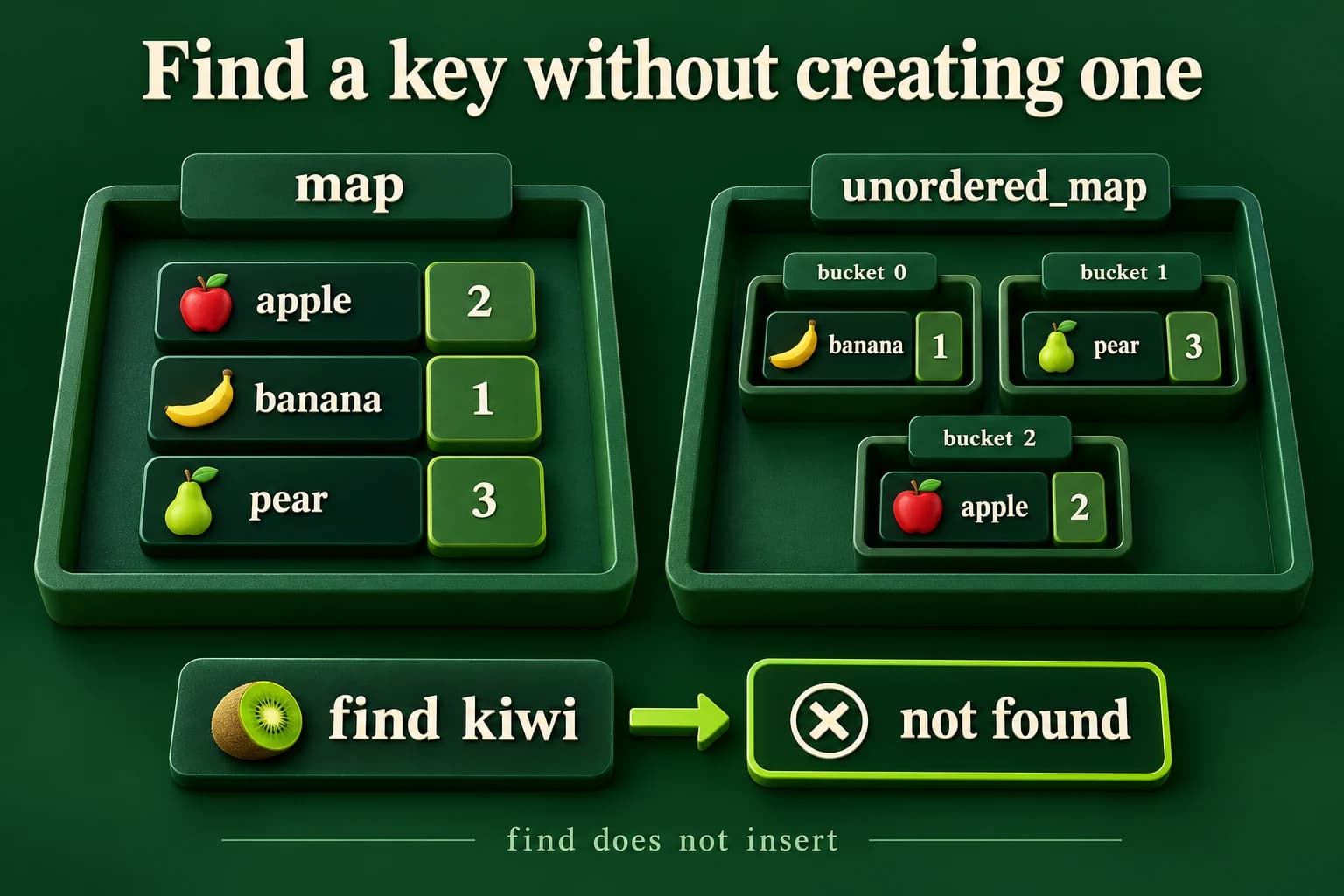
An ordered map lists apple, banana and pear by key, while illustrative unordered-map buckets contain the same key-value pairs without a promised iteration order. A find query for missing kiwi reports not found and adds no kiwi entry to either collection.
The bucket arrangement is illustrative, not a guaranteed runtime order. Read-only find must not create the missing key or change the container's size.

Choose ordered output when ordering is part of the answer

std::map keeps keys in the order defined by its comparison rule. With the default string comparison and this lesson's lowercase English word inputs on the documented toolchains, the example prints apple before pear. This makes it useful for a report that must have stable key ordering. The container does not sort values by frequency unless you ask a separate algorithm to organize a different result structure.

std::unordered_map uses hashing to organize key lookup. Its iteration order is not a promise of alphabetical order, input order or random order. It may change when the container changes or when you use another implementation. If your required output is sorted, do not compare an observed hash-table printout with a desired sorted transcript and hope it stays that way. Use an ordered representation or sort the report separately.

For lookup complexity, map offers logarithmic behavior in the number of elements. Unordered lookup is average constant-time but can be linear in the worst case. Those descriptions are not a guarantee that hashing always runs faster for your actual data. Key comparison costs, memory, hash quality and workload matter. A hash used for table lookup is also not a claim of encryption or password security. Keep these different uses of the word hash separate.

C++ PRACTICE RUNNER

Count repeated words and print distinct keys

operator[] is intentional here: counting a new word should create its count. The map then reports keys in its comparison order.

#include <iostream>
#include <map>
#include <string>
#include <vector>
int main() {
    const std::vector<std::string> words{"pear", "apple", "pear"};
    std::map<std::string, int> counts;
    for (const auto& word : words) ++counts[word];
    for (const auto& entry : counts) std::cout << entry.first << ": " << entry.second << '\n';
    std::cout << "Keys: " << counts.size() << '\n';
}
TERMINAL OUTPUT
Predict the output, edit the source, then select Run code.

C++20 compiler runner: source and input are sent only when you press Run to this website's execution endpoint, not an external vendor. Local preview requires Docker and gcc:14; production requires a separately isolated execution service. Network is disabled; execution is limited to 3 seconds, compilation to 10 seconds, memory to 384 MB and output to 32 KB. Single-file programs only. Don't enter secrets. Edits reset on refresh; Copy your work to keep it.

Compare with the starter's expected output
apple: 1
pear: 2
Keys: 2

After editing inputs, calculate a new prediction; this reference describes only the starter.

operator[] can insert; find only searches

For these maps with int values, counts[word] finds the word or creates it with a value-initialized count of zero. Incrementing that result is a convenient way to count an occurrence. It is a writing operation, even when it looks like an ordinary indexed read. That is why a lookup such as counts[query] can accidentally add a word the input never contained.

Use find when the question is only whether a key exists and what value it already has. The returned iterator identifies the existing entry, or equals end() when no key is found. Check that comparison before reading it->second. The first component of the pair is the key and the second is its stored value; neither the missing-key branch nor the act of searching needs to insert a new entry.

at is another option when a missing key should be reported through an exception, while contains can answer a presence question in C++20. We focus on find because it supplies both the presence result and access to the stored count with one search. Avoid checking with contains and then using operator[] thoughtlessly in a different mutation-heavy context. First choose the intended lookup contract, then use the operation that directly expresses it.

C++ PRACTICE RUNNER

Search a missing key without changing the hash table

No kiwi entry exists before or after this lookup. Do not depend on unordered iteration to obtain a particular report order.

#include <iostream>
#include <string>
#include <unordered_map>
int main() {
    std::unordered_map<std::string, int> counts{{"pear", 2}};
    const auto before = counts.size();
    const auto found = counts.find("kiwi");
    if (found == counts.end()) std::cout << "Not found\n";
    else std::cout << found->second << '\n';
    std::cout << "Before: " << before << "\nAfter: " << counts.size() << '\n';
}
TERMINAL OUTPUT
Predict the output, edit the source, then select Run code.

C++20 compiler runner: source and input are sent only when you press Run to this website's execution endpoint, not an external vendor. Local preview requires Docker and gcc:14; production requires a separately isolated execution service. Network is disabled; execution is limited to 3 seconds, compilation to 10 seconds, memory to 384 MB and output to 32 KB. Single-file programs only. Don't enter secrets. Edits reset on refresh; Copy your work to keep it.

Compare with the starter's expected output
Not found
Before: 1
After: 1

After editing inputs, calculate a new prediction; this reference describes only the starter.

Read entries carefully and respect each container's iterator rules

A map entry pairs a key with a value. In the simple reporting loop, const auto& entry observes that pair without copying its string for each printed line. entry.first names the key and entry.second names the count. You cannot normally rewrite a stored key through that pair as if it were an ordinary mutable string: doing so could break the container's organization. Remove and insert according to a deliberate update design if a key must change.

When you change a container during a traversal, its iterator rules matter. An unordered_map rehash invalidates iterators, though references and pointers to existing elements remain valid unless those elements are erased. Do not keep using an old iterator across growth that may rehash. The lab avoids the problem by finishing every insertion before it begins its report and lookup, making the phases clear to a beginner.

The two-container lab is for comparison, not a recommendation to duplicate every production collection. We build matching counts in a map for ordered reporting and an unordered_map for the lookup demonstration. A real application might need only one. Showing both lets you separate the chosen output order from read-only lookup behavior without pretending that the two internal data structures have identical costs or mutation rules.

  • Collect and validate a word.
  • Increment its stored count intentionally in each container.
  • Finish insertion before reporting or retaining a lookup iterator.
  • Compare a find result with end before reading the stored count.

Use small input rules so the container behavior stays visible

Read a count from zero through eight, then that many word lines and one query line. Each word and query must contain one through twelve lowercase English letters only, with no spaces or trimming. The accepted letter set is written explicitly in the validation helper. Malformed counts, missing required lines or invalid words print Invalid input and return status one without a partial report. These rules are not a multilingual tokenizer.

After accepted input, print the map's ordered frequency rows, then find the query in the unordered_map. Print Lookup with its count or not found, followed by Keys before and Keys after for that hash table. The two sizes must match because the query is read-only. A count of zero is valid input data: it produces no frequency rows and a missing query result, with zero keys before and after.

Test repeated words, all distinct words, an existing query, a missing query and the eight-word maximum. Include an uppercase spelling, a space, an overlong word, a missing query and a final query line without a newline. As a repair exercise, replace find with operator[] in a separate experiment and predict the new missing-key count. Then restore find and verify that observation does not quietly change the data you are trying to observe.

LOCAL TERMINAL COMMANDS

Compile one program and compare its output

The lesson editors run complete programs only when the compiler sandbox is available. You can also save one example as main.cpp and use your installed compiler. Run only the repaired version of an intentional compile-error example.

macOS / Linux (choose your compiler):
clang++ -std=c++20 -Wall -Wextra -Wpedantic main.cpp -o lesson
# Or: g++ -std=c++20 -Wall -Wextra -Wpedantic main.cpp -o lesson
./lesson

Windows Developer Command Prompt:
cl /std:c++20 /EHsc /W4 main.cpp /Fe:lesson.exe
lesson.exe
APPLY THE CONCEPT

Independent lab

Count a bounded list of words, print ordered frequencies, then search a query without adding a missing key.

Acceptance checklist

  • Read a complete count in 0..8, that many word lines and one query line.
  • Accept only 1–12 lowercase English letters per word or query; reject bad or missing input as Invalid input with status 1 before reporting.
  • Count occurrences in both map and unordered_map, using operator[] only for intentional count updates.
  • Print frequency rows from map and use find on unordered_map for the query.
  • Print Lookup, Keys before and Keys after; a missing lookup must not change key count.
Need a hint?
  1. Store and validate all required input before writing the accepted report.
  2. The map's size counts distinct words, not input lines.
  3. The missing find result equals end; do not follow it or replace it with an inserting lookup.
C++ PRACTICE RUNNER

Write and run your lab

Build your own solution before revealing the reference. Use the input field for normal, boundary and invalid cases; this runner executes your program but does not grade it.

#include <iostream>
#include <string>
#include <sstream>
#include <limits>

int main() {
    // Implement the acceptance checklist above.
    return 0;
}

TERMINAL OUTPUT
Predict the output, edit the source, then select Run code.

C++20 compiler runner: source and input are sent only when you press Run to this website's execution endpoint, not an external vendor. Local preview requires Docker and gcc:14; production requires a separately isolated execution service. Network is disabled; execution is limited to 3 seconds, compilation to 10 seconds, memory to 384 MB and output to 32 KB. Single-file programs only. Don't enter secrets. Edits reset on refresh; Copy your work to keep it.

Your lab evidence and notes

Record predictions, actual output, commands and the cause of each repair. Code is plain text: this scratchpad does not execute or grade C++.

Loading local notes…

Review your acceptance checklist and quiz explanations before marking this lesson complete. This is self-review, not a grade or certification.

Reveal the explained lab solution
C++ PRACTICE RUNNER

Reference lab solution

Compare the reference with your own reasoning. Running this solution does not grade or complete the lesson.

#include <iostream>
#include <sstream>
#include <string>
bool readInteger(int& value) {
    std::string line;
    if (!std::getline(std::cin, line)) return false;
    std::istringstream parser{line};
    if (!(parser >> value)) return false;
    parser >> std::ws;
    return parser.eof();
}
#include <map>
#include <unordered_map>
#include <vector>
bool validWord(const std::string& word) {
    return !word.empty() && word.size() <= 12 && word.find_first_not_of("abcdefghijklmnopqrstuvwxyz") == std::string::npos;
}
int main() {
    int count{};
    if (!readInteger(count) || count < 0 || count > 8) {
        std::cout << "Invalid input\n"; return 1;
    }
    std::vector<std::string> words;
    for (int i = 0; i < count; ++i) {
        std::string word;
        if (!std::getline(std::cin, word) || !validWord(word)) {
            std::cout << "Invalid input\n"; return 1;
        }
        words.push_back(word);
    }
    std::string query;
    if (!std::getline(std::cin, query) || !validWord(query)) {
        std::cout << "Invalid input\n"; return 1;
    }
    std::map<std::string, int> ordered;
    std::unordered_map<std::string, int> hashed;
    for (const auto& word : words) { ++ordered[word]; ++hashed[word]; }
    for (const auto& entry : ordered) std::cout << entry.first << ": " << entry.second << '\n';
    const auto before = hashed.size();
    const auto found = hashed.find(query);
    if (found == hashed.end()) std::cout << "Lookup: not found\n";
    else std::cout << "Lookup: " << found->second << '\n';
    std::cout << "Keys before: " << before << "\nKeys after: " << hashed.size() << '\n';
}
TERMINAL OUTPUT
Predict the output, edit the source, then select Run code.

C++20 compiler runner: source and input are sent only when you press Run to this website's execution endpoint, not an external vendor. Local preview requires Docker and gcc:14; production requires a separately isolated execution service. Network is disabled; execution is limited to 3 seconds, compilation to 10 seconds, memory to 384 MB and output to 32 KB. Single-file programs only. Don't enter secrets. Edits reset on refresh; Copy your work to keep it.

Expected output

apple: 1
pear: 2
Lookup: not found
Keys before: 2
Keys after: 2

Each accepted word deliberately updates a count. With at most eight input words, the int frequency is bounded by eight.

The ordered map supplies stable report ordering, while find searches the hash table without creating an absent query key.

Comparing key counts before and after the query catches the common mistake of using an inserting operation for a read-only question.

Review before moving on

Explain the lesson's objectives in your own words, compare your lab evidence with the acceptance checklist, and keep the first failing case alongside your repair. Completing a page is not proof that every C++ feature or input is supported.

  • Explain a key-value pair using a word-frequency example.
  • Choose ordered map output or hash-based lookup for a stated need.
  • Use operator[] deliberately for counting and find for read-only lookup.
  • Handle a missing key without adding an accidental zero entry.
  • Test duplicate words, empty data and unchanged lookup size.

References and further reading

Original examples and exercises accompany these primary references. Tool-specific diagnostics and support depend on your installed version.

  • Microsoft: map class
  • Microsoft: unordered_map class
  • C++ draft: associative containers
KNOWLEDGE CHECK

Check your understanding

Answer all five questions, then review the explanations. Answers are not saved or synced; completion is a separate self-review choice.

01What does map size count in this report?
02What can counts[query] do when query is absent?
03What must happen before reading found->second?
04Does unordered_map guarantee alphabetical iteration?
05Is unordered lookup always faster and constant-time in the worst case?
PREVIOUS LESSONC++ string_view and span: Avoid Dangling Views
NEXT LESSONC++ set, queue and stack: When to Use Each
ON THIS PAGELearning objectivesUse a map when you ask for a value by nameChoose ordered output when ordering is part of the answeroperator[] can insert; find only searchesRead entries carefully and respect each container's iterator rulesUse small input rules so the container behavior stays visibleIndependent labReviewKnowledge checkReferences
Course overview