
C++ Input Parsing and Data Validation
Learn C++ input parsing and validation in clear steps: whole lines, exact record syntax, allowed values, useful line numbers and no partial success output.
What you will learn
- Separate reading text, parsing syntax and checking meaning.
- Write down a small format before coding its parser.
- Reject extra separators, suffixes and unsupported characters.
- Report the first invalid record with a useful position.
- Collect valid records before printing a success report.
Text is not valid data just because it was read
getline can read the text apple:12, apple:2cats or apple:99. Reading a line successfully tells you that text was obtained. It does not tell you that the text follows your format or that its number is suitable. Parsing means turning text that follows a stated structure into values. Validation means checking whether those values satisfy the task's rules. Keep these steps separate so failures are easy to explain.
We use a small record format: a name, one colon, and a quantity. The name has one through twelve lowercase English letters. The quantity has one or two decimal digits and its value must be zero through twenty. There are no spaces, signs, extra fields or empty parts. Leading zeroes within the two-digit limit are accepted, so apple:02 means two. These are written choices, not universal rules for text files.
A narrow format is a good learning tool because every accepted and rejected example can be explained. It is not general CSV, JSON, a spreadsheet import or a language parser. Those formats have their own rules for quoting, escaping, encodings and numbers. Do not call this parser CSV merely because records are on lines. The promise you make in documentation should match the text your program actually understands.
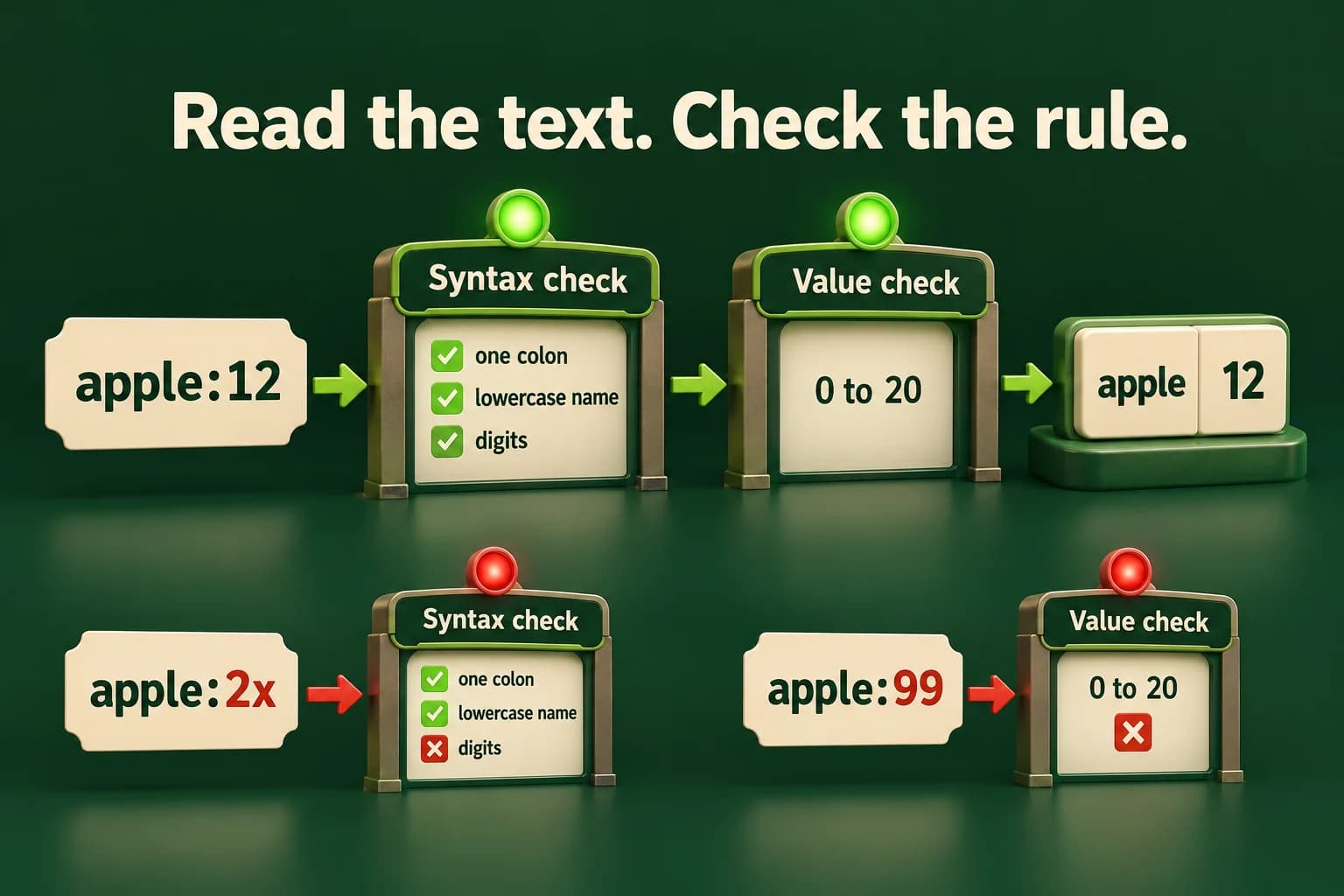
Reject a numeric suffix instead of accepting a prefix
Formatted extraction alone can stop after twelve. The second check requires the rest of the field to be whitespace only.
Predict the output, edit the source, then select Run code.
Compare with the starter's expected output
Rejected
After editing inputs, calculate a new prediction; this reference describes only the starter.
Write the accepted shape before the implementation
Start with ordinary examples. apple:0 and pear:20 are valid. :2 has no name. apple: has no quantity. apple:2:3 has an extra colon. Apple:2 has an uppercase letter, which our rule excludes. apple:21 has the right general shape but a value outside the allowed range. A short list like this is more useful than beginning with conversion code and discovering its accidental behavior later.
Find the first colon and require it to be the only colon. Then check the lengths of the two parts. Loop over the name characters and require each one to belong to the explicit lowercase alphabet. Loop over the quantity characters and require each one to be a decimal digit. We deliberately use explicit character sets rather than claiming to recognize all letters from all languages. No whitespace is trimmed from record lines.
Only after the digit and length checks do we build the quantity. Starting from zero, multiply by ten and add the next digit. With at most two digits, the intermediate number cannot exceed ninety-nine, so this calculation cannot overflow int on a conforming implementation. Finally check zero through twenty. If you later allow longer fields, you must revisit overflow protection rather than copying this bounded calculation into an unlimited parser.
- apple:12 splits into apple and 12.
- The name is nonempty lowercase text and has allowed length.
- Both quantity characters are digits; conversion gives 12.
- 12 is in 0..20, so the record is accepted.
Parse one small record with explicit checks
optional<Record> returns a complete accepted record or no record. It never exposes a half-filled successful result.
Predict the output, edit the source, then select Run code.
Compare with the starter's expected output
apple: 12
After editing inputs, calculate a new prediction; this reference describes only the starter.
Each early return answers one small question
The parser does not need one giant condition that does everything at once. Each early return rules out one kind of failure before later work depends on it. The separator checks happen before slicing the two fields. Length checks happen before bounded numeric conversion. Digit checks happen before using a character as a number. This order makes the function readable and explains why an invalid input cannot sneak through just because its beginning looked correct.
The local name and quantity are work in progress. Only the final return creates a successful Record value. optional makes the success-or-absence boundary visible, and the caller checks presence before using the record. For an application that needs detailed reasons, you can return a richer error type. A single missing result is enough for this lesson because the surrounding loop adds the record number and stops at the first failure.
Duplicate names are allowed here. The parser checks the shape and quantity of one record, not uniqueness across the whole collection. A business rule such as no repeated item name belongs in a later collection-level validation step. Do not quietly add rules that were never documented. A parser that rejects a valid repeated name can be just as wrong for its contract as one that accepts a malformed quantity.
Keep the same rule for edge cases
This small independent check shows the difference between a zero, a leading zero, an out-of-range value and invalid text.
Predict the output, edit the source, then select Run code.
Compare with the starter's expected output
0: 0
02: 2
20: 20
21: Rejected
2x: Rejected
After editing inputs, calculate a new prediction; this reference describes only the starter.
Report the first bad record without a false success report
When reading several records, keep a one-based record number for the user. If the third required line is missing or invalid, report Invalid record: 3. That points the learner to the failing data without printing a partial total that looks complete. It is a record number after the count header, not the physical file line number including that header. Choose and document one meaning so the report cannot be misread.
Collect accepted records in a temporary vector. Print the success report only after all required records pass. If you later load this into an existing application state, use the candidate-and-commit plan from the exceptions lesson. Validation and state updates should not be interleaved accidentally. A program that prints three accepted records and then fails on the fourth needs to explain that the report is partial; our lab avoids that ambiguity entirely.
Do not fix malformed input by deleting characters until it becomes valid unless that normalization is an explicit requirement. apple:2x must not quietly become apple:2. Leading and trailing spaces on record lines are rejected under our exact rules, even though the separate count reader accepts surrounding whitespace. Different fields can have different contracts. The important point is that these choices are visible, consistent and covered by examples.
Build a tiny record import with honest failure
Read a whole-line count from zero through five, then exactly that many required record lines in the documented name:quantity format. A malformed or out-of-range count prints Invalid input with status one. A missing or invalid required record prints Invalid record followed by its one-based record number, with status two. Stop at that first error. Lines beyond the required count are outside this small exercise's input contract.
On success, print Records followed by the count and Total followed by the sum. Keep duplicate names and zero quantities. At most five quantities of twenty keep the total within one hundred. Test empty data, maximum lengths, leading zeroes, extra colons, spaces, missing lines and an invalid last record after several valid ones. Be able to explain whether each rejected example fails structure, character rules or allowed value. That explanation matters more than a long list of conversions.
Compile and check one complete program
Save one example as main.cpp. Choose your installed compiler. Run only after a successful build. The in-page editor needs the configured compiler sandbox; these terminal commands are an alternative, not proof that the sandbox is running.
macOS / Linux:
clang++ -std=c++20 -Wall -Wextra -Wpedantic main.cpp -o lesson
# Or use g++ with the same options.
./lesson

Windows Developer Command Prompt:
cl /std:c++20 /EHsc /W4 main.cpp /Fe:lesson.exe
lesson.exeIndependent lab
Import a small exact text format without accepting prefixes or reporting partial success.
Acceptance checklist
- Read count 0..5 on a complete integer line; reject a bad count with Invalid input and status 1.
- Require one colon, a 1..12 lowercase-English-letter name, and 1..2 quantity digits with value 0..20; accept two-digit leading zeroes.
- Do not trim record lines or accept signs, extra fields or numeric suffixes; allow repeated names.
- Return optional<Record>; stop on missing or invalid required record with Invalid record: N and status 2.
- After all records pass, print Records and Total; support zero records and keep the total bounded.
Need a hint?
- Check the colon and lengths before slicing or converting fields.
- The two-digit rule makes manual conversion bounded by 99 before the domain check.
- Store accepted records first and report only after the full required group passes.
Write and run your lab
Build your own solution before revealing the reference. Use the input field for normal, boundary and invalid cases; this runner executes your program but does not grade it.
Predict the output, edit the source, then select Run code.
Your lab evidence and notes
Record predictions, actual output, commands and the cause of each repair. Code is plain text: this scratchpad does not execute or grade C++.
Loading local notes…
Review your acceptance checklist and quiz explanations before marking this lesson complete. This is self-review, not a grade or certification.
Reveal the explained lab solution
Reference lab solution
Compare the reference with your own reasoning. Running this solution does not grade or complete the lesson.
Predict the output, edit the source, then select Run code.
Expected output
Records: 3
Total: 22
Whole-line reading does not itself validate a record. The parser checks every separator, character, length and bounded quantity.
The error number counts required records after the header. No success count or total is printed when a later record fails.
Leading zeroes within two digits and duplicate names are accepted because the contract says so. No undocumented normalization changes rejected input.
Review before moving on
Explain the lesson's objectives in your own words, compare your lab evidence with the acceptance checklist, and keep the first failing case alongside your repair. Completing a page is not proof that every C++ feature or input is supported.
- Separate reading text, parsing syntax and checking meaning.
- Write down a small format before coding its parser.
- Reject extra separators, suffixes and unsupported characters.
- Report the first invalid record with a useful position.
- Collect valid records before printing a success report.
References and further reading
Original examples and exercises accompany these primary references. Tool-specific diagnostics and support depend on your installed version.