
C++ Vector: std::vector with Examples
Learn C++ std::vector with size versus capacity, initialization, push_back, checked access, copying, invalidation and a validated score-collection lab.
What you will learn
- Choose a vector when the number of owned elements can change.
- Distinguish existing elements from reserved storage.
- Validate an index before unchecked access and explain at().
- Predict when growth can invalidate element references.
- Collect validated scores and report an explicit empty result.
What is a C++ vector, and when should you use one?
A single score variable answers a single question. A report for an unknown number of scores needs a collection that owns those values together. std::vector<int> expresses that relationship: one vector object manages a sequence of integers. Include <vector> and name the element type between angle brackets. This is a use of a library class template, not a request to manually allocate each integer or invent a linked structure.
Choose a vector when your program can gain or lose elements while running. Its elements are contiguous, which makes indexed access straightforward and is useful for many library operations. Contiguous does not mean that an element's address remains unchanged forever. The vector may need different storage as it grows. Treat the vector as the owner, and treat temporary references into it as a separate responsibility with a shorter validity window.
Start with values rather than raw pointers. When a vector of integers leaves scope, its elements and managed storage are released through the library's normal lifetime rules. A copied vector of integers owns an independent sequence, so changing the copy does not change the original integers. This lesson does not generalize that independence to pointees inside a vector of pointers. The element type matters whenever you reason about ownership or copying.
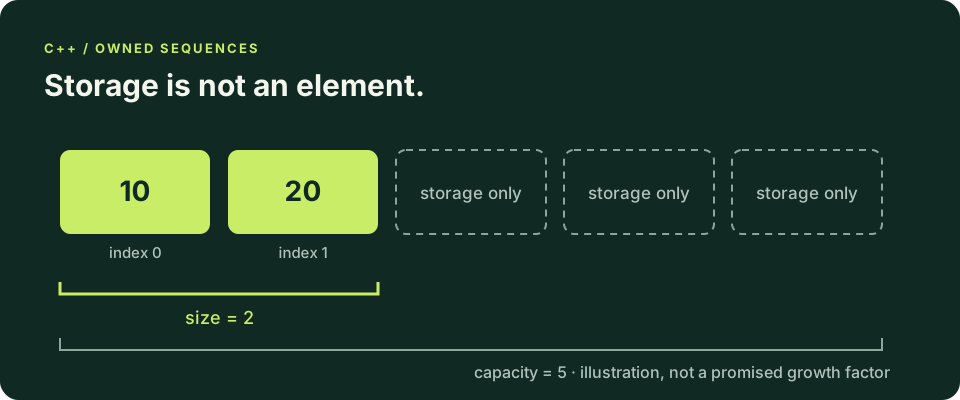
Construct elements deliberately: braces, count and push_back
std::vector<int> scores; starts empty. std::vector<int> scores{3, 10}; creates two elements with values three and ten. By contrast, std::vector<int> scores(3, 10); creates three elements, each equal to ten. The punctuation changes which constructor you select. Before explaining any output, write down the intended number of elements and their initial values, then check that the declaration actually describes that sequence.
push_back appends one value and increases size by one after success. Use it when each validated input contributes another element. resize changes the number of elements: growing a vector<int> with resize creates additional value-initialized integers, which are zero in this case. reserve does not do that. It requests storage capacity but leaves the number of accessible elements unchanged. Reserving five places is not the same as recording five scores.
Repair a reserved-storage mistake by deciding which operation the requirement needs. If the requirement says collect accepted values, append with push_back. If it says create a fixed number of editable initial values, choose an appropriate count constructor or resize. Do not write through scores[0] merely because reserve succeeded. In C++20, unchecked access outside size violates its precondition even if the allocation happens to contain enough bytes.
Observe size without assuming a growth factor
reserve guarantees enough capacity if it succeeds, not an exact capacity or a particular growth formula. Only live elements are read.
Predict the output, edit the source, then select Run code.
Compare with the starter's expected output
Size: 0
Capacity enough: 1
Size: 2
First: 10
After editing inputs, calculate a new prediction; this reference describes only the starter.
Check indices against size, and handle the empty vector
Valid positions form the half-open interval from zero up to, but not including, size. For a two-element vector, zero and one are valid indices; two is not. operator[] does not perform the bounds check you need in C++20. at checks its position and throws std::out_of_range when the position is invalid. That diagnostic mechanism is useful, but routine user-input validation should still explain the domain error before attempting the access.
front and back also require a nonempty vector. Ask empty() before reading the first or last element when the collection can have no accepted values. An empty report is an ordinary outcome in the lab, not a reason to read a fictional zero element. A sum can meaningfully start at zero for an empty integer sequence, while a minimum or maximum needs a separate absence policy that the later summary lesson will develop.
External positions often arrive as signed integers because a user can type a negative value. Reject negative input before converting it to the unsigned index type. For a validated one-based position, subtract one only after proving the position is at least one. Mixing signed values with unsigned sizes too early can turn a negative number into an unexpectedly large value and obscure the actual error you wanted to report.
Reallocation, cost and reference validity
A vector can append efficiently over a series of insertions, but an individual append can allocate new storage and move or copy existing elements. Do not promise that every push_back is constant-time or that capacity always doubles. Reserve a known reasonable count once when it follows from validated input. Repeatedly reserving exactly one more slot can defeat the growth strategy and add work instead of removing it.
When reallocation occurs, previously obtained pointers, references and iterators into the vector no longer identify usable elements there. Even without reallocation, a previous past-the-end iterator is invalidated by an append. Reacquire the element after a structural change rather than retaining a convenient reference and hoping capacity is sufficient. The iterator lesson will show why mutation during traversal needs a more specific algorithm than simply writing another loop.
Allocation can fail; a bounded input policy limits work but does not prove memory allocation always succeeds. Our small laboratory assumes ordinary allocation succeeds and does not teach a general recovery scheme for memory exhaustion. Keep that limitation separate from correctness on accepted scores. Native compiler checks, resource limits in the execution tool, and application validation address different failure classes, so none should be advertised as a substitute for the others.
Copy a vector, then change only the copy
Both vectors own integers. Mutating the copied element leaves the original value unchanged.
Predict the output, edit the source, then select Run code.
Compare with the starter's expected output
Original: 10
Copy: 99
After editing inputs, calculate a new prediction; this reference describes only the starter.
Design the score collector before writing its loop
The lab accepts a count from zero through five on its own line, followed by exactly that many score lines. Every score must be a whole integer from zero through one hundred. Parse an entire line and reject leftover nonwhitespace so 90points cannot silently become ninety. Stop at the first bad or missing required line, print Invalid input, and return status one without presenting an accepted summary of a partial collection.
After successful collection, compute the total with a loop and print the number of stored elements and the total. Five scores of one hundred produce at most five hundred, so an int accumulator is sufficient under this explicit contract. The program does not claim that int can sum an arbitrarily large sequence. Additional lines after the required records are outside this one-report protocol and are left unread rather than interpreted as extra scores.
Test zero scores, one zero score, five maximum scores, malformed counts, out-of-range scores and early end-of-input. Keep the expected transcript next to each case. A zero count must not ask for or read a score; a negative score must not be appended before rejection. These tests connect container state to input policy instead of checking only that a particular example prints a plausible total once.
Compile and test outside the lesson
The compiler-backed editors support complete single-file programs when the execution service is available. Otherwise save one program as main.cpp and run these commands with your configured compiler. Supply all standard input before Run; this is not an interactive terminal.
macOS / Linux (choose your installed compiler):
clang++ -std=c++20 -Wall -Wextra -Wpedantic main.cpp -o lesson
# Or: g++ -std=c++20 -Wall -Wextra -Wpedantic main.cpp -o lesson
./lesson

Windows Developer Command Prompt:
cl /std:c++20 /EHsc /W4 main.cpp /Fe:lesson.exe
lesson.exeIndependent lab
Collect up to five validated scores in a vector and print count and total only after every required line is accepted.
Acceptance checklist
- Read one count line containing an integer from 0 through 5.
- Read exactly that many whole-line integer scores from 0 through 100.
- Reject malformed, missing or out-of-range required input with Invalid input and status 1.
- Append only accepted scores; reserve must not be treated as creating elements.
- For valid input print Count and Total, including zero for an empty collection.
Need a hint?
- Reuse whole-line parsing from the input-validation lesson.
- Reserve after validating count, then push_back each accepted score.
- Use a separate reporting loop so invalid input cannot produce a partial success report.
Write and run your lab
Build your own solution before revealing the reference. Use the input field for normal, boundary and invalid cases; this runner executes your program but does not grade it.
Predict the output, edit the source, then select Run code.
Your lab evidence and notes
Record predictions, actual output, commands and the cause of each repair. Code is plain text: this scratchpad does not execute or grade C++.
Loading local notes…
Review your acceptance checklist and quiz explanations before marking this lesson complete. This is self-review, not a grade or certification.
Reveal the explained lab solution
Reference lab solution
Compare the reference with your own reasoning. Running this solution does not grade or complete the lesson.
Predict the output, edit the source, then select Run code.
Expected output
Count: 3
Total: 60
The parser accepts one complete integer per required line and rejects overflow or trailing junk before storage changes.
Validated count bounds both resource use and the accumulator; reserve affects capacity while push_back creates elements.
Reporting happens only after collection succeeds. Empty input data is represented by count zero, not by accessing a nonexistent first element.
Review before moving on
Explain the lesson's objectives in your own words, compare your lab evidence with the acceptance checklist, and keep the first failing case alongside your repair. Completing a page is not proof that every C++ feature or input is supported.
- Choose a vector when the number of owned elements can change.
- Distinguish existing elements from reserved storage.
- Validate an index before unchecked access and explain at().
- Predict when growth can invalidate element references.
- Collect validated scores and report an explicit empty result.
References and further reading
Original examples and exercises accompany these primary references. Tool-specific diagnostics and support depend on your installed version.