
C++ Debugging: Warnings and Breakpoints
Debug C++ with compiler warnings, breakpoints and value inspection. Find a wrong total, use LLDB or GDB locally, and verify the repair with test cases.
What you will learn
- Distinguish diagnostics from evidence about runtime values.
- State an expected result before investigating.
- Build with debug information and explain a breakpoint.
- Inspect values before and after a calculation.
- Verify a repair with normal and boundary cases.
Begin with a discrepancy, not a guess
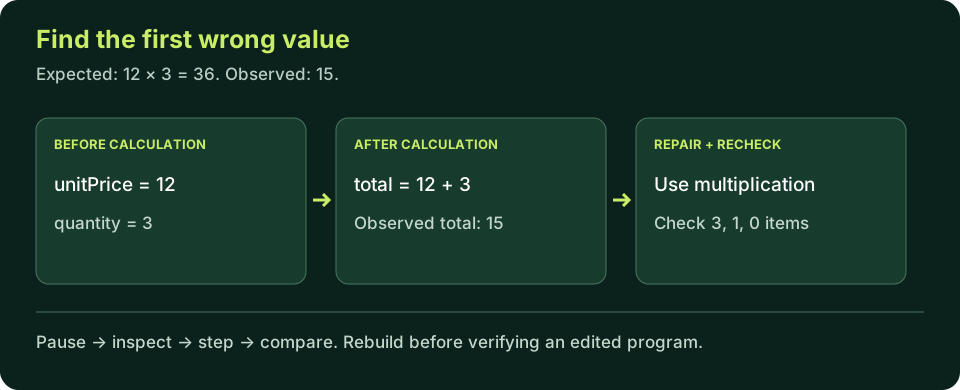
Suppose an item costs twelve whole currency units and a customer requests three items. Before running anything, write the expected total: thirty-six. Our program prints fifteen. That concrete discrepancy is a better starting point than 'the compiler is broken.' It identifies a requirement and an observation, and it gives the investigation a stopping condition: explain the difference and verify the corrected rule.
The example intentionally uses whole units to keep arithmetic simple; it is not a production money representation. Real prices require deliberate rounding and representation decisions. Here the task is to distinguish addition from multiplication, not to design a payment system. Limiting the question keeps debugging focused and prevents a small lesson from making unsupported claims about financial accuracy.
Write down inputs, expected output, actual output, build command and the smallest source that reproduces the issue. Do not begin by replacing several lines. If the next run changes behavior, you need to know which edit caused the change. A short evidence trail makes a solution explainable to another person and easier to test when the same mistake appears in a larger program.
A program that builds but computes the wrong total
Predict the output. Run, identify the first wrong rule, then change only the operator in the initializer.
Predict the output, edit the source, then select Run code.
Compare with the starter's expected output
Total: 15
After editing inputs, calculate a new prediction; this reference describes only the starter.
Warnings catch some mistakes, not every requirement
Warnings are feedback about patterns a compiler considers suspicious under the selected options. Keep useful warnings enabled from the beginning rather than waiting until a project becomes large. For GCC or Clang, this course starts with -Wall -Wextra -Wpedantic. For MSVC, the basic examples use /W4. These are different option families, not identical sets of diagnostics, and a clean build is not proof of correctness.
The wrong-total example can compile without warning because adding two integers is a valid operation. A compiler does not know the business rule you intended. Warnings can point out an unused variable or a questionable conversion while still missing a valid expression with the wrong meaning. Treat them as useful checks alongside output contracts and tests, not a replacement for reasoning about the program.
Read a warning's location and category, inspect the surrounding code, and explain why it is safe or needs repair. Avoid turning warnings off merely to obtain a clean screen. Also avoid changing correct behavior just to silence a message you have not understood. Record the decision, and keep deliberately problematic warning experiments separate from the warning-clean reference examples.
Give a local debugger the right executable
For this investigation, build with debug information and minimal optimization. The commands below use -g -O0 with GCC or Clang. Debug information maps source-level names and locations to the executable; low optimization makes early stepping easier to interpret. This is a teaching configuration, not a recommendation that every production build should disable optimization.
Save the wrong-total program as debug.cpp and build the named output. Launch that same output in the debugger. A debugger attached to an old binary can show values that do not correspond to the source currently open in your editor. If source locations look wrong, first verify the build, program path and configuration before treating the result as evidence about your latest code.
Build a local debugging executable
Choose g++ or clang++ as installed. On Windows, Visual Studio's Debug configuration and F10/Locals window offer the corresponding workflow; no LLDB installation is implied by using MSVC.
GCC / Clang:
clang++ -std=c++20 -Wall -Wextra -Wpedantic -g -O0 debug.cpp -o debug-demo

LLDB, where installed:
lldb ./debug-demo
breakpoint set --name main
run
next
frame variable

GDB, where installed:
gdb ./debug-demo
break main
run
next
info locals
A breakpoint stops before you inspect a state
A breakpoint requests a pause when execution reaches a location. It is not a statement added to your business calculation. Start at main, then step until the two input declarations have executed. Inspect unitPrice and quantity at that point. Variables may be unavailable or not meaningfully initialized before their declaration has run; the fact that their source text is visible does not make their future values available yet.
Before executing the total initializer, predict thirty-six. Step over that statement and inspect total: the addition produces fifteen. This is the earliest value that diverges from the rule. The output statement merely reveals it. Changing the output label would not repair the computation. Write the cause as 'the initializer adds quantity to unitPrice instead of multiplying them' so the correction has a specific justification.
Step over advances across the next source-level operation without intentionally exploring a called function's internals. Step into is useful when you need to investigate such a call. For this example, entering stream library code is a distraction. Continue resumes until another stop or completion. Source line mappings are not always one line per operation, especially after optimization; observe values rather than assuming each keypress represents exactly one C++ statement.
- Pause at main and reach the point after input initialization.
- Inspect both operands before the total expression.
- Step over the calculation and compare total with your prediction.
- Repair the source, rebuild and rerun the same test; an edit does not alter an already loaded binary.
Repair the rule and verify independently
Run the repaired version. Try quantity zero and one, then explain why both expected results follow from the same multiplication rule.
Predict the output, edit the source, then select Run code.
Compare with the starter's expected output
Total: 36
After editing inputs, calculate a new prediction; this reference describes only the starter.
Keep a small regression checklist
For unitPrice twelve, test quantity three for thirty-six, quantity one for twelve, and quantity zero for zero. These cases show an ordinary multiplication and two simple boundaries. Negative quantities are outside this example's stated domain; identify the need for validation rather than treating a negative computed total as a supported order. Very large counts also require range decisions that this tiny fixed-input program does not implement.
A test should compare actual behavior with an independently derived expectation. Copying the program's expression into a test and calling the result expected can reproduce the same bug on both sides. Here hand-calculated small values are appropriate. In larger work, use requirements and independent reference cases. Keep the original failing case after the repair so a later edit cannot silently reintroduce it.
When a program crashes or an operation has undefined behavior, one observed run may be misleading. This lesson's wrong arithmetic is deterministic within small integer bounds and is not itself undefined behavior. Sanitizers and deeper memory debugging arrive later. Do not interpret the browser interpreter's bounds checks as a proof that an arbitrary native program is memory-safe.
Explain the repair, not just the green result
A useful debugging note contains the failing case, the first incorrect state, the responsible rule, the smallest repair and the cases rerun afterward. That makes success reviewable rather than dependent on a lucky final run. If the result still differs, repeat the evidence loop with the new observation. Adding tools can help, but the central skill is narrowing the question until a specific value or operation explains the difference.
Independent lab
Investigate a time estimate: each session lasts twenty-five minutes and four sessions are planned. The faulty expression adds the two counts. Produce a trace and verify the corrected total.
Acceptance checklist
- Predict the correct normal result before editing.
- Record the faulty output from 25 + 4.
- If using a local debugger, inspect both operands before and total after the calculation.
- Change only the arithmetic rule and rebuild locally if applicable.
- Test four, one and zero sessions; describe negative sessions as an invalid input requirement.
Need a hint?
- A label can be correct while the value inserted after it is wrong.
- Compare units: minutes per session multiplied by sessions gives minutes.
- Inspect after the initializer executes; do not read a value before it exists.
Write and run your lab
Build your own solution before revealing the reference. Use the input field for normal, boundary and invalid cases; this runner executes your program but does not grade it.
Predict the output, edit the source, then select Run code.
Your lab evidence and notes
Record predictions, actual output, commands and the cause of each repair. Code is plain text: this scratchpad does not execute or grade C++.
Loading local notes…
Review your acceptance checklist and quiz explanations before marking this lesson complete. This is self-review, not a grade or certification.
Reveal the explained lab solution
Reference lab solution
Compare the reference with your own reasoning. Running this solution does not grade or complete the lesson.
Predict the output, edit the source, then select Run code.
Expected output
Minutes: 100
The faulty addition yields 29. The multiplication models the stated relationship and yields 100.
One session should produce 25 and zero sessions should produce 0. These independent predictions help detect the original wrong rule.
The browser can execute the small calculation; real breakpoints, stepping and locals inspection require the local debugger described above.
Review before moving on
Explain the lesson's objectives in your own words, compare your lab evidence with the acceptance checklist, and keep the first failing case alongside your repair. Completing a page is not proof that every C++ feature or input is supported.
- Distinguish diagnostics from evidence about runtime values.
- State an expected result before investigating.
- Build with debug information and explain a breakpoint.
- Inspect values before and after a calculation.
- Verify a repair with normal and boundary cases.
References and further reading
Original examples and exercises accompany these primary references. Tool-specific diagnostics and support depend on your installed version.