SovranCode
Modern C++ Lesson 33
Course contents50 available · 0 planned

Get a program running

01 · C++ Introduction: What Is C++?02 · How to Install a C++ Compiler and Set Up Your Editor03 · C++ Hello World: Your First Program Explained04 · How to Compile and Run C++ Programs05 · C++ Debugging: Warnings and Breakpoints

Work with values and input

06 · C++ Variables: Initialization and Scope07 · C++ Data Types: int, double and Type Conversion08 · C++ const, constexpr and auto Explained09 · C++ Operators: Arithmetic, Comparison and Logic10 · C++ User Input: cin, getline and Validation

Control flow and functions

11 · C++ Conditions: if, else if and else12 · C++ Switch Statement: Cases, break and default13 · C++ For Loop: Syntax and Examples14 · C++ While and Do-While Loops: Examples15 · C++ Functions: Parameters and Return Values

Strings and sequences

16 · C++ Strings: std::string with Examples17 · C++ Vector: std::vector with Examples18 · C++ Arrays: std::array and Bounds Checking19 · C++ Range-Based For Loop and Iterators20 · C++ Vector Practice: Build a Data Summary

Model data with classes

21 · C++ Structs and enum class Explained22 · C++ Classes and Objects: Encapsulation23 · C++ Constructors and Member Initialization24 · C++ Const Member Functions and Composition25 · C++ Copying Objects and the Rule of Zero

Lifetime and resource ownership

26 · C++ Object Lifetime, Destructors and RAII27 · C++ Pointers and References: nullptr and Borrowing28 · C++ unique_ptr: Smart Pointers and Ownership29 · C++ Move Semantics: std::move vs Copying30 · C++ string_view and span: Avoid Dangling Views

Containers and algorithms

31 · C++ map vs unordered_map: Lookup and Examples32 · C++ set, queue and stack: When to Use Each33 · C++ Lambda Expressions and STL Algorithms34 · C++ sort and binary_search: Rules and Complexity35 · C++20 Ranges: Views, filter and transform

Errors, files, and interfaces

36 · C++ optional and variant Explained37 · C++ Exceptions: try, catch and Safe Cleanup38 · C++ File Handling: Read and Write Text Files39 · C++ Input Parsing and Data Validation40 · C++ Polymorphism: Virtual Functions and Interfaces

Generic programming and quality

41 · C++ Templates: Function and Class Examples42 · C++20 Concepts and Template Constraints43 · C++ Unit Testing: Normal and Boundary Cases44 · C++ Sanitizers: Find Memory and Undefined Behavior Bugs45 · C++ Performance: Benchmark Before Optimizing

Build and deliver a complete application

46 · C++ Header Files and Translation Units47 · C++ CMake Tutorial: Build an Executable48 · C++ Dependencies and CTest: Automated Tests49 · C++ Multithreading: Threads and Data Races50 · C++ Command-Line Applications: Help and Release Checks
Modern C++50 available · 0 planned

Get a program running

01 · C++ Introduction: What Is C++?02 · How to Install a C++ Compiler and Set Up Your Editor03 · C++ Hello World: Your First Program Explained04 · How to Compile and Run C++ Programs05 · C++ Debugging: Warnings and Breakpoints

Work with values and input

06 · C++ Variables: Initialization and Scope07 · C++ Data Types: int, double and Type Conversion08 · C++ const, constexpr and auto Explained09 · C++ Operators: Arithmetic, Comparison and Logic10 · C++ User Input: cin, getline and Validation

Control flow and functions

11 · C++ Conditions: if, else if and else12 · C++ Switch Statement: Cases, break and default13 · C++ For Loop: Syntax and Examples14 · C++ While and Do-While Loops: Examples15 · C++ Functions: Parameters and Return Values

Strings and sequences

16 · C++ Strings: std::string with Examples17 · C++ Vector: std::vector with Examples18 · C++ Arrays: std::array and Bounds Checking19 · C++ Range-Based For Loop and Iterators20 · C++ Vector Practice: Build a Data Summary

Model data with classes

21 · C++ Structs and enum class Explained22 · C++ Classes and Objects: Encapsulation23 · C++ Constructors and Member Initialization24 · C++ Const Member Functions and Composition25 · C++ Copying Objects and the Rule of Zero

Lifetime and resource ownership

26 · C++ Object Lifetime, Destructors and RAII27 · C++ Pointers and References: nullptr and Borrowing28 · C++ unique_ptr: Smart Pointers and Ownership29 · C++ Move Semantics: std::move vs Copying30 · C++ string_view and span: Avoid Dangling Views

Containers and algorithms

31 · C++ map vs unordered_map: Lookup and Examples32 · C++ set, queue and stack: When to Use Each33 · C++ Lambda Expressions and STL Algorithms34 · C++ sort and binary_search: Rules and Complexity35 · C++20 Ranges: Views, filter and transform

Errors, files, and interfaces

36 · C++ optional and variant Explained37 · C++ Exceptions: try, catch and Safe Cleanup38 · C++ File Handling: Read and Write Text Files39 · C++ Input Parsing and Data Validation40 · C++ Polymorphism: Virtual Functions and Interfaces

Generic programming and quality

41 · C++ Templates: Function and Class Examples42 · C++20 Concepts and Template Constraints43 · C++ Unit Testing: Normal and Boundary Cases44 · C++ Sanitizers: Find Memory and Undefined Behavior Bugs45 · C++ Performance: Benchmark Before Optimizing

Build and deliver a complete application

46 · C++ Header Files and Translation Units47 · C++ CMake Tutorial: Build an Executable48 · C++ Dependencies and CTest: Automated Tests49 · C++ Multithreading: Threads and Data Races50 · C++ Command-Line Applications: Help and Release Checks
PREVIOUS LESSONC++ set, queue and stack: When to Use Each
NEXT LESSONC++ sort and binary_search: Rules and Complexity
C++ foundations · Lesson 33 About 47 min with practice

C++ Lambda Expressions and STL Algorithms

Learn C++ lambda expressions and STL algorithms with simple find, count_if and transform examples, clear capture rules and safe output storage.

Before you begin

Know functions, vectors, loops and iterators. A lambda is a small callable piece of code; we explain its parts before using it in an algorithm.

What you will learn

  • Read the parts of a small lambda expression.
  • Use find and check its end result.
  • Count matching values with count_if.
  • Transform values into real output storage.
  • Choose a safe value capture for a local rule.

An algorithm names a job you already know

You already know how to walk through a vector with a loop. You can search for a value, count values that pass a test, or build another sequence. The standard library supplies named algorithms for many of these jobs. Using one can make your intention easier to read. Instead of asking the reader to inspect a whole loop, count_if says that the job is to count matches.

STL is a common name used when talking about standard containers, iterators and algorithms. You do not need to learn a large new system to begin. Start with one algorithm, a small vector and a clear question. A range written with begin and end means start here and stop before this boundary. The end iterator is not an element. It must not be read as though it holds another number.

Some algorithms need a rule that your program supplies. A predicate is simply a rule that returns true or false. For example, is this number greater than five? A lambda expression is a compact way to write such a rule near the place it is used. A regular named function can work too. Choose the form that makes a small task easy to understand, not the form with the fewest characters.
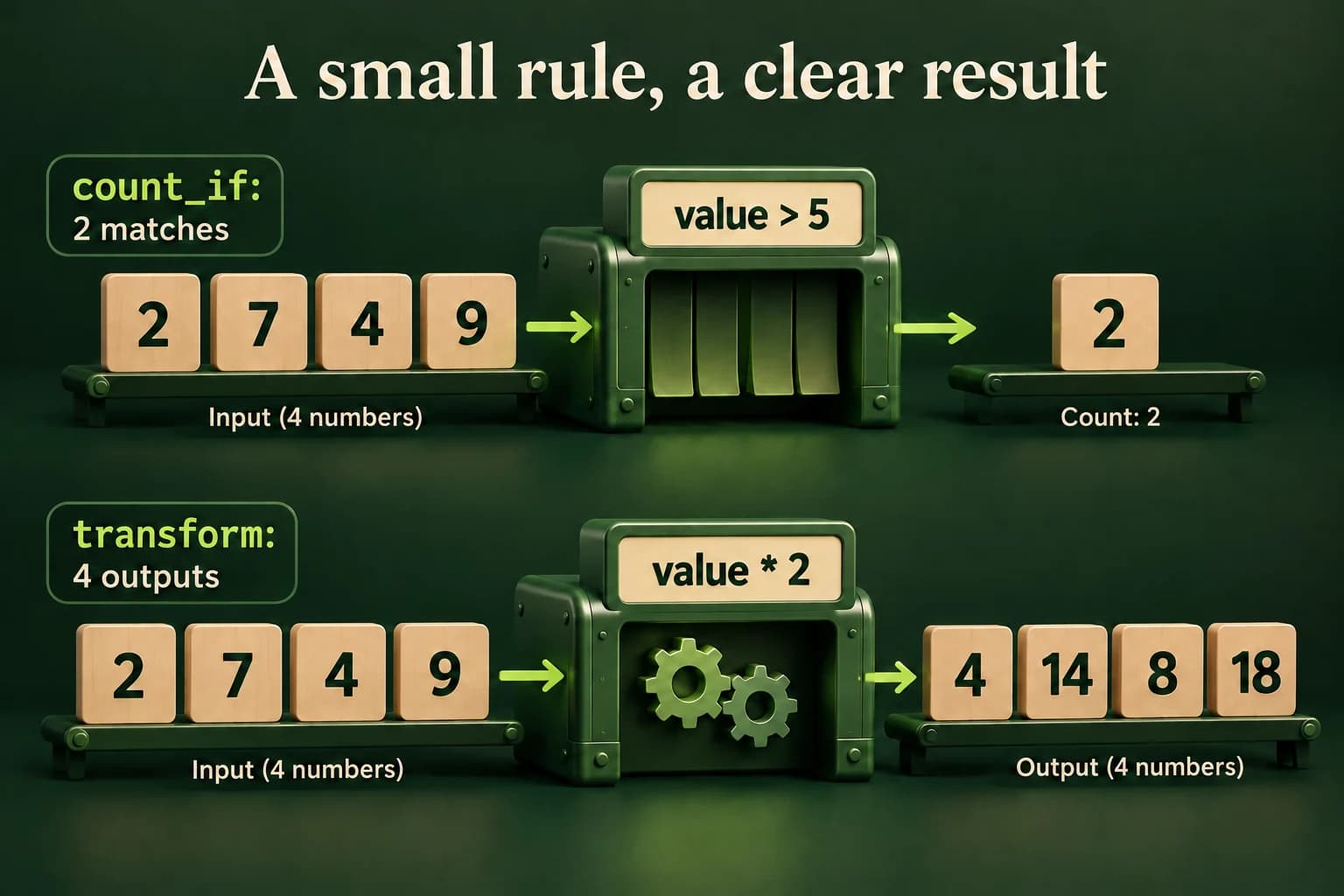
The unchanged input two, seven, four and nine is tested by a greater-than-five rule, producing two matches. A separate doubling operation creates four outputs: four, fourteen, eight and eighteen.
count_if counts matches without removing values. transform writes a result for every input value in this example; it needs actual output storage, not merely unused vector capacity.
C++ PRACTICE RUNNER

Read a lambda like a small function

The brackets are the capture list, the parentheses hold the parameter, and the braces hold the work.

#include <iostream>
int main() {
    const auto isEven = [](int value) { return value % 2 == 0; };
    std::cout << std::boolalpha << isEven(4) << '\n';
    std::cout << isEven(7) << '\n';
}
TERMINAL OUTPUT
Predict the output, edit the source, then select Run code.

C++20 compiler runner: source and input are sent only when you press Run to this website's execution endpoint, not an external vendor. Local preview requires Docker and gcc:14; production requires a separately isolated execution service. Network is disabled; execution is limited to 3 seconds, compilation to 10 seconds, memory to 384 MB and output to 32 KB. Single-file programs only. Don't enter secrets. Edits reset on refresh; Copy your work to keep it.

Compare with the starter's expected output
true
false

After editing inputs, calculate a new prediction; this reference describes only the starter.

Read brackets, input and result one part at a time

In the first example, [] means the lambda does not take any outside local variables with it. (int value) says it receives one integer when called. The body returns whether the remainder after division by two is zero. isEven is a local name for this callable object. auto lets the compiler name its special type for us. Calling isEven(4) works much like calling an ordinary function.

The expression value % 2 == 0 returns a bool. Four passes the test, while seven does not. boolalpha asks the output stream to display true and false rather than one and zero. Nothing in this lambda changes the original number. A small read-only rule is a useful place to begin because its result depends only on its input and is easy to check by hand.

Do not confuse declaring the lambda with calling it. The declaration creates the callable object, but the body runs when it is called. The parameter name is local to that call. If a rule is used in several places or needs a long explanation, give it a clear name or write a regular function. A lambda is a tool for keeping a short rule close to its use, not permission to hide a complicated program inside one line.

  • [] takes no outside local state.
  • (int value) receives one number.
  • The body checks the remainder and returns true or false.
  • isEven(4) calls the rule and produces true.
C++ PRACTICE RUNNER

Search, count and build a result

The destination vector has four existing elements before transform writes to it.

#include <algorithm>
#include <iostream>
#include <vector>
int main() {
    const std::vector<int> values{2, 7, 4, 9};
    const auto found = std::find(values.begin(), values.end(), 4);
    if (found != values.end()) std::cout << "Found: " << *found << '\n';
    const auto count = std::count_if(values.begin(), values.end(),
        [](int value) { return value > 5; });
    std::cout << "Matches: " << count << '\n';
    std::vector<int> doubled(values.size());
    std::transform(values.begin(), values.end(), doubled.begin(),
        [](int value) { return value * 2; });
    std::cout << "Doubled:";
    for (int value : doubled) std::cout << ' ' << value;
    std::cout << '\n';
}
TERMINAL OUTPUT
Predict the output, edit the source, then select Run code.

C++20 compiler runner: source and input are sent only when you press Run to this website's execution endpoint, not an external vendor. Local preview requires Docker and gcc:14; production requires a separately isolated execution service. Network is disabled; execution is limited to 3 seconds, compilation to 10 seconds, memory to 384 MB and output to 32 KB. Single-file programs only. Don't enter secrets. Edits reset on refresh; Copy your work to keep it.

Compare with the starter's expected output
Found: 4
Matches: 2
Doubled: 4 14 8 18

After editing inputs, calculate a new prediction; this reference describes only the starter.

Check what each algorithm changes

find returns an iterator to the first matching element, or end when no match exists. The check before *found is required because end is not a stored value. find does a straightforward search through the sequence. It does not require sorting first. Try searching for eight instead of four and decide what your program should print when the result is missing. A missing value is a normal possible result, not automatically a program failure.

count_if applies the predicate to the input values and returns how many pass. In our vector, seven and nine are greater than five, so the count is two. It does not remove two or four. It does not put the matching values into another vector. Read the algorithm's name and contract carefully: counting, selecting and removing are different tasks even when they use the same true-or-false rule.

transform applies its rule to each input and writes results to the output positions. doubled(values.size()) creates enough real elements. reserve alone would only arrange capacity; it would not create elements to write through begin. Another valid approach is back_inserter with the proper header, but this lesson uses a sized destination first. Keep the input and output separate while learning, and check the size before running an algorithm that writes through iterators.

C++ PRACTICE RUNNER

Repair a missing capture

Intentional compile error: limit is an outside local variable. Change [] to [limit] so the rule keeps a value copy.

#include <iostream>
int main() {
    int limit{5};
    const auto above = [](int value) { return value > limit; };
    std::cout << above(7) << '\n';
}
TERMINAL OUTPUT
Predict the output, edit the source, then select Run code.

C++20 compiler runner: source and input are sent only when you press Run to this website's execution endpoint, not an external vendor. Local preview requires Docker and gcc:14; production requires a separately isolated execution service. Network is disabled; execution is limited to 3 seconds, compilation to 10 seconds, memory to 384 MB and output to 32 KB. Single-file programs only. Don't enter secrets. Edits reset on refresh; Copy your work to keep it.

Capture means what the rule keeps from outside

A lambda can use outside local data when its capture list allows it. [limit] stores a value copy of limit in the callable object. [&limit] refers to the existing local variable instead. The difference is similar to copying a value versus borrowing it in the pointer lesson. A reference capture must not be used after the referred-to local object is destroyed. A convenient short spelling does not remove the lifetime rule.

Repair the broken example with [limit]. The local rule then has its own copied threshold, and calling it with seven gives true. If the original mutable limit later changes, the stored copy does not automatically change with it. That is often what you want for one fixed calculation. For beginners, an explicit named value capture is easier to review than a broad default capture that quietly takes many outside variables.

Avoid making a predicate depend on a changing counter or on the order in which the algorithm happens to call it. Write a rule that answers the same question for the same input during the calculation. Also remember that algorithms may copy callable objects. A hidden mutable counter inside one copy is not a reliable way to count all visits. Use count_if for counting and keep the test itself focused on the value being tested.

Count above a limit and double the data

Read a count from zero through six, then that many readings between minus fifty and fifty, then one threshold in that same range. Every required number uses a complete input line. Validate everything before reporting. Use count_if with an explicit value capture of the threshold. A reading must be strictly greater than the threshold to count; a reading equal to it does not pass.

Create an output vector with the same size as the readings, then use transform to double each value. These bounds keep every result between minus one hundred and one hundred, so there is no integer overflow in this task. Print Above followed by the count, then Doubled followed by the new sequence in its original order. An empty input sequence gives Above: 0 and an empty Doubled row, but still requires the threshold line.

Test equal-to-threshold values, repeated values, negative readings, zero and both allowed endpoints. Reject suffixes, overflow and missing lines as Invalid input with status one. Keep the source vector unchanged and confirm the doubled vector has exactly the original number of elements. Explain why a count is not a filtered vector, and why having capacity is not the same as having writable elements. These two distinctions prevent common first mistakes.

LOCAL TERMINAL COMMANDS

Run the same program on your computer

Save one complete example as main.cpp. Choose your installed compiler and run only after a successful build. These are terminal commands, not C++ source. The in-page Run button needs the configured compiler sandbox.

macOS / Linux:
clang++ -std=c++20 -Wall -Wextra -Wpedantic main.cpp -o lesson
# Or use g++ with the same options.
./lesson

Windows Developer Command Prompt:
cl /std:c++20 /EHsc /W4 main.cpp /Fe:lesson.exe
lesson.exe
APPLY THE CONCEPT

Independent lab

Use a captured threshold to count readings, then build a doubled result without changing the input.

Acceptance checklist

  • Read count 0..6, that many readings -50..50, then a threshold -50..50 on whole lines.
  • Reject bad required input as Invalid input with status 1 before any report.
  • Use count_if with an explicit value capture and strict greater-than comparison.
  • Use transform with a destination sized to the input; leave input unchanged.
  • Print Above and Doubled, including empty data and bounded arithmetic.
Need a hint?
  1. Collect the threshold after the readings, even when the count is zero.
  2. Use [threshold](int value) for the counting rule.
  3. std::vector<int> doubled(values.size()) creates actual output elements.
C++ PRACTICE RUNNER

Write and run your lab

Build your own solution before revealing the reference. Use the input field for normal, boundary and invalid cases; this runner executes your program but does not grade it.

#include <iostream>
#include <string>
#include <sstream>
#include <limits>

int main() {
    // Implement the acceptance checklist above.
    return 0;
}

TERMINAL OUTPUT
Predict the output, edit the source, then select Run code.

C++20 compiler runner: source and input are sent only when you press Run to this website's execution endpoint, not an external vendor. Local preview requires Docker and gcc:14; production requires a separately isolated execution service. Network is disabled; execution is limited to 3 seconds, compilation to 10 seconds, memory to 384 MB and output to 32 KB. Single-file programs only. Don't enter secrets. Edits reset on refresh; Copy your work to keep it.

Your lab evidence and notes

Record predictions, actual output, commands and the cause of each repair. Code is plain text: this scratchpad does not execute or grade C++.

Loading local notes…

Review your acceptance checklist and quiz explanations before marking this lesson complete. This is self-review, not a grade or certification.

Reveal the explained lab solution
C++ PRACTICE RUNNER

Reference lab solution

Compare the reference with your own reasoning. Running this solution does not grade or complete the lesson.

#include <iostream>
#include <sstream>
#include <string>
bool readInteger(int& value) {
    std::string line;
    if (!std::getline(std::cin, line)) return false;
    std::istringstream parser{line};
    if (!(parser >> value)) return false;
    parser >> std::ws;
    return parser.eof();
}
#include <algorithm>
#include <vector>
int main() {
    int count{};
    if (!readInteger(count) || count < 0 || count > 6) {
        std::cout << "Invalid input\n"; return 1;
    }
    std::vector<int> values;
    for (int i = 0; i < count; ++i) {
        int value{};
        if (!readInteger(value) || value < -50 || value > 50) {
            std::cout << "Invalid input\n"; return 1;
        }
        values.push_back(value);
    }
    int threshold{};
    if (!readInteger(threshold) || threshold < -50 || threshold > 50) {
        std::cout << "Invalid input\n"; return 1;
    }
    const auto above = std::count_if(values.begin(), values.end(),
        [threshold](int value) { return value > threshold; });
    std::vector<int> doubled(values.size());
    std::transform(values.begin(), values.end(), doubled.begin(),
        [](int value) { return value * 2; });
    std::cout << "Above: " << above << "\nDoubled:";
    for (int value : doubled) std::cout << ' ' << value;
    std::cout << '\n';
}
TERMINAL OUTPUT
Predict the output, edit the source, then select Run code.

C++20 compiler runner: source and input are sent only when you press Run to this website's execution endpoint, not an external vendor. Local preview requires Docker and gcc:14; production requires a separately isolated execution service. Network is disabled; execution is limited to 3 seconds, compilation to 10 seconds, memory to 384 MB and output to 32 KB. Single-file programs only. Don't enter secrets. Edits reset on refresh; Copy your work to keep it.

Expected output

Above: 2
Doubled: -4 0 10 10

The threshold is captured by value, so the predicate reads one fixed copied rule during counting.

The sized output vector gives transform one valid output position per input value. reserve alone would not provide these elements.

The input range is small and bounded. Negative values, duplicates and an empty range have defined results without special unsafe indexing.

Review before moving on

Explain the lesson's objectives in your own words, compare your lab evidence with the acceptance checklist, and keep the first failing case alongside your repair. Completing a page is not proof that every C++ feature or input is supported.

  • Read the parts of a small lambda expression.
  • Use find and check its end result.
  • Count matching values with count_if.
  • Transform values into real output storage.
  • Choose a safe value capture for a local rule.

References and further reading

Original examples and exercises accompany these primary references. Tool-specific diagnostics and support depend on your installed version.

  • C++ draft: lambda expressions
  • C++ draft: non-modifying algorithms
  • C++ draft: transform
KNOWLEDGE CHECK

Check your understanding

Answer all five questions, then review the explanations. Answers are not saved or synced; completion is a separate self-review choice.

01What is a predicate?
02find returns end. What should happen before reading through the result?
03What does [threshold] keep in this lesson?
04Does reserve(6) alone create six vector elements?
05Does count_if remove nonmatching values?
PREVIOUS LESSONC++ set, queue and stack: When to Use Each
NEXT LESSONC++ sort and binary_search: Rules and Complexity
ON THIS PAGELearning objectivesAn algorithm names a job you already knowRead brackets, input and result one part at a timeCheck what each algorithm changesCapture means what the rule keeps from outsideCount above a limit and double the dataIndependent labReviewKnowledge checkReferences
Course overview