
C++ Templates: Function and Class Examples
Learn C++ function and class templates in simple steps, understand type deduction and requirements, repair mismatched arguments, and test the same pattern with integers and strings.
What you will learn
- Read a template parameter as a type chosen for one use.
- Use a function template with compatible arguments.
- Explain a failed deduction without hiding it with a cast.
- Build a small class template that stores two values.
- State the comparison and copying requirements of the pattern.
Reuse a pattern when the types share the needed operations
You might write one function to choose the larger of two integers, then notice that the same comparison pattern works for two strings. A function template describes that pattern with a type parameter. The compiler uses a suitable type for a particular call and checks the required operations. This is different from storing any possible value in an untyped box and deciding what it means only when the program runs.
The spelling template<typename T> introduces T as a type parameter. In the function below, T appears in the return type and in both parameter types. For a call with two integers, T can be int. For two std::string values, T can be std::string. The name T is only a name; it does not stand for one special built-in C++ type. You can choose a more descriptive parameter name when that helps the reader.
A template is useful only when its operations make sense for the chosen type. Our larger function uses less-than and returns a value copy. A type without a suitable comparison or copy operation may not work with this pattern. Write these requirements in plain words before trying a long diagnostic. Generic code still has rules. A reusable function that does the wrong thing consistently for many types is not a useful abstraction.
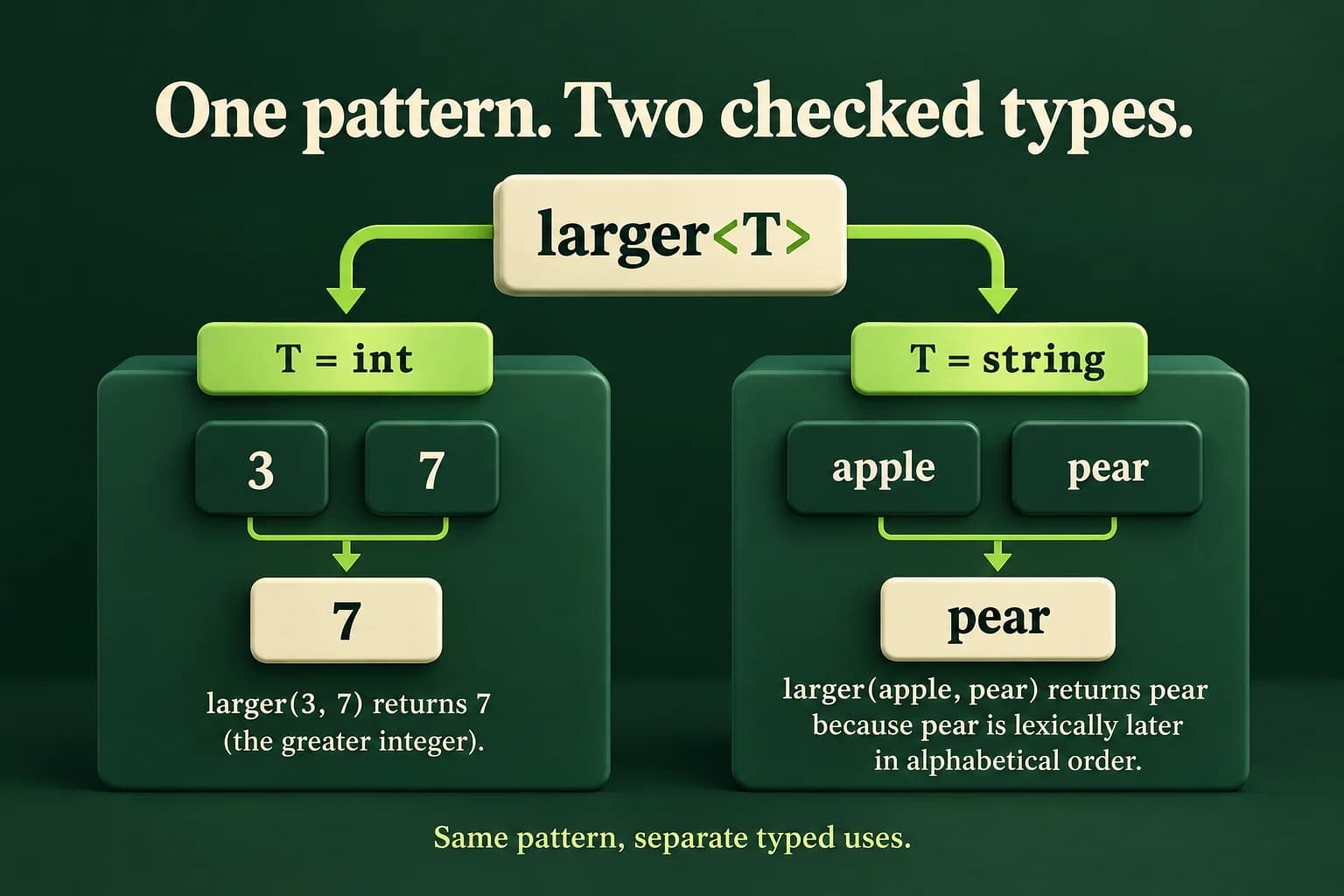
Use one function pattern with two types
Construct real string values for the text call. Comparing raw character pointers would ask a different question.
Predict the output, edit the source, then select Run code.
Compare with the starter's expected output
7
pear
After editing inputs, calculate a new prediction; this reference describes only the starter.
Read one call before generalizing
For larger(3, 7), both arguments are int, so deduction chooses T as int. The function compares three with seven and returns seven. For the second call, both arguments are string objects. Their comparison is lexical: it follows character order rather than comparing lengths. With the permitted lowercase English words in this lesson, apple comes before pear. The function returns pear as a string value.
Type deduction means the compiler works out a template argument from the call's argument types. It is not a search for every conversion that could make unrelated arguments fit. The simple two-parameter pattern expects one T for both positions. If the arguments suggest conflicting types, deduction can fail. Read the types in the call before changing the function. A compiler error often points to a mismatch in the use, not a missing keyword in the template.
Templates are normally defined where the compiler can see their bodies when needed, often in headers in larger projects. The later source-organization lessons discuss that structure. For now, keep the complete definition above main in one file. A forward declaration alone does not automatically provide all needed generated definitions somewhere else. Also do not assume templates always make programs faster or smaller; this lesson teaches checked reuse, not a performance guarantee.
- The first call supplies two int arguments.
- Deduction chooses T as int and checks the comparison.
- The second call supplies two string objects, choosing T as string.
- Each call returns a value according to its type's comparison rule.
Repair conflicting argument types deliberately
Intentional compile error. For this small value, larger<double>(2, 3.5) is a deliberate conversion choice. Do not apply that choice blindly to large integers.
Predict the output, edit the source, then select Run code.
An explicit type is a decision, not a magic repair
The broken call offers int from two and double from three-point-five. The compiler cannot deduce the single T as both. One repair is to supply two values of the same intended type. Another is to write larger<double>(2, 3.5), explicitly choosing double and allowing conversion for this small exact integer. The right repair depends on what the numbers represent. Do not choose a type merely to silence the error without checking whether information is lost.
A large integer may not be represented exactly as double, and converting a fractional value to int can discard its fraction or cause other problems outside the type's range. A more advanced function can support different input types with a deliberately chosen result rule. That is a separate design, not something the simple larger function already promises. Start with one well-defined type per call and keep the arithmetic or comparison policy easy to state.
String literals need care too. Raw string literals are character arrays that can become pointers in many contexts. A less-than comparison of pointers is not a lexical word comparison. The worked example creates std::string objects so their comparison has the intended meaning. Read the actual types of the arguments instead of assuming that two things displayed as words must automatically behave like owning strings in every generic function.
Store a typed pair and reuse the function
Pair<int> and Pair<string> are different class-template uses. Each object owns its two values.
Predict the output, edit the source, then select Run code.
Compare with the starter's expected output
7
pear
After editing inputs, calculate a new prediction; this reference describes only the starter.
A class template keeps the type choice visible
Pair<int> owns two integers, while Pair<string> owns two strings. The constructor initializes both members, so each object begins with its values in place. largerValue is const because observing the larger value does not change the pair. It returns a value rather than a reference to one of the function's copied local parameters. Returning a reference there would create a lifetime problem when those parameters are destroyed.
This simple pattern copies values into members and again into the helper call. That is acceptable for these small teaching examples and bounded words. Later you may improve parameter passing after checking the ownership and performance needs. Do not turn a clear safe value return into a dangling reference in the name of avoiding every copy. First establish correct behavior, then measure whether copying is a real cost for the intended workload.
The requirements are now easy to list: the selected type must be usable for these value copies, and less-than must provide the intended comparison. The two operands in each call must match the same deduced type unless you explicitly select a conversion policy. The next lesson introduces concepts for expressing some requirements in code. Even then, a compiler constraint cannot prove that your comparison matches a product's real-world meaning.
Use a concrete function when it is clearer
Not every repeated-looking function needs a template. If two types need different business rules, one generic less-than expression may hide that difference. For example, a longer word is not necessarily the lexically later word. A specific longerWord function may explain its purpose better. Choose a shared pattern only when both the operation and its meaning are genuinely shared by the types you plan to support.
For ties, our helper returns first because first < second is false. With equal integers or identical strings, the returned value looks the same either way. For richer objects, tie policy may matter and should be documented. Test both argument orders, equal values and boundary values. Do not assume a function is correct for strings merely because its integer example passed. Each intended type use deserves its own observable checks.
Test one pattern with numbers and words
Read two whole integer lines in minus one hundred through one hundred, followed by two exact word lines of one through twelve lowercase English letters. Reject missing input, invalid syntax, out-of-range numbers or unsupported word characters as Invalid input with status one. Validate all four values before output. Word lines are not trimmed. The numeric helper accepts surrounding integer whitespace, following the earlier input contract.
Implement larger<T> and Pair<T>, then create an integer pair and a string pair. Print Number and Word using largerValue. The word result follows lexical character order, not length. Test negative numbers, zero, equal numbers, equal words, a shorter word that sorts later, and maximum accepted lengths. Explain the requirements of the template and show how the intentionally mismatched earlier call is repaired. A passing lab should demonstrate understood types, not only copied angle brackets.
Compile and check one complete program
Save one example as main.cpp. Choose your installed compiler. Run only after a successful build. The in-page editor needs the configured compiler sandbox; these terminal commands are an alternative, not proof that the sandbox is running.
macOS / Linux:
clang++ -std=c++20 -Wall -Wextra -Wpedantic main.cpp -o lesson
# Or use g++ with the same options.
./lesson

Windows Developer Command Prompt:
cl /std:c++20 /EHsc /W4 main.cpp /Fe:lesson.exe
lesson.exeIndependent lab
Apply one checked function-and-class pattern to bounded integers and owning strings.
Acceptance checklist
- Read two whole integers in -100..100 and two exact lowercase-English words of length 1..12.
- Validate all required input before output; reject invalid input with status 1.
- Implement larger<T> using strict less-than and a value return; document the first-value tie rule.
- Implement Pair<T> with initialized owned members and const largerValue calling the helper.
- Print Number and Word for Pair<int> and Pair<string>; use lexical string comparison, not length.
Need a hint?
- Both arguments to each deduced larger call have the same type.
- Use actual string objects for word comparison.
- Return a value; do not return a reference to copied function parameters.
Write and run your lab
Build your own solution before revealing the reference. Use the input field for normal, boundary and invalid cases; this runner executes your program but does not grade it.
Predict the output, edit the source, then select Run code.
Your lab evidence and notes
Record predictions, actual output, commands and the cause of each repair. Code is plain text: this scratchpad does not execute or grade C++.
Loading local notes…
Review your acceptance checklist and quiz explanations before marking this lesson complete. This is self-review, not a grade or certification.
Reveal the explained lab solution
Reference lab solution
Compare the reference with your own reasoning. Running this solution does not grade or complete the lesson.
Predict the output, edit the source, then select Run code.
Expected output
Number: 7
Word: pear
The two intended types are checked through separate uses of the same pattern. There is no runtime conversion from a number into a word.
Pair owns its members and largerValue returns a value. No result refers to a helper parameter that has already been destroyed.
The helper compares by each type's less-than meaning. Bounds and exact word rules keep the lab focused without claiming to implement locale-aware dictionary ordering.
Review before moving on
Explain the lesson's objectives in your own words, compare your lab evidence with the acceptance checklist, and keep the first failing case alongside your repair. Completing a page is not proof that every C++ feature or input is supported.
- Read a template parameter as a type chosen for one use.
- Use a function template with compatible arguments.
- Explain a failed deduction without hiding it with a cast.
- Build a small class template that stores two values.
- State the comparison and copying requirements of the pattern.
References and further reading
Original examples and exercises accompany these primary references. Tool-specific diagnostics and support depend on your installed version.