
C++ Object Lifetime, Destructors and RAII
Learn C++ object lifetime, destructors and RAII with nested scope traces, reverse cleanup order, early return, exception unwinding and explicit limits.
What you will learn
- Connect a resource owner's lifetime with scope-bound cleanup.
- Predict reverse destruction order for fully constructed automatic objects.
- Trace cleanup on normal exit, return and caught exception unwinding.
- Distinguish an owner from a non-owning reference or pointer.
- Recognize forced-termination and failed-construction limits of cleanup claims.
RAII ties a resource to an object's lifetime
RAII stands for Resource Acquisition Is Initialization. The useful idea is to represent a resource's ownership with an object whose construction establishes its usable state and whose destruction releases what it owns. Standard strings and vectors already use this principle for their managed storage. Later examples can apply it to file handles, locks or other resources, but the principle is about a lifetime contract rather than a particular memory-allocation keyword.
An automatic local object normally leaves its scope when control reaches the closing brace, returns out of the function, or unwinds that scope on an exception that is caught outside it. A destructor provides a cleanup operation for an owner. This reduces the need to repeat a matching manual release at every branch. The owner type still has to implement correct cleanup; the language's lifetime machinery does not invent resource-release behavior for an arbitrary unowned handle.
Start by distinguishing objects from names that merely refer to them. A reference to a vector does not own another vector and does not extend the original object's lifetime in general. A raw pointer variable does not automatically delete a dynamically allocated pointee when the pointer itself goes out of scope. This lesson avoids raw owning pointers and manual new/delete because a misleading demonstration would confuse scope exit of a name with release of the resource it happens to reference.
Use a tracing owner model without pretending it holds a real lock
ScopeTrace prints Acquire when its constructor finishes establishing a name and Release from its destructor. The output makes lifetime events visible; it does not open a real file, lock a real mutex or prove that a production resource was released. Name the example as a trace rather than advertising simulated log messages as an external operation. The important observation is which destructors run and in what order for a controlled program path.
The trace type explicitly deletes copying and copy assignment so an accidental copy cannot produce confusing duplicate release messages for a name. With its user-declared destructor and deleted copying, it is not a movable general-purpose value type either. This deliberate instrumentation differs from the ordinary record in the Rule of Zero lesson. A real unique resource owner also needs a deliberate transfer policy; later smart-pointer lessons provide standard facilities instead of encouraging ad hoc copying of handles.
Destructors should not let exceptions escape during cleanup, especially while another exception is already unwinding. Our tiny trace uses the default output-stream exception behavior and does not enable exception throwing on cout. Logging here is a teaching aid, not a production cleanup implementation or a guarantee that output can never fail. For real resource types, distinguish essential release from diagnostics and design the release path not to throw.
Trace normal nested scope exit
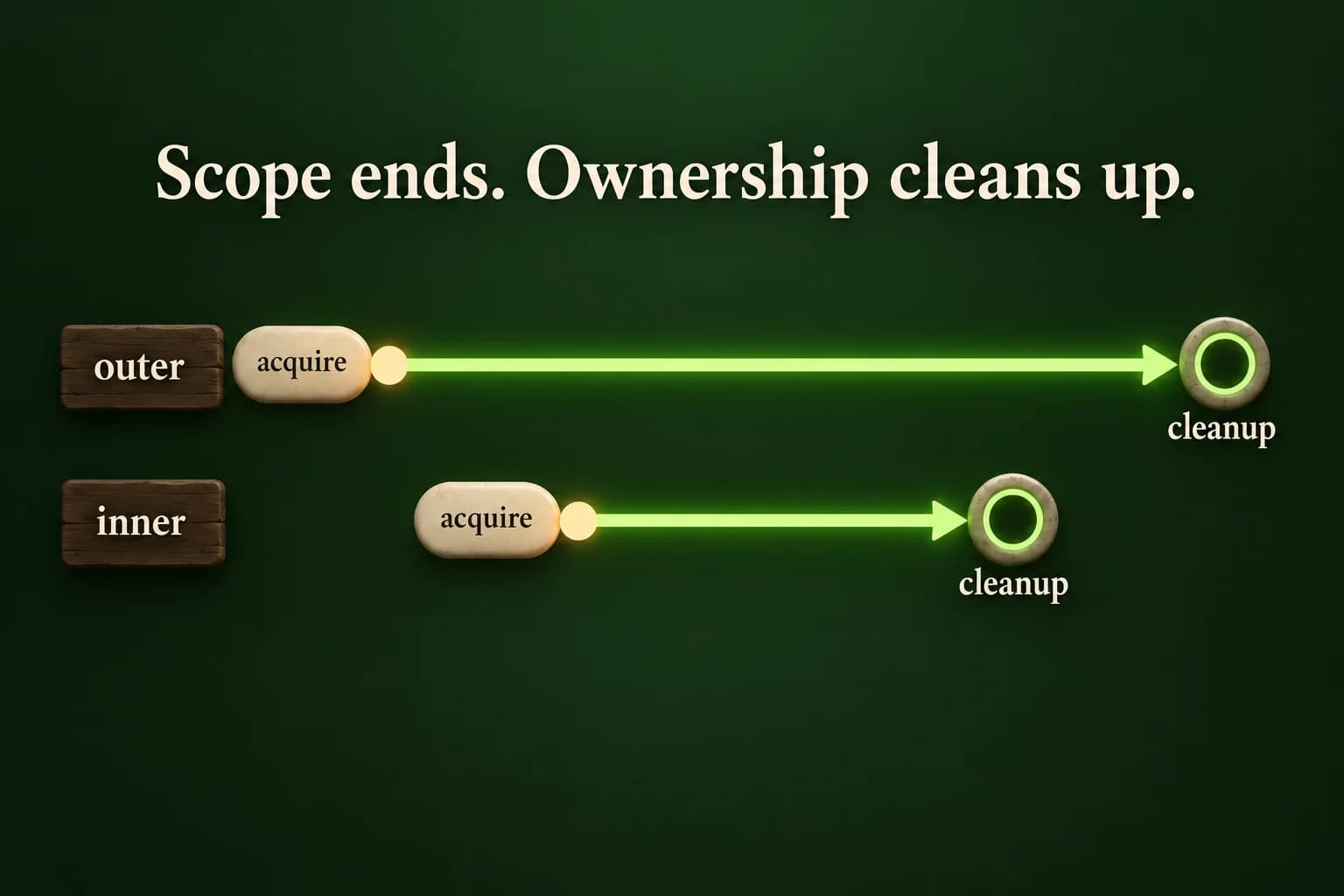
The inner object finishes its scope before the outer object. The trace is deterministic for these named local objects; there are no temporary-copy or elision assumptions.
Predict the output, edit the source, then select Run code.
Compare with the starter's expected output
Acquire outer
Acquire inner
Work
Release inner
After inner
Release outer
After editing inputs, calculate a new prediction; this reference describes only the starter.
Destroy fully constructed local objects in reverse order
For the nested local objects shown here, acquisition of the outer object finishes before the inner object is created. Leaving the inner block destroys the inner object, while the outer object remains alive until its own scope ends. This ordering supports dependency patterns where a later local object uses something owned by an earlier one. The dependent object's cleanup runs before the earlier owner disappears, provided the dependency was designed with those lifetimes in mind.
Multiple local objects in the same block are also destroyed in reverse order of their completed construction. Do not confuse this with a claim about arbitrary global objects across translation units or objects whose lifetimes are managed explicitly elsewhere. Those cases have additional rules and design hazards. The laboratory deliberately uses named automatic objects in one function so each lifetime boundary is visible and its evidence does not depend on global shutdown ordering.
Members of a complete class object are destroyed after its destructor body runs, in reverse order of their construction; base-class destruction introduces further ordering outside this beginner model. A failed constructor is another distinct case: the complete object's destructor is not called, but fully constructed members and bases are cleaned up during unwinding. Keep the phrase fully constructed in your explanation instead of saying every variable declaration always guarantees a later destructor call.
Return without duplicating cleanup code
Returning from work leaves both active scopes. The caller resumes only after the inner and outer trace objects have been destroyed.
Predict the output, edit the source, then select Run code.
Compare with the starter's expected output
Acquire outer
Acquire inner
Early return
Release inner
Release outer
Caller
After editing inputs, calculate a new prediction; this reference describes only the starter.
Caught exceptions unwind; forced termination is different
Throwing an exception that is caught outside the active local scopes unwinds those scopes and destroys their fully constructed automatic objects along the way. The lab's mode two throws runtime_error after both trace objects exist, then catches that specific exception in main. Release inner and Release outer appear before Caught. This demonstrates lifetime cleanup during a handled exceptional path, not a reason to use exceptions for every ordinary branch.
Do not claim RAII guarantees cleanup after a forced kill, a process crash, std::terminate, or every possible program-ending mechanism. Calling std::exit does not unwind ordinary automatic local objects in the calling scope the way returning does. We do not execute a forced-termination experiment in the lesson editor. Read the stated boundary and keep normal return and handled exception unwinding separate from abrupt process termination and external resource-recovery policies.
RAII is not the same as a garbage collector waiting to discover unreachable memory. The examples have deterministic scope boundaries and explicit ownership types. It also does not make dangling borrows safe: retaining a pointer to an inner object after its scope ends remains wrong even if that owner's cleanup was perfect. Correct release and valid later access are two separate questions, so explain who owns a resource and who may merely observe it while the owner is alive.
Test three paths against one ownership story
The lab reads one complete integer mode line: zero means normal work, one means early return and two means a caught demonstration exception. Malformed input or an integer outside zero through two prints Invalid input with status one before either trace object is constructed. This keeps rejection transcripts free of acquisition events and gives the parser a clear responsibility separate from lifetime tracing. Additional lines are outside the single-mode protocol and remain unread.
For normal work, expect acquisition of outer and inner, Work, release of inner, After inner and release of outer. For early return, expect both acquisitions, Early return, then the two releases without After inner. For the exception path, expect both acquisitions, both releases and then Caught, without Work or After inner. The demonstration catches its expected error and ends with status zero; do not mistake that policy for silently converting arbitrary failures into success.
Compare the full event order for each mode, not merely whether the word Release appears somewhere. Duplicate release messages, a catch before cleanup or an After inner line on the return path would each reveal a different misunderstanding. As a repair exercise, draw the active scopes beside each line of your transcript and explain why the same destructor definitions handle all three paths without copied cleanup statements. Keep the trace honest: it proves local object events, not an unobserved external resource outcome.
Build and investigate locally
Complete single-file programs use the compiler-backed editor when its sandbox is available. Otherwise save one program as main.cpp and build with your installed C++20 compiler. Expected output is a comparison target, not a substitute for execution.
macOS / Linux (choose your compiler):
clang++ -std=c++20 -Wall -Wextra -Wpedantic main.cpp -o lesson
# Or: g++ -std=c++20 -Wall -Wextra -Wpedantic main.cpp -o lesson
./lesson

Windows Developer Command Prompt:
cl /std:c++20 /EHsc /W4 main.cpp /Fe:lesson.exe
lesson.exeIndependent lab
Trace two nested noncopyable automatic objects through normal work, an early return and a caught exception.
Acceptance checklist
- Read one whole integer mode in 0..2; otherwise print Invalid input and return 1 before creating trace objects.
- Use a separate ScopeTrace type that logs construction/destruction and prevents accidental copying.
- For mode 0 print Work and After inner at the correct active-scope boundaries.
- For mode 1 return after Early return with inner then outer cleanup and no After inner.
- For mode 2 throw runtime_error and catch it outside both owners, printing Caught only after cleanup; the three valid demonstration modes finish with status 0.
Need a hint?
- Create outer before entering the inner block, then construct inner inside it.
- Keep the return and throw inside the scope in which both objects are active.
- Catch the demonstration runtime_error in main rather than inside the inner scope.
Write and run your lab
Build your own solution before revealing the reference. Use the input field for normal, boundary and invalid cases; this runner executes your program but does not grade it.
Predict the output, edit the source, then select Run code.
Your lab evidence and notes
Record predictions, actual output, commands and the cause of each repair. Code is plain text: this scratchpad does not execute or grade C++.
Loading local notes…
Review your acceptance checklist and quiz explanations before marking this lesson complete. This is self-review, not a grade or certification.
Reveal the explained lab solution
Reference lab solution
Compare the reference with your own reasoning. Running this solution does not grade or complete the lesson.
Predict the output, edit the source, then select Run code.
Expected output
Acquire outer
Acquire inner
Work
Release inner
After inner
Release outer
The mode is parsed and validated before owners are created, so invalid input has no simulated acquisition or cleanup events.
Named automatic objects have visible nested lifetimes; return and handled exception unwinding release fully constructed objects in reverse construction order.
ScopeTrace logs a model rather than holding a real external resource. Cleanup on forced termination and the validity of retained borrows are not established by this trace.
Review before moving on
Explain the lesson's objectives in your own words, compare your lab evidence with the acceptance checklist, and keep the first failing case alongside your repair. Completing a page is not proof that every C++ feature or input is supported.
- Connect a resource owner's lifetime with scope-bound cleanup.
- Predict reverse destruction order for fully constructed automatic objects.
- Trace cleanup on normal exit, return and caught exception unwinding.
- Distinguish an owner from a non-owning reference or pointer.
- Recognize forced-termination and failed-construction limits of cleanup claims.
References and further reading
Original examples and exercises accompany these primary references. Tool-specific diagnostics and support depend on your installed version.