
C++ Strings: std::string with Examples
Use C++ std::string for owning text: construction, concatenation, comparison, find, substr and bounds checks. Normalize a small ASCII command without claiming Unicode processing.
What you will learn
- Distinguish an owning std::string from a literal or borrowed view.
- Read whole lines and compare text contents.
- Check positions before indexing or slicing.
- Handle find returning npos before arithmetic.
- Normalize only a documented ASCII command alphabet.
A string object owns a sequence of characters
std::string is a standard-library type that owns its character sequence. Include string and initialize an object such as std::string topic{"C++"}. The object tracks its length and manages storage, so you do not need a raw character allocation for a beginner text report. That ownership makes copying a string a value operation with its own contents. It does not imply every later pointer or view into those contents remains valid after changes.
A string literal, an owning string and a borrowed string view are different kinds of things. auto label = "ready" does not create an owning std::string in the ordinary declaration used earlier. Write the library type explicitly when ownership is part of the lesson. std::string_view is useful later for borrowed access, but this introduction keeps ordinary owned values so lifetime and mutation have a simple starting model.
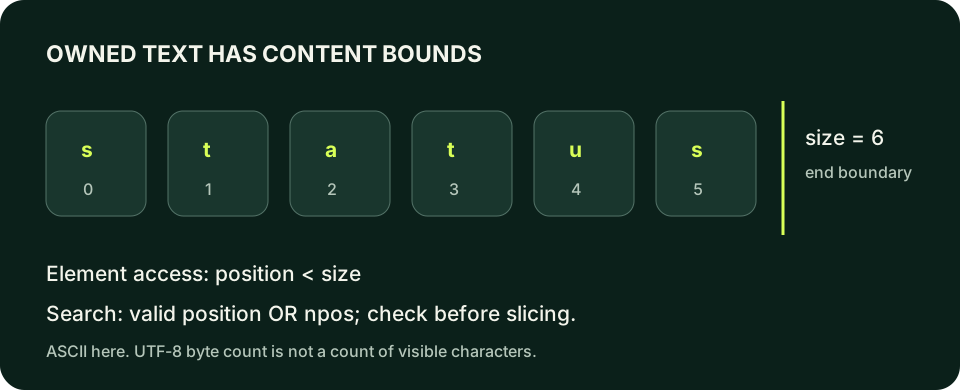
Text has an encoding as well as a storage length. std::string stores char units; when those units contain UTF-8, size counts bytes rather than user-perceived characters. A visible accented character or emoji can require several units. Do not advertise a string length counter as a universal character counter or slice arbitrary Unicode text by byte positions and assume complete symbols are preserved. Our command examples use a deliberately small ASCII vocabulary.
Print an owning text value
Change the label or command independently. This browser example uses only initialized strings and output, not string methods.
Predict the output, edit the source, then select Run code.
Compare with the starter's expected output
Command: status
After editing inputs, calculate a new prediction; this reference describes only the starter.
Combine text and compare content deliberately
For string objects, + can concatenate text and += can append to an existing object. The type of the operands matters: two raw string literals are not automatically two std::string objects whose + operation performs concatenation. Start with an owning string or use a form whose overload you can explain. Keeping a prefix, data value and delimiter separate in output is often clearer than building an intermediate string that is never reused.
== compares string contents. Lexicographic comparison orders character sequences rather than interpreting them as numbers: the ASCII text 10 can sort before 2. Case and whitespace also affect equality; Status is not status, and a trailing space remains part of a plain string. If an interface accepts multiple presentations, define a normalization policy first. Do not silently transform all input in ways that destroy meaningful formatting or identifiers.
Read an entire line with getline when spaces belong to the value. Formatted extraction with >> reads a token and can leave the rest of the line. Both operations have useful contracts, but they are not interchangeable. Check the read result before using the text, and distinguish an empty arrived line from end-of-input. The input lesson's delimiter reasoning applies equally when the destination is an owning string rather than a numeric parser.
Build a label and search its contents
The prefix is an owning string, so concatenation uses string operations. find returns the position of the first matching sequence here.
Predict the output, edit the source, then select Run code.
Compare with the starter's expected output
Task: build
Found at: 6
Slice: build
After editing inputs, calculate a new prediction; this reference describes only the starter.
Empty text has a size, but no ordinary first element
For element access, require position < text.size(). Index zero is a meaningful first character only when the string is nonempty. The past-the-end position is not an ordinary character of your data. The standard has particular rules around the terminator at size, but those do not make it a useful element for this lab. Use the simple content-access precondition instead of relying on a terminator detail to process an empty command.
operator[] does not perform the checked bounds behavior that at provides. at throws an out_of_range exception when the requested position is not a valid element. Exceptions are taught later; for now validate the position before access so the operation's precondition is visible. Do not deliberately run an out-of-bounds read as a repair experiment and treat a displayed character as reliable. Repair the condition in a safe example before any access occurs.
Use the string's size-related type for positions when needed, rather than narrowing a possibly large size to int. The lab's ASCII normalization walks char elements using a range-based loop over the string as a short preview of traversal. The full range-based lesson will cover broader iterator and invalidation rules. Do not mutate the string's structure while keeping a pointer or iterator and assuming its earlier validity automatically persists.
Check before reading the first character
An empty command prints Empty. The guard prevents ordinary element access at zero when no content exists.
Predict the output, edit the source, then select Run code.
Compare with the starter's expected output
Empty
After editing inputs, calculate a new prediction; this reference describes only the starter.
Check npos before turning search into another operation
find returns the first matching position or std::string::npos when the sequence is absent. npos is a sentinel, not a valid index for the located text. Compare with it before calling substr, indexing, or adding an offset. Position zero is a successful find, so testing if (position) would mistakenly treat a match at the start as false while failing to express the absence rule correctly.
substr(position, count) creates an owning copy from a permitted starting position, with count limiting the copied length. A starting position equal to size can produce an empty slice; a starting position beyond size is an error. Distinguish those slice rules from ordinary element indexing, whose valid positions are strictly below size. Check the search result first rather than hoping substr will turn an absent match into the empty text you intended.
A mutation such as append or replace can change length, storage and later positions. A previously found numeric position may still be in range but refer to different text after a change. Keep searches close to their uses or recompute after a relevant mutation. Ownership of the whole string does not make stale positions semantically correct. Tests should describe the relationship you need, such as the word after a colon, rather than merely an index number that happened to work once.
Handle a missing substring explicitly
No match exists. Do not pass npos to substr or interpret it as the last character's position.
Predict the output, edit the source, then select Run code.
Compare with the starter's expected output
Not found
After editing inputs, calculate a new prediction; this reference describes only the starter.
Normalize a small command alphabet—not every language
The lab accepts status or quit, ignoring only leading and trailing ASCII spaces and ASCII letter case. It deliberately does not trim tabs, collapse internal spaces, normalize accented letters, or perform Unicode case folding. A strict policy makes the result testable and avoids changing text under an inflated promise. An input such as sta tus remains unsupported; spaces inside the command are not a cosmetic variation of its spelling.
The reference uses parallel lowercase and uppercase ASCII letter strings to map a known uppercase character to its lowercase counterpart. This avoids claiming an arithmetic character-code trick works on every execution encoding. It also avoids an unexplained call to tolower: that character-classification interface has signed-char and locale considerations. For this limited alphabet, a checked lookup is a small explicit mapping a learner can inspect.
Test lowercase, uppercase, mixed case, surrounding spaces, all spaces, an empty line, internal spaces and a non-ASCII word. Accepted variants should normalize to one of the two documented commands, while unsupported text never becomes an account identifier or a real external action. The program prints a local teaching response only. Preserve the scope of the promise: owning strings and safe searches are demonstrated here, not a production internationalization or security sanitizer.
Compile the examples and your lab
The editors can compile complete single-file programs when the execution service is available. Provide input in the Standard input field before pressing Run. Alternatively save one program as main.cpp and use your installed C++20 compiler with these terminal commands.
macOS / Clang:
clang++ -std=c++20 -Wall -Wextra -Wpedantic main.cpp -o lesson
./lesson

Linux / GCC:
g++ -std=c++20 -Wall -Wextra -Wpedantic main.cpp -o lesson
./lesson

Windows Developer Command Prompt / MSVC:
cl /std:c++20 /EHsc /W4 main.cpp /Fe:lesson.exe
lesson.exeIndependent lab
Normalize one local ASCII command line to status or quit. Trim only ordinary spaces at its ends and fold only ASCII uppercase letters; reject everything else.
Acceptance checklist
- Read one complete line and distinguish input exhaustion from an empty command.
- Trim leading and trailing ASCII spaces, handling an all-space line safely.
- Map uppercase ASCII letters through a checked lookup.
- Print Ready for status, Goodbye for quit, otherwise Unsupported with status one.
- Test mixed case, internal spaces and non-ASCII input without claiming Unicode normalization.
Need a hint?
- find_first_not_of and find_last_not_of locate the trim bounds; check npos before slicing.
- A range-based char& visits each character of the owned string; structural changes are not needed during this traversal.
- Look up a character in the uppercase alphabet and reuse that position in the lowercase alphabet only after checking it.
Write and run your lab
Build your own solution before revealing the reference. Use the input field for normal, boundary and invalid cases; this runner executes your program but does not grade it.
Predict the output, edit the source, then select Run code.
Your lab evidence and notes
Record predictions, actual output, commands and the cause of each repair. Code is plain text: this scratchpad does not execute or grade C++.
Loading local notes…
Review your acceptance checklist and quiz explanations before marking this lesson complete. This is self-review, not a grade or certification.
Reveal the explained lab solution
Reference lab solution
Compare the reference with your own reasoning. Running this solution does not grade or complete the lesson.
Predict the output, edit the source, then select Run code.
Expected output
Ready
The function takes an owning value copy and returns the normalized value, leaving the caller's original line unchanged.
All-space text returns an empty string before substring arithmetic. The alphabet lookup is checked before using its position in the matching lowercase alphabet.
The char& in the range-based loop permits element updates without changing the string's length. Tabs, internal spaces and non-ASCII letters are outside the accepted command policy.
Review before moving on
Explain the lesson's objectives in your own words, compare your lab evidence with the acceptance checklist, and keep the first failing case alongside your repair. Completing a page is not proof that every C++ feature or input is supported.
- Distinguish an owning std::string from a literal or borrowed view.
- Read whole lines and compare text contents.
- Check positions before indexing or slicing.
- Handle find returning npos before arithmetic.
- Normalize only a documented ASCII command alphabet.
References and further reading
Original examples and exercises accompany these primary references. Tool-specific diagnostics and support depend on your installed version.