
C++ User Input: cin, getline and Validation
Read C++ input with cin and getline, distinguish parsing from range validation, handle stream failure and leftover newlines, and build a bounded retry without an endless loop.
What you will learn
- Check extraction before using a value.
- Separate format validation from domain validation.
- Read complete lines without losing spaces.
- Explain leftover delimiters and stream failure recovery.
- Reject trailing junk and keep retries bounded.
External text is not a validated value
A terminal receives characters, not a trustworthy integer object. A person may enter a number, a word, an empty line, an out-of-range value or end the input stream. Treat that boundary as a conversion with an observable success or failure. Initializing a destination to zero prevents an uninitialized object, but it does not make a failed read equivalent to a valid zero. Never proceed merely because a variable contains some value after extraction.
std::cin is the standard input stream. The >> operation performs formatted extraction according to the destination type. Reading an int attempts to interpret numeric text; reading a string extracts a whitespace-delimited token. Successful conversion is only the first check. A parsed count of minus three is still invalid for a requirement that allows one through five tickets. Keep syntax validity and domain validity separate so an error message tells the learner which condition failed.
An if statement executes its body when its condition is true. In if (!(std::cin >> count)), the extraction runs first, the stream's state is checked through its Boolean behavior, and ! reverses success into the failure condition. The example returns early on failure rather than using an unreliable count. You do not need a retry loop to read one value safely; a clear one-attempt program is a useful starting point before adding recovery.
Check one formatted read
Enter 3 followed by Enter. Try apples, zero and end-of-input in separate launches. This basic extraction accepts a numeric prefix; the stricter line-based example below closes that gap.
Predict the output, edit the source, then select Run code.
Compare with the starter's expected output
Tickets: 3
After editing inputs, calculate a new prediction; this reference describes only the starter.
A successful prefix is not a valid whole line
Formatted integer extraction can read the numeric prefix of 3abc and leave abc in the stream. The extraction may report success even though the user's entire line is not a valid integer entry. If your interface promises exactly one integer per line, read the complete line first and parse that bounded string separately. Then verify that only permitted trailing whitespace remains. This is a stronger contract than assuming extraction consumed everything the person typed.
std::getline(std::cin, line) stores a whole line without its newline delimiter. It preserves spaces within the line, making it suitable for names or free-form labels. Check its success too: end-of-input is not a reason to repeatedly request text forever. An empty line can be a successful line read, even if the domain rejects it. That distinction matters when tests compare an intentionally blank submission with an input stream that has ended.
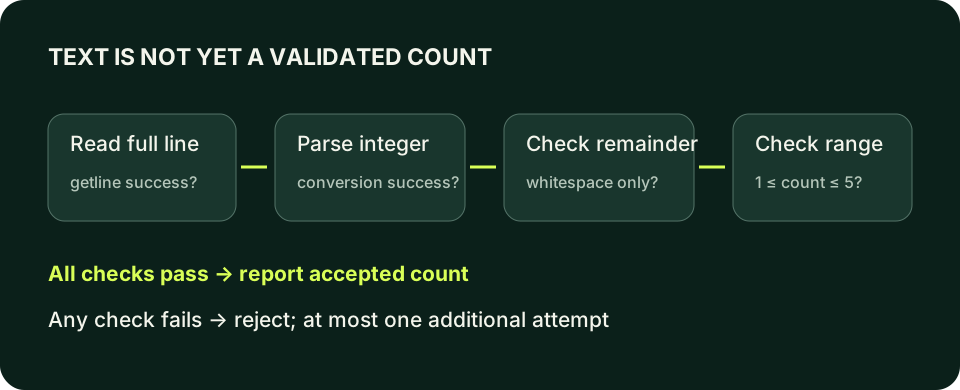
The lab uses std::istringstream to parse a saved line. This creates a separate input stream over text, so its parse failure does not poison std::cin for the next line. After extracting count, std::ws consumes remaining whitespace. The eof check then verifies there is no extra token or suffix. The ordering matters: first confirm numeric extraction succeeded, then inspect the remainder, then apply the range rule. A single vague 'bad input' condition would hide these separate decisions.
Why getline sometimes appears to skip a prompt
Formatted extraction commonly leaves the terminating newline behind. If you read an integer with >> and immediately call getline on the same stream, getline can consume that pending newline and return an empty string. The line-reading function is following its contract, not randomly skipping work. Choose one input style for a small program when possible. Reading lines consistently avoids mixing delimiter rules and makes transcripts easier to reason about.
When the requirement genuinely mixes styles, discard the remainder of the numeric line before reading the next whole line. std::cin.ignore(std::numeric_limits<std::streamsize>::max(), '\n') reads through the next newline, subject to stream state. This discards the rest of that line, including text you might otherwise want to validate. Explain that choice rather than treating ignore as a magic fix placed after every input operation.
getline(std::cin >> std::ws, name) is another common pattern, but std::ws removes all leading whitespace. It can skip blank lines and remove meaningful indentation. That is appropriate for some interfaces and incorrect for others. If a blank line is a meaningful response, preserve it with a plain getline and explicit delimiter management. Your input strategy should follow the user's data contract, not whichever short expression appears first in a search result.
Read a count and then a full label
Enter 2 on the first line and Blue team on the second. ignore intentionally discards the rest of the count line before getline reads the label.
Predict the output, edit the source, then select Run code.
Compare with the starter's expected output
Blue team: 2
After editing inputs, calculate a new prediction; this reference describes only the starter.
Recovery needs both state and character handling
A failed formatted extraction sets failure state. Further formatted reads typically do not make useful progress until that state is addressed. clear resets state flags; it does not remove the characters that caused the failure. Conversely, discarding characters without first clearing a failed stream may not achieve the intended recovery. For a recoverable nonnumeric line, clear then ignore through its newline before offering another bounded read.
End-of-input and a serious stream error deserve separate treatment from a recoverable format mistake. Do not blindly clear and retry when the input source has ended. A real retry loop needs an explicit termination policy and will be introduced with loops. This lesson allows at most two full-line attempts, making the stopping rule visible without introducing unbounded repetition. The second attempt is optional, and no accepted report is produced unless that attempt passes the same checks.
Large numeric text that does not fit int must fail parsing rather than enter your domain as a guessed truncated count. Test it alongside words and suffixes. This is why the validation receipt records both the actual text and observed status. A range comparison cannot fix an extraction that failed earlier, and a valid extraction cannot prove a value meets a business rule. Keep the accepted value unavailable to the report until both stages succeed.
Recover once from a nonnumeric formatted line
Enter apples then 4 on the next line. This demonstrates clear plus ignore with only one retry; it intentionally remains prefix-based rather than claiming strict whole-line validation.
Predict the output, edit the source, then select Run code.
Compare with the starter's expected output
Tickets: 4
After editing inputs, calculate a new prediction; this reference describes only the starter.
Use transcripts to prove the boundary
Keep independent launches for a normal value, each endpoint, just outside each endpoint, a blank line, a word, a suffix such as 3abc, an oversized integer and end-of-input. For the two-attempt lab, also test invalid-then-valid and invalid-then-invalid sequences. Expected output should distinguish acceptance from failure without requiring personal information. Use fictional labels when experimenting; this lesson stores only your voluntary local notes, not the terminal input itself.
A program that accepts three does not yet demonstrate reliable input handling. The useful evidence is that rejected text never produces an accepted ticket report, valid boundaries survive parsing, and the program terminates when attempts are exhausted or the input ends. Preserve the first failing transcript when repairing a parser. In the next lesson, the same separation of valid data and valid decisions becomes the foundation for ordered if/else branches.
Build and run the local examples
Save one complete example or lab solution as main.cpp. Choose your installed toolchain; run only after a successful build. Input examples wait for text in your terminal. The browser teaching interpreter does not support these full-language features.
macOS / Clang:
clang++ -std=c++20 -Wall -Wextra -Wpedantic main.cpp -o lesson
./lesson

Linux / GCC:
g++ -std=c++20 -Wall -Wextra -Wpedantic main.cpp -o lesson
./lesson

Windows Developer Command Prompt / MSVC:
cl /std:c++20 /EHsc /W4 main.cpp /Fe:lesson.exe
lesson.exeIndependent lab
Accept one whole-line ticket count from one through five. Permit at most one additional line after a failed parse or range check. Use the same validation for both attempts.
Acceptance checklist
- Read lines with getline, preserving each attempted line.
- Parse with a separate istringstream and reject trailing nonwhitespace.
- Accept only counts from one through five.
- Allow at most two lines and stop on end-of-input.
- Print Tickets: 3 for input apples followed by 3; never report accepted tickets for 3abc.
Need a hint?
- A small local lambda reuses the validation body; its syntax is explained below, and the later functions lesson develops named functions.
- Check parse success before consuming trailing whitespace.
- After ws, eof means there is no remaining text; do not check the stream as though another value must exist.
Write and run your lab
Build your own solution before revealing the reference. Use the input field for normal, boundary and invalid cases; this runner executes your program but does not grade it.
Predict the output, edit the source, then select Run code.
Your lab evidence and notes
Record predictions, actual output, commands and the cause of each repair. Code is plain text: this scratchpad does not execute or grade C++.
Loading local notes…
Review your acceptance checklist and quiz explanations before marking this lesson complete. This is self-review, not a grade or certification.
Reveal the explained lab solution
Reference lab solution
Compare the reference with your own reasoning. Running this solution does not grade or complete the lesson.
Predict the output, edit the source, then select Run code.
Expected output
Try once more
Tickets: 3
The local lambda is a small reusable operation: [] captures nothing, () takes no arguments, -> int names its result, and braces hold its body. Calling readCount() performs one attempted read. This is a preview, not an assumption that functions have already been taught.
Minus one is an unambiguous invalid marker because the accepted domain is one through five. General models may need optional or another explicit result type later.
A parser failure affects only the temporary parser. The next getline can read a fresh line without clearing std::cin; two failed attempts return status one and never print an accepted count.
Review before moving on
Explain the lesson's objectives in your own words, compare your lab evidence with the acceptance checklist, and keep the first failing case alongside your repair. Completing a page is not proof that every C++ feature or input is supported.
- Check extraction before using a value.
- Separate format validation from domain validation.
- Read complete lines without losing spaces.
- Explain leftover delimiters and stream failure recovery.
- Reject trailing junk and keep retries bounded.
References and further reading
Original examples and exercises accompany these primary references. Tool-specific diagnostics and support depend on your installed version.