
C++ Dependencies and CTest: Automated Tests
Learn C++ dependency management and CTest with a shared library target, real boundary tests, meaningful failure exit codes and a repeatable offline build-and-test workflow.
What you will learn
- Share one implementation between an app and tests.
- Register a test executable with CTest.
- Make a failed check return a nonzero process status.
- Document dependency versions, sources and licenses.
- Verify a fresh build and prove a broken rule fails its test.
Let one command run checks another person can repeat
You already know how to compare a function's actual answer with an expected answer. The next step is making those checks easy to find and run from a clean project. CTest is CMake's test-running tool. It starts registered test commands and reports their results. It is not a replacement for writing useful test cases. A test program that never checks an answer can exit successfully while the application is still wrong.
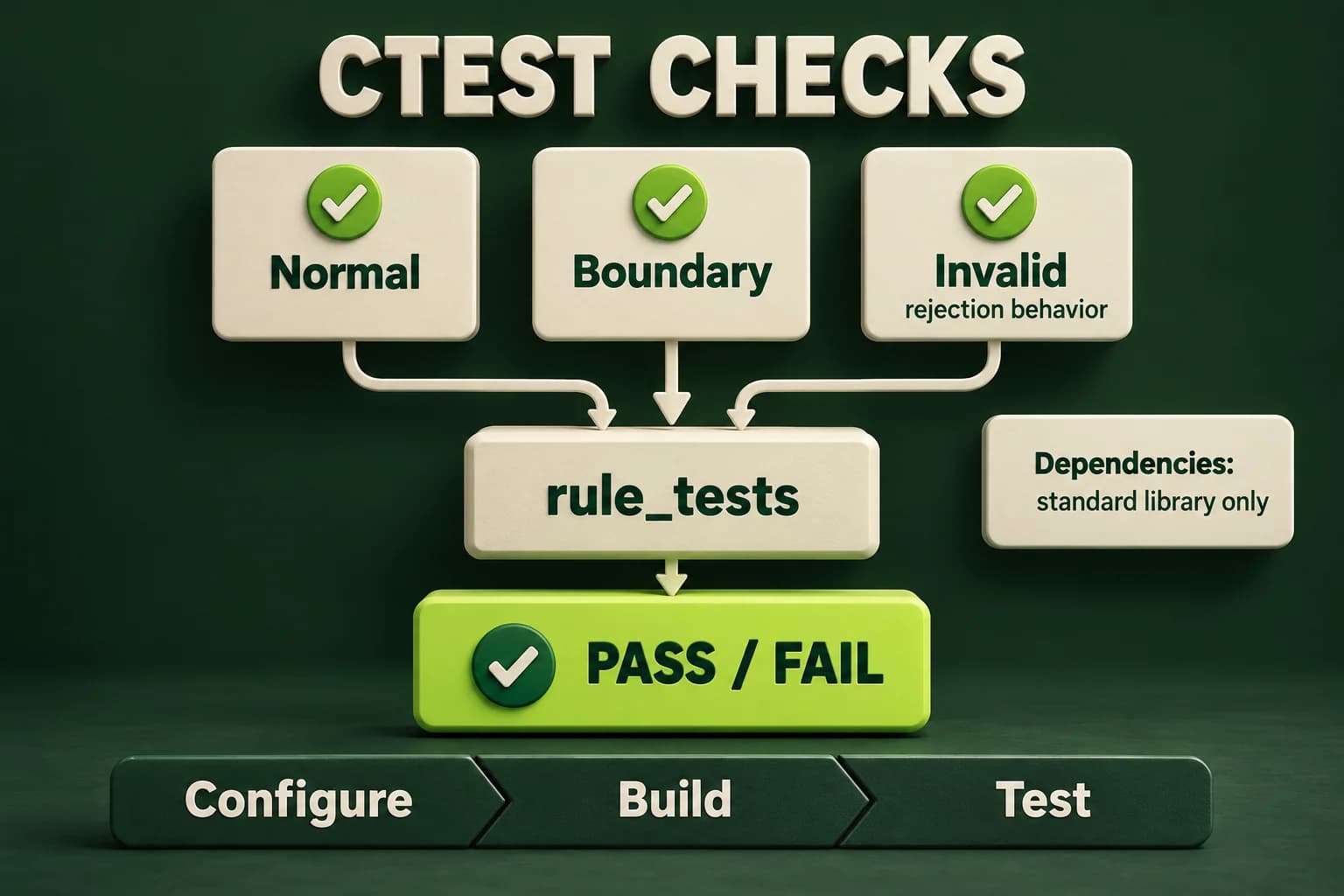
This lesson keeps the same bounded addition rule: each operand is in minus one hundred through one hundred, and the answer is their sum. Rejection is represented by an empty optional, not by zero. Normal, boundary and invalid cases all have explicit expected results. The normal case catches arithmetic mistakes. Endpoints catch incorrect comparisons. Invalid cases check that rejected input is not converted into a plausible answer.
A dependency is something your project relies on. Your own report_core library becomes a dependency of both the application and its test executable. The compiler, CMake and standard library are environment dependencies. A downloaded testing framework would add another dependency, but we do not need one here. Starting with the standard library makes the build work without network access after the development tools are installed and helps you understand which part supplies each behavior.
Compile the rule once and link both callers to it
Create include/total.hpp, src/total.cpp and src/main.cpp with the same contents shown below. Add tests/total_tests.cpp. Instead of listing total.cpp in two executables, create a report_core library target from it. Link report and rule_tests to that target. Both callers now use the same saved implementation. Testing a copied function in another file would risk proving a version that the real application never calls.
The include path and C++20 requirement are PUBLIC on report_core. The header exposes optional, so callers need compatible language support and must be able to find the header. PUBLIC applies those usage requirements to the library and passes them to targets that link it. The app's link is PRIVATE because it is not publishing a reusable interface to another target. These words describe build relationships, not runtime permissions.
The test program loops over a fixed table. Each row names the case, supplies two inputs and gives an independently stated optional result. It compares the complete optional values, so a present zero differs from absence. On a mismatch it prints the case name to the error stream and increments failed. Returning one when any check fails gives CTest a meaningful process result even in a Release build with assertions disabled.
include/total.hpp
include/total.hppSave this file at the shown path inside the project folder. Build the complete project locally; this file is not an independent in-page program.
#ifndef SOVRA_TOTAL_HPP
#define SOVRA_TOTAL_HPP
#include <optional>
std::optional<int> boundedTotal(int first, int second);
#endif
src/total.cpp
src/total.cppSave this file at the shown path inside the project folder. Build the complete project locally; this file is not an independent in-page program.
#include "total.hpp"
std::optional<int> boundedTotal(int first, int second) {
    if (first < -100 || first > 100 || second < -100 || second > 100)
        return std::nullopt;
    return first + second;
}
src/main.cpp
src/main.cppSave this file at the shown path inside the project folder. Build the complete project locally; this file is not an independent in-page program.
#include "total.hpp"
#include <iostream>
#include <sstream>
#include <string>
bool readInteger(int& value) {
    std::string line;
    if (!std::getline(std::cin, line)) return false;
    std::istringstream parser{line};
    if (!(parser >> value)) return false;
    parser >> std::ws;
    return parser.eof();
}
int main() {
    int first{}, second{};
    if (!readInteger(first) || !readInteger(second)) {
        std::cout << "Invalid input\n"; return 1;
    }
    const auto total = boundedTotal(first, second);
    if (!total) { std::cout << "Rejected\n"; return 2; }
    std::cout << "Total: " << *total << '\n';
}
tests/total_tests.cpp
tests/total_tests.cppSave this file at the shown path inside the project folder. Build the complete project locally; this file is not an independent in-page program.
#include "total.hpp"
#include <iostream>
#include <optional>
#include <string_view>
int main() {
    struct Case { std::string_view name; int a; int b; std::optional<int> expected; };
    const Case cases[]{
        {"normal", 3, 4, 7}, {"zero", 0, 0, 0},
        {"lower", -100, -100, -200}, {"upper", 100, 100, 200},
        {"first too low", -101, 0, std::nullopt},
        {"second too high", 0, 101, std::nullopt}
    };
    int failed{};
    for (const auto& item : cases) {
        if (boundedTotal(item.a, item.b) != item.expected) {
            std::cerr << "Failed: " << item.name << '\n'; ++failed;
        }
    }
    if (failed != 0) return 1;
    std::cout << "Passed: 6/6\n";
}
CMakeLists.txt
CMakeLists.txtSave this file at the shown path inside the project folder. Build the complete project locally; this file is not an independent in-page program.
cmake_minimum_required(VERSION 3.20)
project(SovraReport LANGUAGES CXX)
add_library(report_core src/total.cpp)
target_include_directories(report_core PUBLIC include)
target_compile_features(report_core PUBLIC cxx_std_20)
set_target_properties(report_core PROPERTIES CXX_EXTENSIONS OFF)
add_executable(report src/main.cpp)
target_link_libraries(report PRIVATE report_core)
set_target_properties(report PROPERTIES CXX_EXTENSIONS OFF)
include(CTest)
if(BUILD_TESTING)
    add_executable(rule_tests tests/total_tests.cpp)
    target_link_libraries(rule_tests PRIVATE report_core)
    set_target_properties(rule_tests PROPERTIES CXX_EXTENSIONS OFF)
    add_test(NAME total_contract COMMAND rule_tests)
    set_tests_properties(total_contract PROPERTIES TIMEOUT 5)
endif()
Register the test, then build before running it
include(CTest) enables the project's testing setup when BUILD_TESTING is on, which is its normal default. The if block creates rule_tests only when tests are requested. add_test gives the test a readable name and refers to the executable target. CMake can then locate the correct built executable rather than relying on a guessed path. The timeout prevents this tiny check from hanging a test run indefinitely; it does not prove all possible inputs terminate.
Configuration only registers the test. You must still build rule_tests before CTest can run it. ctest --test-dir build chooses the generated test directory, and --output-on-failure shows useful failing output. Passing -C Debug selects the configuration for a multi-configuration generator. The regular single-configuration workflow accepts it too. Run ctest -N to inspect registration, but remember that listing tests is not evidence that they have executed successfully.
- Save the single shared rule and the independent expected cases.
- Configure with BUILD_TESTING=ON so the test target and registration exist.
- Build the configured project, including rule_tests.
- Run CTest and inspect both its exit status and any failed case names.
Run the real offline project
Run from the project root. This project has no network-fetching build step. A failure must stop your verification workflow, not be hidden by a later successful command.
cmake -S . -B build-tests -DBUILD_TESTING=ON -DCMAKE_BUILD_TYPE=Debug
cmake --build build-tests --config Debug
ctest --test-dir build-tests -C Debug --output-on-failure

# Inspect registration only; this does not execute tests:
ctest --test-dir build-tests -C Debug -NRun the same six checks in one file
This editor counterpart embeds the same rule. The actual CMake project above links its shared library instead.
Predict the output, edit the source, then select Run code.
Compare with the starter's expected output
Passed: 6/6
After editing inputs, calculate a new prediction; this reference describes only the starter.
A passing report needs a tested failure path
Temporarily replace addition with subtraction in the rule. Rebuild, then run CTest again. The normal and endpoint expectations should disagree and the test command must fail. Restore the correct rule, rebuild and confirm a pass. This small mutation experiment checks that the registered test really observes the implementation and that failure reaches the process status. Do it in a local working copy, not a shared release artifact.
Also try configuring with BUILD_TESTING=OFF into a separate folder. That can be useful when packaging just the application, but an empty test listing must not be reported as a completed test suite. Record how many tests were registered and run. This example registers one executable containing six case checks. Do not confuse CTest's test count with the number of assertions or claim six independently registered processes.
CTest normally regards an ordinary test command's zero exit status as success and a nonzero status as failure, subject to properties you explicitly configure. Our project uses the default success convention and adds only a timeout. It does not invert the result with WILL_FAIL or search output for a magic word. A program printing Passed while returning failure is still failing; a program printing an error while returning zero needs its own contract examined.
Compare zero and missing as different expectations
This small demonstration checks an optional value, not a nonzero numeric condition.
Predict the output, edit the source, then select Run code.
Compare with the starter's expected output
Zero: true
Rejected: true
After editing inputs, calculate a new prediction; this reference describes only the starter.
Record dependencies before adding downloads
For this project, write a short dependency note saying that there are no third-party runtime or test packages. Record the compiler and standard library actually used, the C++20 requirement, the minimum CMake version and the tested operating system. Do not invent exact versions for another student's computer. Reproducible instructions state what is required and separately record what was verified. They do not imply that identical binaries are guaranteed across different toolchains.
If you later add a package, record its purpose, official source, chosen version or immutable revision, license and update policy. Use the package's documented imported target instead of copying unexplained global compiler flags. Prefer the project's established package manager and lockfile if it has one. A floating latest version can change tomorrow without a source edit, which makes a previously passing checkout harder to reproduce and review.
Downloaded build scripts and dependencies can execute code during configuration or installation. Review where they come from before enabling them. Avoid putting tokens in CMakeLists.txt, terminal examples or public logs. Explain whether a first build needs network access and whether later builds can work offline. A successful build is not a license audit or a security guarantee. Dependency decisions need ongoing maintenance, not just a command copied into a tutorial.
Check both exact endpoints
The rule accepts endpoints before calculating the bounded sum.
Predict the output, edit the source, then select Run code.
Compare with the starter's expected output
-200
200
After editing inputs, calculate a new prediction; this reference describes only the starter.
Keep the checks small, independent and honest
The editor lab reproduces all six expected cases so you can inspect the harness before managing files. Then build the actual library-backed project locally and record the CTest result. Add a cancellation case such as minus one hundred plus one hundred only after predicting a present zero. Do not generate expectations by calling the function under test; that would merely compare the implementation with itself and hide the same mistake on both sides.
Finish by making a new build directory, running configure, build and test in order, and recording any limitations. If your machine lacks CMake, the single-file harness can still teach test logic, but it does not verify CTest integration. Keep those claims separate. A useful handoff tells another person exactly what ran, what passed, what failed and what could not be checked in the available environment.
Independent lab
Write a repeatable six-case contract test and register its real shared-library version with CTest.
Acceptance checklist
- Test normal addition, present zero, both exact endpoints and two rejected operand cases.
- Compare complete optional results with independent expected values.
- Name failed cases on stderr and return 1 if any fail; return 0 on success.
- Link the app and test target to one report_core library; enable BUILD_TESTING and register total_contract.
- Verify a fresh build and a deliberately broken addition rule, then restore the correct rule and document dependencies.
Need a hint?
- The standard library is enough for this small test table.
- A registered test is not built automatically by running ctest.
- A present optional zero must not be treated as an absent result.
Write and run your lab
Build your own solution before revealing the reference. Use the input field for normal, boundary and invalid cases; this runner executes your program but does not grade it.
Predict the output, edit the source, then select Run code.
Your lab evidence and notes
Record predictions, actual output, commands and the cause of each repair. Code is plain text: this scratchpad does not execute or grade C++.
Loading local notes…
Review your acceptance checklist and quiz explanations before marking this lesson complete. This is self-review, not a grade or certification.
Reveal the explained lab solution
Reference lab solution
Compare the reference with your own reasoning. Running this solution does not grade or complete the lesson.
Predict the output, edit the source, then select Run code.
Expected output
Passed: 6/6
Each expected answer follows from the written operand contract, not from executing the implementation to discover its own answer.
The failed counter controls the process result explicitly, so checks remain active when NDEBUG disables ordinary assert calls.
CTest runs the linked test executable. A mutation and fresh-directory build check that registration, linking and failure reporting are connected.
Review before moving on
Explain the lesson's objectives in your own words, compare your lab evidence with the acceptance checklist, and keep the first failing case alongside your repair. Completing a page is not proof that every C++ feature or input is supported.
- Share one implementation between an app and tests.
- Register a test executable with CTest.
- Make a failed check return a nonzero process status.
- Document dependency versions, sources and licenses.
- Verify a fresh build and prove a broken rule fails its test.
References and further reading
Original examples and exercises accompany these primary references. Tool-specific diagnostics and support depend on your installed version.