
How to Compile and Run C++ Programs
Understand C++ preprocessing, compilation, linking and execution. Build object files, diagnose missing definitions, and avoid stale executables.
What you will learn
- Distinguish source, preprocessed text, object code and executables.
- Use a compile-only command and a separate link command.
- Classify syntax, linker and runtime problems.
- Explain declarations versus missing definitions.
- Prevent a failed rebuild from being mistaken for a successful new run.
One command can perform several jobs
A command such as g++ main.cpp -o hello is convenient, but it hides intermediate work. Source must be prepared, translated for a target, and combined with required definitions before an executable can run. Understanding those jobs gives error messages a location in the workflow. You no longer need to treat every failed build as an unexplained complaint from one mysterious compiler button.
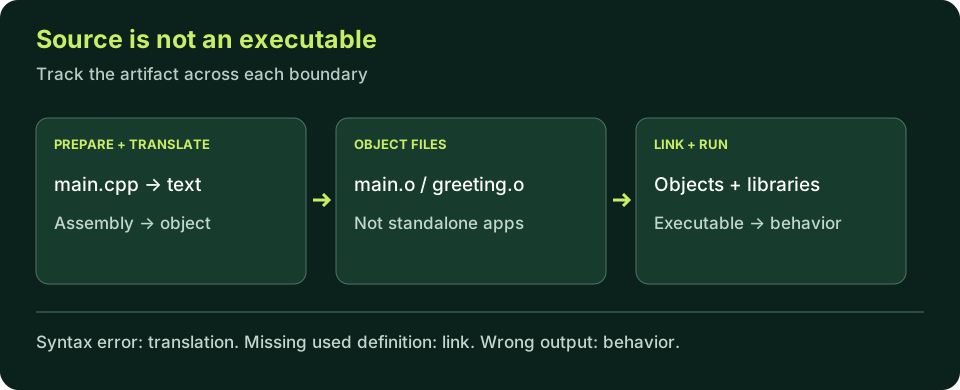
The .cpp file is editable source. An object file such as main.o contains translated code and information used by the linker; it is normally not a standalone program you launch. The final executable combines the required pieces for a selected platform. A file extension is a useful convention, not a substitute for understanding the artifact's role. Windows toolchains commonly use .obj and .exe instead of .o and an extensionless executable.
Preparation and translation are not execution
Preprocessing handles directives such as include before the compiler translates the resulting source. Including a header makes declarations available; it does not run the header's contents as an application script. You can inspect preprocessed text with a toolchain option, but it will often be much larger than your original file because standard headers bring in substantial declarations. Size alone is not evidence of a faulty build.
Compilation checks the prepared source and translates it toward target code. Assembly, where exposed separately by the toolchain, produces object code from assembly representation. GCC's -E, -S and -c options let you stop at different points. These names are useful for investigation, not instructions to hand-run every phase for ordinary work. For this lesson, separating compile-only from link gives enough visibility to understand common failures.
A language-mode option belongs in each translation command. If one file is compiled under different assumptions from another, a later successful link does not establish that the whole program used the intended configuration. Keep the same compiler and baseline throughout the experiment. Reproducible builds record both the commands and the input files, not just the final executable's name.
Object files can become stale too. Editing greeting.cpp and relinking the unchanged greeting.o does not translate the new function body. Recompile each changed source before linking its object. Likewise, do not combine two object files that both define main and expect the linker to choose the right one: a program needs one entry definition. Keep this experiment in its own folder so unrelated exercises cannot accidentally become link inputs.
Verify the source you actually built
Change buildNumber to 2 and run. Repeat the change locally; the local executable should change only after rebuilding successfully.
Predict the output, edit the source, then select Run code.
Compare with the starter's expected output
Build: 1
After editing inputs, calculate a new prediction; this reference describes only the starter.
Compile first, then link
Save the marker source as main.cpp. On macOS use clang++ in place of g++ in each command. These are local shell commands, not browser execution.
GCC / Clang-style workflow:
g++ -std=c++20 -Wall -Wextra -Wpedantic -c main.cpp -o main.o
g++ main.o -o hello
./hello

MSVC Developer Command Prompt:
cl /std:c++20 /EHsc /W4 /c main.cpp /Fo:main.obj
cl main.obj /Fe:hello.exe
hello.exe
A declaration can compile without supplying a definition
A declaration tells the compiler enough to check a use of a name. A function declaration specifies what can be called and the relevant types. A definition supplies the function body. If your program calls a declared function, translating that call does not necessarily require its body to be in the same source file. The linker later needs the actual definition to complete the program.
That separation enables multi-file programs, but it also explains a common failure: a valid call compiles, then the link reports an unresolved or undefined symbol. The solution is not to add a random header until the message disappears. Check that the matching definition exists and that its object file is included in the link. Names, parameter types and namespaces must match the declaration; similar wording is not enough.
The next example intentionally introduces one small function before the dedicated functions lesson. Treat int greetingCount() as a promise to return an integer and greetingCount() as a call to that promised function. You do not need to master function design yet. The example's purpose is to reveal the boundary between knowing how to check a call and having code available to execute it.
Experiment: a declared but undefined function
Save as main.cpp. Compile-only should succeed; linking this file alone should fail because greetingCount has no definition. Run in the compiler-backed editor to observe the single-file link failure; the multi-file repair below needs your local toolchain.
Predict the output, edit the source, then select Run code.
Provide the missing definition
greeting.cppSave this separate source as greeting.cpp. Its name and signature match the declaration in main.cpp.
int greetingCount() {
    return 3;
}Build both translation units
A successful final link includes both object files. The expected program output is 3 followed by a newline.
GCC / Clang-style commands:
g++ -std=c++20 -Wall -Wextra -Wpedantic -c main.cpp -o main.o
g++ -std=c++20 -Wall -Wextra -Wpedantic -c greeting.cpp -o greeting.o
g++ main.o greeting.o -o hello
./hello

MSVC Developer Command Prompt:
cl /std:c++20 /EHsc /W4 /c main.cpp greeting.cpp
cl main.obj greeting.obj /Fe:hello.exe
hello.exe
Classify the first useful failure
A missing semicolon or an unknown variable is a source translation problem. A missing called definition is typically a link problem. A nonexistent executable path is a launch problem. A wrong calculation after launch is a behavior problem. Use that classification to choose evidence: inspect syntax for the first, linked inputs for the second, paths for the third, and values and rules for the fourth.
Diagnostics vary by toolchain and version. Do not memorize an exact sentence as the only sign of an error. Preserve the command and the first meaningful message, then express the cause in your own words. A long list of later errors may cascade from one missing boundary. Fix the smallest identified cause and rebuild before trying to interpret the entire list as independent defects.
Compile-only success proves less than a completed build, and a completed build proves less than correct behavior. Keep those claims separate in lab notes. Reaching an executable is a milestone in the workflow, not a certificate that every input is valid, the application is safe, or its output meets the requirement. The debugging lesson next uses this distinction to investigate a program that builds cleanly but computes the wrong answer.
Do not let an old executable masquerade as a new result
After a successful build, deliberately remove a semicolon and try to rebuild. The old executable may still be present. If you launch it, its output belongs to the previous source, not the broken source. Checking that a binary exists is therefore weaker than checking the current command succeeded. On a POSIX shell, chaining a build and run with && prevents the second command from running when the first fails.
The same principle applies to editor tasks: the debugger's program path must match the executable produced by the build, and the build task must complete successfully before launch. Keep source and generated outputs distinct. Do not delete arbitrary folders to resolve confusion; identify the exact artifact and command first. Later CMake lessons organize these decisions into a reusable build system.
Independent lab
Produce a build-stage notebook: show a syntax failure, a successful compile-only step, a missing-definition link failure, and a repaired two-file executable.
Acceptance checklist
- Use the two source files above and record the exact commands.
- Demonstrate that main.o or main.obj is not the final executable.
- Capture the missing-definition linker diagnostic without fabricating its wording.
- Link both objects and verify output 3.
- Explain why launching a previous binary after a failed rebuild is not a valid new test.
Need a hint?
- A declaration alone is enough to check this call during compilation.
- The link command must include greeting.o or greeting.obj.
- Use a source marker when checking whether a run belongs to a new build.
Write and run your lab
Build your own solution before revealing the reference. Use the input field for normal, boundary and invalid cases; this runner executes your program but does not grade it.
Predict the output, edit the source, then select Run code.
Your lab evidence and notes
Record predictions, actual output, commands and the cause of each repair. Code is plain text: this scratchpad does not execute or grade C++.
Loading local notes…
Review your acceptance checklist and quiz explanations before marking this lesson complete. This is self-review, not a grade or certification.
Reveal the explained lab solution
Reference lab solution
Compare the reference with your own reasoning. Running this solution does not grade or complete the lesson.
Predict the output, edit the source, then select Run code.
Expected output
3
Save the two labeled parts as separate files, compile each, and link both objects using the documented commands. Do not treat the display as one browser-runnable file.
The declaration permits the call to be checked; greeting.cpp supplies the definition needed by the linker.
Record actual diagnostics from your environment. The evidence is the stage and cause, not whether your message matches a screenshot word for word.
Review before moving on
Explain the lesson's objectives in your own words, compare your lab evidence with the acceptance checklist, and keep the first failing case alongside your repair. Completing a page is not proof that every C++ feature or input is supported.
- Distinguish source, preprocessed text, object code and executables.
- Use a compile-only command and a separate link command.
- Classify syntax, linker and runtime problems.
- Explain declarations versus missing definitions.
- Prevent a failed rebuild from being mistaken for a successful new run.
References and further reading
Original examples and exercises accompany these primary references. Tool-specific diagnostics and support depend on your installed version.