
C++ Header Files and Translation Units
Learn C++ header and source files with a small real project: declarations, definitions, include guards, translation units, object files and clear compiler-versus-linker troubleshooting.
What you will learn
- Separate an operation's declaration from its definition.
- Write a self-contained guarded header.
- Compile source files into separate translation units.
- Link the needed object files exactly once.
- Diagnose a missing definition without including implementation files.
Share what callers need without copying all implementation code
A small program can fit in main.cpp. As it grows, you may want the input code in one file and the reading calculation in another. The caller still needs to know the function's name, parameter types and return type. A header shares those declarations. A source file provides the ordinary function's definition, which is its implementation body. Keeping those roles distinct makes separate compilation easier to explain and maintain.
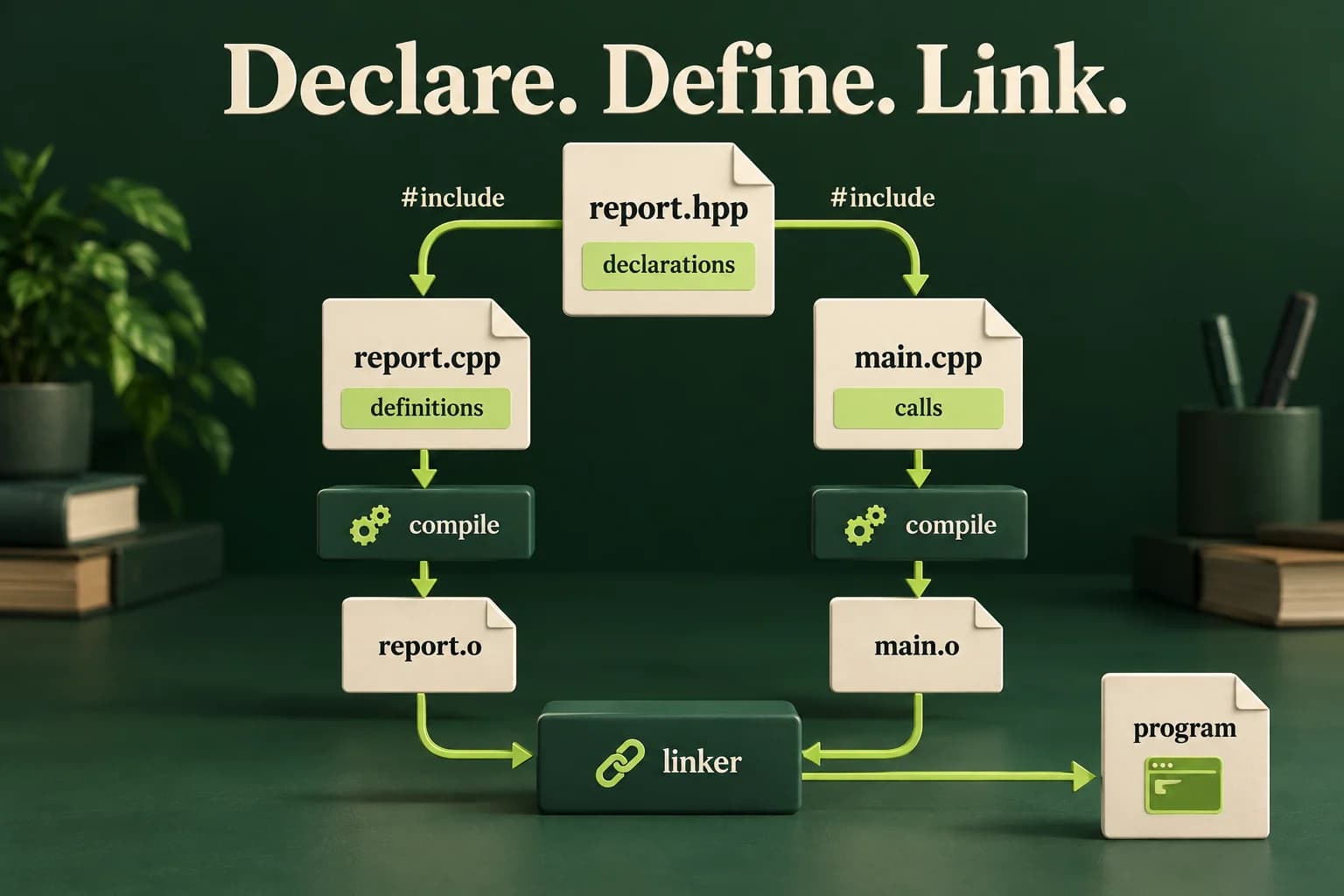
A declaration introduces what can be used. A definition supplies the actual object or function being defined. A function declaration ends with a semicolon; its definition includes the body. In our project, report.hpp declares ReadingPair and totalOf. report.cpp defines totalOf. main.cpp includes the header and calls the function. It does not include report.cpp as a shortcut to finding the implementation.
The preprocessor expands includes before the compiler translates a source file. A translation unit is, roughly, one source file after its included content and preprocessing have been handled. report.cpp and main.cpp therefore become separate translation units that both know the shared declarations. The linker later connects the compiled references with the needed definitions. An editor showing a declaration is not proof that the build has linked its implementation.
report.hpp
report.hppSave this project file beside the other listed files. It is not a complete standalone lesson-runner program.
#ifndef SOVRA_REPORT_HPP
#define SOVRA_REPORT_HPP
#include <optional>
namespace course {
struct ReadingPair { int first; int second; };
std::optional<int> totalOf(const ReadingPair& pair);
}
#endif
report.cpp
report.cppSave this project file beside the other listed files. It is not a complete standalone lesson-runner program.
#include "report.hpp"
namespace course {
std::optional<int> totalOf(const ReadingPair& pair) {
    if (pair.first < -100 || pair.first > 100 || pair.second < -100 || pair.second > 100)
        return std::nullopt;
    return pair.first + pair.second;
}
}
main.cpp
main.cppSave this project file beside the other listed files. It is not a complete standalone lesson-runner program.
#include "report.hpp"
#include <iostream>
#include <sstream>
#include <string>
bool readInteger(int& value) {
    std::string line;
    if (!std::getline(std::cin, line)) return false;
    std::istringstream parser{line};
    if (!(parser >> value)) return false;
    parser >> std::ws;
    return parser.eof();
}
int main() {
    course::ReadingPair pair{};
    if (!readInteger(pair.first) || !readInteger(pair.second)) {
        std::cout << "Invalid input\n"; return 1;
    }
    const auto total = course::totalOf(pair);
    if (!total) { std::cout << "Rejected\n"; return 2; }
    std::cout << "Total: " << *total << '\n';
}
Follow one declaration from header to executable
The header includes optional because its own public declaration uses std::optional<int>. A header should include what it directly needs rather than accidentally depending on some earlier include in the caller. ReadingPair owns two integers, and totalOf accepts it by const reference. The declaration tells the caller enough to type-check a call without copying the implementation body into main.cpp.
The definition checks each integer against minus one hundred through one hundred before adding them. The sum is then within minus two hundred through two hundred. An out-of-range pair returns no value. main.cpp parses two whole integer lines, distinguishes malformed input from a rejected pair, and prints a total only for a present result. A total of zero remains a valid present answer, as in earlier optional lessons.
Compile both source files, then link both resulting objects. The command sequence below makes those stages visible. A one-command build listing both sources is also valid for this small project. A later lesson introduces CMake so the build can record sources and requirements without relying on someone remembering every command. First understand what the build tool will need to automate.
- main.cpp includes report.hpp and learns the function declaration.
- report.cpp includes the same header and supplies the matching definition.
- Each source compiles into its own object file.
- The linker combines both objects, then the executable handles the input.
Build the three-file project locally
Save the listed files together in a new practice folder. Run from that folder. For sample input 10 and -3 on separate lines, a successful executable prints Total: 7. Do not paste this multi-file command into the single-file lesson source editor.
Clang on macOS / Linux (or g++ with equivalent flags):
clang++ -std=c++20 -Wall -Wextra -Wpedantic -c report.cpp -o report.o
clang++ -std=c++20 -Wall -Wextra -Wpedantic -c main.cpp -o main.o
clang++ main.o report.o -o report
./report

Equivalent single compiler-driver invocation:
clang++ -std=c++20 -Wall -Wextra -Wpedantic main.cpp report.cpp -o report

MSVC Developer Command Prompt:
cl /std:c++20 /EHsc /W4 main.cpp report.cpp /Fe:report.exe
report.exe
A guard stops repeated inclusion, not every duplicate in a program
The header's ifndef, define and endif form an include guard. Once this header's guarded contents have been included in one translation unit, including it again there does not repeat those contents. Use a project-specific guard name to reduce accidental collisions. Some compilers also support pragma once, but the guard shown here uses standard preprocessing facilities and makes the purpose visible to a student.
An include guard does not prevent an ordinary non-inline function definition in a header from appearing in several different translation units. Each source is preprocessed separately. If several resulting object files supply the same ordinary definition, the program violates the relevant one-definition rules and commonly gets a duplicate-symbol linker error. For this project, keep the ordinary totalOf body in report.cpp exactly once.
Templates are an important related case. Their definitions are commonly placed in headers so the compiler can instantiate the needed uses. Inline functions and suitable inline variables also have specific rules that allow matching definitions across translation units. Do not simplify this into either all definitions belong in cpp files or everything can be placed in a guarded header. The right location depends on what kind of entity you are defining.
Practise the same calculation in one complete file
This runnable counterpart combines declaration and definition for the single-file editor. It does not pretend to test separate compilation.
Predict the output, edit the source, then select Run code.
Compare with the starter's expected output
Total: 7
After editing inputs, calculate a new prediction; this reference describes only the starter.
Repair a missing declaration before blaming the linker
Intentional compile error. Add a matching declaration before main, or move a suitable definition above its first call.
Predict the output, edit the source, then select Run code.
Keep the declared and called namespace consistent
The namespace is part of the function's identity. This complete example uses an unambiguous qualified call.
Predict the output, edit the source, then select Run code.
Compare with the starter's expected output
5
After editing inputs, calculate a new prediction; this reference describes only the starter.
A compiler failure and a linker failure ask different questions
An undeclared name means the compiler cannot see a suitable declaration at the call. A missing header points to the include path or file location. A matching declaration with no linked definition can compile to an object but fail at linking with an unresolved reference or similar message. Read which stage failed before making changes. Adding a cast or moving an output statement does not supply a missing object file to the linker.
A duplicate-definition error can happen when you compile a source file twice or include its implementation and also compile it separately. Repair the build or definition placement instead of deleting random object files until one command appears to work. The project deliberately includes only report.hpp in its sources. Keep the function signature and namespace identical between declaration and definition; a look-alike function in another namespace does not satisfy the caller's reference.
Rebuild all affected sources after changing a shared declaration, and launch the newly named output only after a successful link. A stale executable may remain after a failed build. A clean build from the saved project files is useful evidence that you did not rely on an old object by accident. Avoid putting using namespace std in a shared header because it affects every source that includes it and can create surprising name conflicts.
Validate behavior, then prove the split project builds
Implement the two-reading contract shown in the project. The single-file reference solution reads two complete integers, prints Invalid input with status one for malformed or missing input, and prints Rejected with status two when either number is outside minus one hundred through one hundred. Otherwise print Total with status zero, including a valid zero sum. Validate before adding so extreme int input cannot overflow the operation.
Then split the logic into report.hpp, report.cpp and main.cpp using the supplied files, build from a clean practice directory and compare the same input cases. Try omitting report.o from the link to observe a missing definition, then restore it. Include the header twice to verify its guard. Record source names, compiler commands and actual results. A successful single-file run proves the calculation, not the separate project organization, so keep both pieces of evidence.
Build one complete safe example
Choose an installed compiler. These commands run locally, not in the source editor. The in-page Run button requires the configured compiler sandbox. Diagnostic fixtures and multi-file projects use their separate instructions.
macOS / Linux:
clang++ -std=c++20 -Wall -Wextra -Wpedantic main.cpp -o lesson
# Or use g++ with the same options.
./lesson

Windows Developer Command Prompt:
cl /std:c++20 /EHsc /W4 main.cpp /Fe:lesson.exe
lesson.exeIndependent lab
Build a checked calculation as both a complete single-file exercise and a real guarded three-file project.
Acceptance checklist
- Read two whole signed integers; reject malformed or missing input as Invalid input with status 1.
- Validate each in -100..100 before addition; print Rejected with status 2 for a well-formed out-of-domain pair.
- Return optional total so a present zero is not confused with rejection; print Total with status 0 on success.
- Put declarations and their direct includes in guarded report.hpp, one ordinary definition in report.cpp, and the caller in main.cpp.
- Compile and link the actual project, verify repeated header inclusion, and distinguish an omitted-object link error from a missing-declaration compiler error.
Need a hint?
- The in-page runner accepts one complete file, not an include of files that exist only in the lesson text.
- Include the header in each source; do not include report.cpp.
- The namespace and function signature must match between declaration, definition and call.
Write and run your lab
Build your own solution before revealing the reference. Use the input field for normal, boundary and invalid cases; this runner executes your program but does not grade it.
Predict the output, edit the source, then select Run code.
Your lab evidence and notes
Record predictions, actual output, commands and the cause of each repair. Code is plain text: this scratchpad does not execute or grade C++.
Loading local notes…
Review your acceptance checklist and quiz explanations before marking this lesson complete. This is self-review, not a grade or certification.
Reveal the explained lab solution
Reference lab solution
Compare the reference with your own reasoning. Running this solution does not grade or complete the lesson.
Predict the output, edit the source, then select Run code.
Expected output
Total: 7
The complete reference source verifies the domain behavior in the single-file editor. The project blocks provide the equivalent separated sources for local compilation.
Each source sees the declaration through the guarded header, while exactly one ordinary definition is linked from report.cpp.
The accepted numeric range bounds the sum before arithmetic. Compiler, linker and runtime evidence remain separate checks rather than one generic success claim.
Review before moving on
Explain the lesson's objectives in your own words, compare your lab evidence with the acceptance checklist, and keep the first failing case alongside your repair. Completing a page is not proof that every C++ feature or input is supported.
- Separate an operation's declaration from its definition.
- Write a self-contained guarded header.
- Compile source files into separate translation units.
- Link the needed object files exactly once.
- Diagnose a missing definition without including implementation files.
References and further reading
Original examples and exercises accompany these primary references. Tool-specific diagnostics and support depend on your installed version.