SovranCode
Modern C++ Lesson 13
Course contents50 available · 0 planned

Get a program running

01 · C++ Introduction: What Is C++?02 · How to Install a C++ Compiler and Set Up Your Editor03 · C++ Hello World: Your First Program Explained04 · How to Compile and Run C++ Programs05 · C++ Debugging: Warnings and Breakpoints

Work with values and input

06 · C++ Variables: Initialization and Scope07 · C++ Data Types: int, double and Type Conversion08 · C++ const, constexpr and auto Explained09 · C++ Operators: Arithmetic, Comparison and Logic10 · C++ User Input: cin, getline and Validation

Control flow and functions

11 · C++ Conditions: if, else if and else12 · C++ Switch Statement: Cases, break and default13 · C++ For Loop: Syntax and Examples14 · C++ While and Do-While Loops: Examples15 · C++ Functions: Parameters and Return Values

Strings and sequences

16 · C++ Strings: std::string with Examples17 · C++ Vector: std::vector with Examples18 · C++ Arrays: std::array and Bounds Checking19 · C++ Range-Based For Loop and Iterators20 · C++ Vector Practice: Build a Data Summary

Model data with classes

21 · C++ Structs and enum class Explained22 · C++ Classes and Objects: Encapsulation23 · C++ Constructors and Member Initialization24 · C++ Const Member Functions and Composition25 · C++ Copying Objects and the Rule of Zero

Lifetime and resource ownership

26 · C++ Object Lifetime, Destructors and RAII27 · C++ Pointers and References: nullptr and Borrowing28 · C++ unique_ptr: Smart Pointers and Ownership29 · C++ Move Semantics: std::move vs Copying30 · C++ string_view and span: Avoid Dangling Views

Containers and algorithms

31 · C++ map vs unordered_map: Lookup and Examples32 · C++ set, queue and stack: When to Use Each33 · C++ Lambda Expressions and STL Algorithms34 · C++ sort and binary_search: Rules and Complexity35 · C++20 Ranges: Views, filter and transform

Errors, files, and interfaces

36 · C++ optional and variant Explained37 · C++ Exceptions: try, catch and Safe Cleanup38 · C++ File Handling: Read and Write Text Files39 · C++ Input Parsing and Data Validation40 · C++ Polymorphism: Virtual Functions and Interfaces

Generic programming and quality

41 · C++ Templates: Function and Class Examples42 · C++20 Concepts and Template Constraints43 · C++ Unit Testing: Normal and Boundary Cases44 · C++ Sanitizers: Find Memory and Undefined Behavior Bugs45 · C++ Performance: Benchmark Before Optimizing

Build and deliver a complete application

46 · C++ Header Files and Translation Units47 · C++ CMake Tutorial: Build an Executable48 · C++ Dependencies and CTest: Automated Tests49 · C++ Multithreading: Threads and Data Races50 · C++ Command-Line Applications: Help and Release Checks
Modern C++50 available · 0 planned

Get a program running

01 · C++ Introduction: What Is C++?02 · How to Install a C++ Compiler and Set Up Your Editor03 · C++ Hello World: Your First Program Explained04 · How to Compile and Run C++ Programs05 · C++ Debugging: Warnings and Breakpoints

Work with values and input

06 · C++ Variables: Initialization and Scope07 · C++ Data Types: int, double and Type Conversion08 · C++ const, constexpr and auto Explained09 · C++ Operators: Arithmetic, Comparison and Logic10 · C++ User Input: cin, getline and Validation

Control flow and functions

11 · C++ Conditions: if, else if and else12 · C++ Switch Statement: Cases, break and default13 · C++ For Loop: Syntax and Examples14 · C++ While and Do-While Loops: Examples15 · C++ Functions: Parameters and Return Values

Strings and sequences

16 · C++ Strings: std::string with Examples17 · C++ Vector: std::vector with Examples18 · C++ Arrays: std::array and Bounds Checking19 · C++ Range-Based For Loop and Iterators20 · C++ Vector Practice: Build a Data Summary

Model data with classes

21 · C++ Structs and enum class Explained22 · C++ Classes and Objects: Encapsulation23 · C++ Constructors and Member Initialization24 · C++ Const Member Functions and Composition25 · C++ Copying Objects and the Rule of Zero

Lifetime and resource ownership

26 · C++ Object Lifetime, Destructors and RAII27 · C++ Pointers and References: nullptr and Borrowing28 · C++ unique_ptr: Smart Pointers and Ownership29 · C++ Move Semantics: std::move vs Copying30 · C++ string_view and span: Avoid Dangling Views

Containers and algorithms

31 · C++ map vs unordered_map: Lookup and Examples32 · C++ set, queue and stack: When to Use Each33 · C++ Lambda Expressions and STL Algorithms34 · C++ sort and binary_search: Rules and Complexity35 · C++20 Ranges: Views, filter and transform

Errors, files, and interfaces

36 · C++ optional and variant Explained37 · C++ Exceptions: try, catch and Safe Cleanup38 · C++ File Handling: Read and Write Text Files39 · C++ Input Parsing and Data Validation40 · C++ Polymorphism: Virtual Functions and Interfaces

Generic programming and quality

41 · C++ Templates: Function and Class Examples42 · C++20 Concepts and Template Constraints43 · C++ Unit Testing: Normal and Boundary Cases44 · C++ Sanitizers: Find Memory and Undefined Behavior Bugs45 · C++ Performance: Benchmark Before Optimizing

Build and deliver a complete application

46 · C++ Header Files and Translation Units47 · C++ CMake Tutorial: Build an Executable48 · C++ Dependencies and CTest: Automated Tests49 · C++ Multithreading: Threads and Data Races50 · C++ Command-Line Applications: Help and Release Checks
PREVIOUS LESSONC++ Switch Statement: Cases, break and default
NEXT LESSONC++ While and Do-While Loops: Examples
C++ foundations · Lesson 13 About 55 min with practice

C++ For Loop: Syntax and Examples

Learn C++ for-loop syntax, initialization, condition and update. Trace zero and one iterations, repair off-by-one logic, use nested loops and build a bounded multiplication table.

Before you begin

Understand comparisons, integer operations and validation. Run loops in the compiler-backed editor when available, or with your local C++20 toolchain.

What you will learn

  • Trace the four stages of a counter-based for loop.
  • Choose a half-open interval and predict iteration counts.
  • Separate per-iteration state from an accumulator.
  • Explain continue, break and nested-loop scope.
  • Validate bounds and test zero, one and several iterations.

Use a for loop for a deliberate count of steps

A counter-based for loop describes repeated work using initialization, a condition, an update and a body. It is a good fit when the number of steps is known from a validated count. Our first example prints three row numbers. Before writing it, specify whether row labels start at zero or one, how many rows are required, and what should happen for zero rows. Those decisions are the contract; the loop syntax is how you encode it.

The initialization runs once when control reaches the loop. The condition is checked before each possible body execution. If true, the body runs, then the update expression runs, then the condition is checked again. When false, execution continues after the loop. A successful iteration is therefore not just body followed by body: it passes through an update and another decision. That order explains many beginner surprises about printed counters.

For for (int index{0}; index < count; ++index), the ordinary small nonnegative count controls the interval [0, count). The left endpoint is included and the right endpoint excluded. With count three, the body sees zero, one and two. Printing index + 1 can give human-friendly row labels without changing the loop's interval. Distinguish the internal counter from the displayed label so an output change does not accidentally add another iteration.
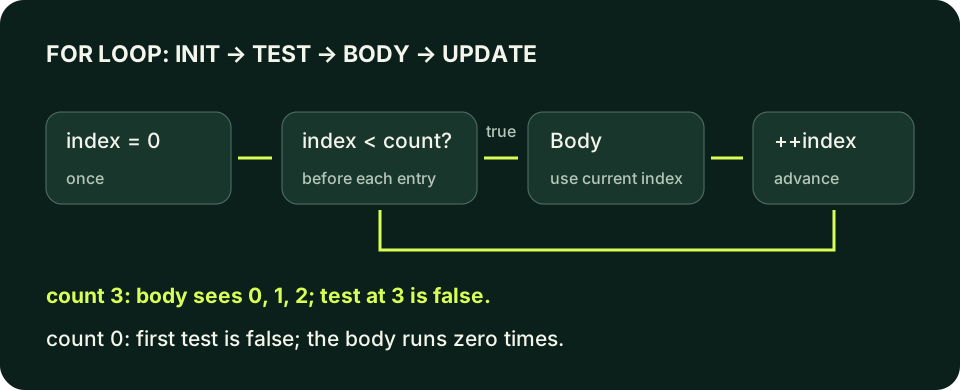
A counter-based loop initializes once, tests before the body, executes the body only while true, updates after the body, and returns to the test. Count three with index less than count visits zero, one and two, then exits at three.
Initialization happens once; test, body and update form the repeated cycle.
C++ PRACTICE RUNNER

Trace three iterations and the final stop

Write a trace with condition results for index zero, one, two and three. The final test is false, so no fourth row is printed.

#include <iostream>
int main() {
    const int count{3};
    for (int index{0}; index < count; ++index) {
        std::cout << "Row " << index + 1 << '\n';
    }
    std::cout << "Finished\n";
    return 0;
}
TERMINAL OUTPUT
Predict the output, edit the source, then select Run code.

C++20 compiler runner: source and input are sent only when you press Run to this website's execution endpoint, not an external vendor. Local preview requires Docker and gcc:14; production requires a separately isolated execution service. Network is disabled; execution is limited to 3 seconds, compilation to 10 seconds, memory to 384 MB and output to 32 KB. Single-file programs only. Don't enter secrets. Edits reset on refresh; Copy your work to keep it.

Compare with the starter's expected output
Row 1
Row 2
Row 3
Finished

After editing inputs, calculate a new prediction; this reference describes only the starter.

Zero iterations are a valid result

If count is zero, index starts at zero and index < count is immediately false. The body never runs, but the statement after the loop still does. With count one, the body runs once at index zero. Testing these two cases exposes a surprising number of boundary errors. Do not add a special first iteration merely because a loop looks unproductive for an empty request; zero work may be exactly the requested behavior.

Changing < to <= adds another visited value for this starting counter. With count three, index now visits three too. That fourth execution is an off-by-one error relative to a three-row contract. For container access in later lessons, an index equal to size is not an element position. A half-open interval provides a reusable mental model, but the counter's type, update direction and valid bounds still need deliberate review.

The examples constrain counts to small nonnegative values. If an external count is negative, do not silently interpret the loop's immediate stop as successful validation. Reject it before repetition. Likewise, a huge count might make a technically bounded loop impractical, and a counter update near its numeric maximum can overflow. An explicit upper limit protects the teaching program's resources and arithmetic; 'it eventually stops' is not enough of an interface contract.

C++ PRACTICE RUNNER

Repair a loop that prints one row too many

Intentional logic-error example. The contract is three rows, but <= prints four. Replace it with < and keep the starting counter and display label unchanged.

#include <iostream>
int main() {
    const int count{3};
    for (int index{0}; index <= count; ++index) {
        std::cout << "Row " << index + 1 << '\n';
    }
    return 0;
}
TERMINAL OUTPUT
Predict the output, edit the source, then select Run code.

C++20 compiler runner: source and input are sent only when you press Run to this website's execution endpoint, not an external vendor. Local preview requires Docker and gcc:14; production requires a separately isolated execution service. Network is disabled; execution is limited to 3 seconds, compilation to 10 seconds, memory to 384 MB and output to 32 KB. Single-file programs only. Don't enter secrets. Edits reset on refresh; Copy your work to keep it.

Compare with the starter's expected output
Row 1
Row 2
Row 3
Row 4

After editing inputs, calculate a new prediction; this reference describes only the starter.

Give repeated state and shared state different lifetimes

A variable declared in the initialization belongs to the loop's scope and is unavailable after the loop. A local declared inside the body is created for each body execution and ends with that block. An accumulator that must retain a running total belongs outside the body. If you initialize it to zero inside every iteration, you reset the history rather than accumulate it. Trace both declarations and updates instead of only reading the final print statement.

Use clear names for different responsibilities: index tracks position, value is the current calculation, and total summarizes completed work. Updating the counter in both the body and the update clause is legal in some cases but makes visited positions harder to reason about. Prefer one obvious progress update until a different design is required. Separate calculation from output when you want to inspect intermediate state or test a formula independently later.

The increment expression ++index advances the counter by one. For this simple integer update used alone, postfix index++ also advances it, but the two forms produce different expression values when those values are used. There is no reason to embed several counter modifications in one statement. Avoid memorizing a performance slogan about increment syntax; focus on a trace that makes every visited value and stopping condition explicit.

C++ PRACTICE RUNNER

Accumulate work without resetting the total

total remains outside the body. Each iteration creates its own value, then adds it to the retained sum.

#include <iostream>
int main() {
    int total{};
    for (int index{0}; index < 3; ++index) {
        const int value{index + 1};
        total += value;
    }
    std::cout << "Sum: " << total << '\n';
    return 0;
}
TERMINAL OUTPUT
Predict the output, edit the source, then select Run code.

C++20 compiler runner: source and input are sent only when you press Run to this website's execution endpoint, not an external vendor. Local preview requires Docker and gcc:14; production requires a separately isolated execution service. Network is disabled; execution is limited to 3 seconds, compilation to 10 seconds, memory to 384 MB and output to 32 KB. Single-file programs only. Don't enter secrets. Edits reset on refresh; Copy your work to keep it.

Compare with the starter's expected output
Sum: 6

After editing inputs, calculate a new prediction; this reference describes only the starter.

Nested loops multiply the work

An inner loop completes its own sequence for each outer iteration. Two outer rows and three inner columns produce six inner-body executions, not five. Each inner initialization runs again when that inner loop is reached. Use distinct row and column names instead of shadowing a counter called i. Predict the order of the output pairs before running, because a correct count alone does not prove the intended layout.

break exits the nearest enclosing loop or switch. In nested loops, a break inside the inner loop normally leaves only that inner loop, not the outer one. continue skips the remaining body of the current loop. In a for loop it still reaches the update expression before the next condition check. That difference matters when comparing the later while-loop lesson, where a skipped body statement might also skip your only progress update.

Do not use continue to hide a failed validation that should stop the whole task. Decide whether a rejected item consumes an attempt, whether a partial result is valid, and whether the program should report it. For this multiplication table, every validated requested row is processed, so no skip is needed. A straightforward loop is easier to verify than a collection of early exits introduced without a requirement.

C++ PRACTICE RUNNER

Predict row-major iteration order

Each new row starts column at zero. The body prints six coordinate pairs in a deterministic order.

#include <iostream>
int main() {
    for (int row{0}; row < 2; ++row) {
        for (int column{0}; column < 3; ++column) {
            std::cout << row << ',' << column << '\n';
        }
    }
    return 0;
}
TERMINAL OUTPUT
Predict the output, edit the source, then select Run code.

C++20 compiler runner: source and input are sent only when you press Run to this website's execution endpoint, not an external vendor. Local preview requires Docker and gcc:14; production requires a separately isolated execution service. Network is disabled; execution is limited to 3 seconds, compilation to 10 seconds, memory to 384 MB and output to 32 KB. Single-file programs only. Don't enter secrets. Edits reset on refresh; Copy your work to keep it.

Compare with the starter's expected output
0,0
0,1
0,2
1,0
1,1
1,2

After editing inputs, calculate a new prediction; this reference describes only the starter.

Keep an iteration receipt, not just a screenshot

For every counter loop, record its starting value, the condition before each body execution, the values used in the body, the update and the first false condition. Your trace should explain why the number of executions matches the requested count. If an output row is missing, compare those stages before rewriting the formula. If an extra row appears, inspect the interval and label separately instead of subtracting one from an unrelated value.

The upcoming range-based loop lesson will traverse library containers directly. Do not publish or imitate an unchecked array access to make this introductory counter loop seem more useful. You can learn counted repetition safely through generated values and text output. When containers are introduced, the same boundary reasoning becomes an access precondition, and the choice between a counter loop and range-based traversal depends on the actual work required.

LOCAL TERMINAL COMMANDS

Compile the examples and your lab

The editors can compile complete single-file programs when the execution service is available. Provide input in the Standard input field before pressing Run. Alternatively save one program as main.cpp and use your installed C++20 compiler with these terminal commands.

macOS / Clang:
clang++ -std=c++20 -Wall -Wextra -Wpedantic main.cpp -o lesson
./lesson

Linux / GCC:
g++ -std=c++20 -Wall -Wextra -Wpedantic main.cpp -o lesson
./lesson

Windows Developer Command Prompt / MSVC:
cl /std:c++20 /EHsc /W4 main.cpp /Fe:lesson.exe
lesson.exe
APPLY THE CONCEPT

Independent lab

Read a row count from zero through five and print that many rows of the seven-times table. Empty work is valid; malformed or out-of-range input is not.

Acceptance checklist

  • Validate one whole-line integer and reject trailing junk.
  • Accept counts from zero through five inclusive.
  • Print Table: once before any rows.
  • Use index < rows with index starting at zero.
  • Print rows as 7 x 1 = 7 onward; verify zero, one and five requested rows.
Need a hint?
  1. Keep the internal half-open index and display multiplier distinct.
  2. Reject invalid bounds before entering the loop.
  3. All products are small; the limit is part of the lab's arithmetic contract.
C++ PRACTICE RUNNER

Write and run your lab

Build your own solution before revealing the reference. Use the input field for normal, boundary and invalid cases; this runner executes your program but does not grade it.

#include <iostream>
#include <string>
#include <sstream>
#include <limits>

int main() {
    // Implement the acceptance checklist above.
    return 0;
}

TERMINAL OUTPUT
Predict the output, edit the source, then select Run code.

C++20 compiler runner: source and input are sent only when you press Run to this website's execution endpoint, not an external vendor. Local preview requires Docker and gcc:14; production requires a separately isolated execution service. Network is disabled; execution is limited to 3 seconds, compilation to 10 seconds, memory to 384 MB and output to 32 KB. Single-file programs only. Don't enter secrets. Edits reset on refresh; Copy your work to keep it.

Your lab evidence and notes

Record predictions, actual output, commands and the cause of each repair. Code is plain text: this scratchpad does not execute or grade C++.

Loading local notes…

Review your acceptance checklist and quiz explanations before marking this lesson complete. This is self-review, not a grade or certification.

Reveal the explained lab solution
C++ PRACTICE RUNNER

Reference lab solution

Compare the reference with your own reasoning. Running this solution does not grade or complete the lesson.

#include <iostream>
#include <sstream>
#include <string>
int main() {
    std::string line;
    if (!std::getline(std::cin, line)) { std::cout << "Invalid input\n"; return 1; }
    std::istringstream parser{line};
    int rows{};
    if (!(parser >> rows)) { std::cout << "Invalid input\n"; return 1; }
    parser >> std::ws;
    if (!parser.eof()) { std::cout << "Invalid input\n"; return 1; }
    if (rows < 0 || rows > 5) { std::cout << "Invalid count\n"; return 1; }
    std::cout << "Table:\n";
    for (int index{0}; index < rows; ++index) {
        const int multiplier{index + 1};
        std::cout << "7 x " << multiplier << " = " << 7 * multiplier << '\n';
    }
    return 0;
}
TERMINAL OUTPUT
Predict the output, edit the source, then select Run code.

C++20 compiler runner: source and input are sent only when you press Run to this website's execution endpoint, not an external vendor. Local preview requires Docker and gcc:14; production requires a separately isolated execution service. Network is disabled; execution is limited to 3 seconds, compilation to 10 seconds, memory to 384 MB and output to 32 KB. Single-file programs only. Don't enter secrets. Edits reset on refresh; Copy your work to keep it.

Expected output

Table:
7 x 1 = 7
7 x 2 = 14
7 x 3 = 21

Zero rows prints only the header and succeeds. It is distinct from malformed input or a count outside the accepted interval.

index visits zero through rows minus one; multiplier converts that internal position to a human-facing one-based label.

The five-row limit prevents excessive work and keeps products well within the range guaranteed for int.

Review before moving on

Explain the lesson's objectives in your own words, compare your lab evidence with the acceptance checklist, and keep the first failing case alongside your repair. Completing a page is not proof that every C++ feature or input is supported.

  • Trace the four stages of a counter-based for loop.
  • Choose a half-open interval and predict iteration counts.
  • Separate per-iteration state from an accumulator.
  • Explain continue, break and nested-loop scope.
  • Validate bounds and test zero, one and several iterations.

References and further reading

Original examples and exercises accompany these primary references. Tool-specific diagnostics and support depend on your installed version.

  • C++ draft: for statement
  • C++ draft: continue
  • C++ Core Guidelines: statements
KNOWLEDGE CHECK

Check your understanding

Answer all five questions, then review the explanations. Answers are not saved or synced; completion is a separate self-review choice.

01Which stage runs once on entering this for loop?
02For index zero, index < 3 and ++index, what values reach the body?
03What happens for count zero in that half-open loop?
04Where should an accumulator live if it must retain every iteration's contribution?
05What does continue do in a counter-based for loop?
PREVIOUS LESSONC++ Switch Statement: Cases, break and default
NEXT LESSONC++ While and Do-While Loops: Examples
ON THIS PAGELearning objectivesUse a for loop for a deliberate count of stepsZero iterations are a valid resultGive repeated state and shared state different lifetimesNested loops multiply the workKeep an iteration receipt, not just a screenshotIndependent labReviewKnowledge checkReferences
Course overview