
Semantic HTML
Use meaningful landmarks that help people and search engines.
Semantic HTML uses elements whose names describe the role of their content. Landmarks such as header, nav, main, aside, and footer create dependable navigation. article and section describe content boundaries. div and span remain useful when no semantic element fits.
Build the page from landmarks
A typical page has a site header, primary navigation, one main region, and a footer. main contains the unique central content and should appear only once when visible. aside holds complementary content, not everything placed visually on the side.
<header>
  <a href="/">SovranCode</a>
  <nav aria-label="Primary">…</nav>
</header>
<main>
  <article>
    <h1>Semantic HTML</h1>
    <p>Choose elements by meaning.</p>
  </article>
  <aside aria-labelledby="related-title">
    <h2 id="related-title">Related lessons</h2>
  </aside>
</main>
<footer>© SovranCode</footer>- Use one visible main region.
- Label multiple nav or aside landmarks.
- Use article for self-contained content.
- Give section a heading in most cases.
- Use div and span when no semantic role fits.
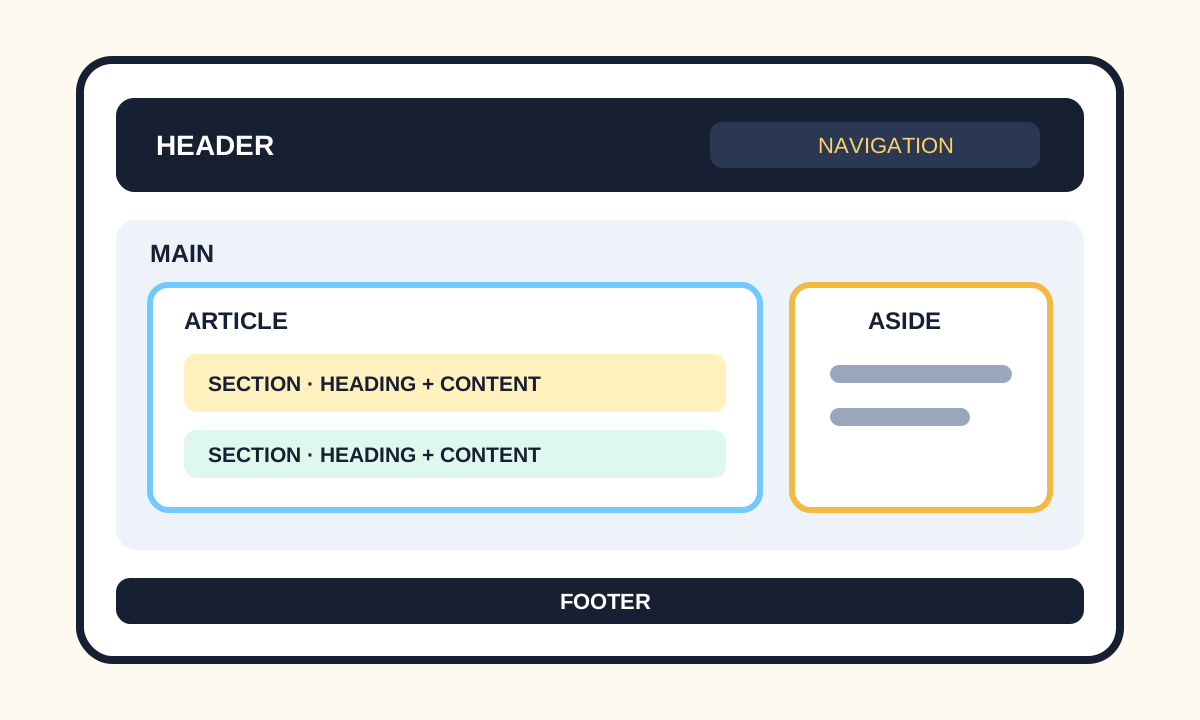
Distinguish article, section, and div
An article could usually stand alone or be distributed, such as a post, card, or comment. A section groups a thematic part of a document and normally has a heading. A div is a neutral container for styling, layout, or scripting when no meaningful element applies.