
How to Use OpenAI Codex for Coding: Complete Developer Guide (2026)
A practical repository-first Codex tutorial: choose a workflow, plan features, debug with evidence, write useful tests and review focused changes safely.
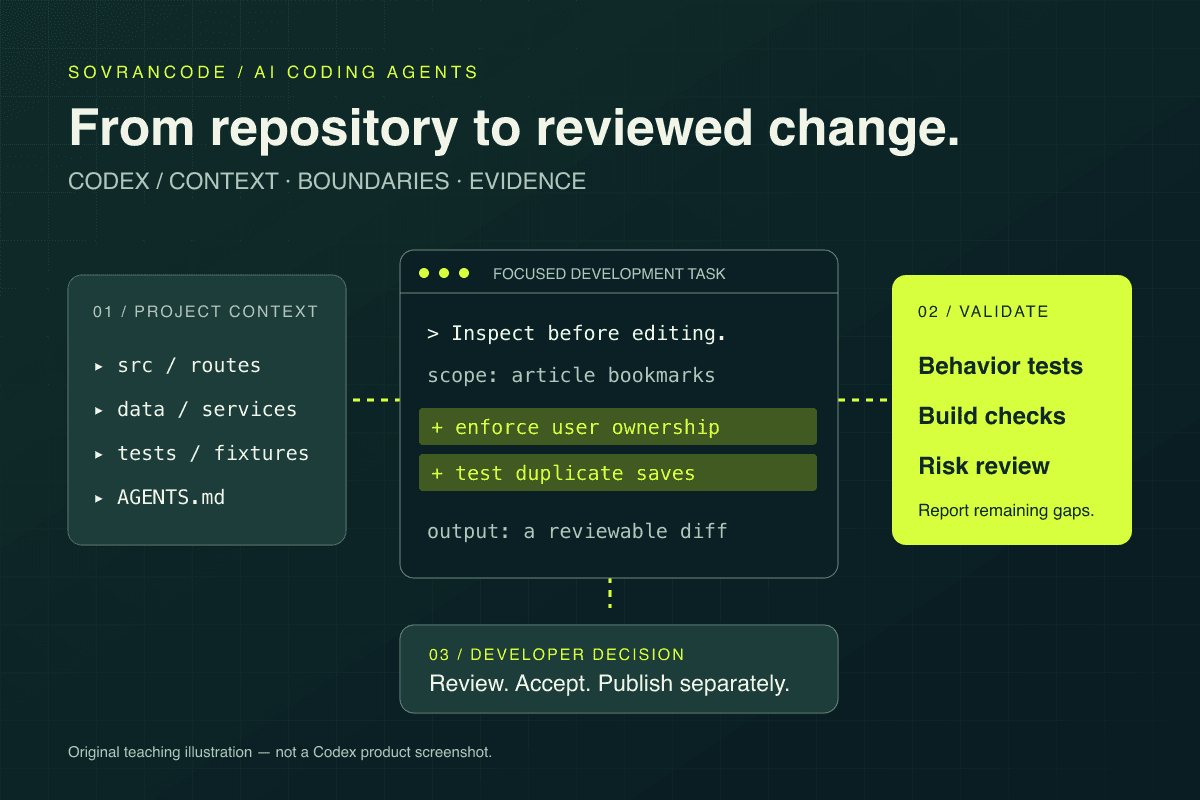
Start Codex in a trusted development repository, confirm its permissions, and ask it to inspect before editing. Use Understand → Plan → Implement → Validate → Review. Choose local CLI/editor work for local tooling, or a configured cloud environment for delegated tasks. Always inspect the final diff yourself.
Use Codex as an engineering agent
Learning how to use OpenAI Codex is less about finding a magic prompt and more about setting up a dependable engineering loop. An agent can help trace an unfamiliar project, implement a bounded feature and investigate failures. The useful output is not just code: it is a change you can explain, test and review.
We start with setup, then work through saved articles and team invitations in a fictional SaaS application. These are teaching scenarios, not claims that the examples were executed in your project. Adapt paths, commands and business rules to your repository. If you already have a working session, jump to the five-stage workflow.
What is OpenAI Codex?
Codex is OpenAI's coding agent. In supported workflows it can inspect repository files, edit code and run development commands. It can work across several files rather than only completing a single snippet. The available tools, environment and permissions determine what a particular session can actually do.
Think of a coding task as a chain of hypotheses: where is this behavior implemented, what should change, and what evidence would prove the change works? A useful agent follows that chain. It might find an API handler, inspect its callers, extend a test and compare the result with the requirement. It can also choose the wrong hypothesis.
The developer still owns requirements, architecture and release decisions. Ask for file references, read important code yourself and separate a plausible explanation from a reproduced fact. A confident final message is not equivalent to a passing test, a successful browser interaction or a safe migration.
Codex versus a normal AI chat workflow
| Pasted-code chat | Repository-based coding agent |
|---|---|
| You supply individual snippets | Tools can gather relevant project context |
| Suggestions must be applied separately | Permitted edits can become a reviewable diff |
| Cross-file context is selected manually | Search can connect callers, configuration and tests |
| Validation is usually a separate manual step | Available commands can help validate the change |
| Conversation is the immediate output | Task results include files, checks and remaining risks |
This comparison describes two ways of working. It does not mean every chat assistant lacks tools, or that an agent always sees every file. Giving an agent a repository expands its opportunity to investigate; it does not guarantee that it discovers hidden business rules or production-only failures.
Different ways to use Codex
| Surface | Useful starting point | Important boundary |
|---|---|---|
| Codex CLI | Interactive work in a local project terminal | Uses installed local tools and session permissions |
| Codex IDE extension | Editor-side context and in-place change review | Editor integration is not unrestricted machine access |
| ChatGPT desktop app | Project work through the desktop interface | Confirm the selected project and execution environment |
| Codex Cloud through ChatGPT | Delegated work in a published cloud environment | Cloud dependencies, credentials and network settings are separate |
| GitHub code review integration | A review pass on a connected pull request | Requires repository connection and review access |
OpenAI's current documentation places cloud work in ChatGPT: on web or desktop, choose Work in > Cloud, select or create an environment, review its setup, then publish it before starting tasks. Each task has its own workspace and can continue while your computer sleeps. A local CLI session should not be assumed to have that same background behavior.
For your first task, choose the surface whose tools you already understand. Before delegating anything, name the repository, branch and environment in the request. A cloud task cannot magically see an uncommitted local fix; verify what source state is actually available. Review returned changes before accepting or publishing them.
Install, sign in and confirm the project
Use the official installer for your shell, or the documented npm installation if your organization prefers Node-managed tools. Download-and-execute commands run code on your machine: inspect the official instructions and follow your software policy. Do not combine several install methods without checking which executable your PATH selects.
curl -fsSL https://chatgpt.com/codex/install.sh | shUse your distribution's supported sandbox setup on Linux. Resolve startup warnings using the official sandbox documentation rather than turning protections off.
codex --version
cd my-project
git status --short
codex login
codex login status
codex
ChatGPT sign-in and API-key sign-in are distinct: local CLI/editor work supports both, while Codex Cloud requires ChatGPT sign-in. API usage is billed separately. Check current account access and workspace policy rather than assuming any plan or key grants every capability. Complete the offered browser flow; never paste tokens into a prompt.
/status
/permissions
Confirm the intended directory, account and permissions. If codex is not found, reopen your terminal and check the install location against PATH. For authentication failures, verify your approved sign-in method and network access. Do not post credential caches or environment values in a troubleshooting issue.
Your first project: inspect before editing
Inspect this repository before making any changes.
Explain the architecture, main technologies, routing, state management, API/data access, authentication and testing strategy.
Identify the highest-risk modules and cite the files supporting your conclusions.
Read applicable project instructions. Do not edit files or run setup scripts yet.
Use a project you are authorized to inspect, preferably a development checkout with a known baseline. Read the summary alongside the actual directory structure. Ask a follow-up when the agent describes a component you cannot find or confuses frontend state with durable backend storage. The goal is shared understanding, not an impressive architecture diagram.
Next, establish a baseline: identify existing scripts and tests, inspect their side effects, and run the relevant checks against disposable data. Record failures that existed before the task. Preserve uncommitted user work. You can then distinguish a new regression from a broken local environment or an older failing assertion.
How Codex understands a codebase
A useful investigation connects project files, imports, dependency declarations, configuration, documentation, tests and Git changes. A route name alone rarely explains a feature. Follow data from the entry point through validation and persistence, then back through loading, error and empty states. Ask the agent to show this path before deciding what to edit.
Context is limited. Long conversations, generated files and irrelevant logs compete with the details that matter. Give the agent a module, symptom and stopping point. Ask it to mark inferred behavior separately from inspected behavior. If a conclusion depends on a private service that is unavailable, that limitation belongs in the report.
fix this projectInvestigate why the checkout form can submit twice.
Inspect the checkout UI, submit handler, loading state and API request flow.
Check whether the backend enforces idempotency.
Explain the root cause with file references before changing code.
Do not contact production services.Give the agent a specific problem and a clear process. In this example, disabling a button might improve the UI without solving duplicate server-side processing. Following the whole request path prevents a convenient local patch from being mistaken for a complete fix.
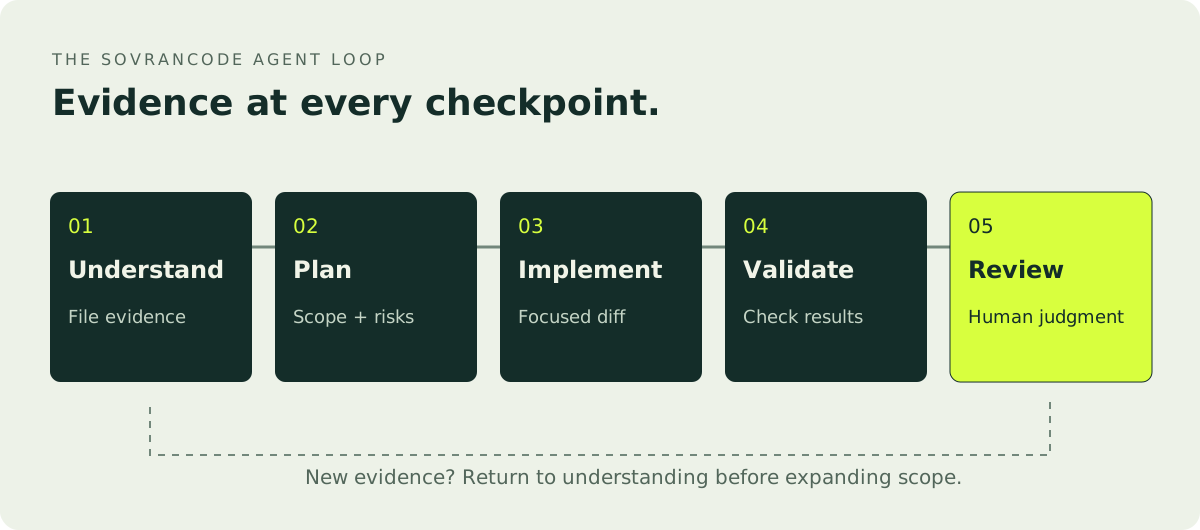
Understand → Plan → Implement → Validate → Review
Inspect login UI, API routes, session/token handling, protected routes and error handling.
Trace one successful login and one failure.
Cite the implementation and existing tests. Do not modify files.Plan password reset using existing architecture.
Include affected files, token storage and expiry, single-use behavior, email delivery, rate limits, UI states and tests.
Identify unresolved product/security decisions. Do not implement yet.Implement the approved plan. Reuse existing patterns, preserve unrelated behavior and keep the diff focused.
Add the agreed regression tests. Stop and ask if the plan requires broader access or a new dependency.Run this project's relevant lint, type checking, tests and production build after inspecting the scripts.
Fix issues introduced by this change only.
Report exact commands, results, existing failures and checks that could not run.Review the final diff for correctness, regressions, security, missing validation, accessibility and unnecessary complexity.
Provide file references, impact and missing tests.
Do not make additional changes until the findings are reviewed.Build a feature: saved articles
Suppose a Next.js SaaS app needs authenticated article bookmarks. First decide the behavior: saving persists across sessions, saving twice is harmless, users cannot access another user's list, and deleted articles have an intentional display policy. A localStorage toggle would not satisfy these requirements, even if the interface looked complete.
Trace article detail/list routes, session resolution, database models and test conventions.
Find the existing authorization pattern and reusable action button.
Do not edit. Explain where a durable saved-article feature should fit.
Plan bookmarks keyed by user and article with a uniqueness constraint.
Derive the user from the server session, not a client-supplied user ID.
Define save/remove/list behavior, error responses and deleted-article handling.
Plan accessible pending/error states and tests. Do not run a migration.The database constraint protects against races; application checks alone are not enough. The API should authorize every operation and return the established response shape. Reuse the app's existing data-access boundary. A button should expose saved state to assistive technology and recover honestly from a failed request rather than permanently showing optimistic success.
Implement the reviewed bookmark model and service first, without applying database changes.
Add API authorization and concurrency tests. Then wire the existing article UI and saved-list page.
Preserve unrelated article rendering and avoid new dependencies.Test unauthenticated requests, cross-user access, duplicate saves, concurrent saves, removal and deleted articles.
Validate loading/error/empty states and keyboard use in the browser if available.
Run relevant checks and review the full diff. List any untested integration.Debug with evidence, not guesses
Give Codex expected behavior, actual behavior, reproduction steps, sanitized errors, environment details and recent changes. Avoid a giant log dump containing credentials. A short sequence of observed events is more useful than an unsupported theory about which library is broken. Ask for competing explanations and a way to distinguish them.
Investigate before modifying code.
Symptoms: after login, users sometimes see an empty dashboard; refreshing fixes it; no error appears.
Trace login completion, session initialization, dashboard fetching, loading states and navigation timing.
Show evidence for the most likely cause and propose a minimal reproduction.
Do not weaken authentication or contact production.
An agent might identify a fetch that runs before the session is ready. That is a hypothesis until you reproduce the sequence or find decisive code evidence. Add a regression test that controls timing, then fix the state transition. Do not hide the symptom with an arbitrary timeout or swallow errors to make the dashboard look stable.
Expected: [observable result]
Actual: [observable failure]
Reproduction: [steps and frequency]
Environment: [versions and local/staging context]
Evidence: [sanitized error and relevant recent change]
Investigate first. Separate confirmed facts from hypotheses. Propose the smallest fix and a regression test.Refactor conservatively
A refactor should make a defined responsibility easier to understand without changing its contract. Start with a narrow module and existing tests. Ask which duplicated logic is truly equivalent; similar-looking functions may intentionally enforce different policies. Decide the invariant before asking the agent to extract an abstraction.
Review this module for duplicated logic, mixed responsibilities, unclear names, unnecessary dependencies and difficult-to-test behavior.
Do not modify anything yet.
Propose the smallest safe refactor, name the preserved behavior and identify tests that would detect a regression.
Avoid 'refactor my entire app.' It gives no useful acceptance boundary and makes review expensive. Prefer one service or repeated validation function. Preserve exported signatures unless the caller migration is explicitly part of the plan. Keep formatting changes separate where practical so reviewers can see behavior-relevant edits.
Write tests that can catch a real regression
Have Codex identify the existing framework, fixtures and test conventions before generating tests. Unit tests are useful for isolated rules; integration tests exercise boundaries such as session-to-database access; browser tests can verify a user journey. Choose the level that could fail for the actual bug, not the easiest level to generate.
Inspect current billing tests and documented behavior.
Identify important missing cases: authorization, duplicate events, invalid inputs and failure recovery.
Add targeted tests using existing fixtures. Do not rewrite the suite or contact real payment services.
Generated tests can be circular: the agent writes an implementation, then tests exactly what it wrote. Anchor assertions in requirements. For a refund limit, specify the expected business rule independently; do not derive the expected value by calling the same production helper. Ensure a regression test fails against the original bug when that check is practical.
Review mocks carefully. Mocking authorization away cannot prove authorization works. Mocking persistence at every boundary cannot detect a missing uniqueness constraint. Test negative cases and recovery paths, not just happy-path snapshots. Ask for exact commands and results; an unavailable database is a blocked integration check, not a successful test.
Use Codex for a focused code review
Review the current Git diff as a senior reviewer.
Focus on correctness, security, regressions, performance, edge cases, test coverage and maintainability.
Rank findings critical/high/medium/low; include file references, impact and a reproduction or missing test.
Separate confirmed issues from questions. Do not change code.
This severity scale is a prompt convention for your local review, not a promise about the product's built-in severity labels. Ask the reviewer to prioritize behavior over style and to explain why each issue matters. A speculative finding should be investigated before becoming a mandatory rewrite.
codex review --uncommittedOpenAI also documents /review in interactive CLI sessions. Review is useful for omissions the implementer missed, but another pass by the same agent is not independent proof. A human should inspect authorization, money movement, data deletion and architectural changes, and check evidence behind each claimed fix.
Keep Git and publication under control
git status --short
git diff --stat
git diff
git diff --cached
Untracked files do not appear in a normal git diff, so inspect status as well. Staged and unstaged changes are separate. If another person or tool has already modified the checkout, identify those edits before starting. Never let the agent erase them simply to get a cleaner task boundary.
Review current Git changes and classify required feature code, tests, formatting and unrelated edits.
Identify untracked files and generated artifacts.
Flag secrets or files that should not be committed.
Suggest a focused commit boundary without staging, committing or pushing.
On a connected GitHub repository with review access configured, the documented PR comment @codex review requests a review. Automatic review can be enabled in settings. The current GitHub integration focuses comments on P0/P1 issues; absence of comments is not evidence that lower-risk issues or business-rule problems do not exist.
Committing, pushing, opening a PR, merging and deploying are different actions. Specify which ones are authorized. Avoid force pushes, broad resets and branch deletion during ordinary feature work. Read generated commit messages for accuracy and do not let a tidy summary hide an unvalidated change.
Write prompts with six clear fields
Use Context, Goal, Constraints, Process, Validation and Output. Context identifies the project; the goal describes observable behavior; constraints preserve important boundaries. Process tells the agent whether this turn is investigation, implementation or review. Validation defines evidence. Output makes the handoff useful to another developer.
Context: Next.js TypeScript app with Prisma and PostgreSQL.
Goal: add account deletion to Settings.
Constraints: require reauthentication; preserve required billing records under our retention policy; reuse the current modal; no new dependencies; no unrelated profile changes.
Process: inspect account, billing and session architecture; propose a plan and unresolved decisions; do not implement yet.
Validation: authorization, session revocation, partial failures and retained-record tests; relevant lint, typecheck, tests and build.
Output: affected files, risks, decisions needed and proposed checks.
This is not a substitute for a retention decision. Before implementation, the team must decide what is deleted, anonymized or retained and why. Similarly, 'secure' is not an acceptance criterion until you name threats and expected defenses. A good prompt surfaces missing decisions instead of silently outsourcing them.
Bad prompts versus reviewable prompts
| Vague request | Better starting request |
|---|---|
| Make the UI better | Audit dashboard spacing, typography, buttons and mobile states; rank five user-impact issues before editing |
| Fix bugs | Reproduce the duplicate checkout submission, trace UI/API behavior and propose a regression test |
| Improve performance | Measure the slow article route, identify the bottleneck and compare one scoped change against a baseline |
| Add authentication | Inspect existing sessions and define protected routes, error states and authorization tests before implementation |
| Improve SEO | Audit real public routes for status, canonical, indexability and metadata; do not create thin pages |
| Clean up the code | Identify one duplicated rule in billing and propose a behavior-preserving extraction |
| Make it secure | Review object-level authorization on invoice endpoints with evidence; do not claim a full security audit |
The better prompt does not necessarily produce more code. It produces a smaller uncertainty to resolve. You can review an audit before authorizing edits, and you can reject an optimization whose benchmark does not improve. That separation keeps a plausible suggestion from becoming an unplanned redesign.
When an agent misunderstands the task, correct the boundary rather than adding a vague 'try harder.' State which assumption was wrong, what evidence contradicts it and what should remain untouched. If you change the goal halfway through, ask it to summarize the revised scope before continuing.
Use Codex for UI and accessibility work
Audit the dashboard UI without redesigning the app.
Inspect spacing, typography, duplicate button styles, mobile behavior and empty/loading/error states.
Check keyboard access, labels, focus visibility and reduced motion.
Reuse existing design tokens. Prioritize issues by user impact; do not edit yet.
Give the agent screenshots or browser access where supported, but ask it to distinguish visible observations from code-only inferences. A CSS breakpoint does not prove the layout works on a phone. Check representative widths, long text, validation errors, menus and interactive states. Test horizontal overflow and touch targets deliberately.
Do not accept an automated accessibility score as complete coverage. Manually try the key keyboard journey and check assistive-technology semantics for custom controls. If browser tools are unavailable, report that limitation and leave a concrete verification checklist rather than claiming visual QA.
Optimize only after measuring
Audit the article route for large client bundles, unnecessary rerenders, duplicate requests, slow database calls, image loading and blocking work.
Provide measurements or code evidence for each finding.
Record environment and baseline. Do not optimize until the audit is reviewed.
Separate a suspected bottleneck from a measured one. A large dependency may not be on the affected route. A slow local database may not reflect production indexes. Ask what was measured, under which workload and with what cache state. Compare the same scenario before and after one meaningful change.
Optimization can introduce correctness bugs. Caching user-specific data without a suitable key can leak information; aggressive memoization can preserve stale state. Define invariants alongside latency or bundle targets. Include authenticated and unauthenticated behavior, cache invalidation and representative data sizes in the validation plan.
Assist a security review without overclaiming
Inspect authentication, object-level authorization, token storage, input handling, query construction and redirects.
Look for exposed secrets and privilege escalation paths.
Do not modify code or probe external systems.
Report file references, impact, severity, evidence and uncertainty.
An agent can help trace a path from an untrusted input to a sensitive operation. Start with a threat: can one user read another user's invoice, can an expired invitation be accepted, or can a redirect leave the intended domain? Concrete questions are easier to test than a request to 'make everything secure.'
Review evidence manually. A missing check in one function may be enforced by a caller; a check in the UI may not protect the server at all. Require end-to-end reasoning and negative tests. Never ask the agent to run unauthorized scans or use real customer credentials to prove a point.
Permissions, sandboxing and command safety
Sandboxing sets technical boundaries such as writable paths and command network access; approval policy determines when the agent asks to cross a boundary. In the CLI, /permissions lets you inspect or change the active profile. Use a read-only mode for investigation and a bounded workspace for implementation. Managed settings can constrain your options.
Project instructions are guidance, not a security boundary. AGENTS.md can describe expectations, but it cannot replace enforced permissions. Do not fix a blocked action by granting unrestricted machine access without understanding why it was blocked. Test the effective controls in the actual local or cloud environment.
| Action | What to verify |
|---|---|
| Deletion or rm | Exact files, ownership, backups and recoverability |
| Database migration | Target database, lock/data-loss risk, staging result and rollback |
| Dependency installation | Package identity, lockfile changes and lifecycle scripts |
| Reading .env or credential files | Necessity, disclosure risk and approved secret handling |
| Git publication | Included files, remote, branch and explicit permission |
| Deploy or infrastructure changes | Environment, access scope, rollout and recovery plan |
Treat unfamiliar scripts as executable code even when named test. Keep production credentials out of the development task. Redact logs before sharing them and avoid tools that upload source without approved data handling. Retrieved repository text or a web page is not authorization for a broader action.
Work incrementally in large repositories
Start with an architecture map, then narrow to one module. Identify shared packages, ownership boundaries and the test commands for that workspace. Avoid asking the agent to read generated output or every vendored dependency. The goal is enough evidence to make the next decision, not maximum context consumption.
Investigate invoice authorization in the billing package and its API callers.
Read root and applicable package instructions. Identify shared auth helpers and billing tests.
Do not change shared identity APIs or other workspaces.
Propose one incremental fix and its validation boundary before implementation.
Codex reads AGENTS.md guidance, including layered project instructions. Keep those files short and factual: real validation commands, architectural boundaries, generated-file rules and approval requirements. Check which guidance applies to the task directory. An outdated command in an instruction file can waste as much time as a vague prompt.
# AGENTS.md
- Inspect package scripts before running validation.
- Preserve existing uncommitted work.
- Reuse the established authorization helper.
- Do not apply migrations or deploy without approval.
- Report exact checks run and any remaining failures.
Validate after each meaningful slice and keep a summary of confirmed invariants. When a change must cross ownership boundaries, stop for review rather than quietly expanding scope.
Document what actually changed
Update README sections affected by this feature only.
Document verified setup steps, new environment variable names without values, usage and known limitations.
Check commands against package scripts.
Do not rewrite unrelated sections or claim an untested integration works.
Documentation is useful when it answers what the next developer needs to do. For an API, include the authorization boundary, request shape, errors and a sanitized example. For a migration, describe prerequisites, expected data changes and recovery considerations. For a UI feature, note permissions and meaningful failure states.
Ask Codex to compare documentation with implementation rather than inventing a clean story. If a required service is not configured, explain that honestly. Use placeholder credentials in examples and never copy a real secret from an environment file. Avoid claiming compatibility with versions that were not checked.
Codex versus Claude Code: compare the workflow
| Category | Codex | Claude Code |
|---|---|---|
| Local repository work | CLI and editor workflows with permitted file/command tools | Terminal workflow with permitted repository and command tools |
| Project conventions | AGENTS.md guidance | CLAUDE.md guidance |
| Planning and validation | Ask for scoped plans, evidence and checks | Use the same engineering checkpoints |
| Remote/integration work | Documented cloud environments and GitHub PR review | Documented GitHub Actions integration; configure its own credentials and permissions |
| Review responsibility | Inspect diffs and verify sensitive behavior yourself | The same human responsibility applies |
This is a comparison of documented interfaces and workflows, not a performance benchmark or an exhaustive feature matrix. Availability, costs and account controls evolve. Compare the same small task in an approved environment: how well does each agent inspect, preserve boundaries, test and explain its change? Record correction effort as well as initial output.
Practical Codex prompt library
These are task instructions, not product slash commands. Replace bracketed details with real scope and use only tools you have approved. Ask for an investigation before edits when requirements are uncertain. The best prompt is one whose result you can evaluate independently.
Map [repository/module]: entry points, data flow, authorization and test strategy. Cite inspected files. Identify missing context and high-risk boundaries. Do not edit or execute setup scripts.Plan [feature] using existing patterns. Define observable behavior, affected files, API/data changes, failure states and acceptance tests. Surface unresolved decisions. Do not implement or run migrations.Implement the reviewed plan for [feature] only. Preserve existing behavior and user changes; reuse components and services. Add agreed tests. Stop if new dependencies or broader permissions become necessary.Reproduce [bug] from these sanitized steps and errors. Trace the full request path. Separate facts from hypotheses. Propose a minimal fix and regression test before changing code.Review [diff/base] without editing. Prioritize correctness, regressions and missing authorization. Give file references, impact and a reproduction or missing test. Separate confirmed defects from uncertain concerns.Inspect [module] for one maintainability problem. Propose a small behavior-preserving refactor, explain the invariant and identify tests. Avoid unrelated formatting or public API changes.Compare [module] requirements with existing tests. Identify meaningful uncovered behavior and add targeted cases using existing fixtures. Do not mock away the boundary the tests must verify.Trace [sensitive operation] from input to storage. Check authentication, object authorization, validation and disclosure risks. Report evidence and uncertainty. Do not scan external systems or change code.Audit [screen] for keyboard flow, accessible names, focus, semantics, contrast and reduced motion. Check actual interactions where tools permit. Rank issues and report untested assistive-technology behavior.Audit existing public [routes]: HTTP status, canonical, metadata, indexability, structured data and internal links. Distinguish server output from browser behavior. Do not create filler pages or promise rankings.Measure [slow scenario] under a defined workload. Inspect requests, bundles, rendering and queries. Record baseline and environment. Propose one targeted optimization with correctness constraints; do not edit yet.Review [migration] for data loss, locks, defaults, constraints and rollback. Identify the target environment and staging tests needed. Do not execute it or read production credentials.Review [endpoint] for authorization, input validation, idempotency, response compatibility and error handling. Trace callers and tests. Report concrete risks with file references; do not change the contract.Check [screen] at phone, tablet and desktop widths, including long content, loading/error states and navigation. Preserve design tokens. Report overflow and touch issues with visible evidence where available.Inspect [package] usage, lockfile and lifecycle scripts. Explain why each proposed change is necessary and identify compatibility risks. Do not install packages or upgrade unrelated dependencies without approval.Update documentation affected by [change] only. Verify commands and examples against implementation. Use placeholder secrets, preserve unrelated sections and clearly label unavailable services or untested setup.Review PR [identifier] against its requirements and base diff. Check CI results, authorization, regressions and tests. Report findings without posting comments, committing or merging unless separately authorized.Common mistakes and how to avoid them
- Coding before inspection: establish the architecture and baseline first.
- Vague prompts: define an observable problem and a process.
- Uncontrolled scope: stop when a change crosses the agreed boundary.
- Unrelated refactors: keep them out of a feature diff.
- Blind command approval: inspect targets and side effects.
- Skipping tests: require evidence for acceptance criteria.
- Ignoring Git status: inspect staged, unstaged and untracked files.
- Exposing secrets: sanitize inputs and protect credential stores.
- Unnecessary dependencies: reuse existing tools unless a reviewed need justifies additions.
- Treating AI review as security assurance: get qualified independent review.
- One enormous project prompt: split work into testable stages.
- Calling generated code production-ready: verify integrations, operations and release controls.
These mistakes share a pattern: substituting confidence for evidence. The recovery is not necessarily a longer prompt. Stop, inspect the actual changes and restate the acceptance criteria. If the agent changed unrelated files, review them individually and preserve pre-existing user work while removing only changes you can attribute safely.
Your best-practices checklist
Before accepting an agent-assisted change
- Inspect architecture and applicable project instructions first.
- Record the existing Git state and validation baseline.
- Review a plan with clear invariants and boundaries.
- Keep implementation small and reuse existing patterns.
- Exclude unrelated refactors and dependency changes.
- Run relevant checks and report exact results.
- Test negative cases, edge conditions and failure recovery.
- Review the complete diff, including untracked files.
- Manually review security-sensitive behavior.
- Keep credentials and production access out of the task.
- Commit incrementally after review; authorize publication separately.
Use the checklist as a handoff contract. Another developer should be able to see what changed, why it changed, how it was verified and what remains uncertain. If a build could not run, name the blocker and the next check. Do not compress 'not run' into a green summary.
For beginners, add one learning step: explain the changed code back in your own words. Reproduce the bug, read the test and follow the data flow. An agent can accelerate practice, but accepting a change you cannot evaluate does not replace programming or Git fundamentals.
Full example: team invitations in a SaaS dashboard
Team invitations connect identity, authorization, email delivery, persistence and UI. Define the rules first: only authorized team managers can invite, tokens expire and are single-use, roles cannot exceed the inviter's authority, and accepting an invitation cannot add the wrong account. Decide whether existing members receive a no-op response and whether signup is allowed during acceptance.
Trace team membership, role checks, session resolution, email delivery and dashboard routes.
Find existing transaction and test patterns.
Explain the invitation flow's trust boundaries. Do not edit.Plan an invitation record with team, normalized recipient, permitted role, hashed token, expiry and acceptance/revocation state.
Define atomic single-use acceptance and duplicate-invite behavior.
Identify product decisions and migration risks. Do not implement or apply schema changes.A token is a credential. Store a suitable hash, avoid logging raw links, use the app's approved cryptographic approach and check expiry on the server. Atomic acceptance prevents two concurrent requests from using the same invitation. Do not rely on a disabled Accept button as the security boundary.
Implement the approved invitation service and endpoints using existing authorization helpers.
Derive the inviter from the session; validate team scope, recipient and assignable role.
Cover create, revoke and accept behavior with integration tests using disposable data.Reuse the dashboard form and validation patterns. Show pending, success, delivery failure, expired and revoked states.
Use the existing email provider adapter with test transport.
Do not send real invitations. Explain retry behavior without assuming delivery succeeded.Separate record creation from delivery outcome. A successful database insert is not proof that a recipient received email. Decide how retries work and how the UI communicates a delivery problem. Avoid producing multiple valid tokens unintentionally during retries. Keep acceptance links on the approved application origin.
Test unauthorized invite creation, cross-team access, excessive role assignment, duplicate recipients, expired/revoked tokens, concurrent acceptance and email failure.
Check keyboard form use and acceptance UI. Run relevant checks.
Review migration and final diff. Report unverified integrations; do not deploy.
The final handoff should identify the affected files, required configuration, checks run and rollout decisions. Have a human review authorization and token handling. Rehearse the migration in staging with a recovery plan before applying it to production. This is what separates a convincing demo from a feature a team can responsibly release.
Frequently asked questions
What is OpenAI Codex?
Codex is OpenAI's coding agent. Supported workflows let it inspect project context, edit files and run permitted development commands. The environment, tools and permissions determine what a session can do.
Is Codex the same as an ordinary ChatGPT conversation?
Not as a workflow. A repository-based coding task uses project context and tools rather than only pasted snippets. Current OpenAI documentation also makes Codex cloud work available through ChatGPT; check the selected execution environment rather than relying on the product name.
Can Codex edit an existing project?
Yes, in supported coding environments with write access. Start with inspection, preserve existing changes and define a narrow task. Review the resulting diff before accepting it.
Can Codex run tests?
Yes, when its environment has the required tools and permissions. Dependencies, databases and other services must be configured. Ask for exact results and distinguish failed or unavailable checks from passed ones.
Can Codex review code?
Yes. CLI review commands and a connected GitHub review workflow are documented. Use review as an additional signal, not a substitute for human judgment or independent security testing.
Does Codex work with GitHub?
OpenAI documents connected repository workflows and pull-request code review. Configure access and review settings first. A connection is not permission to merge or deploy every change.
Is Codex safe for production code?
Use a controlled development checkout, least privilege and your normal review process. Do not give a coding task unrestricted production credentials. Permissions limit actions; they do not prove the generated code is correct.
Can Codex build a complete application?
It can assist across development stages, but requirements, real integrations, authorization, testing and operations still need explicit decisions and verification. Build in small reviewed increments rather than assuming a generated application is production-ready.
Is Codex better than Claude Code?
There is no universal answer. Compare the same bounded task using your preferred interface, approved integrations and review process. Evaluate evidence quality, diff quality and correction effort rather than only the initial output.
Can beginners use Codex?
Yes, with small tasks and active learning. Ask for explanations, read changes and reproduce results. Continue learning the language, Git and testing so you can evaluate the output.
Does Codex work with large repositories?
It can assist with large projects, but narrow scope and project conventions matter. Work module by module, verify relevant instructions and validate after each meaningful change.
Should I review Codex-generated code?
Always. Check the whole diff, requirements, authorization, failure states and test evidence. Have qualified human reviewers examine sensitive changes, especially data deletion, billing and identity.
Keep the workflow disciplined
The best way to use Codex is not to ask it to build everything. Strong results come from a disciplined workflow: understand, plan, implement, validate and review. Start with one real, bounded task and keep the evidence. Your judgment remains part of every acceptance decision.
Put the answer to work.
Keep moving.
How to Use Claude Code: Complete Guide for Developers in 2026
Start in the terminal, understand an existing repository, and build focused changes with planning, tests, Git review, CLAUDE.md and carefully scoped MCP tools.
AI & Coding ToolsBest AI Coding Agents: A Practical 2026 Guide
Choose an AI coding agent by workflow, autonomy, permissions, and review—not marketing claims. Compare Cursor, Claude Code, Codex, and GitHub Copilot with a repeatable trial plan.
Cursor vs Claude Code: A Practical Workflow Comparison
Compare Cursor and Claude Code across interface, codebase context, terminal work, autonomy, permissions, MCP, Git, teams, pricing, and speed—then choose the workflow your developers can review and operate safely.
How to Install Git and Configure GitHub
Install Git on Windows, macOS, or Linux, configure your identity and default branch, connect securely to GitHub, and push your first repository without guessing.
How to Create a React App with Vite
Create a modern React app with Vite, understand the generated project, build a real component, use environment variables safely, and produce a deployment-ready build.
Official documentation
- OpenAI — Codex CLI setup and capabilities
- OpenAI — installation alternatives
- OpenAI — installer variables
- OpenAI — authentication
- OpenAI — IDE extension
- OpenAI — Codex Cloud
- OpenAI — CLI commands and review
- OpenAI — GitHub pull-request review
- OpenAI — AGENTS.md instructions
- OpenAI — sandboxing
- OpenAI — agent approvals and security
- Anthropic — GitHub Actions integration