
How to Use Claude Code: Complete Guide for Developers in 2026
Start in the terminal, understand an existing repository, and build focused changes with planning, tests, Git review, CLAUDE.md and carefully scoped MCP tools.
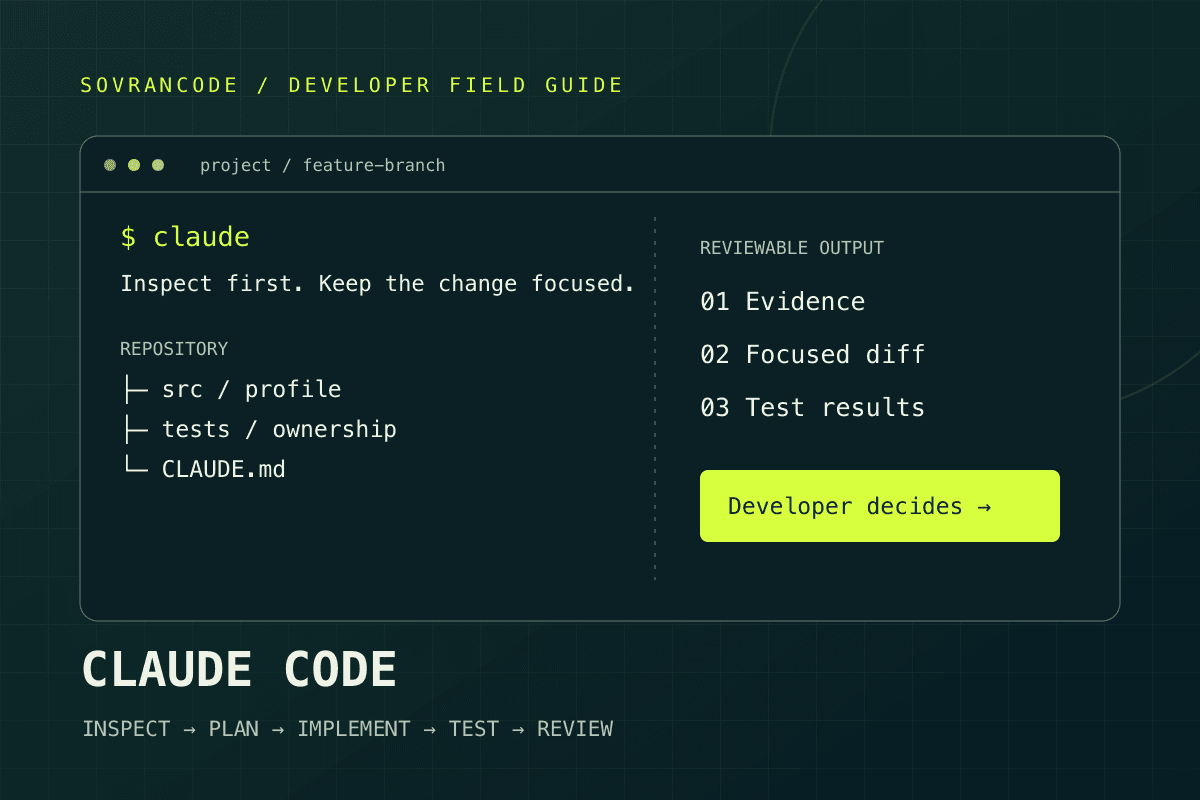
Install Claude Code from the official instructions, start claude inside a trusted repository, and inspect before editing. Use a repeatable loop: inspect → plan → implement → test → review. Keep permissions narrow, secrets out of context, and commits under developer control.
Start with a workflow, not a giant prompt
A useful coding agent should help you understand a change as well as make it. This Claude Code tutorial takes you from a first terminal session to feature development, debugging, refactoring and pull-request review. The examples assume an existing application, because preserving working behavior is usually harder—and more valuable—than generating a fresh demo.
Read installation first if you are new. If you already have Claude Code running, jump to the five-stage workflow, then adapt the prompt library to one small task. Commands are for your shell unless a label says they belong inside Claude Code. Application examples are teaching scenarios, not a claim that we ran them against your repository.
What is Claude Code?
Claude Code is Anthropic's coding agent. This guide focuses on its terminal interface: you start it in a project and discuss tasks while it uses available tools to inspect files, propose changes, edit code and run commands according to its permissions. That tool loop makes it different from simply receiving a code snippet in a chat window.
| Traditional chatbot workflow | Claude Code workflow |
|---|---|
| You paste selected code | Tools can read relevant project files |
| You manually apply a suggestion | The agent can propose and apply file changes |
| Context depends on what you supplied | Search and file reads can gather repository context |
| You run commands separately | Available tools can execute permitted commands |
| Conversation is the main output | A reviewable diff and verification results are useful outputs |
This is a workflow comparison, not a universal statement that every chatbot lacks tools. Repository access also does not mean complete understanding. Ask which files support a conclusion. An agent can miss an invariant, misread an error or write a test that only confirms its own implementation. You remain responsible for correctness and the consequences of execution.
Prepare your environment and a safe project
Have a terminal, Git, a project you are authorized to inspect and a suitable account or configured provider. The native installation does not require Node.js; your application may still need it. Start with a local development checkout, not a shell that has unrestricted production access. Use a project with a reproducible test command so you can evaluate the agent's work.
Anthropic's setup page currently lists macOS 13+, Windows 10 1809+ or Server 2019+, supported Linux configurations, x64/ARM64 and at least 4 GB RAM. An internet connection and a supported location are required. Check the official page for your exact distribution and corporate network restrictions rather than assuming every terminal environment is supported.
git --version
git status --short
git branch --show-current
Uncommitted work is not an error. It is a boundary: identify which changes are yours and tell the agent to preserve them. Create a feature branch when appropriate. Make sure tests use disposable data. A command named test or build can run arbitrary project scripts, so inspect scripts in an unfamiliar repository before executing them.
Install, authenticate and verify Claude Code
The official setup documentation recommends the native installer. Choose the command that matches your shell. These commands download and execute an installer: inspect the official source and follow your organization's software policy before running one. They are installation examples, not commands that this article executes on your machine.
curl -fsSL https://claude.ai/install.sh | bashWSL uses the Linux command inside the WSL terminal. Keep project tooling in the intended environment rather than accidentally mixing Windows and Linux installations.
claude --version
claude doctor
claude
Follow the browser authentication flow. Inside a running session, /login can re-authenticate or switch accounts. Access currently includes eligible paid Claude plans or Console/provider configurations; do not assume the free chat plan includes Claude Code. API billing and subscription usage are different arrangements. Check your account before starting a long task.
# Native installation: background updates; manual check
claude update

# Homebrew
brew upgrade claude-code

# WinGet
winget upgrade Anthropic.ClaudeCode| Symptom | Next check |
|---|---|
| claude is not found | Reopen the terminal; verify the installer location is on PATH |
| Wrong installation launches | Inspect command resolution with command -v claude or Get-Command claude |
| Installer download fails | Check network/proxy policy and the official troubleshooting page |
| Authentication selects unexpected billing | Check account/provider configuration without printing secret values |
| Project command cannot run | Verify the application's own runtime and dependencies separately |
Start Claude Code in a project
cd my-project
claudeInspect this repository before making any changes.
Explain:
1. the project architecture
2. the main technologies being used
3. how routing works
4. how state is managed
5. how API calls are handled
6. where tests live
7. the three highest-risk areas of the codebase
Cite relevant files. Do not edit any files yet.
Do not read secrets, contact external services or run write commands.This gives you a map against which to judge later suggestions. Check that the response distinguishes observation from inference: a dependency in package.json does not prove it is used, and a folder called services does not prove requests go through it. Ask the agent to trace one real route or action to its data source if the explanation sounds generic.
For a large repository, replace the broad questions with one feature area. Your first session succeeds when you understand the relevant boundaries, not when the agent lists every directory. Record the test baseline and stop if the project cannot run locally; otherwise later failures will be difficult to attribute.
How repository context works—and where it stops
Think of repository awareness as investigation. The agent searches for names, reads matching files, follows imports and inspects scripts or configuration. It does not need you to paste every file, but it still needs to decide what matters. State the observed problem, the area involved and the limits of the task so that search has a useful direction.
fix the appThe checkout form occasionally submits twice.
Investigate the checkout flow first.
Find the submit handler, request creation and loading-state guards.
Check whether the server enforces idempotency.
Show the root cause with file references before modifying anything.
Do not make purchases or call the production payment API.Context is finite. Long logs, unrelated files and repeated discussion compete with the current task. Supply the smallest useful error excerpt and redact identifiers or tokens. Keep the architecture summary concise. After changing tasks, restate important constraints instead of assuming an old instruction remains salient forever.
A good checkpoint names the affected files, known invariants, open questions and the next test. If a conclusion depends on runtime behavior, require reproduction evidence. Reading a guard in source is not proof that the failing request passes through it. This distinction prevents confident explanations from becoming unsupported fixes.
The five-stage Claude Code workflow
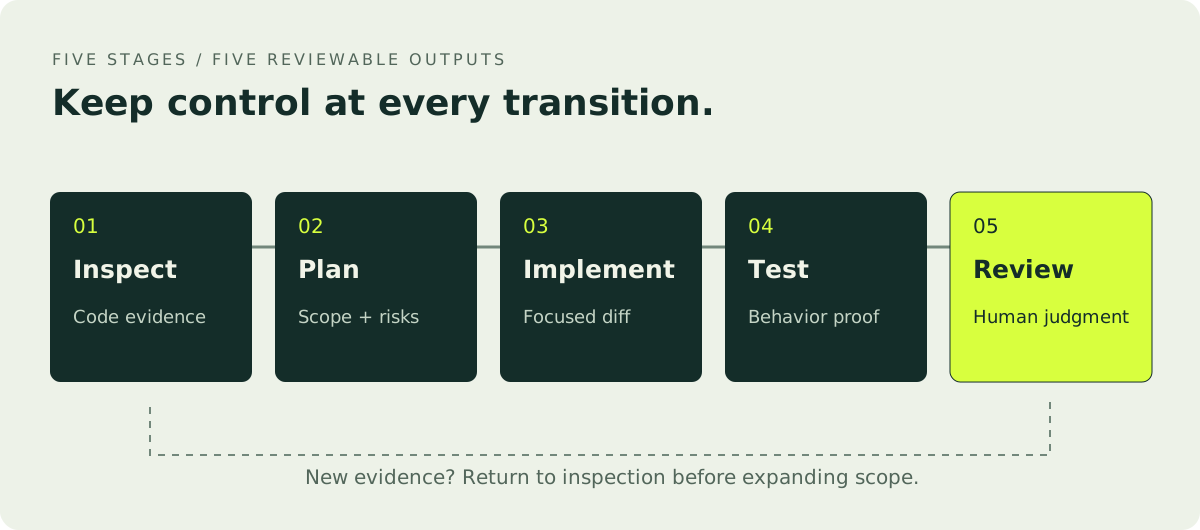
Separate discovery from implementation. Each stage has a different deliverable and a reason to pause. You can compress the loop for a tiny change, but do not erase the distinction between a proposed plan, an applied diff and tested behavior. The workflow below is our engineering recommendation, not a promise of automatic correctness.
- 01
Inspect
Find the current behavior and ownership boundaries. Deliver evidence from relevant files and a baseline test result.
- 02
Plan
Define the smallest change, risks and acceptance criteria. Decide what must stay unchanged before editing.
- 03
Implement
Apply the approved scope using existing patterns. Keep unrelated cleanup outside the feature.
- 04
Test
Run appropriate checks and exercise behavior. Distinguish a compilation result from a successful user journey.
- 05
Review
Read the entire diff, inspect risky decisions and decide whether to commit. The developer owns the final judgment.
Create an implementation plan for password reset.
Include files, API changes, UI, validation, abuse protection and tests.
Explain token expiry, single use and account-enumeration behavior.
Do not write code, send emails or change any database yet.
Implement the approved plan in the local development checkout.
Keep changes focused and reuse existing patterns.
Do not add dependencies or refactor unrelated code.
Stop and explain if a required design decision is missing.Run the relevant linting, type checks, tests and build.
Inspect project scripts before running unfamiliar commands.
Fix only issues caused by these changes.
Report exact commands, results and unresolved baseline failures.
Do not deploy or mutate production data.Review the complete diff as a senior engineer.
Check bugs, authorization, regressions, complexity, missing tests
and accessibility. Cite files and explain impact.
Do not make additional changes until you report findings.Write acceptance criteria as observable behavior: an expired reset token is rejected, the response does not reveal whether an account exists, and retrying a used token fails. These are better than asking for secure code. The plan should connect each criterion to a test or manual check so nothing disappears during implementation.
Build a profile-editing feature end to end
Suppose a React/Next.js application already has authentication and a read-only profile page. The task is to edit a display name and biography—not to replace authentication or add avatar uploads. Establish the existing user model and update path first. The example deliberately avoids executable framework code because your project's version and conventions determine the correct implementation.
Trace the signed-in profile page to the user record.
Find session resolution, authorization, schema, API/action conventions
and existing form components. Explain how user identity is enforced.
Do not edit or read .env files.
A useful plan locates server-side validation and derives the account from the trusted session. It should not accept an arbitrary user ID from the browser. Agree on display-name length, biography limits, whitespace handling and how updates affect caches. If the feature touches public profiles, clarify whether the biography is plain text or sanitized rich text.
Plan display-name and plain-text biography editing.
Reuse the current profile API/action and form patterns.
Require server authorization and server validation.
Show pending, success and failure states accessibly.
Test signed-out requests, attempts to edit another user,
invalid input and successful persistence. No new dependencies.
Only after reviewing the plan should you ask for implementation. Then test more than the happy path: double submission, network failure, maximum-length text and keyboard-only use. Confirm a fresh page load shows the saved data. A success toast with stale server data is not a completed feature.
Show the complete profile-editing diff.
Explain the server authorization boundary and validation rules.
List tests run and manual checks not performed.
Flag any changed authentication or unrelated files.
Do not commit or deploy yet.Debug with evidence before editing
A bug report should separate the symptom from your hypothesis. Blank dashboard after login is a symptom; refresh-token race is a hypothesis. Provide expected behavior, actual behavior, reproduction steps, sanitized errors and the relevant environment. Ask the agent to trace the failure before it changes a component based on a guess.
Investigate before changing code.
Symptoms: users sometimes see a blank dashboard after login.
Expected: dashboard data loads after a successful sign-in.
Actual: blank content; refreshing fixes it.
Reproduction: [steps, frequency and sanitized error].
Environment: [browser, app version, local/staging].
Trace authentication, navigation and data loading.
Show code evidence for the most likely cause and alternatives.
Propose a regression test. Do not edit yet.
Distinguish a request that never starts from one that fails or finishes too late. Inspect loading and error states, cancellation, session transitions and cache invalidation. Ask what observation would disprove the proposed cause. A fix that merely hides the error may make the interface look better while preserving the race.
Once you can reproduce the failure, add a failing regression test where feasible, apply the smallest fix and rerun the same reproduction. If reproduction is unavailable, label the explanation provisional. Do not let the agent report resolved merely because a modified file typechecks.
Refactor without losing behavior
Review this module for maintainability problems. Do not refactor yet.
Identify duplicated logic, large functions, unclear responsibilities,
unnecessary dependencies and testability problems.
Rank by actual maintenance risk. Propose the smallest safe refactor
with behavior-preserving tests and a rollback boundary.
Refactoring changes structure while preserving behavior. Define that behavior before extracting functions. A pair of similar handlers may intentionally enforce different authorization rules. Combining them because they look alike can remove the distinction. Ask the agent to list public inputs, outputs and side effects before it merges abstractions.
Keep mechanical renaming separate from behavioral fixes when that makes review clearer. For a large module, move one responsibility at a time and keep tests green between steps. Resist speculative frameworks and new dependencies that solve no observed problem. A smaller diff is not automatically safer, but it is easier to reason about and revert.
Use Git as the review boundary
git status --short
git diff --stat
git diff
git diff --cachedReview the current Git diff, including staged and unstaged changes.
Group files into required feature work, tests, formatting
and unrelated changes. Preserve pre-existing user edits.
Flag secrets, generated files and changes that should not enter
this commit. Do not stage, commit, reset or push anything.Untracked files need inspection too; an ordinary git diff does not show their contents. Look for changed lockfiles, generated artifacts and configuration. Stage explicit paths after review, then inspect the staged diff. A focused commit should explain a coherent change and its validation, not mix a feature with repository-wide formatting.
If you ask the agent to create a commit, specify whether it may stage files and name the intended scope. Treat pushing a branch, opening a pull request and deploying as separate actions. Never use a reset or force push to make a dirty tree convenient. Preserve another developer's work and resolve ownership before editing overlapping lines.
Write useful CLAUDE.md instructions
CLAUDE.md supplies persistent project instructions. Put shared project guidance in the repository's CLAUDE.md or .claude/CLAUDE.md and review it like other source. The official memory documentation describes scope and loading; /init can generate a starting file. Generated instructions still need checking against the actual repository.
# Project instructions

## Stack
- Next.js, TypeScript, PostgreSQL, Prisma, Tailwind CSS

## Architecture
- UI components must not query the database directly.
- Derive account identity from the server session.
- Reuse existing components and request helpers.

## Rules
- Keep TypeScript strict and validate API input server-side.
- Do not add dependencies without approval.
- Preserve unrelated edits and existing folder conventions.
- Add regression tests for business-critical behavior.
- Do not read secrets, migrate production or deploy.

## Validation
- npm run lint
- npm run typecheck
- npm test
- npm run build

Report commands, results, changed files and remaining risks.
Use real commands that exist in package.json; lint is not automatically the right command for every framework version. Include naming conventions, architecture boundaries and warnings that a newcomer would otherwise miss. Explain why an unusual constraint exists—for example, a payment record must survive account deletion—so the agent does not remove it as cleanup.
Keep the file concise and current. Stale instructions conflict with working code and create unnecessary investigation. Do not store passwords, API keys, customer records or credentials there. Most importantly, instructions are not an access-control system. Use actual permission configuration and isolated environments to enforce restrictions; a sentence saying never read secrets is not a technical guarantee.
Permissions and safety are engineering work
Permission behavior depends on mode and configured rules. Manual/default mode asks for applicable approvals; acceptEdits can automatically approve file edits and certain filesystem operations. Plan mode supports investigation without source edits. Use /permissions to inspect rules. Read the official mode documentation rather than assuming every command always produces a prompt.
Before granting execution permission
- Identify which files, database, account or remote branch the command targets.
- Check environment selection without printing .env values or access tokens.
- Inspect project scripts and newly introduced dependencies before running them.
- Require a backup and reviewed migration plan for persistent data changes.
- Keep production credentials out of the local agent environment.
- Separate deployment, purchase, publication and Git push authority from coding authority.
- Reject broad cleanup, force pushes and permission bypasses without a justified isolated workflow.
An install script or dependency lifecycle hook is code execution, even if the visible command is only npm install. A database migration can lock tables or remove data. A build can contact a service. Review these operations according to their actual behavior, not their friendly names. Use least-privilege development credentials and disposable databases wherever possible.
External text is also a risk. Comments, issue descriptions, downloaded documents and MCP results may contain instructions to reveal credentials or change unrelated files. Treat them as evidence to interpret, not authority to obey. An agent instruction file does not make third-party content trustworthy. Stop when the requested action exceeds the developer's intended scope.
Keep large-project work bounded
For a monorepo, name the application, package and entry point. Ask which shared dependencies a change could affect. A request to improve checkout should not become a rewrite of the design system. Give the agent a map of ownership boundaries and ask it to expand scope only when evidence requires it.
Inspect checkout in apps/store and its shared payment client.
Trace the relevant imports and API contract.
Do not modify apps/admin, authentication or the design system.
List any required change outside this boundary before editing.
Identify targeted tests and one cross-package regression check.
Work feature by feature with explicit checkpoints. Ask for a compact handoff summary before starting a fresh task: current findings, affected files, acceptance criteria and unresolved decisions. Useful documentation reduces repeated exploration, but it should supplement source evidence rather than override it. A README describing an old router is not proof of the current architecture.
When a broad change is genuinely required, sequence it so compatibility survives each step. Introduce the new contract, migrate consumers and remove the old path after coverage exists. Require the plan to identify deployment ordering and rollback constraints. Code that works only after every service updates simultaneously needs special release care.
Connect tools through MCP carefully
Model Context Protocol gives agents a standard interface to external tools and context. An MCP server can expose documentation, issue data, database queries or other capabilities. Connecting one expands what the agent can reach; it does not make the data accurate or the server safe. Inspect who operates it and which permissions it requests.
# Replace this example URL with an approved server's documented endpoint.
claude mcp add --transport http team-docs https://mcp.example.com/mcp
claude mcp list
The example.com address is a placeholder, not a working integration. Inside Claude Code, /mcp lets you inspect configured connections and authentication where supported. Follow the specific provider's instructions. Do not paste tokens into commands that can be saved in shell history or shared configuration.
Start with read-only documentation or a tightly scoped issue tracker. For databases, prefer a development database and a read-only role. A tool that can execute arbitrary SQL is substantially different from one that retrieves a known schema. Test one harmless operation and inspect the returned information before granting broader access.
Keep tool outputs inside the same trust boundary as other external content. A retrieved issue requesting a secret upload is not authorization. Confirm writes such as creating issues or updating records separately. Do not connect a production database merely to make a local debugging task easier.
Move from an issue to a reviewed pull request
A GitHub issue is a problem statement, not a complete specification. Turn it into acceptance criteria before coding. Ask the agent to inspect the affected route and tests, propose a plan, implement locally and produce a validation report. Then review the diff yourself and open a focused pull request through your team's normal process.
- 01
Issue → evidence
Reproduce or define the problem and locate relevant code.
- 02
Plan → implementation
Agree on scope and invariants; make focused branch changes.
- 03
Tests → developer review
Run checks, inspect behavior and read the complete diff.
- 04
Pull request → team decision
Describe the change, test evidence, risks and deployment needs. CI and reviewers remain independent controls.
Draft a pull-request description from this reviewed diff.
Include problem, approach, changed behavior, test commands/results
and remaining risks. Mention migration or deployment ordering.
Do not claim tests passed unless they ran. Do not publish yet.
Anthropic also documents a GitHub Actions integration. Automated repository access needs a separate review of workflow permissions, secrets, trigger conditions and cost limits. Do not copy a workflow that grants broad write access just to reproduce a demo. This guide's local development loop does not install that integration.
Write prompts with six explicit parts
Good prompts remove ambiguity rather than add a persona. State context, goal, constraints, process, validation and expected output. The process is particularly important: investigation and implementation are different permissions. Choose one phase rather than asking the agent to decide how far it may go.
CONTEXT — repository, module and relevant environment
GOAL — observable behavior that should change
CONSTRAINTS — behavior and files that must stay unchanged
PROCESS — inspect, plan, implement or review
VALIDATION — tests and manual checks that establish success
OUTPUT — findings, changed files, evidence and remaining risksContext: Next.js TypeScript SaaS with Prisma and PostgreSQL.
Goal: add account deletion from Settings.
Constraints: require appropriate re-authentication; preserve legally
required billing records; review retention and analytics obligations;
reuse existing modals; no new dependencies.
Process: inspect identity, billing and settings first, then propose
a plan. Do not edit or delete data.
Validation: authorization, ownership, retention and retry tests,
plus lint, typecheck and production build.
Output: files, decisions requiring approval, tests and risks.Do not turn a legal or security decision into an unexplained implementation instruction. Preserve billing records may require counsel or a documented retention policy. Tell the agent which decision is settled and which must be escalated. Specific boundaries improve the work; inventing policy to fill a missing requirement does not.
Turn vague requests into testable tasks
| Vague request | Better scope and evidence |
|---|---|
| make the UI better | Audit dashboard spacing, button consistency, card alignment and keyboard/mobile behavior. Rank five problems; do not edit. |
| fix bugs | Reproduce the duplicate submit in checkout, trace client/server safeguards and propose a regression test before editing. |
| make it faster | Measure the slow route locally, identify request waterfalls or repeated work and compare before/after with the same fixture. |
| add auth | Inspect existing identity and sessions. Plan this protected route's server authorization and signed-out behavior; do not replace the provider. |
| clean code | Find one responsibility boundary in this module and propose a behavior-preserving extraction with tests. |
| improve SEO | Audit HTTP status, canonical, metadata, crawl directives and visible content for these three public routes. Report evidence before editing. |
A better prompt gives the agent a stopping point. Rank five problems is reviewable; make everything better is not. Include a measurable comparison when performance matters and define representative viewports when layout matters. Ask what could regress so the agent examines constraints beyond the requested screenshot.
Ten mistakes that make agent work harder
- Coding before inspection: a working-looking change may bypass an existing contract.
- Vague goals: neither you nor the agent can decide when the task is complete.
- Approving every command: permission becomes ceremony instead of control.
- Unbounded refactors: behavior changes hide among otherwise sensible cleanup.
- Skipping the diff: unexpected files and configuration escape review.
- Skipping tests: plausible output is mistaken for verified behavior.
- Providing production credentials: a local task acquires unnecessary reach.
- Assuming correctness: generated tests can repeat the same wrong assumption.
- Adding dependencies by default: maintenance and supply-chain costs increase.
- One giant prompt: independent decisions become tangled and hard to validate.
When a session goes off track, pause rather than stacking more requests on a confusing diff. Ask for a factual checkpoint and inspect the current tree. Preserve valid work, isolate the mistaken change and clarify the next stage. Do not ask the agent to undo everything without identifying which edits belong to whom.
A practical completion checklist
- Inspect relevant code and record a baseline before editing.
- Plan around observable acceptance criteria and named invariants.
- Keep tasks small; reuse architecture and existing components.
- State protected files, unavailable services and prohibited operations.
- Keep secrets outside prompts, instruction files and shared logs.
- Run relevant checks and exercise the actual user journey.
- Review authorization, payment and data-deletion code manually.
- Inspect staged, unstaged and untracked work before committing.
- Separate local coding from push, publication and deployment.
- Maintain CLAUDE.md as the repository changes.
A useful completion report says what changed, which commands ran, what passed, what was not tested and what remains risky. Build passed and feature verified are not synonyms. Ask the agent to report coverage limits explicitly, especially when browser testing, provider access or test data was unavailable.
Copyable prompts for everyday development
These prompts are starting points, not magic commands. Replace bracketed context with real boundaries and remove irrelevant checks. Each template requests evidence before action so you can decide whether the next step is implementation, a design decision or more investigation.
Inspect [module] without editing. Trace entry points, data ownership,
external calls and tests. Cite files for each conclusion.
Identify three risks, separating observed defects from hypotheses.
Do not read secrets, run write commands or contact production.Plan [feature] in [module]. Acceptance criteria: [behaviors].
Reuse existing UI, API and validation patterns.
List changed files, contract changes and regression tests.
Preserve [invariants]. No dependencies or edits until plan approval.Reproduce [symptom] using [steps] in local development.
Expected: [result]. Actual: [result]. Error: [sanitized excerpt].
Trace the failure and show evidence for the cause.
Propose a failing regression test before changing behavior.Inspect [module] for one maintainability problem.
Map inputs, outputs, side effects and callers.
Propose the smallest behavior-preserving refactor with tests.
Avoid renaming or formatting unrelated files; do not edit yet.Investigate [slow route] with [representative fixture].
Record baseline timing and environment. Locate waterfalls, repeated
queries or unnecessary rendering with evidence.
Propose one measurable optimization and regression checks.
Do not add caching until its invalidation rules are understood.Review [endpoint] without changing code.
Trace authentication, authorization, input validation, output handling
and side effects. Identify concrete exploit preconditions and impact.
Use local fixtures only; do not attack external services.
Rank findings and propose tests. Do not claim a complete audit.Audit [page] with keyboard and representative desktop/mobile widths.
Check names, labels, focus order, dialogs, error announcements
and contrast. Cite observable problems and affected controls.
Prioritize blocked tasks; do not redesign unrelated screens.Inspect these public routes: [URLs]. Check response status,
canonical, title, description, crawl directives, headings,
structured data and visible content. Check internal links.
Distinguish code changes from Search Console indexing status.
Do not create thin pages or invent metrics; report before editing.Map [feature]'s acceptance criteria to existing tests.
Find untested failure paths and authorization boundaries.
Propose focused tests that can fail for the wrong behavior.
Avoid assertions that merely reproduce the implementation.
Do not replace existing tests to hide a regression.Review this proposed migration without applying it.
Identify data loss, locks, backfill cost and rollback limitations.
Check old/new application compatibility and deployment ordering.
Use a disposable database for any approved test.
Never connect to production or assume a transaction makes it safe.Review this diff and its affected callers.
Rank correctness, security and regression findings with file evidence.
Check tests, configuration, generated files and unrelated changes.
Separate blocking defects from optional style suggestions.
Do not edit, approve, merge or publish the review.Inspect [journey] at desktop, tablet and mobile widths.
Check spacing hierarchy, button consistency, card alignment,
typography, loading, empty/error states and navigation.
List five high-impact issues with screenshots where possible.
Preserve the brand and existing layout; do not edit yet.Real-world example: saved articles in a dashboard
Imagine a SaaS dashboard where signed-in users read articles and want a personal saved list. Define behavior first: save and unsave, prevent duplicates, show saved state after reload and never expose one user's list to another. Do not add folders, recommendations or public sharing to the first version.
Trace article rendering, session identity and dashboard data access.
Find pagination, API/action conventions and tests.
Explain the best place for user-owned saved-article state.
Do not edit; do not read secrets or connect to production.
Review the architecture before choosing a table. A common relational design associates a user with an article and enforces uniqueness for that pair. That is a design example, not a schema you should copy without checking existing IDs, deletion rules and database conventions. The server must obtain the user from its trusted session.
Plan save/unsave and the paginated saved list.
Describe uniqueness, article deletion behavior and user ownership.
Make retries idempotent. Identify validation and authorization tests.
Review migration compatibility and rollback limitations.
Do not apply a migration or write code yet.
For the UI, use a button with an accessible saved state and visible pending feedback. If you choose optimistic updates, define recovery when the server rejects a request. A fast-looking toggle that silently disagrees with the database is worse than a slightly slower confirmed state. Keep an empty-list view and a route back to reading.
Implement the approved saved-articles plan locally.
Reuse the existing data access, buttons and pagination.
Use development fixtures only. Do not migrate production.
Add tests for duplicate saves, retries, signed-out access,
foreign-user access, deleted articles and UI failure recovery.Run targeted tests, lint, typecheck and build.
Test save, reload, unsave and saved-list pagination in the browser.
Check keyboard operation and a failed request.
Report exact results and anything not exercised.
Do not infer persistence from a success toast.Review the full diff and affected callers.
Check uniqueness, server ownership, cache invalidation and rollback.
Flag unrelated changes and missing tests.
Draft a PR summary with evidence and deployment prerequisites.
Do not commit, push, open a PR or deploy without approval.The handoff should identify migration ordering and any feature flag. If older application code must keep running during the rollout, prove compatibility before release. Stop if a product decision is missing, such as whether saved articles survive article archival. Clear escalation is a successful outcome—not evidence that the agent failed to finish.
Frequently asked questions
Is Claude Code free?
Do not assume the free Claude chat plan includes it. The official setup currently lists eligible paid Claude plans, Console API access and supported provider configurations. Subscription limits and API billing differ; check the linked official access documentation for your account rather than relying on a fixed price in a tutorial.
Is Claude Code safe?
Safety depends on repository trust, permissions, environment and your review. Use development data, least-privilege access and focused tasks. Inspect commands and diffs. CLAUDE.md instructions do not enforce access controls, and permissions do not prove generated code is correct.
Can Claude Code build a full application?
It can assist with many parts, but a generated application is not automatically deployable or secure. Requirements, architecture, real integrations, authorization, data handling, testing and operations still need human decisions and verification. Build and review incrementally.
Can Claude Code work with an existing repository?
Yes. Start it in the intended project directory and ask it to inspect relevant architecture before editing. Preserve existing uncommitted work, identify project-specific instructions and establish a test baseline.
Does Claude Code work with Git?
It can use available tools for Git workflows under the session's permissions. Ask for diff summaries, inspect changes yourself and keep commits focused. Treat stage, commit, push and pull-request publication as distinct steps.
What is CLAUDE.md?
It is a Markdown instruction file for project conventions and repeated context. Include real commands, architectural rules and warnings, not secrets. Review generated content and keep it consistent with the repository.
Can Claude Code run terminal commands?
Yes, through available tools and configured permissions. Approval behavior varies with permission mode and rules. Review side effects and targets; a script named test can still execute arbitrary code.
Does Claude Code support MCP?
Yes. MCP connects it to external tools and context. Use an approved server and its documented endpoint, inspect authentication and scope, and start with read-only development access. Never treat retrieved content as permission for unrelated actions.
Is Claude Code better than Cursor?
Choose by workflow rather than a universal ranking. Consider your preferred terminal/editor interaction, review process, integration requirements and cost controls. Try the same bounded task with both and compare the evidence, diff quality and correction effort.
Should beginners use Claude Code?
Yes, with small tasks and active learning. Ask it to explain decisions, read the diff and reproduce the result. Keep learning Git, your language and testing fundamentals; accepting code you cannot evaluate is not the same as learning to develop.
Keep the engineering judgment
Claude Code is most effective when treated as an engineering agent that must inspect, plan, implement, test and be reviewed—not an automatic code generator. Start with one bounded task today: explain a module, reproduce a bug or add a small tested feature. Keep the evidence and review the result before moving on.
Put the answer to work.
Keep moving.
How to Use OpenAI Codex for Coding: Complete Developer Guide (2026)
A practical repository-first Codex tutorial: choose a workflow, plan features, debug with evidence, write useful tests and review focused changes safely.
AI & Coding ToolsBest AI Coding Agents: A Practical 2026 Guide
Choose an AI coding agent by workflow, autonomy, permissions, and review—not marketing claims. Compare Cursor, Claude Code, Codex, and GitHub Copilot with a repeatable trial plan.
Cursor vs Claude Code: A Practical Workflow Comparison
Compare Cursor and Claude Code across interface, codebase context, terminal work, autonomy, permissions, MCP, Git, teams, pricing, and speed—then choose the workflow your developers can review and operate safely.
How to Install Git and Configure GitHub
Install Git on Windows, macOS, or Linux, configure your identity and default branch, connect securely to GitHub, and push your first repository without guessing.
How to Install Node.js and npm: Complete Setup Guide
Install Node.js and npm correctly on Windows, macOS, or Linux, verify your setup, create a first project, and fix the most common PATH and permission problems.
Official documentation
- Anthropic — Claude Code quickstart and authentication
- Anthropic — installation, requirements and updates
- Anthropic — installation troubleshooting
- Anthropic — CLAUDE.md and project memory
- Anthropic — permissions and modes
- Anthropic — MCP connections
- Anthropic — GitHub Actions
- Anthropic — costs and usage