
Databases, SQL, and the Relational Model
SQL becomes much easier when you understand the system it describes. In this lesson, you will build an in-memory relational database, identify tables, rows, columns, schemas, keys, and relationships, run real queries, and explain why SQL asks for a result instead of prescribing every execution step.
Build the mental model before memorizing statements
Database, DBMS, and SQL are different things
A database is an organized collection of data plus the structures that give that data meaning. A database management system, or DBMS, is the software responsible for storing that database, coordinating readers and writers, enforcing rules, recovering work, and answering queries. PostgreSQL, MySQL, SQLite, SQL Server, and Oracle Database are DBMS products or engines. SQL is the language used to define, query, and change relational data through those systems.
The distinction is practical. If a query is valid SQL but uses a function that only PostgreSQL implements, portability is a language-dialect concern. If two users change the same row simultaneously, coordination belongs to the DBMS. If a foreign key rejects a nonexistent department, the rule belongs to the database schema and is enforced by the DBMS.
Database
Tables, records, relationships, indexes, and rules persisted as one organized data system.
DBMS
The engine that stores, validates, protects, plans, coordinates, and recovers the database.
SQL
The declarative language you use to define structures and request or change data.
The relational model organizes facts through relations
In everyday SQL, a relation is represented by a table. A table models one kind of entity or fact: students, courses, departments, purchases, or enrollments. Each row represents one occurrence. Each column represents one named attribute with an intended domain of allowed values. A well-designed table has a clear sentence behind it—for example, “one row represents one learning path.”
The formal relational model and practical SQL are not identical. Mathematical relations do not contain duplicate tuples and have no inherent order. SQL tables may permit duplicate-looking rows unless keys or constraints prevent them, query results can preserve duplicates, and SQL adds NULL for missing or unknown information. Treat ordering as explicit: without ORDER BY, the DBMS does not promise the order in which rows appear.
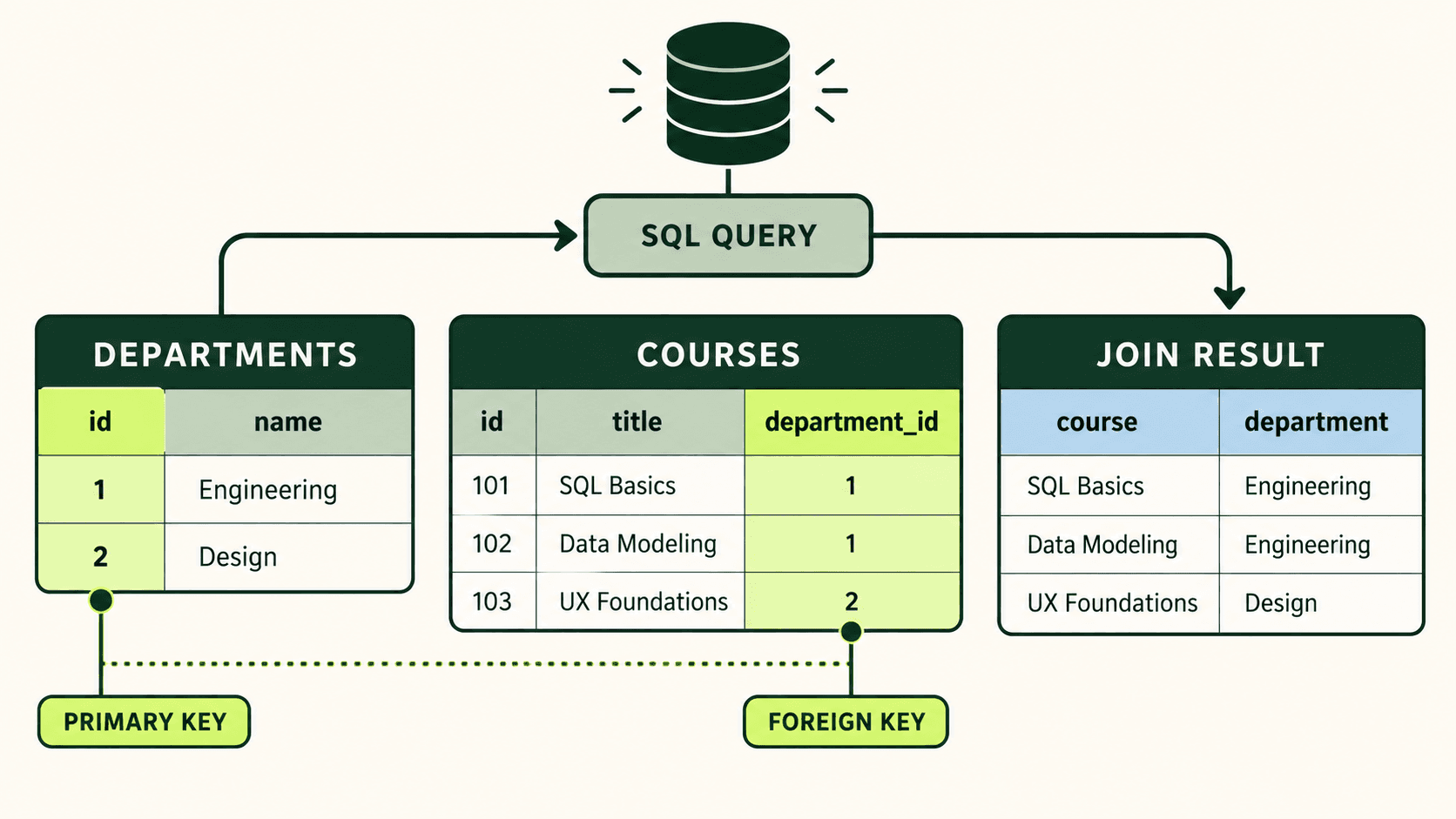
Identify each entity
departments and courses describe different kinds of things, so they belong in separate tables.
Give rows stable identity
departments.id uniquely identifies a department even when its display name changes.
Store the relationship
courses.department_id records which department owns each course and can be checked by a foreign-key constraint.
Build the result on demand
A JOIN matches equal key values so the report can show course and department names together.
Create and query a first database
The notebook below runs real SQLite-compatible SQL inside an isolated browser worker. Every run creates a new in-memory database, executes the statements in order, prints the result set, then discards the database. Change the inserted names or add a fourth row. Run again and compare the result with your prediction.
Create, insert, and select
Define one table, insert three rows, and request a predictable result. The database exists only for this run.
Edit the query, predict the rows it will return, then run it.
CREATE TABLE defines the schema. INSERT creates rows that obey that schema. SELECT produces a result set. These labels are often described as data definition, data manipulation, and data query language. The labels are useful for learning, though database documentation may categorize statements differently.
- 01Define structure
CREATE TABLEnames the table, columns, types, and constraints. - 02Store valid records
INSERTsupplies rows whose values must satisfy the declared rules. - 03Request a result
SELECTchooses the attributes and rows that answer a question. - 04Order deliberately
ORDER BYmakes presentation order part of the request instead of relying on an accident.
Schema and data change at different speeds
The schema is the durable description of structure: table and column names, types, keys, constraints, defaults, and relationships. The current rows are the database’s changing state, sometimes called an instance or snapshot. Applications add and modify rows constantly; schema changes should be planned because every existing and future row must fit the new structure.
Run this example to inspect SQLite’s own schema catalog and then inspect the rows. Change the UNIQUE email rule or add a column definition, reset the notebook when needed, and observe how the schema text differs from the result data.
Inspect structure and stored rows
The first result describes the table definition. The second result contains the current student records.
Edit the query, predict the rows it will return, then run it.
Keys give rows identity and relationships meaning
A primary key identifies one row inside its table. Good keys are unique, non-null, and stable. A user-facing value such as a department name may be unique today but can change later. A separate identifier lets the name change without rewriting every relationship that refers to the department.
A foreign key stores the primary-key value of a related row and asks the DBMS to protect that reference. In the example, many courses can point to one department. The department name is stored once; each course stores only department_id. The JOIN reconstructs a useful combined result when it is needed.
Connect courses to departments
Run the same departments-and-courses model shown in the illustration, then inspect the joined result.
Edit the query, predict the rows it will return, then run it.
Primary key
Answers “which exact row?” inside one table and provides a stable target for references.
Foreign key
Answers “which related row?” and can reject references that would otherwise become orphaned.
Join condition
Explains how matching keys reconstruct a result from normalized tables without permanently merging them.
A query result is a shaped view, not a second copy of the table
The table retains all four columns in this example, but the query returns only title and pages for finished books. WHERE chooses qualifying rows, the select list chooses output columns, and ORDER BY controls presentation. The query does not delete the unfinished row or remove columns from the stored table.
Shape a focused result set
Run the query, then change finished = 1 to a pages condition. Try pages >= 300 and predict the new order.
Edit the query, predict the rows it will return, then run it.
Constraints move essential rules closer to the data
NOT NULL requires a value. UNIQUE prevents two rows from using the same candidate value. CHECK tests a row-level condition. PRIMARY KEY combines identity and uniqueness rules. FOREIGN KEY protects references between tables. These constraints do not replace application validation; they provide a final shared boundary for every application, script, import, and administrator that writes to the database.
A rule belongs in the schema when invalid data would be invalid regardless of which interface produced it. A book with negative pages is not merely a form error—it contradicts the model. A message about how to help a user repair the field belongs in the application, but the database should still reject the impossible record.
Know what the runnable SQL environment does
SovranCode’s SQL runner loads SQLite compiled to WebAssembly and executes each block in a Web Worker. It does not receive database credentials, production access, server filesystem access, or access to an existing database. This is ideal for syntax, data modeling, and deterministic practice. It is not a substitute for verifying PostgreSQL- or MySQL-specific behavior in that engine.
- Every example creates the schema and data it needs, so a run does not depend on an earlier block.
- Each database is in memory and is discarded after the block finishes.
- The output shows result columns and rows, or a clear completion or error message.
- Production credentials and protected data never belong in a learning notebook.
Independent lab: model teams and developers
Use the starter as a working system, then make it your own. Add one team and two developers. Keep every team_id valid. Change the result so it includes the developer identifier, developer name, and team name. Finally, order first by team and then by developer.
Build and query a two-table model
Do not stop when it runs. Explain what one row means in each table and why the join condition uses two different columns with the same values.
Edit the query, predict the rows it will return, then run it.
Common beginner mistakes—and the better question
Was an ORDER BY requested?
Storage order and result order are not a contract. Ask for the exact order needed by the consumer.
Can that name change?
Prefer a stable key for identity, then place uniqueness rules on business values that truly require them.
Can any other writer bypass the app?
Keep essential integrity in the schema so imports, scripts, and future applications obey it too.
Which DBMS will run this?
Separate transferable relational reasoning from engine-specific functions, types, and operational behavior.
Lesson review
You now have the foundation that later statements depend on. A database contains organized structures and data; a DBMS manages them; SQL describes definitions, changes, and results. Tables model one kind of fact, rows represent occurrences, columns represent attributes, keys create identity and relationships, constraints protect shared truths, and queries construct focused result sets without rewriting the stored tables.
- I can distinguish the database, DBMS, and SQL language using a concrete example.
- I can state what one row means in each table before choosing its columns.
- I can explain schema versus current data and identify a primary-key and foreign-key contract.
- I can run a complete create–insert–select example and translate the final query into a precise sentence.
- I know that SQL results require explicit ordering and that engine-specific behavior must be verified.